
I Used 3 Auto-Apply Tools for 30 Days: What Happened

Sarah Mitchell
July 7, 2026

My result was simple: more applications did not mean more interviews.
After 30 days, the tools that pushed out the most forms gave me the weakest response rates, while the human-led option gave me better follow-through, fewer failed submissions, and more recruiter replies.
If you want the short version:
- LazyApply, LoopCV, and Sonara helped with volume
- Scale.jobs did better on interview yield
- The main gap was submission quality, not just speed
- Workday, Greenhouse, and other ATS flows were a common failure point for bots
- Proof mattered: a dashboard saying “applied” was often not enough
If you’re trying to decide whether to keep using automation, switch to a human-led job application service, or mix both, this breakdown gives you the clear tradeoffs fast.
The real reason you shouldn’t pay AI bots to apply to jobs for you… 👀
sbb-itb-564272e
Quick comparison
| Tool | Best for | Main tradeoff | Interview outcome trend |
|---|---|---|---|
| LazyApply | High-volume job board outreach | Low tailoring, more bot risk | Low |
| LoopCV | Passive discovery and outreach | Match volume does not always mean submitted apps | Low |
| Sonara | Hands-off background applying | Weak proof and mixed ATS performance | Low |
| Scale.jobs | Human-led execution | Higher upfront cost, lower volume than bots | Higher |
This data highlights why human-assisted vs. automated job applications yield such different interview results.
What I learned fast
When I tried to Apply for jobs at scale, three things shaped results more than anything else:
- Whether the application was fully submitted
- Whether the resume matched the role
- Whether I could verify what was sent
That is why this test ended up being less about software features and more about execution. If your goal is interviews, not just a busy dashboard, that difference matters.
My take in plain English
Auto-apply tools still have a place. If you are chasing broad, lower-stakes roles and want pure volume, they can help. If you want more control, tools on a job search platform with review steps can be a better middle ground.
But if you are targeting harder-to-land roles, want cleaner ATS handling, or need a Virtual Assistant for Job Applications, human-led apply made more sense in my test.
The playbook I’d use now
If I were starting over, I’d use this setup:
- Use automation for early discovery
- Use an ai resume builder or ai cover letter builder for draft support
- Use a human-led service for actual submissions on stricter ATS portals
- Track interviews, not just application count
Who this is for
This comparison is most useful if you are:
- applying to full time jobs
- trying to cut time spent on repeat forms
- comparing bots vs human-led help
- deciding if a job search virtual assistant is worth paying for
If that sounds like you, the short answer is this: automation can help you send more, but human-led apply gave me better results.
Why do job seekers use auto-apply tools instead of human-powered apply?
The job market in the U.S. has gotten tighter since 2022. There are fewer openings, but more people still Apply for jobs. That puts job seekers in a crowded, fast-moving race where speed matters a lot.
Manual applications take time - more than most people expect. On big platforms, one Workday application can eat up 12–20 minutes. Stack that across 40 applications in a week, and you're looking at hours of the same copy-paste routine. That's the main reason many people turn to automation first. They don't want to spend their week filling out the same fields again and again.
Most tools in this space fall into three buckets:
- Browser extensions that pre-fill forms but still need you to review and click submit
- AI agents that send applications on their own
- Human-assisted services where trained people apply for you
That split matters. Some tools help you move faster. Others take over the whole process.
On platforms like LinkedIn, Greenhouse, and Workday, bot checks and behavior-based filters have become more common. So the big issue isn't just speed. It's how the application gets submitted. A tool that fills fields is one thing. A tool that sends dozens of fully automated applications is another.
This is where scale.jobs lands in a different lane. It works more like a job application service than a pure bot tool. The platform pairs AI-based resume tailoring with trained people who submit each application by hand. That lowers bot-detection risk and helps keep the application matched to the role instead of blasting out the same profile everywhere.
For many job seekers, that's the trade-off in plain English: automation can save time, but submission quality still shapes results. And when people compare tools, callback rates tend to be the point that matters most. Human-assisted options often report better callback performance than fully automated systems, especially for people targeting full time jobs or harder-to-land roles. It's also why more candidates now look at support options like a Virtual Assistant for Job Applications, a job search coach, or a full job search platform instead of relying on one-click apply alone.
What problems do auto-apply tools solve for job seekers?
Auto-apply tools fix one big pain point: repeating the same application steps again and again. If you’ve tried to Apply for jobs at scale, you already know the grind. You upload a resume, type in your work history, answer the same screening questions, and then do it all over again on another portal. That can eat up dozens of hours fast.
Here’s where these tools save time:
- Repeated ATS form filling on Greenhouse, Lever, and Workday. They auto-fill personal details, work history, and demographic fields.
- Applications can go out while you’re busy or asleep because backend agents keep submitting in the background.
- More applications without more hours spent at your laptop.
- AI-written resumes and cover letters shaped to each role, often using role matching so you’re not sending the exact same file every time. If that matters to your process, an ai resume builder or ai cover letter builder can help with the drafting side.
- Listings from multiple sites in one dashboard, pulling jobs from LinkedIn, Indeed, and company career pages into a single job search platform.
That said, speed by itself doesn’t help much if the application never goes through.
This is the weak spot with many auto-apply systems. The time you save can vanish the second a bot gets flagged or a form breaks on Workday or iCIMS. On more complex enterprise ATS setups, failure rates can reach 25%–40%. And basic autofill browser extensions only parse Workday fields at about 34% accuracy, which can leave blank fields, wrong entries, or half-finished applications.
That’s where the gap shows up between software automation and a human-led job application service.
Scale.jobs takes a different route. Instead of relying only on bots, trained people submit each application by hand through real browsers on residential connections. That cuts bot-flag risk and helps with field accuracy. Resumes are ATS-friendly and matched to each role. Each submission comes with time-stamped proof-of-work screenshots. The service also handles most major portals, including the messy ones, and gives job seekers live WhatsApp support during the search instead of sending them into a support queue.
For someone who wants more oversight from a virtual assistant for job seekers, that level of follow-through matters. It’s closer to having a job search virtual assistant in your corner than relying on a browser plugin and hoping for the best.
That’s the bar the comparison criteria below should use: automation depth, ATS handling, and proof-of-work.
What should you look for in auto-apply and human-powered apply tools?
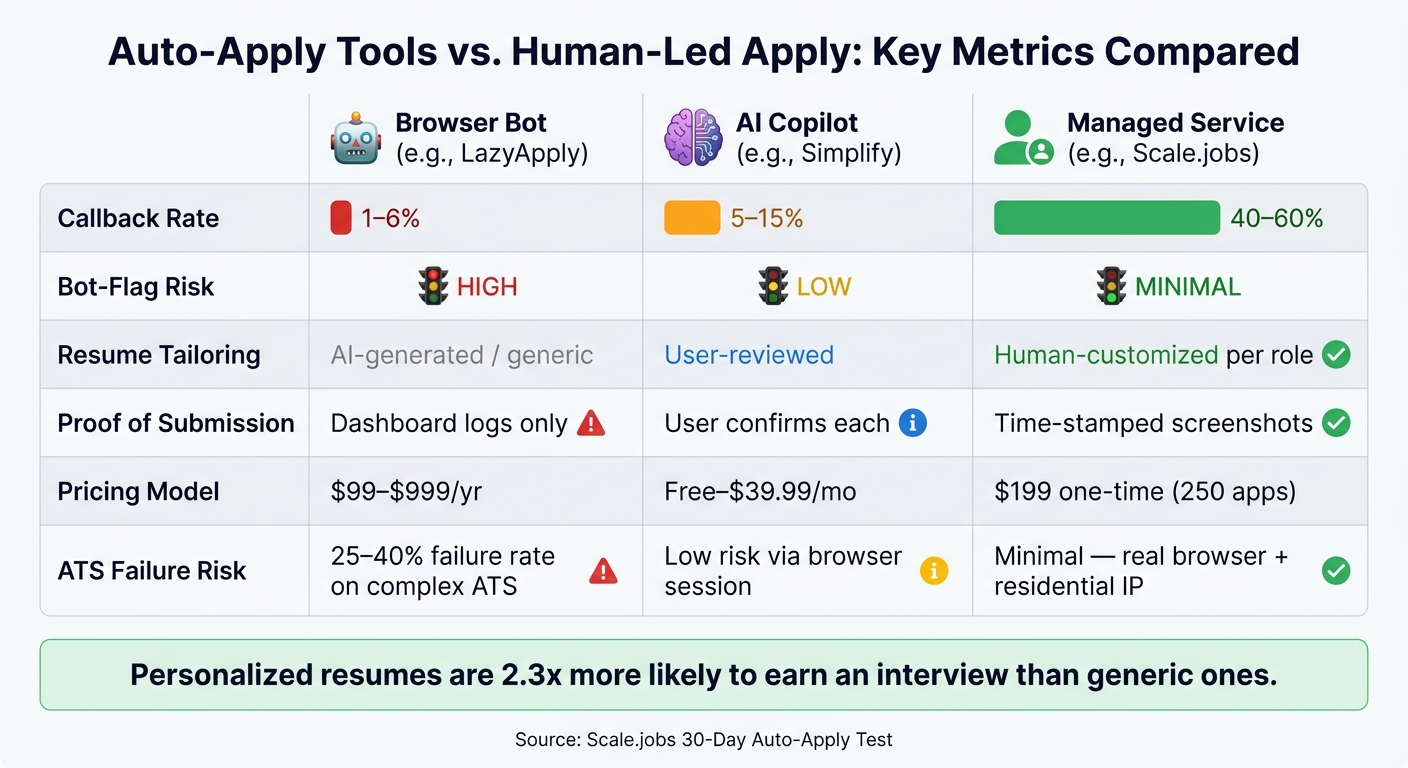
Auto-Apply Tools vs. Human-Led Apply: Key Metrics Compared
Focus on interviews, not raw application volume. That’s the one number that separates auto-apply tools from human-powered services like Scale.jobs. A tool can fire off 500 applications and still do very little for your job hunt. If those applications don’t turn into recruiter replies, they’re just noise.
Use these four filters to compare any job search platform or job application service in the rankings below.
Applications sent vs. interviews booked. This is the first thing to check. Fully automated tools often land in the 1%–6% callback range. AI copilot tools tend to sit around 5%–15%. Managed human services usually do much better, at 40%–60%.
ATS coverage and bot-flag risk. Not every tool works the same way with Workday, Greenhouse, Lever, iCIMS, and Taleo. That matters more than most people think. Browser-based tools that submit from your IP can lower risk. Human submissions on residential connections lower it even more. That gap can decide whether your application gets through or stalls before a recruiter even sees it.
Resume customization depth. There’s a big gap between generic AI text, light keyword edits, and a resume shaped for a specific role. Personalized resumes are 2.3 times more likely to earn an interview. If you’re using an ai resume builder or an ai cover letter builder, check how much editing still falls on you.
Proof of submission. Don’t settle for a dashboard counter. Ask for time-stamped screenshots, employer confirmation emails, or portal receipts. A number on a screen is not the same as proof that someone actually submitted your application.
These four checks drive the side-by-side comparison that follows. Use the table below to compare categories before you review the rankings.
| Dimension | Browser Bot (e.g., LazyApply) | AI Copilot (e.g., Simplify) | Managed Service (e.g., scale.jobs) |
|---|---|---|---|
| Callback rate | 1–6% | 5–15% | 40–60% |
| Bot-flag risk | High | Low | Minimal |
| Resume tailoring | AI-generated / generic | User-reviewed | Human-customized per role |
| Proof of submission | Dashboard logs only | User confirms each | Time-stamped screenshots |
| Pricing model | $99–$999/yr | Free–$39.99/mo | $199 one-time (250 apps) |
The best setup depends on your goal. If you want to apply for jobs at high volume with the least effort, bots may look tempting. If you care about interview yield, proof, and role-level resume edits, the gap between software and a human-powered virtual assistant for job seekers gets much easier to see.
The rankings below apply this rubric tool by tool.
How are job seekers using auto-apply tools and scale.jobs today?
These five patterns show how people Apply for jobs in very different ways. In each case, the main need shifts a bit: speed, accuracy, proof, or control.
The big point: the right setup depends on the kind of search you're running. A high-volume search has one set of problems. A careful, high-stakes search has another.
- The recently laid-off tech worker (500+ applications in 30 days)
A laid-off tech worker often needs volume, fast. The goal is simple: get as many solid applications out as possible before savings start to shrink.
This is where auto-apply tools can help. But there’s a catch. Heavy automation can trigger behavior checks and IP filters on sites like LinkedIn, Greenhouse, and Workday. On top of that, generic resumes often miss ATS keyword thresholds, which can hurt response rates before a recruiter even sees the application.
That’s the tradeoff. Speed helps, but blunt automation can backfire. In this case, a service like Scale.jobs fits people who want volume and better submission quality through human support instead of pure bot-driven sending.
That same tension shows up in a different way for people searching quietly while they keep their current job.
- The full-time employee running a passive search after hours
This person doesn’t want to spend every night filling out forms. They want a background system running while they work their day job and handle life.
The main risk here is lack of visibility. If a tool fails silently, you may have no idea whether an application was sent, saved as a draft, or dropped halfway through. That’s a bad place to be, especially if you’re juggling a long list across multiple best job boards and company portals.
Scale.jobs helps here with time-stamped proof-of-work screenshots and status updates. That matters because users can verify what was submitted without opening every portal one by one. For someone who wants a quiet, after-hours system, that proof layer can make a big difference.
Then accuracy becomes the bigger issue, especially when work authorization is part of the process.
- The international student on F-1 or OPT
For F-1 and OPT candidates, small errors can cost a lot of time. One wrong answer on work authorization. One submission to a company that doesn’t sponsor. One skipped field in an ATS form. Suddenly, weeks are gone.
Tools like Jobright.ai can help with sponsorship filtering, which makes them useful for discovery. That’s a solid starting point for people trying to narrow down roles before they apply.
But filtering is only one part of the job search workflow. Pure automation can still enter the wrong work-authorization details or fill portal fields in ways that create problems later. Scale.jobs uses human assistants to check sponsorship needs before each submission, which gives job seekers a more careful path. For people who need a job search virtual assistant or a Virtual Assistant for Job Applications, this kind of review can save a lot of wasted effort.
The next pattern is less about volume and more about match quality.
- The mid-career candidate targeting 20–30 specific roles
Mid-career candidates usually don’t want to spray applications everywhere. They want to focus on a smaller set of roles that line up with their background, pay target, and next step.
That’s why AI copilots like Simplify and Jobright.ai can work well here. They help with discovery, matching, and form-fill support. If your search is focused and you still want to stay hands-on, that setup can make sense.
The issue is control. Simplify can autofill forms, but the user still has to stay involved. For many people, that’s fine. For others, it becomes one more task hanging over the week. Scale.jobs handles that gap by pairing ATS-tuned resumes with human-reviewed submissions. If someone wants more support than a tool but less chaos than doing everything alone, that’s where a job application service or job search coach starts to make sense.
At senior levels, the margin for error gets even smaller.
- The senior professional in a high-stakes search
For director, VP, and C-suite candidates, one bad submission can do more damage than it would in a broad search. A wrong title, a messy field entry, or a bot-flagged application doesn’t just waste time. It can affect how a candidate is seen.
That’s why fully automated tools are often a poor fit for senior searches. These candidates usually need fewer applications, more review, and tighter control over what gets sent out.
Scale.jobs is built with that use case in mind: human review before each submission and a documented trail that shows what was sent, to whom, and when. For senior candidates using a job search platform to manage a careful search, that paper trail matters because it removes guesswork and cuts down on avoidable mistakes.
1. scale.jobs
Scale.jobs is a human-assisted job application service, not an auto-apply bot. Instead of blasting out applications through scripts, trained assistants submit them in real browsers using residential internet connections. That matters because many hiring systems now screen for bot-like behavior.
Best for job seekers who want fewer failed submissions, more control, and clearer visibility into what was sent.
Application Volume vs. Interview Yield
A lot of auto-apply tools chase volume. Scale.jobs takes a different route and focuses on interview yield.
The service limits applications by plan:
- 250 applications on Basic for $199 one-time
- 500 applications on Standard for $299
- 1,000 applications on Best Value for $399
Reported callback rates are 40–60%, while fully automated tools like LazyApply or Sonara usually land in the 1–6% range. The tradeoff is pretty clear: you get fewer total applications, but each one gets more hands-on work.
If you're trying to apply for jobs without spraying the same resume everywhere, this model makes more sense.
ATS Coverage and Bot-Flag Risk
This is where many auto-apply tools start to fall apart.
Workday and Greenhouse both use anti-bot checks, including CAPTCHA layers. Tools that run from data center IPs can trip those systems. Scale.jobs assistants work from residential connections and browse like actual users, so bot-flag risk stays low.
That human layer also helps with things software often misses: multi-step forms, custom screener questions, login loops, and email verification steps. In most cases, that means solid coverage across major ATS platforms like Workday, Greenhouse, and iCIMS.
For people comparing a browser bot to a job search platform, this is one of the biggest differences. It’s not just about sending more applications. It’s about getting through the form in the first place.
Resume Customization Depth
Each application includes a tailored, ATS-friendly resume matched to the role. The assistants use internal AI tools to adjust keywords and formatting before submission.
That matters because 97.8% of Fortune 500 companies use an ATS, and tailored applications are 2.3 times more likely to get an interview than generic ones.
If you've looked at an ai resume builder or an ai cover letter builder, think of this as the next step: not just making the document, but lining it up with a live application before it goes out.
Proof-of-Work and Human Oversight
Every submission includes time-stamped proof-of-work screenshots plus real-time WhatsApp updates. So you can see what was submitted, where it was sent, and when it happened without opening every single ATS account yourself.
Unused credits are refunded. There’s also a clear record for each submission, which makes the process easy to audit.
This is a big point for anyone who wants a virtual assistant for job seekers instead of a black-box tool. You’re not left wondering whether the application was sent or whether it failed halfway through.
These are the same criteria used in the comparison table below.
Pricing: $199 one-time (250 applications) · $299 (500 applications) · $399 (1,000 applications) · $1,099 Ultimate Bundle (1,000 applications + dedicated recruiter + LinkedIn makeover)
Pros: Low bot-flag risk, broad ATS compatibility, custom resume per application, proof-of-work transparency, no subscription trap
Cons: Higher upfront cost than software tools, turnaround is naturally slower than pure automation, callback data is vendor-reported and not independently audited
Use scale.jobs if you want manual submission, role-specific resume tailoring, and proof for each application.
2. LazyApply
LazyApply is a Chrome extension built to help people apply for jobs at scale. It works across LinkedIn, Indeed, Dice, and ZipRecruiter. You set your preferences, stay logged in, leave the browser open, and the tool keeps running in the background.
The big draw is simple: volume. The tradeoff is just as clear: it is built for speed, not tailoring. That makes LazyApply a useful benchmark when you compare volume-first automation with a human-led job application service.
Key features
- Browser-based automation for major job boards
- AI-generated answers to screener questions
- Up to 1,500 applications per day on the Ultimate plan
- No human review before submission
Application volume vs. interview yield
A documented case showed 5 interviews from 5,000 applications. That works out to a 0.1% hit rate.
That number gets to the heart of the issue. Sending more applications can fill the top of the funnel, but it does not mean you’ll get more callbacks. If the resume is generic, the answers are thin, or the role is a poor match, high volume can turn into a lot of motion with very little progress.
This is where the gap shows between an automation-first tool and a human-backed job search platform. One pushes out more submissions. The other tries to improve the odds that each submission is worth sending.
ATS coverage and bot-flag risk
Volume matters less if the application does not go through cleanly.
LazyApply tends to work best on simple job board flows. It has a harder time with complex ATS platforms, especially when forms have custom fields, odd layouts, multi-step flows, or checks that look for bot-like behavior. That means the tool carries more automation risk than human-run workflows.
If you’re targeting large employers with stricter systems, this matters a lot. A missed field, broken submission, or flagged session can quietly hurt your search. For job seekers who want more control, a Virtual Assistant for Job Applications can be a better fit because a real person can catch issues before hitting submit.
Resume customization depth
LazyApply sends the same resume unless you change it yourself. Its AI-generated answers can handle simple prompts, but there is no per-role tailoring.
That’s the weak spot.
When an application asks about salary, visa status, work authorization, relocation, or industry-specific questions, generic answers can do damage fast. The same goes for resume fit. One version of a resume rarely works well across different titles, teams, and job levels.
If you need deeper tailoring, pairing your search with an ai resume builder or ai cover letter builder can help, but LazyApply itself does not handle that role-by-role adjustment.
Proof-of-work and human oversight
LazyApply is a fully automated tool. It does not provide submission receipts or human review.
That may not bother someone doing broad, simple outreach. But if you want proof that an application was sent, or you want another set of eyes on the form before submission, that layer is missing. A lot of job seekers do not think about this until they have sent hundreds of applications and can’t tell which ones actually went through.
Pros
- Fast to set up
- Covers major job boards
- Lower upfront cost than managed services
- Useful for high-volume searches where tailoring is less important
Cons
- Higher bot-flag and account-risk exposure
- Limited reliability on complex ATS platforms
- Minimal resume customization
- No human oversight before submission
- Trustpilot rating sits around 2.3/5 to 2.4/5, with roughly 56% of reviews at 1 star
Pricing
- Basic: $99/year for up to 15 applications per day
- Premium: $149/year for up to 150 applications per day
- Ultimate: $999/year for up to 1,500 applications per day
Who should use each
The right choice comes down to speed versus control.
LazyApply makes more sense if you are applying to straightforward postings, want a lower-cost automation tool, and do not need much tailoring. It can also fit entry-level searches where getting seen on major best job boards is the main goal.
Choose scale.jobs if you want human VAs applying through real browsers, ATS-tuned resumes for each role, time-stamped proof-of-work screenshots, real-time WhatsApp support, or a one-time payment instead of a recurring annual subscription. That setup is closer to working with a job search virtual assistant than relying on a browser bot alone.
LazyApply vs Scale.jobs: LazyApply leans toward raw output. Scale.jobs leans toward control, review, and cleaner submissions on tougher ATS flows.
Is LazyApply worth it? Yes, if your goal is simple, high-volume outreach and you accept the limits that come with automation. If ATS friction, resume fit, and proof of submission matter more, scale.jobs is the stronger option.
3. LoopCV
Against the rubric above, LoopCV stands out most for passive discovery and falls shortest on proof that an application was actually sent.
LoopCV positions itself as a hands-off job search platform. You upload your resume, choose your target role and location, and the tool scans 20+ job boards to find roles and line up applications on your behalf. It also includes direct recruiter email outreach, which helps it stand apart from many other tools in this space.
The big question, though, is simple: how many of those matches turn into real submitted applications?
Application volume vs. interview yield
On paper, LoopCV can look strong if you're focused on raw volume. The Pro plan allows up to 300 applications per month. But reported tests show a big gap between matched roles and submitted applications. In one May 2026 hands-on review, a tester matched with more than 1,800 jobs and LoopCV submitted none of them.
That’s the catch with automation-first tools. Big numbers sound good, but they mean little if the applications don’t go out or can’t be verified. Tools like LoopCV are often tied to callback rates of about 1% to 6%. Scale.jobs, which uses human VAs to Apply for jobs manually, reports callback rates between 40% and 60%.
If you care about interview yield, not just dashboard activity, that difference matters.
ATS coverage and bot-flag risk
LoopCV uses browser automation across 20+ job boards and career pages. That gives it broad reach, but it also adds risk on systems that are sensitive to automated submissions. Platforms like Greenhouse and LinkedIn can flag cloud or data-center traffic, and LinkedIn's User Agreement prohibits automated methods.
Scale.jobs takes a different route. Its human VAs apply in real browsers on residential connections, which avoids bot-detection risk entirely. For job seekers dealing with stricter ATS setups, that can be a major edge.
Why Scale.jobs wins vs. LoopCV:
- Human submissions: VAs apply manually in real browsers, not through automated scripts
- ATS-tuned documents: Each resume is tailored to the role before submission with help from an ai resume builder workflow when needed
- Proof of work: Time-stamped screenshots confirm every application, not just dashboard logs
- WhatsApp support: Live updates during your search instead of a support queue
- One-time payment: No recurring subscription - pay once per application block
Resume customization depth
LoopCV mainly works from the resume you upload. It does support A/B testing for CV variants and email templates, which can help if you want to test different approaches. Still, it does not offer deep, role-by-role tailoring for every application.
That gap affects the number that matters most: interview yield.
A generic resume can get you into more queues. A tailored one gives you a better shot at moving forward. That’s why some job seekers pair managed help with tools like an ai cover letter builder or a Virtual Assistant for Job Applications when they want closer attention on each submission.
Proof of work and human oversight
LoopCV gives you a central dashboard and a kanban-style tracker to log activity. That’s useful for seeing what the system is doing. But those records are still automated logs.
That’s the core split here: LoopCV logs activity; Scale.jobs shows proof.
And that tradeoff shows up in pricing. With LoopCV, you're paying for automation, not hands-on oversight from a virtual assistant for job seekers.
Pros
- Passive, low-effort setup
- Scans 20+ job boards automatically
- Direct recruiter email outreach
- A/B testing for CV variants
- Free tier available (10 apps/month)
Cons
- Reported tests show big gaps between matches and actual submissions
- Cloud or data-center automation adds bot-detection risk
- No deep per-role resume customization
- Limited human oversight compared with managed services
- User reviews point to uneven matching and limited support
Pricing
| Plan | Price | Applications/Month |
|---|---|---|
| Free | $0 | 10 |
| Loop (Standard) | ~$32/month (€29) | 100 |
| Pro | ~$54/month (€49) | 300 |
| Done For You | ~$89.99/month | 300 + weekly advisory call |
Use the summary below to decide whether LoopCV or Scale.jobs fits your search.
Who should use LoopCV: Passive discovery and light oversight. It makes sense if you want background outreach running with very little involvement and don’t mind checking results yourself.
Who should choose Scale.jobs: Proof of submission, tailored documents, and lower execution risk. It’s the stronger fit for stricter ATS setups like Workday and Greenhouse, or for any search where you need a clear record of what was sent.
4. Sonara
Sonara is a hands-off auto-apply tool built for people who want applications going out in the background, day and night. The pitch is simple: low starting cost, lots of volume, less manual work. If your main goal is passive automation, Sonara fits that lane.
But there’s a catch. Sending applications is not the same as getting interviews. That’s the gap that matters most when you Apply for jobs, especially in a crowded market.
Application volume vs. interview yield
At first glance, high application volume sounds like a win. More shots on goal, right? In practice, the results look uneven.
One documented case found that Sonara led to just 1 screening interview from about 700 automated applications. That works out to a 0.14% yield. By contrast, Scale.jobs reports 40% to 60% callback rates. That’s a much better match for people who care about responses, not just activity on a dashboard.
This is the main tradeoff with automation-heavy tools. Volume looks busy. Interview yield shows whether the process is working.
If you’re comparing Sonara with a job application service, this is where the split becomes clear: one system aims to send more applications, while the other aims to make each submission count.
ATS coverage and bot-detection risk
Sonara runs on cloud automation, and that can hit friction on more complex ATS flows like Workday and Greenhouse. In one test covering 50 applications, failures showed up on both platforms.
That matters because many large employers use those systems. If the tool stalls, skips fields, or fails to finish the process, the application may never land at all.
Scale.jobs takes a different route. It uses human virtual assistants in real browsers with residential IPs. That setup helps avoid automated bot-detection systems instead of trying to push through them. For job seekers dealing with messy ATS forms, that human layer can make a big difference.
If Workday and Greenhouse are common in your target list, a virtual assistant for job seekers may be a better fit than pure automation.
Resume customization depth
Sonara usually sends the same stored resume to every role. Cover letters are template-based, with little or no job-level tailoring.
That’s a weak spot. Personalized resumes are 2.3 times more likely to earn an interview than generic ones. So if you’re applying for senior roles, niche roles, or jobs with sharp keyword filters, Sonara’s bulk method can work against you.
This is where tools like an ai resume builder or ai cover letter builder can help with drafting, but even then, someone still needs to check whether the final version fits the role. Otherwise, it’s just the same message dressed up a bit.
Proof of work and human oversight
Sonara’s dashboard shows activity, but that isn’t the same as review or confirmation. There’s no human check before submission, no clear proof that every application reached the employer, and limited traceability when something breaks.
In plain English: an application can look “sent” in the dashboard and still never make it through.
Some user reviews also mention unexpected charges and abrupt service discontinuation, which adds another layer of risk for people who want tighter control over the process.
Scale.jobs does better on the same comparison points used earlier: control, proof, and submission quality. A human checks the work, confirms the submission, and shares time-stamped proof. That’s a very different experience from hoping the automation completed the task.
Why Scale.jobs wins vs. Sonara:
- Human VAs confirm each submission, which cuts down on undelivered applications
- Residential IP submissions in real browsers lower bot-detection risk
- Time-stamped proof of work and real-time WhatsApp updates
| Feature | Sonara | Scale.jobs |
|---|---|---|
| Human involvement | None; no human review before submission | Human VAs review and submit |
| Resume customization depth | Same stored resume; template cover letters | Custom ATS-optimized resume and cover letter per role |
| ATS handling | Cloud automation can struggle on Workday and Greenhouse | Human-powered apply with real browsers |
| Application execution method | Cloud automation | Human VAs using real browsers and residential IPs |
| Transparency and proof of work | Dashboard logs only | Time-stamped screenshots and WhatsApp updates |
| Pricing model | $2.95 trial, then $23.95 every 4 weeks | $199 one-time for 250 applications |
Who should use Sonara: Users who want fully automated volume and are okay with limited oversight.
Who should choose Scale.jobs: Users who want human review, proof of submission, and stronger handling of Workday or Greenhouse flows.
5. Jobright.ai
Jobright.ai is an AI copilot for finding roles and tailoring drafts. It is not a managed apply service. That’s the core tradeoff: Jobright helps you prep faster, while Scale.jobs takes the submission work off your plate.
If your goal is to Apply for jobs with more control, Jobright makes sense. If your goal is to avoid the repetitive work of sending applications one by one, Scale.jobs sits in a different lane.
Application volume vs. interview yield
Jobright aims for about 5–15 applications per day. For AI copilot tools, callback rates usually land around 5–15%. That’s better than mass auto-apply tools that spray applications everywhere, but it still falls short of the 40–60% Scale.jobs reports from human-managed submissions.
That gap matters. Sending more applications is nice, but interview yield is what most job seekers care about. A tool can help with speed, sure, but if the final submission still depends on you, the process can slow down fast.
ATS coverage and bot-flag risk
Jobright’s extension submits from your own IP and at normal browsing speed, so bot-flag risk is low. It works across LinkedIn Easy Apply, Greenhouse, Lever, and many company career pages.
There is a catch, though. Users say that “autopilot” mode often still needs a manual click at the end. So while the product helps with the process, it’s not always a full hands-off setup.
Low bot-flag risk is helpful, but it doesn’t answer the bigger question: who is doing the final submit, checking that it worked, and keeping a record of it? That’s where a job application service starts to feel very different from a browser tool.
Resume customization depth
This is one of Jobright’s better areas. It creates a tailored resume and cover letter for each role, which can save a lot of time. For people using an ai resume builder or an ai cover letter builder, that kind of draft help can be useful.
The problem is the same one that shows up with many AI writing tools: hallucinations. In plain English, the tool may insert details that were never in your original profile. That can turn a helpful draft into something risky if no one checks it before it goes out.
So yes, the drafts can be strong. But the draft is only half the job. The last step still matters.
Proof of work and human oversight
If you like reviewing each submission yourself, Jobright is a fair fit. If you want a virtual assistant for job seekers to handle the actual sending and tracking, Scale.jobs is the better match.
There’s no VA confirming submissions. There are no time-stamped proof-of-work screenshots. There are no WhatsApp updates showing what was sent, where it went, and when it happened. For many people, that missing layer is the whole story.
Why Scale.jobs wins vs. Jobright.ai:
- Human VAs handle submissions from start to finish, so you don’t need to jump in for manual clicks
- Human reviewers check each application before it goes out and share time-stamped proof of work plus WhatsApp updates
- Human-led tailoring cuts the risk of AI-made resume claims reaching employers
The table below shows where the workflow splits most clearly.
| Feature | Jobright.ai | Scale.jobs |
|---|---|---|
| Human involvement | User reviews AI drafts before submit | Human VAs review and submit on your behalf |
| Resume customization depth | AI-generated per role; may add unsupported details | Human-led tailoring, ATS-optimized per role |
| ATS handling | Browser-based, low bot-flag risk | Human-powered, lower bot-flag risk via real-browser submission |
| Application execution | Browser extension / AI Agent | Human VAs using real browsers and residential IPs |
| Transparency and proof of work | Dashboard activity logs | Time-stamped screenshots and WhatsApp updates |
| Pricing model | $19.99–$39.99/mo (billed annually) | $199 one-time for 250 applications |
Who should use Jobright.ai: Job seekers who want AI help with job discovery and tailoring, but still want full control over what gets submitted.
Who should choose Scale.jobs: Job seekers who want managed submissions, human-checked quality, and proof that each application was sent.
You see this same divide again and again across the best job boards, AI copilots, and managed services in this list: one side helps you prepare, the other side helps you finish the work.
6. Simplify
Simplify is a browser autofill extension, not a full auto-apply tool. It speeds up forms, but you still review and send every application yourself. So if your goal is to Apply for jobs faster while keeping full control, Simplify makes sense. If you want the submission work off your plate, it doesn’t go that far.
Best for job seekers who want autofill speed while keeping full control over what gets submitted.
Summary of company
Simplify has over 1,000,000 Chrome installs and a 4.9/5 rating on the Chrome Web Store. Its main product centers on form autofill across major job boards and company career pages. It also includes a job tracker and, on the paid plan, AI-generated resume tailoring.
In plain English: Simplify helps you move faster, but you’re still the one doing the final check and clicking Submit.
Key features
- Autofill across 100,000+ company career pages
- Automatic application tracker to manage submissions
- AI-generated resume tailoring and cover letters on paid tier
- Job matching and deduplication built in
Job search automation offerings
Simplify works inside your browser and supports ATS platforms like Greenhouse, Lever, Workday, Taleo, and iCIMS. It can also draft resume and cover letter content through Simplify+, then store your application history in one dashboard.
That setup is handy for people who want a lighter job search platform rather than a done-for-you job application service. You stay in charge at each step.
Application volume vs. interview yield
Most users complete around 6–10 assisted applications per hour with Simplify. That’s decent if you care most about speed.
But speed alone doesn’t tell the whole story. Scale.jobs reports 40–60% callback rates from human-managed submissions, compared to the 5–15% range often seen with AI copilot tools like Simplify. That gap matters if you’re trying to get more interviews, not just send more forms.
ATS coverage and bot-flag risk
This is where Simplify does one thing well and one thing less well.
On the plus side, it supports 100,000+ company pages, including Greenhouse, Lever, Workday, Taleo, and iCIMS. Because it runs inside your own browser session, bot-flag risk stays low.
The tradeoff shows up on harder forms. Autofill accuracy drops on complex setups - down to about 40–50% on iCIMS and Taleo, and around 50% on multi-step Workday flows. If you’ve ever watched a form break halfway through and thought, “Great, now I have to fix this by hand,” that’s the kind of friction this refers to.
If you want a Virtual Assistant for Job Applications that handles messy portals for you, Simplify isn’t built for that.
Resume customization depth
Simplify+ costs $39.99/month and adds AI-generated resume tailoring and cover letters. That can save time, especially if you want a built-in ai resume builder or ai cover letter builder workflow.
Still, the drafts need a final review before you send them. That’s the catch. AI can help with first drafts, but accuracy and fit still depend on you checking the details.
Scale.jobs takes a different route. It uses human VAs to review materials for fit and accuracy before each submission, which is closer to what people want when they hire a virtual assistant for job seekers.
Proof of work and human oversight
The biggest gap here is proof.
Simplify logs your applications, but it does not give you time-stamped screenshots or WhatsApp updates. You’re still the reviewer, the checker, and the final sender. For some people, that’s a plus. For others, it means the mental load never leaves.
Scale.jobs is closer to a done-for-you setup because the work is handled and documented. That matters if you want clear visibility into what was sent and when.
Simplify vs Scale.jobs
| Feature | Simplify | Scale.jobs |
|---|---|---|
| Human involvement | User reviews and submits every application | Human VAs submit on your behalf |
| Resume customization depth | AI-generated tailoring on paid tier; basic job matching on free tier | Human-tailored, ATS-optimized per role |
| ATS handling | Strong on major systems; weaker on complex enterprise forms | Human-powered navigation across portals |
| Application execution | Browser extension; user clicks Submit | Human VAs using real browsers and residential IPs |
| Transparency and proof of work | Automated tracker logs | Time-stamped screenshots and WhatsApp updates |
| Pricing model | Free core tier; Simplify+ at $39.99/month | $199 one-time for 250 applications |
Is Simplify Worth It?
Yes - if you want faster applications and still prefer to review and submit each one yourself.
It’s a solid fit for people who don’t mind staying hands-on. It’s less fitting if you want a job search virtual assistant to take care of the execution for you. In that case, a human-led service will usually save more time and reduce more friction.
Pros
- Large ATS coverage across 100,000+ pages
- Low bot-flag risk via browser-session submissions
- Free core tier with solid autofill and tracking
- Strong Chrome Web Store ratings and install base
Cons
- Autofill accuracy drops a lot on complex enterprise ATS forms
- No hands-off submission; user must click Submit every time
- AI resume drafts need manual review before sending
- No time-stamped proof of work or WhatsApp updates
Pricing
- Free: Autofill, job matching, application tracking
- Simplify+: $39.99/month - AI resume tailoring and cover letters
Who should use Simplify: Job seekers who want to review and submit each application themselves, but want autofill speed.
Who should choose Scale.jobs: Job seekers who want the full submission process handled, including quality checks, ATS navigation, and proof that each application was sent.
7. EarnBetter
EarnBetter is a lighter option than a managed job application service. It uses AI to match people with roles and helps draft application materials, but you still do the final review and hit submit yourself. That split matters. Some people want help with the heavy lifting but still want the last word on every application.
Best for job seekers who want partial automation and still want to review submissions themselves.
Application volume vs. interview yield
EarnBetter leans more toward matching and AI-assisted drafting than high-volume submissions. In plain English, it helps tee things up, but it does not finish the job for you.
The workflow is semi-automated. The platform surfaces jobs, helps prepare materials, and then waits for you to confirm and send each one. For career switchers or anyone trying to Apply for jobs with care, the main question is simple: are the applications tailored, and do they actually get submitted?
EarnBetter cuts down prep work. The final step still sits with you. If you want less effort without giving up control, that can feel like a good middle ground. If you want a full done-for-you job search platform, it may feel a bit hands-on.
ATS coverage and bot-flag risk
Because EarnBetter depends on user-initiated submissions, bot-flag risk is low. That’s one of its clearest strengths.
The tradeoff is just as clear: it does not take over messy ATS flows for you. If a job lives inside a clunky Greenhouse or Workday process, you still have to deal with that last-mile work yourself.
Scale.jobs takes a different path. It uses human VAs applying through real browsers on residential connections, which helps avoid many bot-detection checks on platforms like Greenhouse and Workday. For job seekers who want a Virtual Assistant for Job Applications, that difference can be a big deal.
Resume customization depth
EarnBetter creates AI-assisted resume and cover letter drafts for each role. You review the drafts before anything gets sent. That gives you control, which many job seekers like.
At the same time, control comes with homework. The quality of each draft still depends on your review. If the AI misses context, uses weak wording, or leans too generic, you have to catch it.
Scale.jobs handles this with human-led tailoring and ATS tuning for each role, which cuts out that review burden. If you're already tired of editing every draft from an ai resume builder or ai cover letter builder, a done-for-you setup may save more time.
Proof of work and human oversight
This is the biggest gap between the two.
EarnBetter does not give you time-stamped proof that an application was submitted, and there is no human confirming each send. You are the last checkpoint. That’s fine if you want full visibility and don’t mind doing the final click yourself.
Scale.jobs documents each submission with time-stamped screenshots and WhatsApp updates. For people working with a job search virtual assistant, that kind of paper trail can matter a lot. You’re not left wondering what was sent, when it was sent, or whether it was done at all.
Use the table below to compare workflow depth, oversight, and submission transparency.
| Feature | EarnBetter | Scale.jobs |
|---|---|---|
| Human involvement | User reviews AI drafts and submits | Human VAs review and submit on your behalf |
| Resume customization | AI-generated per role; user reviews before sending | Human-tailored, ATS-optimized per role |
| ATS handling | User-initiated; low bot-flag risk | Real browsers on residential IPs; avoids bot detection |
| Proof of work | No submission receipts; user confirms manually | Time-stamped screenshots and WhatsApp updates |
| Pricing | Pricing not stated on the page | $199 one-time for 250 applications |
Pros
- Low bot-flag risk due to user-initiated submissions
- AI-assisted drafting speeds up resume and cover letter prep
- User keeps full control over what gets sent
- Less commitment than a fully managed service
Cons
- No time-stamped proof of submission
- No human review before applications go out
- Final submit step still needs user involvement
- Pricing is not published on the site
Who should use EarnBetter: Job seekers who want AI-assisted drafting and job matching, but prefer to review and submit each application themselves.
Who should choose Scale.jobs: Job seekers who want sourcing, tailoring, and submission handled in one workflow, with documented proof for every application sent.
8. JobCopilot
JobCopilot is a cloud-based AI agent built to automate job submissions on company career pages. It says it covers 500,000+ sites and can send up to 50 applications per day on its Elite plan. On paper, that sounds strong. In practice, the main issue is simpler: do those submissions get through ATS filters, and can you confirm they were sent?
If you're comparing tools to Apply for jobs, that's the core difference to watch.
Application volume vs. interview yield
On higher plans, JobCopilot can hit 600 to 1,500 applications in 30 days, based on tier and usage. That kind of volume is the main sell.
But volume alone doesn't mean interviews. One documented user reported 4 final-round interviews from 300+ applications, which works out to about 1.3% yield. Across this category, AI copilot tools tend to land around 5% to 15% callback rates, while Scale.jobs reports 40% to 60%.
That tradeoff is pretty clear. JobCopilot leans into scale. Scale.jobs leans into human-checked execution.
For people looking at a job application service, this is often the fork in the road: more submissions, or fewer submissions with tighter review.
ATS coverage and bot-flag risk
This is where the cloud setup starts to matter.
JobCopilot runs through cloud-based automation, which can add risk on stricter ATS platforms. Greenhouse, for example, uses IP-quality scoring that can flag data center IPs and VPN traffic. Workday also has multi-step application flows that automated tools may not parse cleanly every time.
Scale.jobs takes a different path. It uses human VAs applying through real browsers on residential connections, which helps avoid those bot-detection problems. If you're weighing a virtual assistant for job seekers against browser automation, this is one of the biggest practical differences.
Resume customization depth
Lower-tier JobCopilot plans offer light tailoring. The Elite tier costs $39.99/month and adds per-application resume customization, but that customization is still AI-generated.
That matters more than people think. For competitive roles, the question isn't whether a resume was edited. The question is whether the resume, form answers, and job requirements line up in a way that feels tight and role-specific.
Scale.jobs handles this with human review and ATS-focused documents. If you need deeper support, a job search coach or an ai resume builder can help on the front end, but submission quality still comes down to execution.
Proof of work and human oversight
This is the last big dividing line.
JobCopilot gives users an application dashboard and tracker, which makes activity easy to review. That's useful. Still, some users have reported silent failures where the dashboard shows a submission, but the employer never got it.
Scale.jobs adds human oversight, time-stamped screenshots, and WhatsApp updates so you can see what was submitted and when. If you're choosing between a general job search platform and a hands-on Virtual Assistant for Job Applications, this level of proof can make a big difference.
| Feature | JobCopilot | Scale.jobs |
|---|---|---|
| Human involvement | User-led | Human-led |
| Resume customization | AI-generated; deeper tailoring on Elite | Human-tailored, ATS-optimized per role |
| ATS handling | Cloud-based automation; higher risk on stricter ATSs | Manual submissions through real browsers on residential connections |
| Application execution method | Browser automation on company career pages | Human-powered application submission |
| Transparency and proof of work | Dashboard tracker | Time-stamped screenshots + WhatsApp updates |
| Pricing model | Monthly subscription; starts at $19/month | One-time fee; $199 for 250 applications |
Pros
- Up to 50 applications per day on the Elite tier
- Save-for-review mode gives users more control
- Chrome extension is rated 4.4/5 on the Web Store
Cons
- Cloud-based automation can face more bot-detection pressure
- Silent submission failures have been reported
- Fraud-listing filtering is limited, and some users have reported auto-applications to fraudulent listings
- Billing complaints, including double charges and slow refunds, have been reported
Who should use JobCopilot
Job seekers who want high-volume applications for standard roles and don't mind checking submissions closely.
This can fit people targeting broad pools of full time jobs or routine openings where speed matters more than heavy tailoring.
Who should choose Scale.jobs
Job seekers who want human oversight, proof of work, and per-application tailoring. It makes more sense for senior roles, competitive openings, or career pivots where each submission needs more care.
It's also a stronger fit if you're using support tools like an ai cover letter builder but still want a person checking the final application flow.
Decision summary
If speed is your main goal, JobCopilot is the better fit. If you care more about proof, human review, and ATS-aware execution, Scale.jobs stands out more clearly.
How do the top auto-apply tools compare side by side?
Using the same rubric from above, this side-by-side view narrows the choice to three things: workflow, proof, and interview yield.
| Tool | Human Involvement | Resume Customization Depth | ATS Handling | Application Execution Method | Transparency / Proof of Work | Pricing Model |
|---|---|---|---|---|---|---|
| scale.jobs | Human assistants review and submit every application | Human-tailored, ATS-optimized per role | Real-browser submissions on residential IPs; broad portal coverage | Human assistants submit in real browsers | Time-stamped screenshots and WhatsApp updates | One-time bundles |
| LazyApply | None | Same resume sent to all roles | Works on major job boards; higher risk on complex ATS flows | Fully automated high-volume submission | Dashboard logs only | Annual subscription |
| LoopCV | None | Single uploaded resume; supports CV variant testing | Automated matching plus recruiter outreach across 20+ boards | Automated matching plus recruiter outreach | Dashboard and kanban tracker | Free + paid tier |
| Sonara | None | Same stored resume; template cover letters | Cloud automation; reported failures on Workday and Greenhouse | Fully automated, runs 24/7 | Dashboard logs only | Monthly subscription |
| Jobright.ai | User reviews AI drafts before submitting | AI-generated per role; user reviews before sending | Browser-based; low bot-flag risk | AI-assisted job search tool; most final submission steps still require user review | Dashboard activity logs | Free + paid tier |
| Simplify | User reviews and clicks Submit every time | AI-generated tailoring on paid tier | Strong on Greenhouse and Lever; weaker on complex enterprise forms | Browser extension; user clicks Submit | Automated tracker logs | Free + paid tier |
| EarnBetter | User reviews AI drafts and submits | AI-generated per role; user reviews before sending | User-initiated; low bot-flag risk | Semi-automated; user confirms and sends | No submission receipts | Pricing not published |
| JobCopilot | User-led | AI-generated; deeper tailoring on Elite tier | Cloud-based automation; higher risk on stricter ATS platforms | AI agent submitting on company career pages | Dashboard tracker | Monthly subscription |
If you're trying to apply for jobs at scale, this table shows a simple truth: most tools don't fail on volume. They fail on follow-through.
Some push out hundreds of applications. That sounds good on paper. But if the resume is generic, the ATS flow breaks, or the tool can't show that the form was fully submitted, volume stops meaning much. That's why the split here matters more than it may seem at first glance.
A few patterns stand out:
- scale.jobs leans on human assistants, real-browser submission, and proof of work
- Tools like LazyApply and Sonara lean hard into automation, but give limited proof beyond dashboard activity
- Jobright.ai, Simplify, and EarnBetter sit in the middle, helping with drafts or workflow while still asking the user to review and submit
- LoopCV and JobCopilot push beyond basic form fill, but their models still depend on how well automation holds up inside stricter ATS systems
That difference shows up fast when you're using a job search platform day after day. A dashboard saying "applied" is not the same as a confirmed submission with a screenshot, timestamp, and clear handoff.
For many job seekers, that's the real dividing line between an auto-apply tool and a job application service. One is built for speed. The other is built to get the application across the finish line.
This also affects resume strategy. Some tools send the same file everywhere. Others use AI to tailor resumes per role, often with help from an ai resume builder or an ai cover letter builder. That can save time, sure. But if you still have to review every draft and click submit yourself, the tool is doing support work, not full execution.
A high application count can look busy. Verified submissions are what matter.
If your goal is interview yield, not just a bigger tracker, then the table points you toward tools with stronger execution checks. That's also why some people pair software with a job search coach or a virtual assistant for job seekers when they want tighter control over where and how they apply.
That structure matters because the tools differ less in volume than in whether the application actually gets submitted and verified.
The next section explains why scale.jobs ranks #1 when interview yield matters more than application volume.
Why scale.jobs ranks #1 for interview results, not just application volume
The table above already points to the core gap: workflow. scale.jobs ranks #1 because human assistants submit applications in real browsers, not just because the service can send out a high number of applications. That difference shows up where it counts most: deliverability and interview yield.
This ranking is based on execution quality, not raw app volume.
Here’s the big reason. Human-led submissions cut down friction across hiring systems like Workday, Greenhouse, Lever, and iCIMS. Anyone who has spent time trying to Apply for jobs at scale knows these systems can be clunky, inconsistent, and easy for automation to trip over. A real person working in a real browser helps avoid many of those issues.
There’s also the tailoring piece, and it matters more than people think. Each application includes role-specific resume and cover letter edits. That extra effort can change outcomes because personalized resumes are 2.3 times more likely to earn an interview than generic versions. If you're comparing a bulk-send tool with a hands-on job application service, that’s the kind of gap that can tilt results.
Cost is another reason people make the switch. scale.jobs uses a one-time fee of $199 for 250 applications, with no recurring subscription. For job seekers weighing tools, coaches, or a job search virtual assistant, that pricing model is simple and easier to commit to.
Verification also helps. Proof-of-work screenshots and WhatsApp updates make every submission easy to check. You’re not left guessing whether the applications went out, where they went, or how the process is moving. That kind of visibility is a big deal when you're trying to manage a serious job search platform workflow without burning hours every day.
The next section shows how to choose between automation and human-powered apply.
How to choose between auto-apply tools and scale.jobs
The table above shows the feature gap. This section turns that into a practical choice.
Pick based on three things: the kind of roles you want, your ATS risk, and whether you want software help or human execution.
Decision summary:
- Choose pure auto-apply if you're going after repetitive roles and care most about speed.
- Choose an AI copilot if you want to check and edit applications before they go out.
- Choose scale.jobs if role-by-role quality, human review, and proof of work matter more than raw volume.
Pure auto-apply tools like Sonara, LoopCV, and LazyApply fit repetitive roles where job descriptions look almost the same from one company to the next. Estimated callback rates sit around 1% to 6%, and complex ATS flows can fail 25% to 40% of the time. Cloud bots can also trigger LinkedIn flags.
That trade-off is simple: you get speed, but you give up control. If your main goal is to Apply for jobs at scale for entry-level or low-stakes openings, this route can work.
AI copilot tools like Simplify and Jobright land in the middle. They score job fit, help tailor resumes, and let you review everything before you hit submit. Callback rates usually fall in the 5% to 15% range.
This setup makes sense for someone who wants help from a job search platform but doesn't want a bot firing off applications unchecked. It's a better fit when you want volume and a final human decision before submission.
Switch to scale.jobs if:
- You're targeting senior roles, dealing with a visa-sensitive search, or making a career switch where each application needs closer review
- You need verified proof of submission, not just dashboard activity
- You want human-reviewed, ATS-optimized documents matched to each role before anything is sent
This is usually the better path for people looking for a job application service instead of another browser extension. It also fits job seekers who need more hands-on support from a Virtual Assistant for Job Applications or a job search coach, not just automation.
Use the table below to match the workflow to your search type.
| Your situation | Best fit |
|---|---|
| Entry-level, high-volume, low-stakes roles | Pure auto-apply (Sonara, LoopCV, LazyApply) |
| Mid-level professional, want to review before submit | AI copilot (Simplify, Jobright) |
| Senior, executive, visa-dependent, or career switcher | scale.jobs (human-managed) |
Conclusion
The table and rubric lead to the same takeaway: auto-apply tools are built for volume, while human-powered apply is built for better submissions. Volume can help, but mostly when the roles are simple and the application process stays the same from one company to the next.
Personalized resumes are 2.3 times more likely to earn an interview than generic versions. That changes the decision in a pretty direct way. If you're choosing between automation and managed apply, it comes down to execution quality.
When interview conversion matters more than raw application count, Scale.jobs stands out. It adds human submission, ATS-optimized documents, and time-stamped proof, which gives job seekers more control over what gets sent and how well each application is handled.
FAQs
How should I track real apply success?
Track real application success with hard evidence of submission, not just a tool dashboard. What matters is simple: did the application make it into the employer’s applicant tracking system?
Look for a few clear signs:
- An official ATS confirmation email
- The application showing up in your candidate profile on the company’s career portal
- Recruiter acknowledgment
The best setup gives you a full audit trail. That can include time-stamped proof-of-work screenshots, plus inbox folders or labels that sort recruiter replies. If you want help staying on top of this while you Apply for jobs, this kind of paper trail makes it much easier to see what was sent, where it went, and what got a response.
When should I use automation vs human help?
Use automation when you're going after high-volume, lower-variance roles where job descriptions look almost the same and speed is the main bottleneck. In that setup, automation is a good fit for repetitive form filling, resume uploads, and broad submission volume. If your goal is to apply for jobs at scale across similar openings, this approach can save time and keep momentum up.
Choose human help for senior, complex, or dream roles where closer tailoring can make the difference. A person can catch generic mistakes, adjust your pitch for the role, and fine-tune details for ATS parsing and platform quirks. That extra review matters when response rate matters more than raw application count.
This is where a mix can work well. You might use a job application service or job search platform for volume, then bring in a job search coach or Virtual Assistant for Job Applications for the roles you care about most. For many job seekers, that's the sweet spot: automation for repeatable tasks, human review for the applications that need more care.
How can I verify an application was truly submitted?
Look for tools that show proof of work. That can be time-stamped screenshots, direct ATS integration, or a clear record of each submission.
Good proof can look like this:
- An ATS confirmation email from the employer
- The job showing up in your company portal account
- A clear submission audit trail
That matters more than flashy claims. If you can’t verify that an application went through, you’re basically taking it on faith.
Be careful with tools that run quietly in the background and offer little or no reporting. A lot of bot-based services stop short of the final submit step. Some don’t give you any way to check whether your resume, cover letter, or other materials were actually received.
If you’re comparing a job application service or a job search platform, this is one of the first things to check. The same goes for a Virtual Assistant for Job Applications or a job search virtual assistant: you should be able to see what was done, where it was sent, and whether the application made it all the way through the employer’s system.