
How to Find Verified Jobs Posted in the Last 24 Hours

Sarah Mitchell
February 28, 2026

Finding jobs posted within the last 24 hours can significantly boost your chances of standing out as an applicant. By acting quickly and targeting verified listings, you ensure your application gets seen by hiring managers before the competition escalates. Here's a quick breakdown of how to streamline your job search for maximum efficiency:
- Use Advanced Search Filters: Platforms like LinkedIn and Indeed let you filter jobs posted in the last 24 hours. Adjust sorting preferences to prioritize recent listings and verify company profiles to avoid scams.
- Set Up Real-Time Alerts: Automate your search with job alerts on LinkedIn, Indeed, or niche boards like Dice or FlexJobs. Opt for daily notifications to stay ahead.
- Leverage Job Application Tools: Tools like Scale.jobs provide human-powered assistance for tailored, error-free applications, while LazyApply and Simplify.jobs offer automated solutions for high-volume submissions.
- Avoid Common Mistakes: Use trackers to organize applications, cross-check postings on company websites, and vet listings for legitimacy to save time and effort.
Step 1: Use Advanced Search Filters on Job Boards
Filter Jobs by Date Posted
Many job boards tuck their advanced search options away in menus, but these features can save you time and help you find the freshest listings. On LinkedIn, after entering your search terms, click "All filters" and select "Past 24 hours" under the "Date Posted" section. If you're using Indeed, look for "Date posted" on the left sidebar and choose "Last 24 hours."
For those comfortable with LinkedIn's advanced features, you can tweak the URL to refine your search even further. For example, change the parameter f_TPR=r86400 to f_TPR=r3600 to only see jobs posted in the last hour. This can give you a head start since early applicants often have a better chance of standing out.
Don't forget to adjust your sorting preferences, too. LinkedIn defaults to a "Relevant" sort, which can prioritize older or sponsored posts. Switch to "Most Recent" by adding sortBy=DD to your URL. This ensures you're viewing the latest opportunities as they appear.
Once you've sorted for recency, take a moment to verify that the listings are legitimate to avoid wasting time on ghost jobs.
Check Job Listings for Authenticity
After narrowing down your search, it's important to confirm that the job postings are genuine. Start by reviewing the employer's profile and the job description. While speed is important, accuracy is just as critical. On LinkedIn, use the "Has verifications" toggle to filter for companies with verified pages and confirmed job posters. You can also add f_VJ=true to your search URL to apply this filter manually.
Take a close look at the recruiter's profile before applying. A legitimate recruiter will typically have a complete profile, a clear job title tied to the hiring company, and a history of professional activity. Be cautious of profiles that go inactive after initial contact, use vague language like "exclusive recruiting channels", or send messages during unusual hours. And never share your LinkedIn credentials for services like "resume optimization" - this is a red flag for scams.
Pay attention to the job description as well. Authentic postings will include detailed information about responsibilities, required qualifications, and the company itself. Be wary of listings with generic language, missing salary ranges (when you'd expect to see one), or requests for personal financial details. If you're managing a large number of applications and finding it challenging to vet each opportunity, you might benefit from a professional resume writing service to help streamline your process and keep your focus on genuine opportunities.
Step 2: Set Up Real-Time Job Alerts
Create Alerts on LinkedIn and Indeed

Setting up automated job alerts ensures you never miss new opportunities. On LinkedIn, start by running a search with the "Past 24 hours" filter enabled. Once your search results are displayed, activate the Set Alert option at the top left of the page. LinkedIn allows you to manage up to 20 active alerts via Jobs > Preferences > Job alerts. Opt for Daily notifications instead of Weekly to stay updated on postings from the previous day. For maximum coverage, enable both email and app notifications so you're informed whether you're at your desk or on the move.
Similarly, Indeed offers a straightforward way to set alerts. After refining your search terms and applying the date filter, click the Get new jobs for this search button. Indeed aggregates listings from company career pages and staffing agencies, providing a broader range of opportunities than LinkedIn. However, keep in mind that LinkedIn-exclusive postings won’t appear here, so using both platforms is essential for comprehensive coverage.
Timing is critical when applying for competitive roles. Many recruiters stop reviewing applications once they reach around 200 submissions, often within the first day. Career strategist Berj Kazanjian emphasizes:
Apply within 24 hours of job postings going live, because most recruiters stop looking after they hit 200+ applications (which happens fast).
Daily alerts help you act within this crucial window, giving you a better chance of standing out. To further refine your approach, consider using niche job boards for industry-specific opportunities.
Use Niche Job Boards for Industry-Specific Alerts
For more targeted results, niche job boards are an excellent resource. These platforms often verify postings in real time, offering quicker access to high-quality opportunities. For example, Dice is ideal for tech professionals, allowing you to set alerts based on specific programming languages, frameworks, or seniority levels. If you're seeking remote or flexible roles, FlexJobs carefully screens every listing to eliminate scams and irrelevant postings. For specialized fields like finance or marketing, or for regional opportunities, platforms like Macildowie focus on exclusive listings that may not appear on larger job boards.
Niche boards often provide faster updates compared to general aggregators, sometimes alerting you to jobs within 2–6 hours of posting. This is a significant advantage, especially for roles where timing matters. For instance, on platforms like Upwork, proposals sent within the first five minutes have a 34% success rate, while those submitted after 30 minutes see a steep decline. Even for full-time roles, being an early applicant can give you a measurable edge.
When using niche boards, ensure they have mechanisms to verify the authenticity of listings. To refine your searches, leverage Boolean operators. For instance, you could search for "Data Scientist" AND "remote" AND "Series B" to pinpoint remote roles at venture-backed startups. Use negative keywords like -internship or -commission to exclude irrelevant results. Additionally, create a dedicated email address for job alerts to prevent notifications from getting lost in your primary inbox. If you’re monitoring several niche boards, tools like Distill Web Monitor can track specific sections of a company’s career page and notify you of new postings within minutes - much faster than traditional alerts.
How to Find Latest LinkedIn Jobs in Minutes: Proven Search Tricks
Step 3: Use Job Search Tools to Save Time
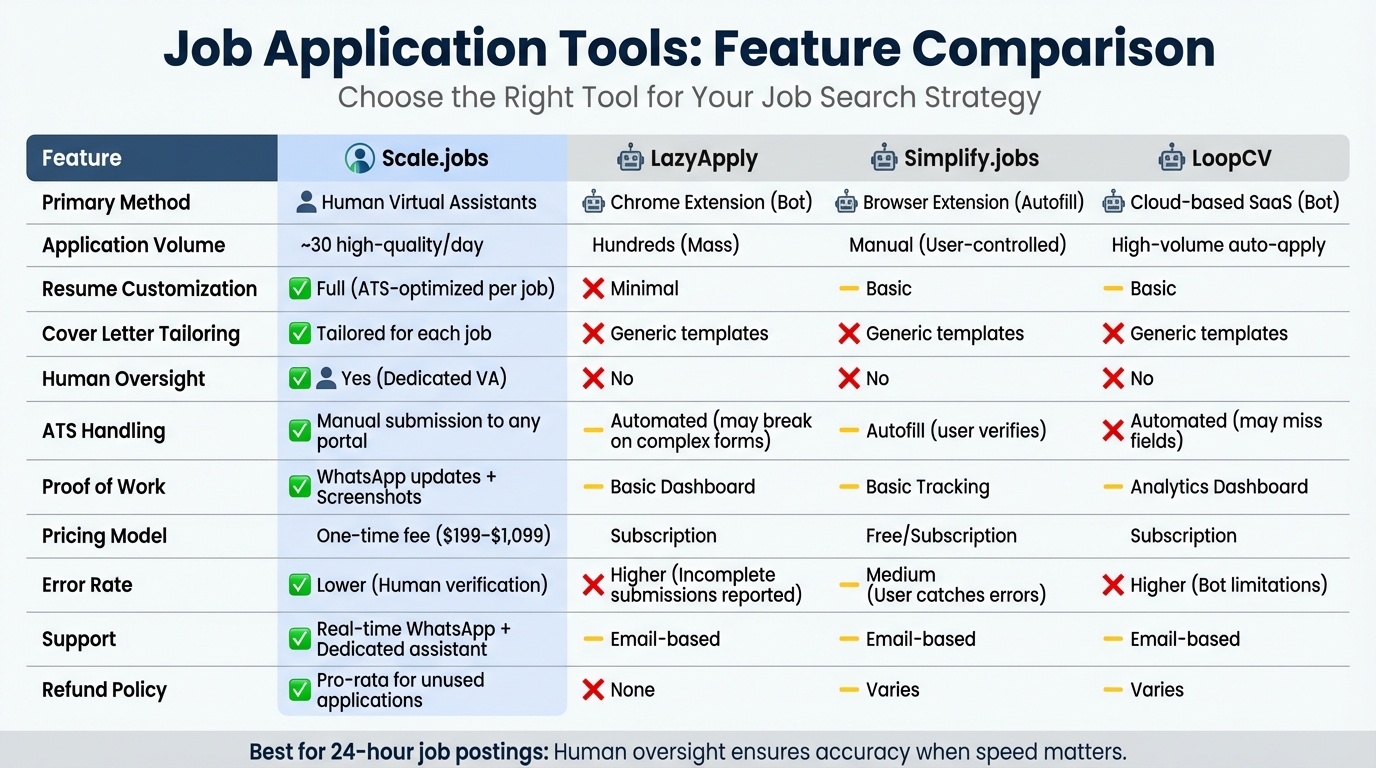
Job Application Tools Comparison: Scale.jobs vs LazyApply vs Simplify.jobs vs LoopCV
How scale.jobs Stands Out Among LazyApply, Simplify.jobs, and LoopCV
Once you've set up job alerts, the next challenge is sending out applications tailored to each role. Platforms like LazyApply, Simplify.jobs, and LoopCV aim to simplify this process, but their methods vary significantly. These differences can be critical, especially when you're vying for jobs posted within the last 24 hours.
LazyApply and LoopCV focus on automating high-volume applications, using bots or browser extensions to submit hundreds of applications daily. Simplify.jobs, on the other hand, offers a form-autofill tool to speed up manual entries on platforms like LinkedIn or Indeed. While these tools can cut application time from 30–45 minutes down to a few minutes, they often sacrifice precision for speed. This can lead to errors like misread form fields or incomplete submissions, which may reduce the chances of catching a recruiter's attention.
In contrast, scale.jobs relies on trained human virtual assistants to handle each application manually. These assistants customize your resume and cover letter for every position and submit them directly through the company's applicant tracking system (ATS) portal. The process ensures ATS compatibility, even with platforms known to disrupt autofill scripts, such as Greenhouse or Taleo. You’ll also receive updates via WhatsApp and timestamped screenshots as proof of work - all within a 24-hour turnaround. This human-first approach is particularly effective for meeting tight deadlines and ensuring your application stands out. As career strategist Melissa Occhipinti explains:
"Automation isn't your advantage anymore. It's your competition. ... the smart candidates, the ones who take the time to tailor, to think, to be human, are the ones getting the call."
While LazyApply and LoopCV are great for casting a wide net in exploratory searches, and Simplify.jobs works well for those who prefer control over each submission, scale.jobs is ideal for candidates targeting specific roles. If you're looking to focus on networking or preparing for interviews while ensuring your applications are tailored and error-free, combining professional resume writing services with human-powered application support can be a game-changer.
Choosing the Right Tool: Competitor Tools vs. scale.jobs
When to Use LazyApply, Simplify.jobs, or LoopCV:
These tools are suitable for job seekers aiming to apply to hundreds of roles quickly, especially when exploring multiple industries or prioritizing volume over customization.
When to Choose scale.jobs:
This service is perfect for candidates focusing on specific roles who need ATS-optimized documents, proof of submission, and a flat-fee pricing model. It’s especially beneficial for professionals who value quality over quantity and want to save time for higher-impact tasks like networking.
Feature Comparison: scale.jobs vs Competitors
Here’s a breakdown of how scale.jobs compares to other tools across critical factors:
| Feature | scale.jobs | LazyApply | Simplify.jobs | LoopCV |
|---|---|---|---|---|
| Primary Method | Human Virtual Assistants | Chrome Extension (Bot) | Browser Extension (Autofill) | Cloud-based SaaS (Bot) |
| Application Volume | ~30 high-quality/day | Hundreds (Mass) | Manual (User-controlled) | High-volume auto-apply |
| Resume Customization | Full (ATS-optimized per job) | Minimal | Basic | Basic |
| Cover Letter Tailoring | Tailored for each job | Generic templates | Generic templates | Generic templates |
| Human Oversight | Yes (Dedicated VA) | No | No | No |
| ATS Handling | Manual submission to any portal | Automated (may break on complex forms) | Autofill (user verifies) | Automated (may miss fields) |
| Proof of Work | WhatsApp updates + Screenshots | Basic Dashboard | Basic Tracking | Analytics Dashboard |
| Pricing Model | One-time fee ($199–$1,099) | Subscription | Free/Subscription | Subscription |
| Error Rate | Lower (Human verification) | Higher (Incomplete submissions reported) | Medium (User catches errors) | Higher (Bot limitations) |
| Support | Real-time WhatsApp + Dedicated assistant | Email-based | Email-based | Email-based |
| Refund Policy | Pro-rata for unused applications | None | Varies | Varies |
Why Choose scale.jobs?
- You're applying for roles posted in the last 24 hours and need fast, tailored submissions.
- You've encountered issues with bots or incomplete submissions and want the accuracy of human oversight.
- You value transparent proof of work, such as WhatsApp updates and screenshots, over generic dashboards.
- You prefer a flat-fee model with the option for pro-rata refunds, avoiding recurring subscription costs.
- You’re targeting niche or complex ATS platforms like Workday, Greenhouse, or Taleo, where automated tools often fail.
Step 4: Avoid Common Application Mistakes
Once you've fine-tuned your filters and alerts, the next step is steering clear of common pitfalls in the application process. Spotting new job postings is just part of the equation; you also need to dodge duplicate listings, phantom jobs, and scams. Did you know that roughly 33% of companies post phantom jobs just to build talent pools? On top of that, job scams have surged nearly 20% this year, making it essential to verify every opportunity before you hit "apply."
After identifying authentic openings, it’s smart to streamline your approach. One way to stay organized is by maintaining a job search tracker, like a Google Sheet or Notion board. Use it to log details like job titles, companies, and application dates. This is especially helpful because many recruiters use tools like itris X to distribute the same job posting across platforms like LinkedIn, Indeed, and Glassdoor. Without a tracking system, you might accidentally apply for the same job twice, which can come across as unprofessional to hiring managers.
To ensure you’re applying to legitimate roles, always cross-check job postings on the company’s official "Careers" page. For instance, if a LinkedIn job listing claims to be "new" but has been live on the company site for over 30 days, it might be a ghost listing. Another smart move is to verify recruiter profiles - steer clear of those using generic email addresses or asking for payment. Genuine employers will never charge you for training, equipment, or background checks. As recruiter Brendan O. puts it:
"If they rely on fear, exploiting myths, urgency, or fluffy promises instead of transparent information, you can bet it's not legit." – Brendan O., Recruiter
For roles with higher stakes, make sure your resume and cover letter are optimized for applicant tracking systems (ATS). Below is a quick guide to identify red flags that could save you from wasting time on questionable opportunities:
| Red Flag | Implication |
|---|---|
| Generic Greeting | Scammers often use "Dear Candidate" in mass messages to appear impersonal. |
| Unrealistic Salary | Offers far above market rates are often bait to lure unsuspecting applicants. |
| Text-Only Interviews | Legitimate companies typically conduct video or in-person interviews. Solely text-based interactions are suspicious. |
| Requests for Payment | Any request for money - for training, equipment, or software - is a clear scam. |
| Missing Company Info | Listings from "Confidential Company" without a website or LinkedIn presence are highly questionable. |
Decision Summary: Which Tools and Methods to Use
LazyApply vs Scale.jobs: Why Switch to Human-Powered Apply
When searching for jobs posted in the last 24 hours, the tools and methods you choose depend on two factors: how much time you can dedicate and the level of customization you need. While AI-driven platforms like LazyApply and Jobright rely on automation to send out hundreds of applications, Scale.jobs stands out by offering dedicated human assistants who tailor every resume and cover letter to the specific role.
Why Scale.jobs Stands Out Compared to LazyApply and Jobright
- Human oversight eliminates ATS errors: Scale.jobs employs assistants who manually handle applications, navigating complex portals like Workday and Greenhouse to ensure submissions are complete - something bots often fail to do.
- Tailored resumes and cover letters: Each document is customized to match the job description, avoiding the generic templates that can trigger filters or fail to impress hiring managers.
- Transparent proof of work: WhatsApp updates with screenshots provide clear evidence of submissions, unlike dashboards that don't confirm what recruiters actually receive.
- One-time payment model: With fees ranging from $199 to $1,099, Scale.jobs offers pro-rata refunds for unused applications, avoiding the ongoing costs of subscription services.
- Real-time support: Direct WhatsApp access to your assistant means you can address urgent updates quickly, a feature that email-only platforms lack.
Below, we’ll explore how Scale.jobs compares to AI-only competitors, helping you decide which approach aligns with your job-search goals.
Strengths of LazyApply and Jobright
These platforms excel in high-volume applications across various industries. LazyApply integrates with job boards using a Chrome extension for quick submissions, while Jobright offers a lower upfront cost and covers both U.S. and Canadian markets.
Where Scale.jobs Stands Apart
Human assistants at Scale.jobs address the nuanced requirements that bots often overlook, making it ideal for competitive roles in the U.S. where hiring managers evaluate applications within hours. Personalized submissions are far more impactful than generic templates in these scenarios.
Feature Comparison: Scale.jobs vs LazyApply vs Jobright
| Feature | Scale.jobs | LazyApply | Jobright |
|---|---|---|---|
| Human Involvement | Dedicated VA per client | None (Chrome bot) | None (AI-only) |
| Resume Customization Depth | Full ATS optimization | Minimal | AI templates |
| ATS Handling | Manual submission | Automated (errors common) | Automated (generic fills) |
| Application Execution Method | Human-verified submission | Bot autofill | AI autofill |
| Transparency & Proof of Work | WhatsApp updates + screenshots | Basic dashboard | Basic tracking |
| Pricing Model | One-time fee ($199–$1,099) | Subscription | Subscription |
Who Should Use LazyApply or Jobright
These platforms are better suited for:
- Job seekers exploring multiple industries and prioritizing application volume over personalization.
- Candidates with flexible timelines who can review and fix bot-generated errors.
- Those needing a broader geographic reach, like coverage in Canada through Jobright.
- Users on tighter budgets who don’t mind troubleshooting incomplete submissions on complex ATS platforms.
Who Should Choose Scale.jobs
Scale.jobs is the right choice for:
- Professionals targeting specific U.S.-based roles with postings from the last 24 hours, where error-free, personalized submissions are critical.
- Candidates applying to companies with strict ATS systems like Workday, Greenhouse, or Taleo, where bots often fail.
- Job seekers who want to save 20+ hours per week for networking and interview prep instead of handling applications.
- Those who value clear proof of submission through timestamped screenshots.
- Applicants who prefer a one-time fee structure over recurring subscription costs.
Switch to Scale.jobs if…
- Past bot errors have wasted your time: Automated tools have caused incomplete submissions or ATS rejections, and you need human verification.
- You’re targeting competitive roles: Jobs with 200+ applicants in the first 24 hours require tailored applications to stand out.
- Your resume struggles with ATS systems: Expert customization ensures your documents pass through complex tracking systems.
- You need proof of every submission: Timestamped screenshots provide the accountability that basic dashboards lack.
- You want flat-fee pricing: Avoid the accumulating costs of subscriptions by opting for a single payment with pro-rata refunds.
FAQs
How can I tell if a “new” job post is actually a ghost listing?
To identify a potential ghost job listing, start by checking how long it's been posted - listings lingering for over two months without updates can be a warning sign. Pay attention to descriptions that are overly vague or generic, especially if they lack clear details about the role or the company. Another red flag is unresponsive or missing contact information, as well as the absence of a company website or reviews. Be cautious of listings that promise unusually high pay for minimal effort, as these often lack authenticity. Recognizing these signs can save you time and effort by steering clear of questionable opportunities.
What are the fastest ways to get alerts for jobs posted in the last 24 hours?
The fastest way to stay on top of jobs posted within the last 24 hours is by setting up real-time notifications on popular job platforms like LinkedIn and Indeed. By using their advanced filters, you can refine your search to focus exclusively on recent postings. These features ensure you're notified immediately about verified and current opportunities, giving you a head start in your job search.
How do I avoid ATS issues when applying quickly to brand-new listings?
When applying to new job listings, it's crucial to avoid common issues with Applicant Tracking Systems (ATS). One way to do this is by using platforms like Scale.jobs, which offer human-assisted, ATS-optimized applications. Unlike automated tools that often generate generic resumes, Scale.jobs focuses on creating tailored submissions that align with ATS requirements, increasing your chances of getting noticed.
To further improve your resume's performance, ensure it includes relevant keywords and follows proper formatting. Also, consider setting up real-time alerts on the best job boards. This allows you to respond quickly to new opportunities while still maintaining a personalized and accurate approach to each application.