
Indeed Job Sync API: Candidate Data Mapping Guide

Sarah Mitchell
January 7, 2026

The Indeed Job Sync API simplifies the transfer of candidate data between your ATS and Indeed by automating updates and reducing manual work. Accurate field mapping is critical - it ensures candidate statuses in your ATS (like "Phone Screen" or "Final Round") align with Indeed's categories (NEW, CONTACTED, INTERVIEWED, OFFERED, HIRED, REJECTED). Proper mapping improves application tracking, responsiveness, and candidate matching, while errors can disrupt the hiring process.
Key Takeaways:
- Accurate Mapping: Match ATS stages to Indeed's six statuses for seamless tracking.
- API Setup: Use OAuth 2.0 for authentication and configure endpoints for secure data uploads.
- Data Formatting: Ensure fields like
apply_id(64 characters) and timestamps (ISO 8601) meet requirements. - Best Practices: Upload updates hourly, validate data, and test in Indeed's sandbox environment.
By following these steps, you can maintain smooth data synchronization and improve hiring efficiency.
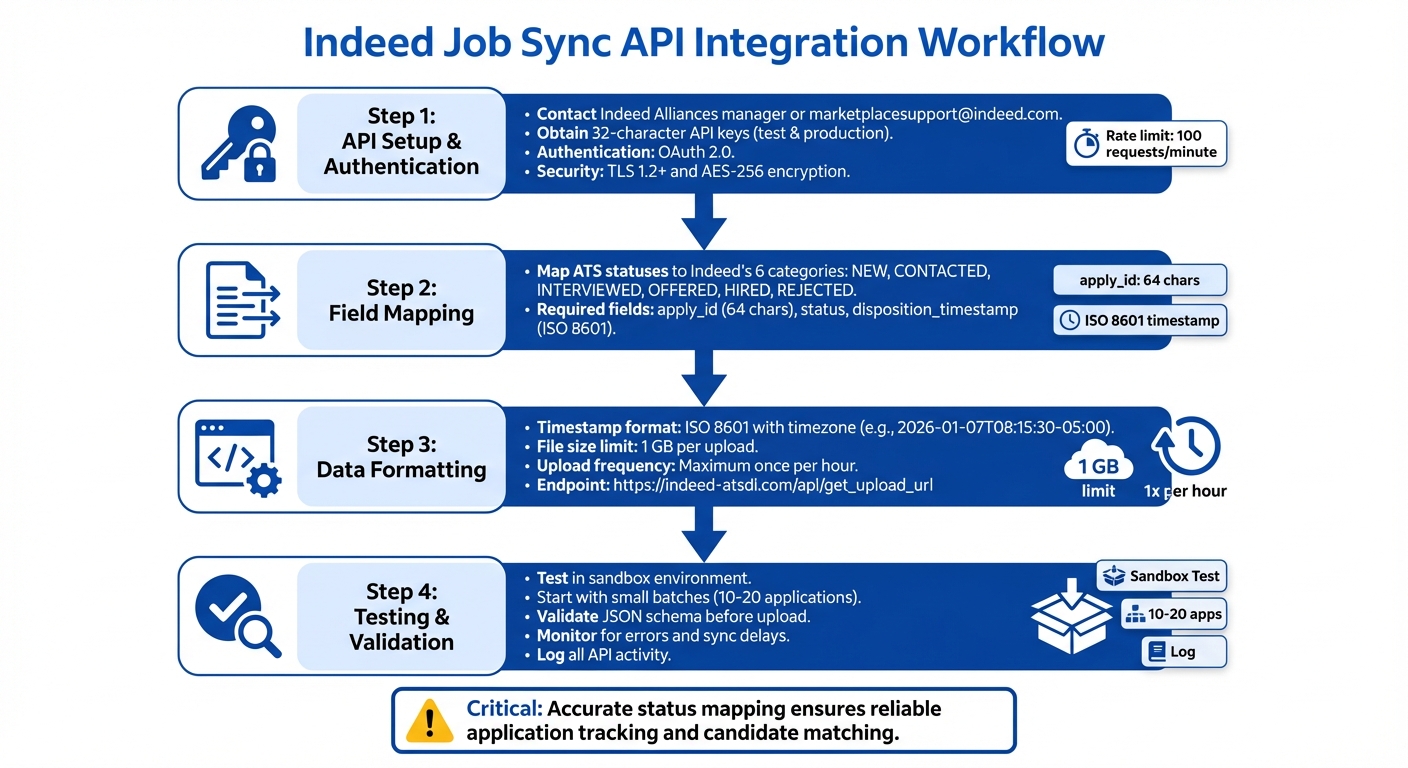
Indeed Job Sync API Integration Workflow: 4-Step Setup and Data Mapping Process
Indeed Simple OAuth API Example: python & requests-oauthlib
Setting Up Indeed Job Sync API
To establish a secure connection between your ATS and Indeed, you'll need to obtain API credentials and configure endpoints. These steps ensure a seamless flow of candidate data between systems. The process involves two key elements: authentication credentials and endpoint configuration for data transmission.
API Credentials and Authentication
Start by requesting API credentials to access the Indeed Job Sync API. Reach out to an Indeed Alliances manager or email [email protected] to get test and production API keys. These keys, each a 32-character string, authenticate your system's requests. Indeed uses OAuth 2.0 for authentication, offering both Authorization Code and Client Credentials flows based on the integration type.
Keep your API keys secure - never hardcode them into your application or share them across different integrations. For added security, Indeed requires TLS 1.2 or higher for data in transit and AES-256 encryption for data at rest. As noted in their privacy policy:
"Appropriate controls and oversight, including complying with Indeed's privacy policy, are essential to the success of AI systems and important for the protection of the people who depend on Indeed."
Before requesting credentials, ensure your system is set up for Indeed Apply if it will handle candidate applications. This setup ensures applications are routed correctly to your ATS. Additionally, if your ATS uses custom candidate statuses beyond the standard workflow (e.g., NEW, CONTACTED, INTERVIEWED, OFFERED, HIRED, REJECTED), coordinate with your Indeed Alliances manager to map these statuses to Indeed's categories.
Endpoint Configuration
Once you have your credentials, the next step is configuring endpoints to manage data uploads. The main endpoint for submitting candidate disposition data is:
https://indeed-atsdi.com/api/get_upload_url
This endpoint generates presigned Amazon S3 URLs for uploading data files. To use it, send a POST request with the appropriate headers, including Content-Type, Accept, and your token. The response will include a presigned URL, which you must use immediately to upload your file via a PUT request. Keep in mind that presigned URLs expire after one hour.
A few important guidelines to follow:
- Split large datasets to stay within the 1 GB file size limit.
- Avoid sending empty files - only upload data when there's an actual status change.
- Indeed enforces a rate limit of 100 requests per minute, and you can submit data up to once per hour.
How to Map Candidate Data Fields
To integrate Indeed's JSON fields with your ATS, the apply_id, status, and disposition_timestamp fields must align correctly. This alignment is crucial for updating candidate dispositions and tracking their progress through your hiring process. Start by reviewing the key JSON fields to understand how candidate data will flow into your ATS.
Understanding Indeed JSON Fields
Indeed's JSON data includes several critical fields you'll need to work with. The apply_id is a unique 64-character identifier that connects the employer, candidate, and job posting. This corresponds to the id field in Indeed Apply JSON data. Additionally, you'll find candidate profile details such as name, email, resume, and an optional cover letter.
The status field is another essential component and must map to one of Indeed’s six predefined categories: NEW, CONTACTED, INTERVIEWED, OFFERED, HIRED, or REJECTED. If your ATS uses custom workflow stages (e.g., "Phone Screen" or "Final Round"), you'll need to translate these into Indeed's categories. For instance, "Phone Screen" typically maps to CONTACTED, while "Final Round" aligns with INTERVIEWED.
Once you’ve identified these fields, the next step is converting them to match your ATS format.
Converting to ATS Format
The disposition_timestamp field must comply with ISO 8601 formatting, including time zone details. For example, Eastern Time would look like this: 2026-01-07T08:15:30-05:00. If no specific time is available, use 00:00:00 with the correct time zone.
Only include records where a status change has occurred. Indeed flags invalid transitions, such as NEW -> NEW, as errors. Upload records only when there’s an actual update, such as moving a candidate from INTERVIEWED to OFFERED.
Field Mapping Reference Table
Here’s a quick reference for mapping Indeed JSON fields to their ATS equivalents:
| Indeed JSON Field | ATS Field Equivalent | Required? | Format Notes |
|---|---|---|---|
id |
Indeed Apply ID | Yes | 64-character string |
status |
Candidate Stage | Yes | Must be one of: NEW, CONTACTED, INTERVIEWED, OFFERED, HIRED, REJECTED |
disposition_timestamp |
Status Change Date | Yes | ISO 8601 format with time zone (e.g., 2026-01-07T08:15:30-05:00) |
name |
Candidate Name | Yes | Full name of the applicant |
email |
Email Address | Yes | Primary email address |
resume |
Resume/CV | Yes | File or text format |
cover_letter |
Cover Letter | No | Additional text or file |
Data Synchronization Best Practices
Keeping data aligned between Indeed and your ATS requires a steady and reliable flow of updates. Whenever candidate statuses change in your system, those updates must reach Indeed promptly and accurately to ensure both platforms stay in sync.
Processing Data in Real Time
Send status updates immediately whenever there's a change in your ATS. The CONTACTED status is especially crucial - Indeed uses this to track how quickly employers respond to applicants. Even if your internal workflow hasn't advanced to a new stage, make sure to send this status as soon as you've reached out to a candidate via phone, email, or any other communication method.
For ongoing updates, use batch uploads - but no more than once per hour. Smaller, more frequent updates help prevent backlogs and minimize data integrity issues.
Validating and Handling Errors
Always validate the apply_id and disposition_timestamp for each record. The apply_id must be exactly 64 characters long, while the disposition_timestamp must follow the ISO-8601 format, including time zone details (e.g., 2026-01-07T08:15:30-05:00). If a request fails, Indeed will return a non-200 HTTP status code along with a JSON dictionary containing an Error key that explains the issue.
A common error you might encounter during S3 uploads is SignatureDoesNotMatch. To avoid this, leave out the Content-Type header during uploads. Additionally, ensure your ATS statuses correctly map to Indeed's six normalized categories: NEW, CONTACTED, INTERVIEWED, OFFERED, HIRED, and REJECTED. Invalid transitions, such as NEW -> NEW, will trigger errors.
Logging API Activity
Log each API request, including the response status, timestamp, and any error messages. Make sure to mask sensitive information like resumes, email addresses, and candidate names in your logs to protect against accidental exposure of personal data.
Set up automated alerts to monitor for API rate limit warnings (the limit is 100 requests per minute), high error rates, or sync delays that exceed your expected thresholds. Keep an eye on your OAuth 2.0 access tokens and deactivate any that are no longer in use. Before moving to production, test your error-handling processes in Indeed's sandbox environment to ensure your system can handle failures effectively, even under heavy loads. These steps will help you troubleshoot common issues and maintain a smooth data flow.
Troubleshooting Common Problems
Candidate data mapping can sometimes hit a few bumps, especially when it comes to status mapping errors. These occur when the statuses in your internal ATS don't match up with Indeed's six normalized categories. For example, if you use custom labels like "Under Review" or "Phone Screen Complete", you'll need to map those to one of Indeed's valid statuses, such as CONTACTED or INTERVIEWED. If statuses are left unmapped or incorrectly mapped, the API will reject them. Below, we’ll walk through specific fixes and testing strategies to address these issues.
Fixing Data Mismatches
Start by ensuring that your disposition_timestamp follows the ISO-8601 format. For instance, Eastern Time should look like this: 2026-01-07T14:30:00-05:00. An incorrect date format or missing timezone will trigger errors. Also, double-check that the apply_id is exactly 64 characters long. For detailed guidance on formatting, see the "Converting to ATS Format" section.
When uploading data in batches, filter out records without status changes. Sending the same status for the same apply_id more than once can not only waste API calls but also cause validation errors. To avoid issues, validate your JSON schema before uploading to catch any malformed data or missing fields.
Keep an eye on the API's rate limits. You’re allowed 100 requests per minute, so implement a mechanism to stay within this limit. If you exceed it, you may face synchronization delays or even gaps in your data.
Testing with Batch Jobs
After resolving mismatches, it’s time to test your integration using batch jobs. Before going live, request test API keys from Indeed Alliances or their support team. These keys let you perform test uploads without impacting your production data. To ensure accuracy, use real Indeed Apply IDs from actual applications during testing. Indeed will manually review your file formats during this phase, so expect some back-and-forth as you fine-tune your integration.
Begin with small batches of 10–20 applications to confirm that status updates sync properly between platforms. Use Indeed’s sandbox environment to submit test applications and observe how your ATS handles each status transition. Once everything is working smoothly, you can gradually increase batch sizes while keeping an eye out for errors. Although disposition data files can be up to 1 GB per upload, smaller, more frequent batches are easier to troubleshoot and reduce the risk of processing failures.
Conclusion
Accurate candidate data mapping plays a key role in ensuring smooth ATS integration with Indeed. As highlighted in Indeed's documentation, "It is absolutely crucial you accurately map the statuses from your ATS into these categories. Without an accurate mapping, Indeed cannot reliably determine what happens to an application." By aligning custom ATS statuses with Indeed's six categories, you enable precise tracking of candidate progress.
This guide covered essential topics like API setup, JSON field mapping, ATS status conversion, and troubleshooting. Remember to stick to ISO-8601 timestamp formats (e.g., 2026-01-07T14:30:00-05:00) and validate your JSON schema before uploading. These practices help ensure a smooth, error-free synchronization of candidate data.
To minimize risks, test with small batches of 10–20 applications in Indeed's sandbox environment. This approach helps identify and address potential issues early in the process.
Finally, while integration is critical, don’t overlook the importance of aligning application materials with ATS standards. Just as precise mapping enhances employer responsiveness, tools like scale.jobs can elevate the job-seeking experience. With free ATS resume checks, AI-driven document tailoring, and support from human assistants, scale.jobs provides real-time updates that reflect the same tracking features employers depend on.
FAQs
How can I accurately map candidate statuses between my ATS and Indeed using the Job Sync API?
To keep candidate status mapping between your ATS and Indeed accurate using the Job Sync API, the first step is to dive into Indeed's API documentation. Understand the status codes it uses and match them with the ones in your ATS. This alignment helps ensure everything runs smoothly and minimizes the risk of errors.
Thorough testing is equally critical. Use sample data to check if the integration updates candidate statuses correctly and in real time. Additionally, make it a habit to review and adjust your mapping logic periodically. This helps you stay on top of any updates in your ATS or changes to Indeed's API specifications. By sticking to these practices, you can keep your hiring process efficient and free of unnecessary hiccups.
How does Indeed ensure the security of API credentials when using the Job Sync API?
While the sources don't detail specific security protocols for handling API credentials in the Indeed Job Sync API, there are some best practices you should follow. Always store your credentials in a secure manner - using environment variables is a smart way to manage sensitive data. Additionally, regularly rotating your API keys can help minimize the risk of unauthorized access.
How can I resolve common issues when uploading candidate data using the Indeed Job Sync API?
When it comes to troubleshooting errors with uploading candidate data via the Indeed Job Sync API, specific guidance can be hard to find. While there are resources that explain how to retrieve candidate data using the API, they often skip over details like upload error codes, validation rules, or common troubleshooting steps.
If you run into issues, start by diving into the API documentation. Look for information on required fields, proper data formatting, and validation rules. Pay close attention to the error messages provided by the API - they often contain clues about what went wrong. If you have specific error messages or additional context, feel free to share them, and I can help break things down further.