
How to Optimize Your Resume for ATS in 2026 (Updated Guide)

Sarah Mitchell
December 10, 2025
Did you know that nearly all Fortune 500 companies use ATS (Applicant Tracking Systems) to screen resumes? If your resume isn’t tailored for these systems, it might never reach a human recruiter due to common formatting and keyword errors. Here's how to ensure your resume gets noticed in 2026:
- Use the right keywords: Match skills, qualifications, and terms from job descriptions.
- Stick to simple formatting: Avoid tables, graphics, and complex layouts that confuse ATS.
- Choose the correct file type: Use .docx unless a job posting specifies PDF.
- Organize sections clearly: Include standard headings like "Work Experience" and "Skills."
- Test your resume: Tools like Jobscan or Rezi can identify issues and improve ATS compatibility.
For those seeking extra help, services like scale.jobs combine AI tools with human assistance to create resumes that pass ATS filters and appeal to hiring managers. Whether you’re DIY or looking for expert support, optimizing for ATS is essential to boost your chances of landing interviews.
Check your resume for free with the Resume ATS Score Checker by Scale Jobs. This quick and easy tool helps job seekers understand how ATS-friendly their resume is before sending applications.
Create An ATS-FRIENDLY Resume For Today's 2025 Job Market | BEST Resume Template & AI Prompts
How ATS Technology Works
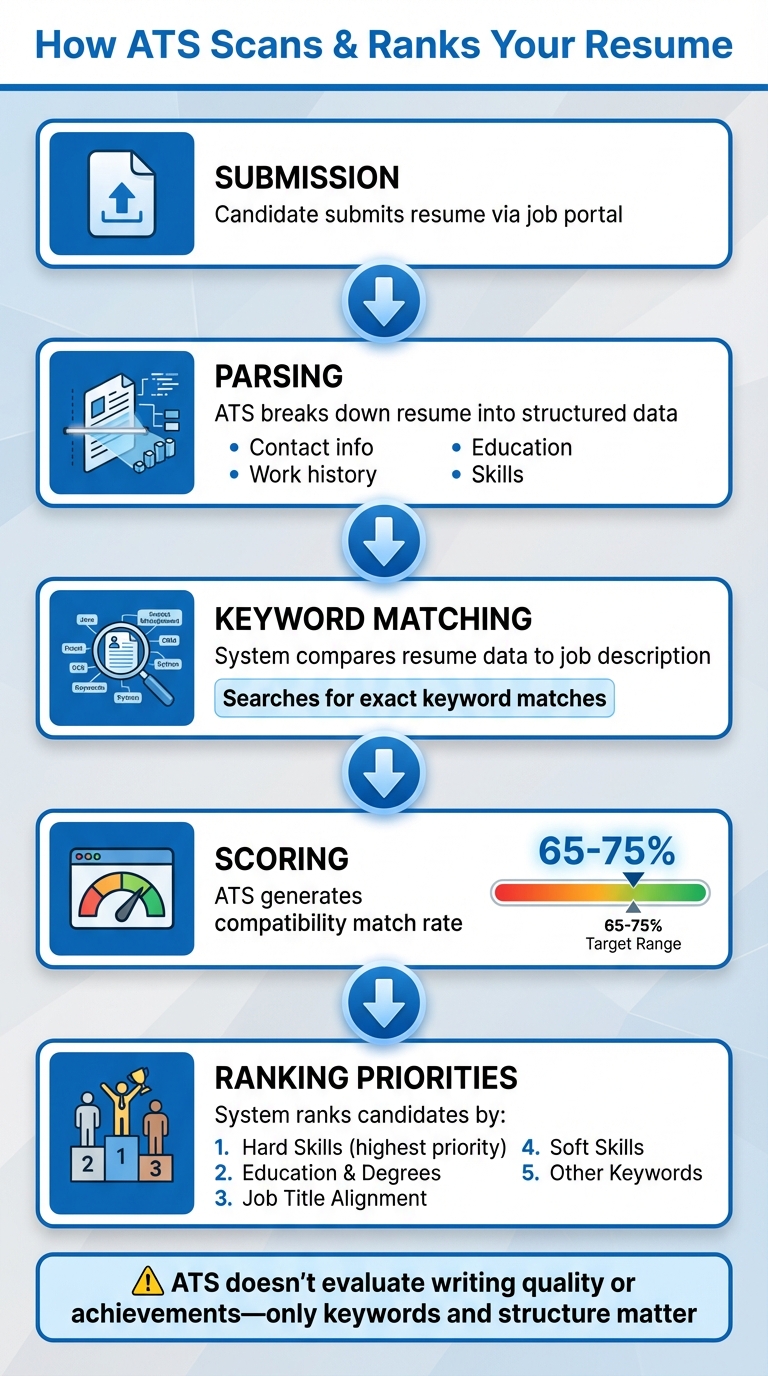
How ATS Systems Scan and Rank Your Resume in 5 Steps
To create a resume that stands out, you first need to understand how Applicant Tracking Systems (ATS) function. These systems use algorithms to scan, analyze, and rank resumes. Here's what happens when you hit "submit" on your application.
How ATS Parses and Ranks Your Resume
Once you upload your resume, the ATS breaks it down into a structured database, pulling out key details like your contact information, work history, education, and skills. It then compares this data to the job description, generating a compatibility score known as a match rate.
"Companies use Applicant Tracking Systems (ATS) to search and filter resumes by keywords." – Jobscan
The ranking process prioritizes hard skills first, followed by education (especially if the role specifies advanced degrees), job title alignment, soft skills, and other relevant keywords. While Jobscan suggests aiming for a match rate of 75%, many applicants achieve success with scores closer to 65%. The ATS doesn’t focus on how well-written or results-driven your resume is - it’s all about keywords and structure.
Read more: How ATS Systems Really Read Your Resume
Take Majid, a maritime law lecturer in the UK, as an example. He struggled with ATS compatibility due to poor formatting:
"Machines couldn't read my old resume properly, so the feedback was horrible." – Majid, maritime law lecturer in the UK
After reformatting his resume specifically for ATS, his results improved significantly.
Next, let’s look at how the file format you choose impacts this process.
File Formats That Work with ATS
The file format of your resume can greatly influence how well it’s read by ATS software. While both .docx (Microsoft Word) and PDF files are generally accepted, testing shows that .docx files are often parsed more accurately. Unless the job posting specifically requests a PDF, it’s better to stick with .docx.
"Our tests have shown that some applicant tracking systems more accurately parse .docx resumes. For this reason, we recommend uploading your resume in the .docx (Microsoft Word) format when applying to a job, unless the job posting requests a PDF." – Jobscan
Be cautious with design elements like tables, columns, graphics, headers, and footers. These can confuse the ATS, leading it to misinterpret or skip important information. What looks polished to you might appear as a garbled mess to the system.
With that in mind, let’s explore why keeping your resume format simple is crucial for ATS success.
Why Simple Formatting Matters
ATS software processes resumes differently than a human recruiter would. Clean, single-column layouts with clear section headers and standard fonts ensure the system can extract and categorize your information correctly. Using straightforward headings such as "Work Experience", "Education", and "Skills" helps the ATS navigate your resume without confusion.
Additionally, sticking to a chronological or hybrid resume format makes it easier for the ATS to follow your career progression. Optimizing fonts, spacing, and line heights not only improves ATS readability but also ensures human reviewers can quickly scan your resume.
This is where tools like scale.jobs excel. Unlike Jobscan or Rezi, scale.jobs combines ATS optimization with human expertise, ensuring every formatting detail is fine-tuned for both the system and the hiring manager.
Read more: Top #7 Reasons Why ATS Rejects Your Resume: Fix Now!
Why Generic Resumes Fail in 2026
Mass applying with the same resume is becoming less effective because ATS and AI systems now prioritize relevance over volume.
Many hiring platforms analyze:
- resume-job match percentage
- role-specific keywords
- industry alignment
- experience relevance
A generic resume sent to 500 jobs often performs worse than 20 highly tailored applications.
This is why more candidates now use:
- ATS score checker tools
- AI resume customization
- human-assisted optimization services
Add an ATS Score Checker Comparison Table
| Tool | Free ATS Score Checker | AI Suggestions | Human Review | Resume Builder |
| Scale.jobs | Yes | Yes | Yes | Yes |
| Rezi | Yes | Yes | No | Yes |
| Teal | Yes | Limited | No | Yes |
How to Use Keywords in Your Resume
Building on ATS (Applicant Tracking System) formatting tips, using the right keywords can significantly increase your resume's chances of being noticed. Without them, even the most impressive resume might get filtered out. Here's how to match resume keywords to job descriptions effectively to improve your match rate.
Finding Keywords in Job Postings
Start by carefully reviewing the job description. Pay attention to skills, qualifications, job titles, and industry-specific terms that are repeated or listed as "required" or "preferred." These are your primary keywords.
Focus on identifying hard skills (like Python or SQL) and soft skills (such as leadership or communication). ATS systems tend to prioritize hard skills first, followed by education, job titles, and then soft skills.
If you’re unsure about which keywords you’re missing, tools like Jobscan, Rezi.ai, Simplify.jobs, and Teal can analyze job postings for you. These platforms highlight missing keywords and provide a match rate score. For example, Jobscan suggests aiming for a 75% match rate, though many users report landing interviews with scores closer to 65%.
"Match your resume keywords to skills found in the job description." – Jobscan
For a more personalized approach, scale.jobs combines AI-powered keyword analysis with human expertise. Their AI Assistant Pro plan ($9/month launch offer) generates unlimited keyword-optimized resumes, while their Human Assistant service has trained professionals craft resumes that are both ATS-friendly and natural-sounding - no robotic phrasing involved.
Once you’ve identified the key terms, the next step is to strategically integrate them into your resume.
Read more: Secret ATS Resume Format That Actually Works in 2026
Where to Place Keywords in Your Resume
To maximize ATS compatibility, distribute keywords throughout your resume. Start with your professional summary, where you can include 3–5 high-priority terms that align with the job description. Then, create a dedicated skills section to list technical and soft skills in a clean, easy-to-read format.
The work experience section is where most of your keywords should appear. Incorporate them naturally into bullet points that describe your responsibilities and achievements. Avoid overloading your resume with keywords ("keyword stuffing"), as this can actually hurt your ATS match score.
Stick to standard section headings like "Work Experience", "Education", and "Skills" to ensure the ATS can navigate your resume without issues.
If manually adjusting your resume for every job sounds overwhelming, scale.jobs offers a solution. Their AI Assistant Pro plan creates tailored resumes in seconds, while their Human Assistant service ensures keywords are perfectly placed and natural-sounding. Plus, they provide real-time updates via WhatsApp, complete with proof-of-work screenshots.
Combining Keywords with Results and Action Words
Using keywords alone isn’t enough to make your resume stand out. Pair them with strong action verbs and quantifiable results to craft bullet points that not only pass ATS filters but also grab a recruiter’s attention. For instance, instead of saying, "Responsible for managing projects", try: "Led a cross-functional team of 8 to deliver a $1.2M project 3 weeks ahead of schedule."
Start each bullet point with an action verb like "Led", "Developed", "Optimized", or "Increased." Follow it with a description of the task or project, naturally weaving in relevant keywords. Finish with measurable outcomes - percentages, dollar figures, timeframes, or team sizes.
Platforms like Rezi.ai (which reports a 62.18% interview rate for users) and Jobscan (whose users report landing 3X more interviews) provide real-time feedback to help refine your bullet points. These tools suggest ways to improve your content while ensuring it includes the right keywords.
"It helped me to get through the ATS system and get notified by recruiters." – Bala, IT Systems Operations Manager
For a more hands-on approach, scale.jobs takes it a step further. Their Human Assistant service not only optimizes for ATS but also crafts results-driven bullet points that resonate with hiring managers. With a 24-hour turnaround and tailored resumes for each job posting, you’ll receive documents that are both ATS-friendly and compelling. And with flat-fee pricing starting at $199 for up to 250 applications, you can skip the recurring subscriptions required by tools like Teal ($13/week) or Simplify+.
How to Structure Your Resume for ATS
Once you've nailed down the right keywords, the next step is organizing your resume so it's clear and effective for ATS (Applicant Tracking Systems). Even a resume packed with relevant terms can fall short if the structure isn’t right. A confusing layout might trip up the software, lowering your chances of making it through the first round. Here’s how to set up your resume so both ATS and hiring managers can quickly see your qualifications.
Required Resume Sections and Labels
An ATS-friendly resume should include six key sections: Header, Summary, Experience, Education, Skills, and Certifications. These sections act as the foundation for ATS parsing. Leave one out, and the system might misinterpret your qualifications - or miss them entirely.
Stick to standard headings like Work Experience and Skills to ensure the ATS reads your resume correctly. Using a chronological or hybrid format is usually the safest bet. Functional resumes, on the other hand, can confuse ATS algorithms, so they’re best avoided.
ATS software tends to focus heavily on hard skills, education, and job titles. This makes the Skills and Experience sections especially important. Be sure to structure these clearly and load them with job-specific keywords.
Not sure if your resume is ATS-compatible? Tools like Jobscan and Rezi.ai can analyze your document and flag any issues. If you’d rather skip the guesswork, services like scale.jobs can create ATS-optimized resumes with proper formatting, section labels, and keyword placement.
Next, let’s talk about formatting your work history to maximize ATS readability.
How to Format Your Work Experience
The Work Experience section is where most ATS scoring happens, so getting the format right is critical. Start each entry with your job title, followed by the company name, location, and dates of employment (formatted as MM/YYYY to MM/YYYY). Use bullet points to describe your responsibilities and accomplishments, making it easier for the ATS to process your information.
Each bullet point should begin with a strong action verb like "Led", "Developed", "Optimized", or "Increased." Then, describe the task or project, weaving in keywords from the job description. Wrap up with measurable results. For example: "Optimized SQL queries, reducing load times by 40% and saving $50K annually."
This format not only improves your ATS ranking but also highlights your achievements for hiring managers. Avoid placing job titles or dates in headers or footers - keep all essential details in the main body of the document.
If customizing your Work Experience section for each job feels overwhelming, scale.jobs offers services that create tailored, ATS-friendly bullet points to streamline the process.
Adding Certifications and Technical Skills
After organizing the main sections, focus on refining your Certifications and Skills. These areas are high-priority for ATS, so they deserve special attention. Create a dedicated Skills section to list both hard and soft skills in a clear, easy-to-read format. For technical skills, include programming languages, software tools, and methodologies that align with the job description.
Certifications should have their own section too. List credentials with their full name and acronym - for instance, "Project Management Professional (PMP)" or "Certified ScrumMaster (CSM)" - so the ATS captures the information accurately. Include the issuing organization and the date earned when possible.
Tailoring these sections for each job application can make a big difference. If the job emphasizes cloud computing, highlight relevant certifications like AWS Certified Solutions Architect. If it’s focused on data analysis, showcase skills such as Python, R, and Tableau. Tools like Jobscan and Rezi.ai can help identify missing skills or keywords and suggest improvements.
For a more hands-on option, scale.jobs can help align your Skills and Certifications sections with specific job requirements, ensuring your resume is optimized for ATS while still looking polished for human reviewers.
sbb-itb-564272e
Resume Formatting and File Preparation for ATS
Getting your resume through an ATS (Applicant Tracking System) isn’t just about the content - it’s also about how it looks. Even the most well-written resume can fail if the formatting confuses the software. By making a few simple tweaks to your fonts, layout, and file type, you can improve your chances of catching a recruiter’s attention. Unlike tools like Jobscan, Rezi, or Simplify, scale.jobs combines automation with human expertise to ensure your resume stands out. Let’s break down the essential formatting tips to create an ATS-friendly resume.
Fonts, Layouts, and Sizes That Work
Stick to traditional fonts like Arial, Calibri, or Times New Roman - these are easy for both ATS software and recruiters to read. For body text, use a font size between 10 and 12 points, and slightly larger sizes (14–16 points) for your name and section headers to make them stand out.
Your layout should be clean and simple. Opt for a single-column format with standard margins (0.5 to 1 inch on all sides). While creative designs or multi-column layouts might look appealing, they can confuse ATS software and hurt your chances.
If you’re unsure about your formatting, try an ATS checker. Tools like Jobscan and Rezi can help you identify potential issues. Alternatively, scale.jobs offers a hassle-free solution by creating ATS-optimized resumes with proper formatting from the start, so you don’t have to worry about the details.
Common Formatting Mistakes That Break ATS
Avoid using elements like tables, columns, text boxes, images, or headers/footers in your resume. These can confuse ATS software, making it harder for the system to read your information and lowering your overall score.
Take the example of Majid, a maritime law lecturer in the UK, who shared his experience using Rezi:
"Machines couldn't read my old resume properly, so the feedback was horrible."
Once he simplified his formatting, he started receiving interest from recruiters.
To avoid similar issues, stick to plain text in the main body of your document, use standard section headings, and steer clear of any visual elements that aren’t strictly necessary.
Why Is Your Resume's ATS Score Low?
Common reasons your ATS score may be low:
- Missing keywords from the job description
- Using tables or graphics
- Incorrect file format
- Generic resume summary
- Missing skills section
- Unclear job titles
- Keyword stuffing
- Poor resume readability
Even highly qualified candidates get rejected because their resumes are not ATS-optimized.
How to Test Your Resume for ATS
Testing your resume is a critical step to ensure it’s ATS-compatible. Upload your resume and the job description to tools like Jobscan, Rezi, or Simplify. These platforms will give you a match rate score - Jobscan suggests aiming for at least 75%, though many users find success even at 65%.
For a quick DIY test, copy and paste your resume into a plain text editor like Notepad. If the text appears jumbled or sections are missing, the ATS might misread your information. This simple check can help you catch formatting issues before they cost you an interview.
According to Jobscan, users who follow these testing methods report securing three times more interviews and significantly shortening their job search. With scale.jobs, you can skip the guesswork. Their service includes built-in compatibility testing and real-time updates via WhatsApp, so you’ll know exactly where your resume stands.
Read more: 10 Reasons ATS Rejects Your Resume Before a Human Sees It
Why scale.jobs Stands Out
- Human expertise combined with technology: Unlike fully automated tools like Jobscan or Rezi, scale.jobs pairs its ATS-compliant resume builder with human reviewers who fine-tune your resume for maximum impact.
- Clear communication: Real-time updates through WhatsApp and proof-of-work screenshots ensure you’re always informed about the progress of your resume.
- Comprehensive service: Beyond resume optimization, scale.jobs offers an all-in-one platform with job board access, networking tools, and application support - all for one flat fee.
These strategies and tools can help you create a resume that not only passes ATS checks but also grabs the attention of hiring managers. By focusing on the right formatting and leveraging services like scale.jobs, you can make your job search more efficient and effective.
Tools and Services for ATS Resume Optimization
The tools you choose can significantly impact your job search. Some rely entirely on algorithms, while others blend human expertise with technology to refine your application. The right choice depends on your budget, timeline, and how hands-on you want to be.
Unlike fully automated platforms, Scale.jobs combines the precision of algorithms with the insight of human review. Let’s break down how these tools differ and why Scale.jobs stands out.
Best ATS Resume Checkers and Builders
Jobscan offers a free resume scanning and building tool, focusing on matching keywords between your resume and job descriptions. Users have reported a 50% boost in interview chances after using the platform. Similarly, Rezi uses AI to suggest content improvements and boasts an 8.23/10 average user rating from over 3.3 million users. Rezi users achieve a 62.18% interview rate. Mario, a graphic designer, shared:
"The free version of Rezi is really good, there's no harm in trying it."
Simplify and Teal also provide free options with unlimited resume creation and job tracking. Simplify users report hearing back from employers 25% more often than on other platforms. Meanwhile, Teal users get jobs 58% faster and receive six times more interview opportunities. Teal’s free plan includes unlimited resumes and keyword suggestions, while its premium plan costs $13 per week for advanced AI features.
Scale.jobs takes a different approach, blending free ATS-compliant resume building with optional AI customization for $9/month and human-assisted services priced between $199 and $1,099. Impressively, 93% of their customers secure jobs within three months, with 70% receiving refunds because they found work before using all their credits.
Human Review Services vs. Automated Software
Automated tools like Jobscan and Rezi analyze resumes in seconds and suggest keyword improvements. However, they can’t replicate the depth and nuance that a human brings to crafting a tailored application.
For those seeking a personal touch, Find My Profession offers resume writing and reverse recruiting, earning an average rating of 4.9/5 from over 730 reviews. Scale.jobs goes a step further by pairing human virtual assistants with ATS-compliant technology. Unlike automated services, which may flag your application as bot-generated, Scale.jobs ensures that trained assistants manually complete job application forms. They provide a 24-hour turnaround, real-time WhatsApp updates, and proof-of-work screenshots showing exactly what was submitted.
One customer, Hemil P., shared their experience:
"Price point maybe on the expensive side, but you pay for the time it saves to create accounts on several sites and apply jobs."
With a 4.8/5 rating from over 1,500 reviews, Scale.jobs demonstrates the value of combining human insight with technology.
Free and Paid Tools for Resume Improvement
If you’re just starting out, free tools like Jobscan, Rezi, Simplify, and Teal are great options. They offer basic resume scanning and keyword matching, ideal for those who prefer to make their own edits and manage applications independently.
For more advanced support, Rezi provides a lifetime plan for $149, granting unlimited access to all features. LazyApply automates application submissions, starting at $99/year for 15 applications per day, with plans reaching $999/year for up to 1,500 daily applications.
Scale.jobs offers a straightforward pricing model: free software and job board access, $9/month for unlimited AI-customized resumes and cover letters, and $199-$1,099 for human-assisted services. These include personalized applications, recruiter outreach, and LinkedIn optimization. With no recurring subscriptions, you pay once and save over 20 hours a week to focus on networking and interview preparation.
Conclusion: Your ATS Resume Strategy for 2026
To stand out in 2026, mastering the art of creating an ATS-friendly resume is non-negotiable. With nearly all Fortune 500 companies using Applicant Tracking Systems to screen candidates, tailoring your resume, formatting it correctly, and testing it with ATS checkers are steps you can’t afford to skip.
Start by pulling keywords directly from job postings and organizing your resume with standard headings like "Work Experience" and "Education." Use simple fonts and save your document as a .docx file unless the employer specifies otherwise. When testing your resume with tools like Jobscan, Simplify, or Teal, aim for a match rate of at least 65–75%. These strategies not only help you pass the ATS screening but also make your resume appealing to hiring managers.
The tools you use can make or break your job application process. Automated platforms are great for quick scans and suggestions, but they often miss the nuances that only human expertise can catch. That’s where Scale.jobs steps in, combining ATS-compliant technology with hands-on assistance from trained virtual assistants who manually review and tailor your applications for maximum impact.
Here’s why Scale.jobs shines:
- Human-Powered Support: Unlike fully automated systems, Scale.jobs offers personalized guidance to customize your resume for each role.
- ATS-Optimized Resumes: Your documents are crafted to align with current ATS standards, increasing your chances of getting noticed.
- Transparent Pricing: A one-time payment model means no recurring fees or surprises.
- Real-Time WhatsApp Support: Stay updated and get immediate help throughout your application process.
- Proof-of-Work: Receive clear evidence of every step taken in your application, giving you confidence in the process.
This mix of human insight and technology can give you a competitive edge. Customizing your resume for every job is critical - generic applications rarely make it past the initial screening. By focusing on keyword optimization, clean formatting, and using the right tools, you could increase your response rate by as much as 25%, according to some ATS checker users.
Now’s the time to refine your ATS-ready resume and start submitting applications that stand out.
FAQs
What’s the best way to choose the right keywords for my resume?
The smartest way to pick resume keywords is by thoroughly studying the job description. Pay attention to terms that highlight the required skills, qualifications, and responsibilities. Use both the full terms and their abbreviations (like Search Engine Optimization and SEO) to cover all bases. Emphasize hard skills, technical expertise, and industry-specific terminology that match the role you're targeting.
To fine-tune your keyword choices, consider using tools like ATS scanners or keyword analyzers to spot impactful terms. Customize your resume for each job by weaving these keywords naturally into sections like skills, experience, and your summary. Be careful not to overdo it - overloading your resume with keywords can make it seem unnatural. Instead, aim for relevance and clarity to boost your chances of getting through ATS filters.
Why is it better to use a .docx file instead of a PDF for ATS?
When submitting your resume to an Applicant Tracking System (ATS), using a .docx file is often the better choice. ATS platforms are typically optimized to read and process .docx files more effectively, ensuring that your details are correctly identified and organized. On the other hand, PDFs can sometimes create issues, like misreading text or struggling with intricate layouts and embedded graphics.
For the best results, keep your resume in a clean .docx format with simple fonts and minimal styling. This not only helps the ATS scan your resume accurately but also makes it easier for hiring managers to review.
What are the most common resume formatting mistakes that can prevent ATS compatibility?
When it comes to applicant tracking systems (ATS), one of the biggest pitfalls is using overly complex formatting. Things like tables, text boxes, or graphics can confuse many ATS tools, making it harder for them to properly read and parse your resume. Other common issues include inconsistent fonts, overuse of special characters, or submitting files in non-standard formats, like PDFs with embedded images.
To make sure your resume is ATS-friendly, keep the design clean and straightforward. Stick to easy-to-read fonts like Arial or Times New Roman, and organize your sections clearly with headings such as Work Experience or Skills. Save your file as a plain-text PDF or Word document to ensure compatibility. And while keywords are important, don’t stuff your resume with irrelevant ones - focus on terms that align closely with the specific job description.