
10 Reasons ATS Rejects Your Resume Before a Human Sees It

Sarah Mitchell
February 5, 2026

Did you know that your resume might never reach a recruiter due to simple ATS errors? Applicant Tracking Systems (ATS) are used by 98% of Fortune 500 companies to filter resumes, often rejecting qualified candidates over avoidable mistakes. From wrong file formats to missing keywords, ATS systems rely on strict criteria to parse, match, and rank resumes. This article outlines the 10 most common reasons resumes fail ATS checks and provides actionable steps to improve your chances.
Key Takeaways:
-
File Format Matters: Use
.docxor text-based PDFs; avoid scanned PDFs or uncommon formats like.pages. - Stick to Simple Formatting: Avoid tables, columns, headers/footers, and decorative elements.
- Keywords Are Crucial: Match job descriptions exactly, including certifications and technical terms.
- Avoid Keyword Stuffing: Integrate keywords naturally into measurable achievements.
- Tailor Every Application: Customize your resume for each job to match specific requirements.
By crafting an ATS-friendly resume, you ensure it gets past automated filters and into the hands of recruiters. If this feels overwhelming, consider using a job application service or a professional resume writing service to save time and boost your chances.
Also read: Top #7 Reasons Why ATS Rejects Your Resume: Fix Now!
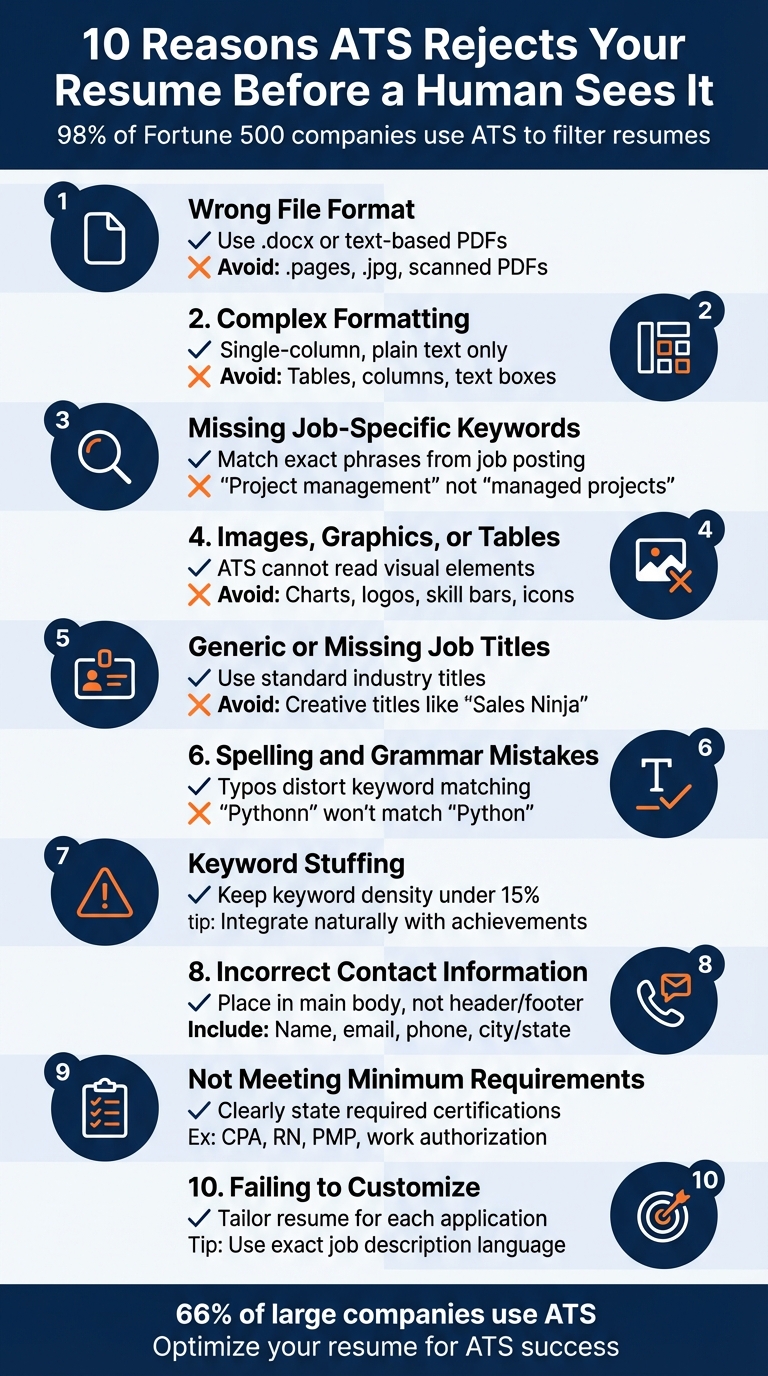
10 Common Reasons ATS Rejects Resumes and How to Fix Them
How to Create an ATS-Friendly Resume (and get through the scanners)
sbb-itb-564272e
What Is an ATS Score?
An ATS score is a compatibility score that shows how well your resume matches a specific job description based on Applicant Tracking System (ATS) criteria. ATS software scans your resume for keywords, formatting, skills, experience, education, and job relevance before ranking it against other applicants.
A higher ATS score increases the chances that your resume will be seen by a recruiter.
Most ATS score checker tools analyze:
- Resume formatting
- Keyword relevance
- Skills match
- Job title alignment
- Experience relevance
- Certifications
- Resume readability
If your resume's ATS score is low, your application may get filtered out automatically before a human recruiter reviews it.
How ATS Does It Screen Resumes?
To understand why resume formatting is crucial, it’s helpful to know how ATS works. The system follows three main steps: parsing, matching, and ranking. First, the ATS parses your resume, extracting and organizing details like your name, contact information, work experience, education, and skills. If your resume uses complex formatting - such as tables, columns, or text boxes - the system might misinterpret or skip key sections entirely. Next, the ATS matches your extracted details to the job description, focusing on specific keywords and qualifications. Here’s the catch: many systems require exact keyword matches. For instance, "project management" could be recognized, but "managed projects" might not. Finally, the ATS ranks your resume by scoring how well your qualifications align with the employer’s requirements.
Recruiters use ATS filters to focus on specific criteria, such as skills, education, certifications, and job titles. Matching the exact job title from the posting can boost your chances of being considered by up to 10x. Additionally, some systems use knockout questions - like those about location, work authorization, or certifications - to automatically disqualify candidates who don’t meet basic requirements.
Today’s ATS platforms are becoming smarter, incorporating AI and machine learning to assess career growth and overall fit. However, they’re far from perfect. Overloading your resume with keywords or using hidden text can raise red flags and get your application flagged as spam. If you’re unsure about your resume’s compatibility, consider using AI resume builders and job search tools to ensure ATS-friendly formatting to improve your chances of passing these filters.
Another important tip: ensure your resume is mobile-friendly, as 62% of hiring managers now review resumes on their phones. Proper formatting can make all the difference in getting noticed.
If you want a FREE test of your resume, use the Resume ATS score checker by Scale Jobs. It is the fastest and free resume score checker tool formulated for all job seekers so that they can apply for a job with confidence.
What Is a Good ATS Score for Resume Screening?
Many candidates ask: “What is a good ATS score?”
While every company uses different ATS software, most recruiters recommend aiming for an ATS score between 75% and 90%.
Here’s a general benchmark:
| ATS Score | Meaning |
| Below 50% | High rejection risk |
| 50%–70% | Average compatibility |
| 75%–90% | Strong ATS optimization |
| 90%+ | Excellent keyword alignment |
A good ATS score for resume screening usually means:
- Your resume contains relevant keywords
- Your formatting is ATS-friendly
- Your experience aligns with the job description
- Your resume is easy for ATS systems to parse
Avoid trying to artificially inflate your ATS score through keyword stuffing because modern ATS systems can detect manipulation.
Why ATS Systems Reject Qualified Candidates
Minor resume mistakes can lead to major rejections by Applicant Tracking Systems (ATS). Even highly qualified candidates can find themselves filtered out because the ATS misinterprets their resumes.
ATS software breaks down your resume into searchable data points. However, when you use elements like tables, columns, or text boxes, the system often reads the content row-by-row, jumbling the information. For instance, if you’ve placed your contact details in the header or footer to save space, many ATS platforms won’t recognize it - leaving recruiters without any way to contact you.
Keyword mismatches are another common problem. ATS platforms rely on exact matches, so variations like "project management" versus "managed projects" or "SEO" versus "Search Engine Optimization" can result in missed opportunities. If the system is set to search for specific phrasing or acronyms, any deviation could mean your application is filtered out.
File formats also play a critical role. Submitting resumes in formats like Apple Pages, outdated .rtf files, or scanned PDFs can cause parsing errors. These formats might appear as images to the ATS, making your information unreadable. Similarly, creative section headers like "My Professional Journey" instead of "Work Experience" can confuse the system, preventing it from categorizing your experience correctly.
The most common errors - confusing formatting, incorrect keywords, incompatible file types, and misplaced contact details - are all avoidable. If you’re unsure whether your resume meets ATS standards, consider consulting resume professionals who specialize in optimizing resumes for these systems. Addressing these issues upfront ensures your qualifications make it through to human review.
How to Calculate ATS Score for Resume Applications
This is a huge keyword opportunity because almost no ATS blogs explain it properly.
Suggested content:
If you are wondering how to calculate an ATS score for resume applications, most ATS score checker tools evaluate resumes using several weighted factors:
| Factor | Approximate Weight |
| Keyword Match | 40% |
| Skills Alignment | 25% |
| Formatting Compatibility | 15% |
| Experience Relevance | 10% |
| Education & Certifications | 10% |
The ATS compares your resume against the job description and assigns a compatibility percentage.
To improve your ATS score:
- Use exact keywords from the job posting
- Match your job title to industry-standard terminology
- Use measurable achievements
- Keep formatting simple
- Remove tables and graphics
- Save your file in .docx format
Use a Free ATS Score Checker Before Applying
Before submitting your application, it’s important to check ATS score compatibility to identify formatting errors, missing keywords, and resume weaknesses.
A free ATS score checker can help you:
- Improve keyword optimization
- Detect ATS formatting issues
- Increase recruiter visibility
- Compare your resume against job descriptions
- Improve your overall resume ATS score
Scale Jobs offers a free resume ATS score checker that instantly analyzes your resume and provides actionable suggestions to improve ATS compatibility.
If your ATS score is low, even a highly qualified resume may never reach a recruiter.
1. Wrong File Format
Submitting your resume in the wrong file format can lead to instant rejection by Applicant Tracking Systems (ATS). With 97.8% of Fortune 500 companies relying on ATS to screen applications, using an incompatible file type means your information won’t even make it past the first step.
The safest bet is to use .docx (Microsoft Word), which works seamlessly with all ATS versions, from older systems to the latest ones. Text-based PDFs are a decent alternative, but only if they’re exported directly from a word processor. Never submit a scanned PDF - ATS software treats it as a blank image and won’t extract any text. Similarly, avoid image formats like JPEGs or PNGs, as these are seen as pictures, not readable documents.
Proprietary file formats such as .pages, .odt, or .rtf also pose issues. These formats often confuse ATS software, leading to scrambled or missing data.
Here’s a quick reference table to help you choose the right file format:
| File Format | ATS Compatibility | Why Use/Avoid |
|---|---|---|
| .docx | High | Most reliable for text extraction, compatible with all ATS systems. |
| .pdf (Text-based) | Medium-High | Preserves layout well, but older ATS systems may struggle to parse it. |
| .jpg / .png | Zero | ATS cannot interpret text embedded in image files. |
| .pages / .odt | Low | Often unsupported, causing errors or incomplete data extraction. |
To test your resume’s compatibility, paste it into Notepad. If the text appears disorganized or sections are missing, the ATS will likely misread it. For added peace of mind, consider using AI resume builders to ensure your resume is optimized for both ATS and hiring managers.
Lastly, name your file clearly (e.g., FirstName-LastName-Resume.docx) and avoid using encryption or password protection, as ATS software cannot process secured files.
2. Complex Formatting That ATS Can't Parse
One of the biggest reasons resumes fail to pass through ATS software is complex formatting. These systems are designed to read documents in a linear order - top to bottom, left to right. Introducing multi-column layouts, tables, or text boxes disrupts this flow, often leading to scrambled or misinterpreted information. Essential details might even be overlooked if they're embedded in headers or unconventional layouts.
For example, using non-standard section titles like "My Career Journey" instead of "Work Experience" can confuse the ATS. These systems rely on specific labels to organize your data, so deviating from standard terminology might cause important sections to be ignored entirely.
Visual elements such as logos, headshots, skill bars, or charts also create problems. ATS software typically sees these as unreadable objects, skipping over them or generating errors. To avoid this, stick to standard text elements like round bullets (•) and commonly used fonts such as Arial, Calibri, or Times New Roman.
Also Read: ATS vs. Visual Resumes: Common Design Errors
A quick way to check if your resume is ATS-compatible is by pasting it into Notepad. If the content appears jumbled or sections are missing, the ATS will face the same issues. For expert help in crafting a clean, ATS-ready resume, you might consider using professional resume services that specialize in optimization for these systems.
Here’s a quick comparison of ATS-friendly formatting versus problematic elements:
| Format Element | ATS-Friendly Choice | Elements to Avoid |
|---|---|---|
| Layout | Single-column, plain text | Multi-columns, tables, text boxes |
| Visuals | None (text-only) | Logos, headshots, charts, icons |
| Fonts | Arial, Calibri, Times New Roman | Decorative, script, novelty fonts |
| Section Headers | Standard (e.g., "Work Experience") | Creative (e.g., "My Journey") |
| Bullet Points | Standard round (•) or square | Custom symbols, stars, arrows |
| Contact Info | Main body of document | Headers or footers |
3. Missing Job-Specific Keywords
Applicant Tracking Systems (ATS) are designed to scan resumes for specific terms from job postings, making it crucial to match your resume language with the employer's requirements. If your resume doesn't include the exact keywords, the system might flag you as unqualified, potentially eliminating your application before it even reaches a recruiter.
ATS platforms rely on precise keyword matches. For instance, if a job posting lists "project management" as a required skill but your resume uses "managing projects", the ATS may not recognize them as equivalent. These systems prioritize resumes based on keyword frequency and relevance, meaning the closer your resume aligns with the job description, the better your chances of being noticed.
To improve your resume's compatibility, mirror the language in the job posting. Carefully review the description and integrate the exact phrases into sections like your bullet points, skills list, and professional summary. For example, if the job mentions "customer onboarding", include that specific term in your resume, such as: "Led customer onboarding processes for over 50 clients." Similarly, use both acronyms and full terms - for example, "Search Engine Optimization (SEO)" or "Project Management Professional (PMP)" - to ensure your resume aligns with the system's search criteria.
Job titles are also key keywords. If your previous title was unconventional (e.g., "Customer Success Ninja"), include a more standard equivalent in parentheses, such as "Account Manager (Customer Success Ninja)." This small adjustment helps the ATS correctly categorize your experience. Additionally, combining keywords with quantifiable achievements - like "Boosted sales by 20% using Salesforce CRM" - adds valuable context for both the ATS and recruiters.
Avoid overloading your resume with keywords or attempting to hide them in white text. Modern ATS platforms can detect these tactics, which may result in your resume being down-ranked or even blacklisted. If you're unsure how to optimize your resume for ATS, consider working with professional resume services to ensure your application is tailored for success.
4. Images, Graphics, or Tables
Images, graphics, and tables can create major obstacles for Applicant Tracking Systems (ATS), emphasizing the need for a clear, text-based resume design.
ATS software processes resumes in a straightforward, top-to-bottom manner. Adding elements like images, graphics, or tables disrupts this linear scanning process. These additions either get ignored or become unreadable, potentially causing important details to be missed.
Tables confuse ATS by merging data in an unreadable format. ATS tools scan tables row by row, not column by column. For example, if your resume uses a table to separate company names, job titles, and dates into different columns, the ATS might merge them into a single phrase. Instead of recognizing "ABC Corporation" as the company and "Marketing Manager" as the job title, the system could combine everything into "ABC Corporation Marketing Manager 01/2020", making it harder to interpret your experience correctly.
Images and graphics are invisible to ATS. Any information embedded in custom graphics, such as a stylized header with your contact details or infographic-style charts showcasing your skills, won’t be processed. Similarly, decorative bullet points or icons often convert into unreadable characters, adding unnecessary confusion.
To avoid these issues, opt for a clean, single-column layout with standard round bullet points (•) and minimal formatting. Use plain text to present your information clearly, while sparingly applying bold or italics to highlight achievements. If you're unsure how to balance visual appeal with ATS compatibility, consider using professional resume services to create a well-structured and functional resume.
Keep all vital details - such as contact information, work experience, and skills - in the main body of your document. Stick to standard fonts like Arial, Calibri, or Times New Roman, and save your resume in .docx format for optimal ATS compatibility. In the next section, we’ll explore additional strategies to ensure your resume is ATS-friendly without compromising design.
5. Generic or Missing Job Titles
Job titles play a crucial role in how ATS (Applicant Tracking Systems) evaluate your resume. If you leave them out, the system struggles to assess your work history and experience, which can result in gaps that lower your ranking or even lead to rejection within 24–48 hours. Beyond that, generic job titles can also hurt your chances of matching with the keywords employers are looking for.
Avoid overly generic titles. For example, listing "Manager" instead of something specific like "Project Manager" or "Marketing Manager" can cause issues. ATS software is designed to match exact or closely related titles from the job description. If the employer is hiring for "Digital Marketing Manager" and your resume just says "Manager", the system won’t see the alignment, putting you at a disadvantage.
Stay away from overly creative titles. While titles like "Customer Success Ninja", "Brand Evangelist", or "Sales Rockstar" might be fun and reflect your company’s culture, they don’t work well with ATS algorithms. These systems rely on standard industry terms to make matches. If your official title is something creative but you're applying for a role like "Account Manager", consider adding a standard equivalent in parentheses or rewording it entirely. For example, "Customer Success Ninja (Account Manager)" ensures clarity while maintaining accuracy.
Match the job description’s wording. If the job posting specifies "Senior Software Engineer", use that exact phrasing on your resume. You can also combine unusual titles with industry-standard ones in parentheses, such as "Chief Happiness Officer (Human Resources Manager)." If you're unsure how to balance creativity with ATS-friendly language, understanding why recruiters trust ATS-optimized resumes can help you reframe your titles with real-life examples while staying true to your actual responsibilities.
Also read: Why Software Engineers Struggle With ATS
6. Spelling and Grammar Mistakes
Spelling and grammar mistakes can throw off ATS (Applicant Tracking System) screening by distorting keywords. For example, a typo like "Pythonn" instead of "Python" can lower your match score, as the ATS might fail to recognize the skill.
Misspelled skills and certifications can hurt your chances. If a job posting specifies "Salesforce" expertise and you mistakenly write "Sales Force" as two words, the ATS may not connect your experience to the job requirements. Similarly, abbreviations like "NLP" should always be paired with the full term - "Natural Language Processing (NLP)" - to ensure the system recognizes your qualifications.
Stick to standard formatting for sections and dates. Non-standard section headers or inconsistent date formats can confuse ATS systems. These small errors can make your resume harder to process and match to job postings.
AI-generated resumes come with their own challenges. While AI tools can simplify resume creation, they sometimes introduce unique risks. For instance, "prompt leakage" - phrases like "As an artificial intelligence, I do not have emotions" - or overly mechanical language can flag your resume as inauthentic. Some advanced ATS systems are now trained to detect AI-generated "word salad", which can hurt your credibility. To avoid these pitfalls, consider using a hybrid resume service that combines software accuracy with human expertise to ensure your resume is polished and ATS-friendly.
"Typos not only look sloppy; they can also alter keywords and cause the ATS to miss important terms." - Lauren Bedford, Seasoned Writer, Rezi
7. Keyword Stuffing
Keyword stuffing happens when resumes are overloaded with job-specific terms in an attempt to manipulate ATS (Applicant Tracking System) scores. While it might seem like a clever shortcut to boost your chances, modern ATS algorithms are built to spot and reject this tactic.
When keyword density surpasses 15%, ATS filters often flag the resume as manipulative. Some systems even use plagiarism detection to identify resumes that copy chunks of the job description. Overusing keywords not only risks ATS rejection but also weakens the overall readability and professionalism of your resume.
Focus on natural integration. For instance, instead of cramming "Python, Python developer, Python programming, Python expert" into one section, weave the skill into your accomplishments: "Developed Python-based automation scripts that cut data processing time by 40%." This strategy satisfies the ATS while demonstrating real-world achievements to recruiters.
To ensure a balanced approach, try the WHO method for crafting bullet points: explain What you did, How you did it, and the Outcome with measurable results. For example: "Led a cross-functional team using Agile methodology to deliver a product launch three weeks early, boosting Q4 revenue by $2.3M." This naturally incorporates keywords like "cross-functional", "Agile", and "product launch" without overloading your resume.
Avoid sneaky tactics like hidden text or using tiny fonts to pack in extra keywords. ATS systems convert resumes to plain text, exposing such tricks and potentially damaging your credibility. If you're struggling to strike the right balance, consider hiring a virtual assistant for your job search to create a polished and ATS-friendly application. Up next, learn how to sidestep formatting mistakes that can further hinder ATS parsing. Understanding these common ATS resume mistakes is the first step toward a successful application.
8. Incomplete or Incorrectly Formatted Contact Information
Getting your contact details right is just as important as having a well-formatted resume when it comes to passing ATS filters. These systems rely on parsing your contact information first. If it's missing, incomplete, or placed in the wrong section, your application might not even make it to the next stage.
Placement matters. Many ATS platforms completely skip over headers and footers during their scans. So, if you've tucked your phone number or email into a header, the system may not even recognize it. Always include your full name, professional email, phone number (with area code), and location (City, State) in the main body at the top of your resume. This ensures the ATS can easily find and process your details, reducing the risk of errors.
Avoid using text boxes, tables, or icons for contact details. These elements can confuse ATS software. For example, if your phone number is displayed as an icon, it won't translate properly in plain text. Similarly, using an unprofessional email address can hurt your credibility when a recruiter reviews your resume. Stick to simple formats, like [email protected] for email and (555) 555-5555 for phone numbers.
Recruiters often filter candidates by location, so be sure to include your city and state (e.g., "Austin, TX" or "Chicago, IL"). Avoid vague terms like "Remote only", and always use the standard two-letter state abbreviation to ensure your resume meets ATS criteria.
For a polished, ATS-friendly resume, consider using scale.jobs' ATS-optimized resume services. Up next, we’ll cover how missing minimum requirements can also lead to rejection.
Also Read: How to Optimize Your Resume for ATS in 2026
9. Not Meeting Minimum Requirements
Applicant Tracking Systems (ATS) are designed to filter out resumes that fail to meet mandatory qualifications. Beyond formatting and keyword optimization, ensuring you meet the basic job requirements is non-negotiable. These systems act as gatekeepers, screening for essential criteria like credentials, work authorization, years of experience, and specific certifications before a recruiter ever reviews your application. Missing even one critical requirement can lead to automatic rejection, regardless of how well-qualified you might be otherwise.
Certifications and licenses such as CPA, RN, or PMP must be clearly stated. If a job posting specifies these credentials, the ATS will search for those exact terms. With over 98% of Fortune 500 companies relying on ATS software, it's common for systems to reject resumes that don't showcase required certifications prominently. To avoid this, include these qualifications in your Professional Summary or Skills section near the top of your resume. Burying them at the bottom increases the risk of the system overlooking them.
Work authorization and security clearances are also deal-breakers for many roles. ATS platforms often include pre-screening questions to confirm your legal right to work in the U.S. or your possession of specific security clearances for government-related positions. Leaving these questions unanswered or providing incorrect information can lead to instant disqualification. Be truthful and proactive by including phrases like "US work authorized" on your resume if applicable. Addressing these fundamental requirements is just as important as formatting and keyword usage in ensuring your resume reaches a recruiter.
If you’re unsure how to address these gaps, consider leveraging professional resume writing services to fine-tune your resume and increase your chances of passing ATS filters.
10. Failing to Customize for Each Application
While formatting and keyword strategies are important, tailoring your resume for each job application is absolutely essential for getting past Applicant Tracking Systems (ATS). A one-size-fits-all resume often leads to automatic rejection. These systems are designed to search for specific job-related keywords that align with the language in the job description. If your resume relies on vague or generic terms instead of the exact qualifications listed, the ATS will assign it a low relevance score, likely eliminating it before a recruiter even has a chance to review it.
Match the job description by using exact phrases for technical skills and qualifications. For example, if the job posting specifies "project management experience with Agile methodologies", make sure your resume includes that exact phrase. Be precise, especially when listing software tools, certifications, or technical skills. This isn’t about cramming in keywords - it’s about showing the hiring team that you understand and meet their specific requirements.
Stick to standard section headers like 'Work Experience' and 'Education' to ensure the ATS categorizes your information correctly. Creative titles like "My Career Journey" or "Highlights of My Impact" might look unique, but they can confuse the parsing algorithms, potentially causing important sections of your resume to be ignored. Using conventional labels ensures your content is properly sorted and fully considered.
Customizing resumes for every job can be a time-consuming process. To streamline this task, consider leveraging professional resume writing services, which can expertly tailor your resume for ATS compatibility and recruiter appeal. These services save you hours of effort while ensuring your application meets the specific requirements of each role.
Ultimately, the difference between a tailored and generic resume can decide whether you make it into the "qualified" pile or face rejection within seconds of submission.
How to Make Your Resume ATS-Compatible
To ensure your resume gets past Applicant Tracking Systems (ATS), it’s crucial to avoid common mistakes and follow these practical tips for optimization.
Start by using the right file format. Submitting your resume as a .docx file is the safest option, as it's the most widely accepted by ATS platforms. If a PDF is required, make sure it’s a text-based PDF created in Word or Google Docs. Stay away from scanned PDFs or those exported from design tools, as they can create parsing errors. As Luc Lemerez, Lead Developer at Rezi, points out:
"PDFs, the universal resume format, were built for printing, not structured data, and ATS systems stumble with them."
Keep your resume layout simple. Stick to a single-column design and use standard fonts like Arial, Calibri, or Times New Roman. Use clear, standard section headers such as "Work Experience", "Education", and "Skills" to help ATS systems categorize your information correctly. Avoid elements that ATS systems struggle with, such as tables, text boxes, headers, footers, images, logos, or icons. Even decorative bullet points like ☆ or ➔ can confuse the system - stick to plain round bullets (•). Testing shows that Rezi templates have a parsing accuracy of over 50%, compared to Enhancv's 18%, highlighting the importance of simplicity.
Language alignment is another key factor. Use the exact terms from the job posting to match the ATS keywords. For example, if the job description specifies "Google Ads", don’t use a generic term like "online advertising." Similarly, if "Agile methodologies" is mentioned, use that precise phrase. Pair these keywords with measurable achievements, such as "Increased CTR by 37%." Avoid tricks like hidden white text, tiny fonts, or keyword stuffing - modern ATS systems can detect and penalize these tactics.
For those applying to many roles, customizing each resume can feel overwhelming. Services like professional resume writing services can handle ATS optimization and keyword adjustments for you. This allows you to focus on other aspects of your job search, like networking and interview preparation, while experts ensure your resume meets ATS standards.
| Format Element | ATS-Friendly | Not ATS-Friendly |
|---|---|---|
| Layout | Single column, plain text | Multiple columns, tables, text boxes |
| Graphics | None (text only) | Logos, headshots, skill bars, icons |
| Fonts | Arial, Calibri, Times New Roman | Script, decorative, or custom fonts |
| Section Headers | Standard (e.g., Work Experience) | Creative (e.g., My Journey) |
| File Type | .docx or text-based PDF | .jpg, .png, .pages, .odt, .rtf |
| Bullet Points | Standard round (•) | Custom symbols (☆, ➔) |
Conclusion
A resume, no matter how impressive, can go unnoticed if it doesn’t pass an ATS filter. Every day, small, avoidable mistakes prevent qualified candidates from landing interviews.
Making your resume ATS-compatible isn’t about tricking the system - it’s about presenting your skills and experience in a way that both the software and hiring managers can easily understand. Use .docx files, stick to single-column layouts with standard fonts, tailor your language to match the job posting, and customize each application. Considering that 98% of Fortune 500 companies rely on ATS, these adjustments are non-negotiable for success.
If the process feels overwhelming, consider using professional ATS-optimized resume services. These services take care of keyword research, formatting, and personalization, ensuring your resume stands out while saving you time. You can also review your resume using an optimization checklist to ensure it meets ATS standards.
FAQs
What’s the best way to format my resume so it passes ATS filters?
To help your resume make it through ATS (Applicant Tracking System) filters, focus on keeping the design simple and straightforward. Avoid using tables, columns, graphics, or decorative elements, as these can confuse the software. Stick to standard fonts such as Arial or Calibri, and use clear, traditional section headers like Work Experience, Education, and Skills.
Save your resume in a .docx or text-based PDF format, as scanned PDFs or image-based files are often unreadable by ATS software. Ensure your dates are formatted consistently (e.g., MM/YYYY), and include keywords from the job description to align your resume with the role. These adjustments will improve the chances of your resume reaching recruiters for further review.
For more help, consider using tools like an AI resume builder to create ATS-friendly resumes efficiently.
What keywords should I use in my resume to pass ATS scans?
To make your resume more ATS-friendly, incorporate keywords directly from the job description. These might include specific skills, certifications, job titles, software tools, or industry-related terms. Using the exact language from the job posting improves your chances of being recognized as a qualified candidate by the system.
However, resist the urge to cram your resume with keywords. Instead, weave them naturally into sections like your skills, professional experience, and summary. This approach keeps your resume clear and readable while still aligning with ATS requirements.
Why do applicant tracking systems (ATS) reject resumes with unconventional job titles?
Applicant tracking systems (ATS) can struggle with resumes that include unconventional or overly creative job titles. These systems are designed to scan for specific keywords and standard terms commonly found in job descriptions. When there's a mismatch, your resume's relevance score drops, reducing the chances of it making it through ATS filters.
To increase your resume's chances, stick to clear, industry-standard job titles that align with the position you're targeting. If you've held a unique or less common role, you can add a standard equivalent in parentheses or clarify its relevance within the job description. This approach helps the ATS better understand your experience and improves your compatibility with the system.