
15 Resume Changes That Improve Callback Rates Fast

Sarah Mitchell
March 18, 2026

By 2026, 73% of resumes never make it past Applicant Tracking Systems (ATS), and 84% of recruiters skip resumes that aren’t customized. These numbers highlight why tailoring your resume is essential. A study of 15,000 applications revealed that resumes optimized for ATS compatibility achieve an 11.7% callback rate, compared to just 4.2% for generic resumes. Small updates, like using ATS-friendly formats, quantifying achievements, and matching job description keywords, can double your chances of landing an interview.
Here’s a quick summary of the 15 changes to improve your resume:
- Use Reverse-Chronological Format: Start with your most recent job and keep formatting uniform.
- Add a Skills Section: Place it after your summary to highlight key qualifications upfront.
- Write a Keyword-Rich Summary: Include measurable achievements and match job-specific terms.
- Use Specific Action Words: Replace generic verbs like "handled" with impactful ones like "spearheaded."
- Quantify Achievements: Add numbers to showcase results (e.g., "Increased revenue by 30%").
- Remove Headers, Footers, and Graphics: Keep formatting clean for ATS readability.
- Stick to Standard Fonts and Single-Column Layouts: Avoid tables, multi-columns, or decorative fonts.
- Copy Exact Phrases from Job Descriptions: Match keywords and terminology precisely.
- Prioritize Relevant Bullets: List the most job-relevant accomplishments first.
- Create a Master Resume: Use it as a detailed reference to quickly tailor applications.
- Focus on the Last 10–15 Years: Highlight recent experience and omit outdated roles.
- Check Your ATS Score: Use ATS-checking tools to optimize your resume before applying.
- Tailor Summaries for Each Industry: Customize your summary to fit the job and sector.
- List Certifications and Tools Exactly: Use exact names and versions as mentioned in job postings.
- Review for Clarity and Consistency: Ensure formatting, tenses, and styles are uniform.
These changes don’t just help your resume pass ATS scans - they also make it more appealing to recruiters. If you’re applying for full-time jobs or part-time jobs near me, consider using tools like an AI resume builder or a job search virtual assistant to streamline the process. For high-volume applications, services like scale.jobs provide tailored resume optimization and job application assistance, ensuring your resume stands out.
Quick Tip:
Always test your resume by pasting it into a plain text editor to check for formatting issues. For added help, consider a job application service or consult a job search coach to refine your approach.
For more insights on how to apply for jobs effectively or explore the best job boards, check out our resources on scale.jobs.
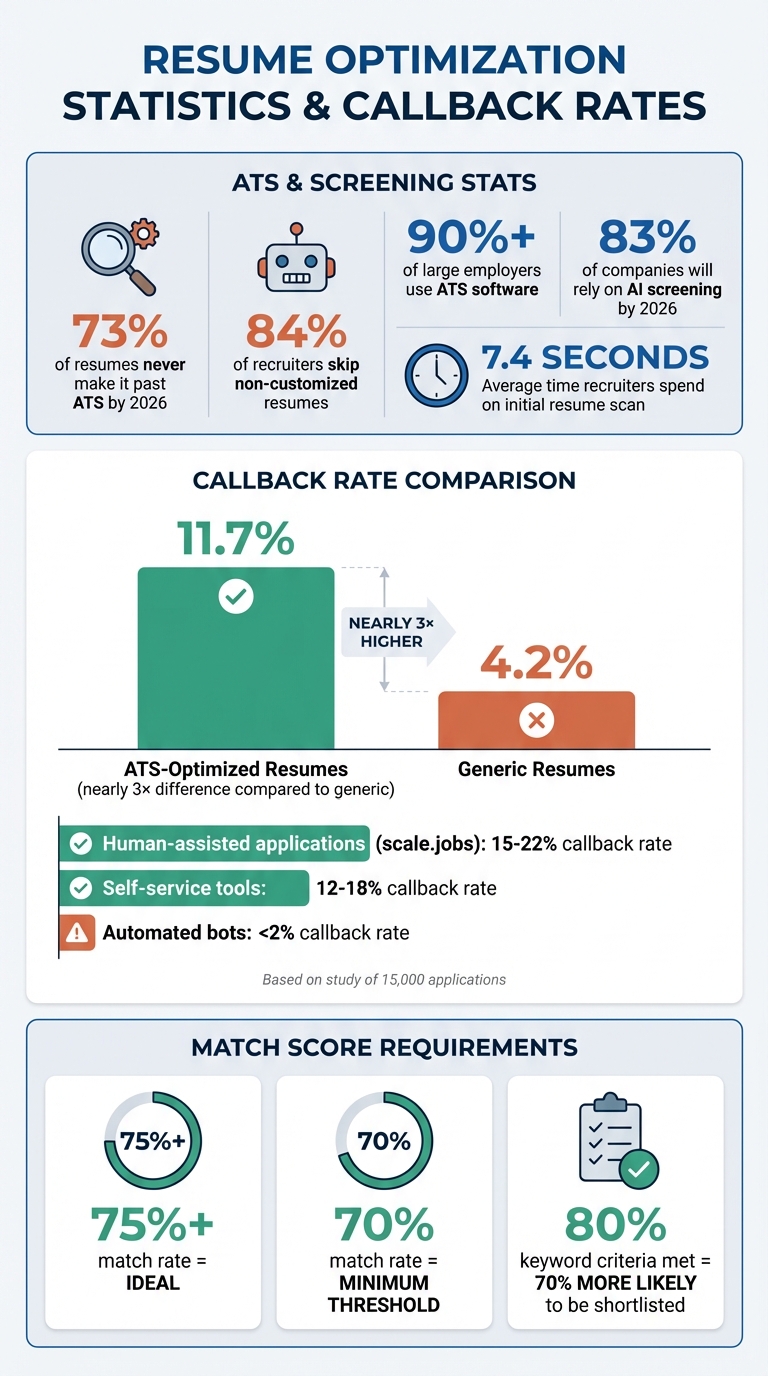
Resume Optimization Statistics: ATS Callback Rates and Key Metrics
How To Write An Impressive ATS-Friendly Resume in 2026! A Guide To Applicant Tracking Systems!
1. Use Reverse-Chronological Format
Start with your most recent job and work backward - this layout is ideal for applicant tracking systems (ATS) and ensures recruiters see your latest role right away. By placing your current or most recent position at the top, you make it easier for both ATS software and hiring managers to quickly identify your most relevant qualifications.
Recruiters typically spend only a few seconds scanning resumes, so showcasing your latest achievements upfront is key. If your recent experience is buried under older roles, it could hurt your chances of getting noticed. This format also highlights your career progression, which helps hiring managers assess whether you're growing in your field.
When listing each role, stick to a clear structure: Job Title | Company | Location | Dates (Month/Year). Follow this with 4–6 bullet points that focus on your accomplishments. For example, use Jan 2020 – Present instead of formats like "01/2020" or "January 2020" to ensure ATS systems correctly interpret your dates. Bold your job titles and dates to enhance readability for both software and human reviewers. Consistency in formatting across all roles is crucial for clarity.
Keep your work history focused on the last 10–15 years, as this ensures your resume stays relevant and concise.
If you're changing careers or just starting out, you can tweak the order for maximum impact. Consider placing a skills section right after your summary, allowing recruiters to see your qualifications before diving into your work history. Then, use reverse-chronological order for your experience, emphasizing bullet points that highlight transferable skills and achievements relevant to your desired role. If you need expert guidance to refine your resume, professional resume writers can help ensure it's ATS-friendly and tailored to your industry.
2. Add a Skills Section After Your Summary
To make your resume more ATS-friendly and immediately grab a recruiter's attention, place a dedicated skills section right after your summary. This strategic positioning ensures that both ATS software and recruiters - who often skim resumes in seconds - can quickly identify your key qualifications. By placing your skills in the top third of your resume, you improve the chances of your qualifications being matched and scored against job requirements without delay.
Format this section as a clean, single-column bulleted list with 8–12 skills. Use standard fonts and prioritize the most relevant skills for the job. When possible, mirror the exact language from the job description - if the posting specifies "SAFe methodology", use that term instead of a general phrase like "Agile frameworks." Aligning your skills with the job description keywords can significantly improve your callback rate, making this section one of the most effective ways to boost your resume's performance.
Include a mix of hard and soft skills to present a well-rounded profile. For example, technical skills like Python or SQL can be paired with soft skills like Leadership or Collaboration. If you're applying for technical roles, highlight certifications, tools, or software exactly as listed in the job description. If you're unsure which skills to emphasize or how to phrase them for ATS optimization, consider consulting professional resume writers to tailor this section to industry-specific needs.
Stick with straightforward headings like "Technical Skills" or "Core Competencies" to avoid confusing ATS software. Avoid creative labels such as "Superpowers" or "My Journey", and skip graphics, tables, or progress bars, as these can disrupt ATS parsing. Keep the section clear, keyword-focused, and easy for both software and human recruiters to digest.
3. Write a 2-4 Line Keyword-Rich Summary
A well-crafted professional summary at the top of your resume can immediately highlight your qualifications to both ATS systems and recruiters. This 2-4 line section should feature your target job title, years of experience, a couple of measurable achievements, and three to five key terms from the job description. Resumes that align with 70% or more of the job description's keywords are shown to increase callback rates by 2.5×.
Structure your summary to showcase value right away. Start with your job title and experience, followed by a quantifiable result. For example: "Digital Marketing Manager with 7+ years of experience in customer acquisition; boosted conversions by 34% and cut cost-per-lead by $12." This precise and impactful format avoids vague language like "seeking growth opportunities" and directly appeals to hiring managers.
Match the job posting's exact phrasing to optimize for ATS. If the role specifies "B2B SaaS marketing", use that exact wording instead of alternatives. Similarly, if "Google Analytics certified" is mentioned, include it explicitly rather than a generic certification reference. This approach improves ATS scores and demonstrates your understanding of the role’s needs.
Stick to simple formatting with standard fonts and label this section as "Professional Summary" or "Summary" to avoid confusing automated systems. If you're unsure how to identify key terms or quantify your accomplishments, professional resume writers can assist in creating summaries that balance ATS compatibility with recruiter appeal.
Regularly update your summary every 3–6 months. Tailored summaries yield an 11.7% callback rate compared to 4.2% for generic versions, making this a crucial step for improving your resume. Once your summary is polished, focus on refining the action verbs throughout your resume for even better results.
4. Replace Generic Verbs with Specific Action Words
Using generic verbs on your resume can dilute the impact of your accomplishments. Recruiters sift through countless resumes daily, and vague wording often fails to communicate the value you bring. On the other hand, specific action words like "spearheaded" or "engineered" immediately convey your role and the results you achieved, making your resume more compelling.
Let’s look at an example: "Handled customer support tickets" doesn’t say much about your contribution. Compare that to "Resolved 60+ tickets daily while maintaining a 4.7/5.0 CSAT score." The second version not only uses a stronger verb but also includes measurable results, turning a routine task into a tangible achievement. Similarly, "Worked on marketing campaigns" can be upgraded to "Spearheaded a $500,000 campaign, increasing retention by 30%." This shift from generic descriptions to action-oriented achievements can significantly boost your chances of getting noticed.
Choose verbs that precisely reflect your role. For instance:
- Use "orchestrated" when managing multiple teams or initiatives.
- Opt for "streamlined" to highlight process improvements.
- Select "engineered" for technical projects or solutions.
- Go with "accelerated" to emphasize faster results or timelines.
If you led a project from start to finish, "spearheaded" is a stronger choice than simply saying "managed." For creative contributions, "conceptualized" better illustrates original thinking than the vague "worked on." The right verbs should effectively showcase what you achieved and how you did it.
Pair these precise verbs with measurable results for maximum impact. For example: "Optimized 15+ landing pages, increasing inbound leads by 42%." This approach not only highlights your actions but also quantifies your success, making your achievements impossible to overlook.
Struggling to find the right words? Professional resume writers can help you craft a resume that emphasizes your achievements in a way that appeals to both hiring managers and ATS systems. Once your verbs are strong and specific, the next step is to back them up with quantifiable results, which we’ll explore further in the next section.
5. Add Numbers to Every Achievement
Numbers make your accomplishments stand out by turning abstract tasks into measurable results. With recruiters spending just 7.4 seconds on an initial resume scan, specific metrics grab their attention quickly and give them a clear picture of your impact. Instead of simply listing responsibilities, you’re showcasing the tangible outcomes of your efforts. This shift can make a world of difference in how your resume is perceived.
Take this example: "Managed marketing campaigns for company products." Now compare it to: "Led a $500,000 marketing campaign that boosted customer retention by 30% and generated $2 million in revenue." The second version not only highlights what you did but also proves the value you brought to the table.
If your role didn’t involve revenue, focus on other measurable outcomes such as volume, time saved, or scale. For instance:
- Volume: "Reviewed 40-50 topical articles weekly for the editorial team."
- Time Saved: "Streamlined onboarding processes, reducing ramp-up time by 40% and saving $50,000 annually."
- Scale: "Managed over 100,000 data points" or "Supervised 7-12 students per semester."
When exact numbers aren’t available, providing a reasonable estimate still adds credibility to your achievements.
To structure your accomplishments effectively, try the PAR method:
- Problem: What challenge did you face?
- Action: What steps did you take to address it?
- Result: What measurable outcome did you achieve?
For example, "Increased qualified inbound leads by 42% in six months by optimizing 15+ landing pages and conducting A/B tests on CTAs." This format turns everyday tasks into compelling evidence of your skills and impact.
scale.jobs' tools are designed to highlight these metrics automatically, ensuring your resume catches the eye of Applicant Tracking Systems (ATS). If you’re unsure how to quantify your contributions, consider working with professional resume writers. They can help uncover metrics from your work history and present them in a way that resonates with hiring managers and ATS alike. Once your achievements are quantified, the next step is ensuring your resume format is ATS-friendly.
6. Remove Headers, Footers, and Graphics
Applicant Tracking Systems (ATS) process resumes as plain text, meaning they can't interpret content placed in headers, footers, or graphics. If you include your contact details in a header or use a logo to make your resume stand out, the ATS will treat these elements as metadata rather than readable content. The outcome? Critical information like your phone number, email address, or even sections showcasing your skills might vanish during the screening process, leaving recruiters with an incomplete picture of your qualifications.
Graphics, such as charts or images, present a similar issue. ATS software typically ignores text embedded in visual elements, making infographics or skill-level bars essentially invisible. While these designs might catch a human recruiter's eye, they often lead to rejection before anyone even reviews your application. Unlike tools like Simplify or Rezi, scale.jobs emphasizes a straightforward approach to ensure your resume gets through ATS filters.
To avoid these pitfalls, place your contact details directly in the main body at the top of your resume using a simple, clear format - either in a single line or bolded for emphasis. Stick to standard section titles like "Experience", "Skills", and "Education" instead of using creative or unconventional headings. If you want to separate sections visually, use simple horizontal lines rather than elaborate designs. Always save your resume as a .docx file or a text-based PDF to maintain compatibility.
A helpful test for ATS compliance is the plain text test: copy your resume into a plain text editor to see if all the content appears correctly. If any part of the text is missing or scrambled, reformat your resume by removing problematic elements and ensuring all information resides in the main body. This step helps prevent formatting issues during the ATS scan.
scale.jobs' resume optimization tools automatically address these formatting challenges, ensuring your resume reaches recruiters error-free. If you're unsure how to adjust your resume for ATS compatibility, consider working with professional resume writers to create a format that passes automated screenings while remaining polished for human reviewers. Once your headers, footers, and graphics are streamlined, the next step is optimizing your layout with standard fonts and a single-column design for improved readability.
7. Stick to Standard Fonts and Single-Column Layout
Using non-standard fonts or complex layouts can make your resume unreadable to applicant tracking systems (ATS). Multi-column designs are particularly problematic, as they disrupt the logical reading order. The system might jump between columns, mixing up your job titles, contact details, or skills, turning your well-organized resume into a chaotic mess.
To avoid these issues, stick to standard fonts like Arial, Calibri, Times New Roman, and Georgia. These fonts are universally recognized by ATS software, ensuring that every character is accurately interpreted when converted into plain text. Additionally, a single-column layout ensures that your information is read in the correct sequence, preventing sections from being misinterpreted or jumbled.
| Element | ATS-Friendly Choice | Avoid These Elements |
|---|---|---|
| Layout | Single-column | Multi-column, sidebars, tables |
| Fonts | Arial, Calibri, Times New Roman, Georgia | Script, decorative, or custom fonts |
| Visuals | Simple horizontal lines, standard bullets | Logos, photos, charts, text boxes, icons |
To make these adjustments, open your resume in Word or Google Docs. Select all text and switch to one of the recommended fonts, keeping the size between 10 and 12 points for body text. If your current resume uses a two-column format (e.g., skills on one side, experience on the other), reformat it into a single vertical column. Stack your sections in a logical order, such as contact details at the top, followed by your summary, experience, skills, and education. Be sure to remove any text boxes, tables, or decorative elements that could confuse the ATS.
If you're uncertain whether your resume meets ATS standards, consider working with professional resume writers. They can reformat your document using templates designed to pass ATS scans while retaining the real-life examples that highlight your qualifications. Once your resume is ATS-friendly, you can shift your focus to tailoring its content to match job descriptions effectively.
8. Copy Exact Phrases from Job Descriptions
Using exact phrases from job descriptions can improve your resume's compatibility with Applicant Tracking Systems (ATS). By aligning your resume's language with the job posting, you not only boost your ATS match score but also show hiring managers that you understand the role's requirements. However, avoid overloading your resume with keywords - strategic placement is key.
Focus on the specific skills, tools, and responsibilities mentioned in the job posting. For example, if the description lists "Agile Scrum" and "backlog grooming", include those exact terms instead of broader alternatives. Similarly, match job titles precisely - if the posting says "Product Manager", avoid using variations like "Product Lead" unless that's your actual title. Even verbs matter; use the exact ones from the job description, such as "directed" instead of "led", when appropriate.
Incorporate these phrases naturally into your resume content. For instance, if a job description emphasizes "SQL database optimization" and "cross-functional team collaboration", you might write: "Optimized SQL databases, reducing query time by 40%, while coordinating cross-functional collaboration between engineering and product teams." This approach highlights your qualifications without making your resume sound mechanical or overly repetitive.
Make sure to include measurable outcomes alongside keywords. Listing skills like "Python, SQL, Agile Scrum, SAFe, Scrum ceremonies" without context can make your resume feel generic. Instead, embed these terms into accomplishment-driven statements that demonstrate your expertise. If you're uncertain about striking the right balance, consider working with professional resume writers who can help tailor your resume for specific roles while maintaining its clarity and impact.
Before submitting your application, use ATS testing tools to assess your match score. These tools analyze your resume against the job description, pinpointing missing phrases or keywords that could enhance your ranking. Adjust your resume accordingly, prioritizing the most frequently mentioned or critical terms. To see how Scale.jobs compares to tools like Jobscan, Rezi, or Simplify, explore their features and find the best fit for your job search needs.
9. Put Most Relevant Bullets First
When it comes to creating an effective resume, prioritizing your most relevant achievements is a game-changer. Recruiters typically spend around seven seconds scanning a resume, so if your standout accomplishments are buried at the bottom of a list, they might never get noticed. By reordering your bullet points to highlight the strongest matches for the role you're applying for, you can significantly increase your chances of landing a callback.
The first step is to thoroughly review the job description and identify the top three priorities for the position. For example, if a product manager role emphasizes data-driven decision-making and cross-functional collaboration, your bullet point about "Analyzed user behavior data to inform product roadmap decisions, increasing feature adoption by 35%" should take the top spot - even if another task, like managing social campaigns, was technically your primary responsibility. Within each job entry, place the most relevant bullet points in the top two or three positions to ensure they grab attention during a quick scan.
Here’s how this works in practice: Suppose you’re applying for a role that values automation and efficiency. In this case, a bullet point like "Automated reporting workflows using Python, reducing manual work by 40%" should be prioritized over one about "Managed weekly team meetings and project timelines." Both are valid achievements, but the first aligns more closely with the employer’s needs.
This strategy benefits both human recruiters and applicant tracking systems (ATS). While ATS software scans your entire resume for keywords, it often gives extra weight to terms found in the top third of the document. By placing your most relevant bullets at the beginning, you not only improve your ATS ranking but also make sure that recruiters immediately see evidence of your suitability for the role. If you're unsure how to identify and reorder your key accomplishments, consider consulting professional resume writers to fine-tune your resume for specific roles.
Tailoring the order of your bullet points for every application is essential. For instance, a bullet that’s perfect for a data analyst role might not be as impactful for a project management position. While this level of customization requires some effort, it’s one of the quickest ways to boost your callback rates without needing to add new content. To streamline the process, maintain a master resume that allows you to quickly adjust bullet orders for each application.
10. Create a Master Resume First
A master resume serves as your all-encompassing career document, making it easier to tailor applications without starting from scratch. Think of it as a detailed inventory of your professional life - every job, skill, certification, and accomplishment neatly documented in one place.
This document should be thorough, typically spanning three to five pages. Include 8–12 bullet points for each job you've held, focusing on technical expertise, leadership roles, and process improvements. Don't forget to list certifications, tools, and professional development courses. Add any relevant details like software proficiencies, methodologies, volunteer work, speaking engagements, and training programs. The goal here is to capture everything, not to condense.
When applying for a specific role, use the job description as your guide. Pull the most relevant details from your master resume to create a tailored version. This approach not only saves time but also ensures your applications are consistent and well-aligned with each opportunity.
To keep your master resume accessible and up-to-date, store it in a cloud-based service like Google Docs or Dropbox. Set a reminder to revisit and update it quarterly, especially after major achievements or new certifications.
If you're struggling to manage multiple tailored resumes or aren't getting the responses you hoped for, consider working with professional resume writers. Services like scale.jobs can help you build a strategic master resume and craft versions optimized for your target roles. Their experts can pinpoint which achievements resonate most with hiring managers in your industry and structure your resume for quick customization. With a polished and updated master resume, you'll be ready to streamline your job applications effectively.
11. Include Only the Last 10-15 Years
Focus your resume on the last 10–15 years of your work history to highlight skills and experiences that are most relevant to today’s job market. This approach ensures that hiring managers immediately see your most impactful achievements and current expertise.
Listing older roles, especially those involving outdated technologies, can detract from your resume's effectiveness. For instance, experience with legacy software or outdated practices from the 1990s or early 2000s might not resonate with employers who prioritize modern skills like AI tools, automation, and contemporary project management methodologies. Employers value candidates who demonstrate proficiency in the latest tools and techniques over those who emphasize obsolete systems.
By trimming older roles, you not only streamline your resume but also ensure it fits within the preferred one to two-page format. This keeps your recent and relevant experience front and center. If you have older roles that are particularly relevant - such as founding a company that resulted in industry-changing patents or holding an executive position directly related to the job you're pursuing - consider summarizing them in a concise "Early Career" or "Previous Experience" section. This way, you can acknowledge your broader career history without overshadowing your recent accomplishments.
Additionally, omitting early career details can help minimize the risk of age bias, presenting you as a candidate with up-to-date and adaptable skills.
If you're unsure about which roles to feature or how to structure your resume, consider working with professional resume writers. They can help refine your work history, ensuring your resume aligns perfectly with the skills and experiences employers value most in today’s market.
12. Check Your ATS Score Before Applying
Running your customized resume through an ATS checker can help you identify missing keywords and formatting mistakes before submitting your application. This step ensures you catch potential issues that might otherwise lead to an automatic rejection.
After tailoring your resume to a specific job, upload both your resume and the job description into an ATS checker. The tool will analyze keyword alignment, formatting compatibility, and parsing accuracy - all critical factors for getting past applicant tracking systems. It also provides a match score, giving you a clear picture of how well your resume aligns with the job posting.
A match rate of 75% or higher is ideal. If your score falls below 70%, it likely indicates missing keywords or inconsistent phrasing. For example, if the job description repeatedly mentions "project management" but your resume says "led initiatives", the ATS might not recognize the connection, even if the skills are similar. Adjust your resume to include exact terms from the job posting, weaving them naturally into your descriptions.
Be on the lookout for common formatting issues, such as tables that don’t parse correctly, skipped text boxes, or headers that confuse the system. If flagged, replace these elements with standard text formatting to ensure compatibility. Once adjustments are made, recheck your ATS score to confirm improvements before finalizing your application.
If you’d rather skip the guesswork, consider using scale.jobs' professional resume services. These services combine expert knowledge of ATS systems with human oversight, offering a one-time payment option and personalized support via WhatsApp. This approach ensures your resume is optimized to pass automated screenings on the first try.
13. Adjust Your Summary for Each Industry
Your resume summary is like your opening statement - it’s your first chance to grab the attention of both ATS systems and recruiters. To make it count, tailor your 2–4 line summary for each industry you’re targeting. Focus on sector-specific terms and accomplishments that align with the job description.
Start by identifying key phrases from the job posting. For example, if you're applying for a tech position and the role highlights "cloud computing" and "network security", make sure those terms appear in your summary. For a sales role, include language like "CRM management" and "revenue growth" to align with the field’s priorities.
A great way to structure your summary is using the "What? / So What?" formula: outline your action and the measurable result. For instance, a project management summary could say: "Agile Project Manager with 8 years of experience leading cross-functional teams, delivering 15+ enterprise projects on time and 12% under budget through optimized resource allocation." This approach immediately communicates your title, experience, relevant skills, and measurable achievements.
Different industries call for different emphasis. Tech roles benefit from highlighting specific programming languages or methodologies upfront, while sales summaries should showcase revenue figures or conversion rates. For executive positions, focus on the scale of operations, such as budget management, team size, or leadership across departments. If you’re switching careers, reframe your transferable skills to fit the new role. For example, if you’re transitioning from teaching to corporate training, rephrase "classroom management" as "facilitated learning for 30+ participants with measurable engagement."
If customizing summaries for multiple sectors feels overwhelming, consider using a virtual assistant to help manage the process. These services can craft industry-specific summaries that resonate with both ATS systems and human recruiters, saving you time while ensuring your resume stands out.
14. List Certifications and Tools Exactly as Posted
When tailoring your resume, it's crucial to list certifications and tools exactly as they appear in the job description. Applicant Tracking Systems (ATS) are designed to match exact keywords, not their synonyms. For example, if a job posting specifies "Amazon Web Services (AWS)", include both the full term and the abbreviation. Avoid using generic terms like "cloud platform experience" since they may not match the ATS filters. With over 90% of large employers using ATS software to screen resumes, even small deviations in formatting or terminology can prevent your application from reaching a human reviewer.
Start by carefully reviewing the job description and highlighting every certification, software tool, and methodology it mentions. Your resume should reflect these terms precisely. For instance, if the posting specifies "Project Management Professional (PMP)", include that exact phrase - don’t rephrase it as "PMP certification" or "certified project manager." Similarly, if "JavaScript" is listed, consider adding both "JavaScript" and "JavaScript (JS)" to cover all variations. Meeting at least 80% of the listed keyword criteria can make your resume up to 70% more likely to be shortlisted.
Pay close attention to certification levels and version details. For example, if the job requires "AWS Certified Solutions Architect – Associate", you must include that full title rather than a generic "AWS certification." Likewise, if the role specifies "Agile Project Management", avoid substituting it with terms like "Agile methods" or "Agile framework." Stick to the exact terminology provided in the posting. Additionally, spell out acronyms at least once (e.g., "Search Engine Optimization (SEO)") to ensure ATS systems recognize the term.
This level of precision not only improves your ATS match score but also ensures your resume is clear and relevant for human recruiters. To simplify the process and align your resume with job requirements, consider using our professional resume services. They can help you optimize your resume for ATS filters and recruiter preferences.
15. Review for Clarity and Consistency
Once you've made all your resume updates, it’s crucial to take a final look to ensure it’s clear, consistent, and easy to read - for both applicant tracking systems (ATS) and recruiters. Any inconsistencies in formatting, verb tenses, or language can create confusion and may harm your chances, even if your qualifications are strong.
To guide this process, follow the "Three C's Rule": your resume should be Clear, Consistent, and Concise. Start by standardizing your font size - use 10–12 pt for the body and 12–14 pt for headers. Keep date formats uniform as well; if you use "MM/YYYY" in one section, stick with it throughout. Similarly, decide on punctuation for bullet points - either include periods at the end of every bullet or leave them out, but don’t mix styles. This final review ties together earlier formatting tips and ensures your resume looks polished and professional.
Pay attention to verb tenses as well. Use past tense for previous roles (e.g., "managed", "developed", "achieved") and present tense for your current position (e.g., "manage", "develop", "achieve"). Avoid passive phrases like "responsible for" or "duties included", as they dilute the impact of your achievements. Instead, opt for direct, action-oriented language that highlights what you’ve accomplished. Trimming unnecessary filler words will also make your resume more impactful and easier to read.
Before submitting your resume, convert it to a PDF and double-check the formatting. Sometimes, converting documents can cause spacing or font issues, which might confuse ATS software. If possible, have someone else proofread your resume - spell-check tools often overlook errors in company names, technical terms, or context-specific language. For additional support, consider reaching out to professional resume services to ensure your document is ATS-optimized and error-free.
Here’s a quick checklist to ensure your resume is both clear and consistent:
| Element | Consistent Standard | Elements to Avoid |
|---|---|---|
| Font Size | 10–12 pt for body; 12–14 pt for headers | Sizes smaller than 10 pt |
| Margins | 0.5 to 1 inch on all sides | Margins smaller than 0.5 inch |
| Date Format | Consistent "MM/YYYY" throughout | Mixing formats like "Jan 2022" and "02/23" |
| Language | Active voice with action verbs | Passive phrases like "responsible for" |
How scale.jobs Compares to Jobscan, Rezi, and Simplify
Once you've refined your resume using the 15 proven tweaks we discussed earlier, your next priority should be the application process. If you're still not landing interviews, the issue might lie in how applications are being handled. Tools like Jobscan, Rezi, and Simplify help optimize resumes but leave the actual submission process up to you. This is where scale.jobs stands out - it combines resume tailoring with human-powered application management, ensuring every step is handled, complete with proof of work delivered via WhatsApp.
Why scale.jobs Stands Out
vs. Jobscan:
- Human-driven applications remove the hassle of manual submissions after resume optimization.
- One-time pricing ($199–$1,099) avoids the recurring $49.95/month subscription.
- Proof of work via WhatsApp screenshots provides complete transparency.
vs. Rezi:
- Virtual assistants handle submissions, saving you from doing it yourself.
- Flat-fee pricing eliminates the need for ongoing $3–$29/month subscriptions.
- Human oversight ensures ATS compatibility beyond AI-generated templates.
vs. Simplify:
- Manual submissions by real people reduce risks of ATS flags caused by autofill automation.
- Tailored applications for each job posting, far beyond basic form-filling scripts.
- Proof of every submission delivered via WhatsApp, versus just dashboard metrics.
Jobscan is known for its keyword matching and ATS analysis, earning a solid 4.43/5 rating on Sitejabber from over 1,600 reviews. However, its self-service model means you're responsible for manually applying to jobs. Rezi offers AI-generated resume content and scoring for $29/month, but again, you handle submissions yourself. Simplify, on the other hand, provides free autofill automation, but this approach can lead to ATS issues and lacks the nuanced customization that recruiters often expect.
scale.jobs, however, takes a different route. It assigns virtual assistants to customize and submit applications on your behalf. Each application is tailored to the specific job, and proof of work is sent via WhatsApp screenshots. With pricing starting at $199 for 250 applications, it eliminates the need for recurring subscriptions. For those applying to numerous roles each week, combining this service with a professional resume service can significantly improve results.
| Feature | scale.jobs | Jobscan | Rezi.ai | Simplify |
|---|---|---|---|---|
| Human Touch | High (Virtual Assistants) | None (AI/Algorithm) | None (AI Builder) | None (Autofill) |
| Resume Customization Depth | High (Per-job tailoring) | Medium (Keyword reports) | Medium (AI templates) | Low (Autofill only) |
| ATS Optimization | Human-verified + AI | AI Keyword Matching | AI Scoring/Templates | Automated Scripts |
| Application Method | Hand-submitted by VAs | Self-service (Manual) | Self-service (Manual) | User-triggered Autofill |
| Pricing Model | One-time ($199–$1,099) | Subscription ($49.95/mo) | Subscription ($3–$29/mo) | Free / Subscription |
| Proof of Work | WhatsApp Screenshots | None | None | Dashboard Metrics Only |
When Jobscan, Rezi, or Simplify Might Be Right for You
For job seekers who prefer to maintain full control over the application process, Jobscan, Rezi, and Simplify can be effective tools. These platforms are ideal for those comfortable with reviewing optimization reports, fine-tuning their resumes using AI or keyword matching, and manually submitting applications. If you're applying to around 10–20 jobs per week and enjoy a hands-on approach, these tools can provide useful support.
Why scale.jobs Is a Game-Changer
If you're targeting a high volume of applications - 50 or more per month - and want to save time, scale.jobs offers a completely managed solution. It’s perfect for those who value a hands-off approach, with virtual assistants managing everything from resume customization to application submissions. Transparent proof of each submission via WhatsApp screenshots ensures accountability, and the flat-fee pricing eliminates the hassle of recurring costs.
Consider Switching to scale.jobs if…
- You're applying to 50+ jobs monthly and want someone else to manage the process.
- You prefer virtual assistants to handle resume tailoring and submissions for each role.
- You need higher ATS compatibility without the risks associated with automated tools.
- You want real-time proof of every application through WhatsApp screenshots.
- You’re looking to free up 20+ hours a week to focus on networking and interview prep.
This breakdown highlights when to stick with DIY-focused tools like Jobscan or Rezi and when to opt for the fully managed, transparent service offered by scale.jobs. If you're ready to reclaim your time and streamline the job hunt, scale.jobs is worth considering.
Conclusion
The 15 resume updates discussed earlier - ranging from reverse-chronological formats and keyword-rich summaries to ATS-friendly designs and precise phrase alignment - are no longer optional adjustments. By 2026, it’s expected that 83% of companies will rely on AI to screen resumes before they reach human eyes. This makes it crucial for your resume to pass these algorithmic filters.
Applying to over 50 jobs a month can take upwards of 25 hours for manual customization and submission. That’s where scale.jobs steps in to simplify the process. Their trained virtual assistants handle the tailoring and manually submit each application, even providing proof of work through WhatsApp screenshots. With flat-fee pricing starting at $199 for 250 applications, scale.jobs eliminates the need for recurring subscriptions while saving you time to focus on networking and preparing for interviews.
For job seekers who prefer more control and are comfortable managing 10–20 applications weekly, self-service tools like Jobscan or Rezi can optimize resumes effectively. However, if you’re applying at higher volumes and need human oversight to minimize ATS-related risks, scale.jobs offers greater transparency, tailored customization, and a hands-off process that self-service tools can’t match.
Consistent, job-specific customization is crucial - whether you do it yourself or use professional resume services. Applications submitted with human assistance through scale.jobs have a callback rate of 15–22%, compared to 12–18% for self-service tools and less than 2% for automated bots.
When to Switch to scale.jobs
- You’re applying to 50+ jobs per month.
- You want human oversight with proof of work provided via WhatsApp.
- You prefer a one-time flat fee instead of recurring subscriptions.
- You’d like to save 20+ hours weekly for networking and interview prep.
- You need advanced ATS customization that automated tools can’t deliver.
Decision Guide
Here’s how to decide based on your job application needs:
- If you’re applying to fewer than 20 jobs a week and prefer full control, tools like Jobscan or Rezi may be a good fit.
- If you’re managing high application volumes and need hands-on, transparent assistance, scale.jobs is the better choice.
Evaluate your application volume, timeline, and preference for control versus delegation to choose the solution that fits your job search strategy.
FAQs
How do I know which keywords to copy from a job description?
To identify the right keywords in a job description, pay attention to the skills, qualifications, and industry-specific terms that appear repeatedly. These are often what employers prioritize. Integrate these keywords naturally into your resume to match the job’s requirements. Using tools like an AI resume builder can streamline this process, but steer clear of overloading your resume with keywords - context matters. This approach not only enhances compatibility with applicant tracking systems (ATS) but also makes your resume more appealing to recruiters.
What should I do if I don’t have numbers to quantify my work?
When you don’t have precise numbers, focus on explaining the breadth, depth, and results of your work. Share details like how many projects you handled, the size of the team you collaborated with, or how often tasks were performed (e.g., "oversaw content creation for five different campaigns"). You can also use descriptive language to convey your impact (e.g., "streamlined internal workflows for better productivity"). If you're comfortable, provide estimated ranges to give context, ensuring your role and contributions are well understood.
Should I submit my resume as a PDF or a .docx for ATS?
For smoother compatibility with ATS systems in 2026, it's typically best to submit your resume as a .docx file. Word documents are widely supported by most ATS platforms, whereas PDFs can sometimes create parsing challenges unless the job posting explicitly requests them. Always review the specific file format requirements listed in the job description to avoid any issues.