
Social Media Clean-Up Checklist for Job Seekers

Sarah Mitchell
January 7, 2026
Your social media presence can make or break your job search. With 70% of hiring managers reviewing profiles before interviews and 57% rejecting candidates based on online content, cleaning up your digital footprint is essential. Employers want to see a professional, consistent, and polished online image that aligns with your resume and reflects sound judgment.
Key Steps to Clean Up Your Social Media:
- Search for All Accounts: Use search engines, old emails, and free job application tools to locate active and forgotten profiles.
- Delete or Deactivate Old Accounts: Remove outdated or inactive profiles that could harm your image.
- Update Profile Information: Ensure your photos, bios, and contact details are current and professional.
- Remove Unprofessional Content: Scrub posts, photos, and comments that could raise red flags.
- Secure Accounts: Use two-factor authentication and adjust privacy settings to control visibility.
- Maintain Your Profiles: Regularly review and update your accounts to reflect your evolving career.
Why It Matters:
95% of recruiters use LinkedIn to find candidates, and 60% check social media to verify qualifications. A clean, professional online presence not only prevents disqualification but also positions you as a strong contender in a competitive job market.
Your online profiles are more than just personal spaces - they’re part of your professional brand. Take control of them to boost your chances of landing your next role.
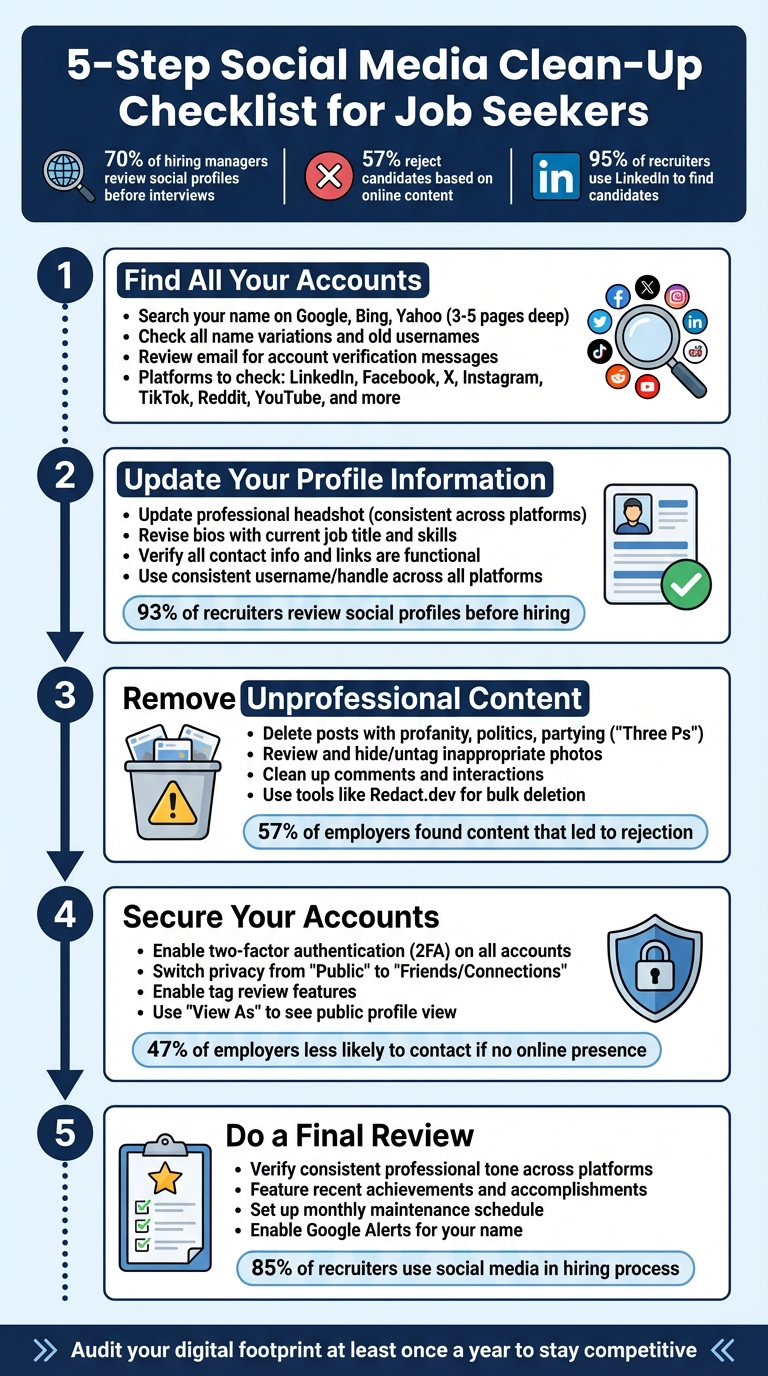
5-Step Social Media Clean-Up Checklist for Job Seekers
How Social Media Affects Your Job Search
Step 1: Find All Your Social Media Accounts
Before tidying up your digital footprint, you need to know what’s out there. Building a professional online presence starts with a thorough inventory of your social media accounts, often managed with job application assistance. Forgotten or inactive profiles can surface during recruiter searches, and with 70% of employers using search engines like Google, Bing, and Yahoo to research applicants, it’s crucial to know what they might find.
Search for Active and Inactive Accounts
Begin by searching your full name on Google, Bing, and Yahoo using an incognito window. Review at least three to five pages of results to uncover any forgotten or hidden accounts. This gives you a clear picture of what recruiters might see when they search for you.
Use all variations of your name during the search. For example, if your name is common, like "John Smith", include your profession or location to narrow the results - search for terms like "John Smith Public Relations Chicago" or "John Smith Software Engineer." Don’t forget to look for old usernames, handles, or nicknames you might have used on gaming platforms or during college.
Expand your search to major platforms and niche sites to capture everything. Check LinkedIn, Facebook, X (formerly Twitter), Instagram, TikTok, Reddit, Snapchat, Pinterest, YouTube, Vimeo, Myspace, Flickr, Tumblr, and even industry-specific forums. If you’re unsure about old accounts, dig through your email inbox for account verification messages - these can help uncover profiles you might have registered years ago and forgotten about.
"If you find any social media accounts that you forgot about or don't represent the image you want to project, delete them immediately, especially if they're on the first page of Google." - Check-a-Salary
Delete or Deactivate Old Accounts
Outdated or abandoned profiles should be deleted or deactivated right away. An old account with embarrassing photos or outdated opinions could harm your chances during a job search. If one of these accounts appears on the first page of Google, it’s even more urgent to remove it since that’s the first thing recruiters are likely to see.
For accounts you can’t delete yourself, reach out to the platform’s webmaster and request removal. You can also use tools like Redact.dev to automate the bulk deletion of old posts on platforms such as X, Reddit, and TikTok. For a detailed breakdown of your digital footprint, services like BrandYourself offer free reports to identify any "digital dirt" that might be lingering online.
Once you’ve cleaned up old accounts, you’ll be ready to focus on updating and refining your active profiles.
Step 2: Update Your Profile Information
Make sure your profile reflects your current professional status. With 93% of recruiters reviewing candidates' social media profiles before making hiring decisions, outdated or incomplete information can cost you valuable opportunities. Your profiles should work together to tell a clear and consistent story about your professional identity. This step sets the foundation for refining your online presence and networking strategies.
Update Profile Photos and Bios
Start by updating your profile photo. Use a professional headshot and ensure it’s consistent across all platforms. A polished photo conveys professionalism and credibility. Avoid using cropped images from social events, as they can give the wrong impression.
"People want to do business with someone who takes themselves seriously enough to not have a cropped picture from a late night at a bar." - Bill Fish, Founder and President, ReputationManagement.com
Next, revise your bios to reflect your current job title, key skills, and a brief career summary. Replace generic or outdated descriptions with a strong elevator pitch that highlights what makes you stand out. Incorporate industry-specific keywords to improve your visibility in recruiter searches. Profiles rich in job titles, skills, and experience are more likely to catch the attention of recruiters using keyword tools.
Verify Contact Information and Links
Double-check that all links in your bios are functional and lead to updated versions of your portfolio, personal website, or LinkedIn profile. Broken links or outdated contact details can make you seem inattentive or inactive. Use professional-grade contact information and ensure any listed phone numbers are current.
Take a moment to customize your profile URLs on platforms like LinkedIn and X. A clean, personalized URL appears more professional than a default string of random numbers. Use tools like Facebook's "View as Public" feature to see what contact details and links are visible to others, including recruiters, before they connect with you.
Ensure Consistent Branding Across Platforms
Consistency is key. Use the same professional username or handle across all platforms to strengthen your personal brand and make it easier for potential employers to identify you. With 70% of recruiters reviewing candidates’ social media profiles and 86% relying on LinkedIn to find talent, a unified online presence makes a strong impression.
"Maintain consistent information across all sites, including the use of a consistent username on all websites and social media. This will help you develop your personal branding." - Ron Stefanski, OneHourProfessor.com
Update your "open to work" status on career-focused platforms, and be sure to add your most recent work experience. Set up Google Alerts for your name to stay informed about any new information connected to your identity. This allows you to spot and address outdated or inconsistent details that may surface during recruiter searches.
Once your profiles are updated and aligned with your brand, you’ll be ready to address unprofessional content in the next phase of your cleanup.
Step 3: Remove Unprofessional Content
Your social media presence paints a picture of your judgment and character. With 57% of employers admitting they've found content on social media that made them reject a candidate, this step is crucial. Recruiters don't just focus on what you post - they're also looking at how you interact, what you share, and whether you'd be a good representative for their company. Once you've cleaned up unprofessional content, you’ll be ready to secure your accounts in the next step.
Delete or Hide Controversial Posts
Go through your profiles and search for posts that might raise eyebrows. Look for red-flag keywords like profanity, complaints about employers, political rants, or divisive opinions. A simple rule to follow is the "Three Ps": remove anything related to Profanity, Politics, and Partying.
"If it is questionable in a job interview, it is risky online." - Redact.dev
Just like deleting old, inactive accounts, this cleanup ensures your visible content reflects professionalism. Tools like Redact.dev can make this process easier by allowing you to filter and delete posts by keyword or date across platforms like Facebook, X (formerly Twitter), Reddit, and TikTok. On Facebook, the "Limit Past Posts" feature can switch all your previous public posts to "Friends Only" with one click, giving your profile a quick privacy boost while you conduct a deeper review. Keep in mind that 43% of employers also monitor current employees' social media, so this step isn’t just about landing a job - it’s about protecting your career long-term with tailored job application assistance.
Review Photos and Tagged Content
Don’t forget to check all photos of you, not just the ones you’ve uploaded. Look at the "Photos of You" sections on platforms like Instagram and Facebook, and use options like "Hide from Profile" or "Remove Tag" for anything that shows intoxication, partial nudity, or anything else that clashes with a professional image. Even if the photo seems fine, captions or comments could contain language that doesn’t align with your brand. Use Facebook’s "View As" feature to see how your profile looks to recruiters, and enable "Timeline Review" so you can approve tagged posts before they appear on your profile. On Instagram, you can archive posts instead of deleting them, allowing you to keep personal memories without making them public.
Clean Up Comments and Interactions
Your comments on other people's posts are just as important as your own content. Delete anything snarky, argumentative, or offensive. Take a moment to review your likes and shares, too - these interactions can reveal a lot about your values and decision-making.
If unprofessional content about you exists on external websites, try reaching out to the webmaster to request its removal. Keep in mind that even after content is deleted, it might still show up in Google search results until the site is re-indexed. To speed up the process, use Google's removal tools to ensure your digital footprint stays polished.
Here’s a quick-reference table to help guide your cleanup efforts on major platforms:
| Platform | Content to Remove | Quick Action |
|---|---|---|
| Party photos, political rants, employer complaints | Use "Limit Past Posts"; enable Timeline Review | |
| X (Twitter) | Offensive tweets, heated arguments | Use bulk-deletion tools; protect tweets |
| Inappropriate captions, unprofessional highlights | Archive photos; audit tagged images | |
| Controversial subreddit activity, hostile comments | Delete posts that don't align with your brand | |
| TikTok | Viral trend videos with profanity | Archive or remove videos |
Next, move on to securing your accounts and updating your privacy settings (Step 4).
Step 4: Secure Your Accounts and Adjust Privacy Settings
Locking down your accounts is just as important as cleaning up your content. Once you've polished your profiles, it's time to secure them and fine-tune your privacy settings. With 70% of employers checking social media during their hiring process, managing your privacy is key to shaping how you're seen. Strong security measures protect your accounts from unauthorized access, while privacy controls ensure recruiters only view what you want them to - no surprises.
Turn On Two-Factor Authentication
Two-factor authentication (2FA) is a must-have for account security. It adds an extra layer of protection by requiring both your password and a code from an authenticator app or your phone. Set up 2FA on all your accounts using apps like Google Authenticator or Authy, and make sure to save the backup codes provided during setup.
Why use authenticator apps over SMS codes? They're more secure. SMS codes can be intercepted through "SIM swapping" attacks, but authenticator apps generate offline six-digit codes that refresh every 30 seconds. Those backup codes? They're your safety net in case you lose access to your phone.
Adjust Your Privacy Settings
Switch your privacy settings from "Public" to "Friends" or "Connections" only. This limits what employers can see while still keeping your profile accessible. For example:
- On Facebook and Instagram, enable tag review so you can approve posts or photos before they show up on your profile.
- On X, consider setting your profile to private to control who sees your posts and interactions.
- On LinkedIn or Handshake, adjust your resume visibility or optimize your LinkedIn profile to align with your job search goals.
"If you are actively pursuing a job, your social media persona should convey professionalism and passion for the career you're pursuing." – Mike Bruni, Partner, Talent Acquisition Strategies
Keep in mind that 47% of employers are less likely to contact a candidate if they can't find them online at all. So, don’t vanish completely - strike a balance between being visible and protecting your personal content. Privacy settings can change without warning, so check them regularly to stay in control.
See What Employers Can View
Take a moment to see your profiles the way an employer might. Open an incognito browser window and search your name on Google, Bing, and Yahoo. Use Facebook's "View As" feature to see your profile from a public perspective. If your name is common, add details like your profession or location to refine the results (e.g., "Sarah Johnson Marketing Chicago").
For a deeper dive, tools like BrandYourself.com can provide a free report on your online presence, while Redact.dev lets you clean up old posts across platforms in bulk. Don’t forget to check sections like "Photos and Videos of You" on Instagram and Facebook - these might include posts from others that appear on your profile. If you find negative content on sites you don’t control, reach out to the webmaster to request its removal. Once deleted, it will eventually disappear from search engine results.
With your accounts secured and privacy settings adjusted, you're ready to move on to the final step: reviewing your overall professional image in Step 5.
Step 5: Do a Final Review
Now that you've polished your content, secured your accounts, and updated your privacy settings, it's time to step back and assess the bigger picture. Take a moment to revisit your profiles and ensure they present a unified and professional image. This final review ties everything together, aligning every detail with your personal digital brand.
Verify Consistent Professional Tone
Consistency is key when presenting your professional brand across platforms. Double-check that your job titles, roles, and skills are identical across all your profiles, from LinkedIn to X (formerly Twitter) and beyond. Recruiters often cross-reference this information with your resume, so everything should match seamlessly.
Your LinkedIn headline is a prime opportunity to stand out. Avoid vague titles like "Marketing Professional" and instead highlight your expertise and value, such as "Digital Marketing Specialist | SEO & Content Strategy | B2B SaaS." Certified Resume Writer Steph Cartwright emphasizes, "The most effective LinkedIn profiles balance keyword optimization and personal branding."
Think of your professional brand as a lens through which all your online activity is filtered. Be mindful of what you post, share, or comment on. Avoid topics that could detract from your professional image, like polarizing opinions or personal disputes. Keep personal accounts, such as Facebook, private and direct colleagues or recruiters to your professional platforms instead.
Feature Recent Achievements
Showcase your latest accomplishments to make your profiles shine. Beyond maintaining a consistent tone, use your profiles to highlight recent successes. Platforms like LinkedIn, Facebook, and X allow you to feature content - use this space wisely. Instead of listing job responsibilities, focus on measurable achievements: "Boosted team productivity by 20%" or "Increased website traffic by 30% through targeted SEO strategies."
Remember, hiring managers spend an average of just 7 seconds scanning a profile. Make those seconds count. Update your LinkedIn banner with a professional tagline or key skills using tools like Canva. Share certificates from recent courses or workshops to demonstrate your commitment to growth. Even small wins, like completing a project ahead of schedule or resolving a challenging issue, can highlight your initiative and problem-solving skills.
Set Up Regular Maintenance
Your social media presence needs ongoing attention - 43% of employers monitor employees' social media activity even after hiring. Regular reviews ensure your professional image remains intact. Schedule monthly check-ins to audit new posts, tags, and comments. Social media platforms often change privacy settings without notice, so verify that your private content stays private.
Enable tag review features on platforms like Facebook and Instagram to control what appears on your profile. Keep personal and professional accounts separate to reduce the risk of accidental oversharing. Before posting anything new, ask yourself whether it aligns with your professional brand. As My Social Traces explains, "Social media screening is now a key part of the hiring process, giving employers insights into a candidate's professionalism, cultural fit, and potential red flags not seen in resumes or interviews."
Staying vigilant protects you from surprises, like old content resurfacing at the wrong time. Professional scanning tools can review up to seven years of social media history across platforms like Facebook, Instagram, X, TikTok, LinkedIn, YouTube, and Reddit. A single overlooked post from years ago could cost you an opportunity - or even complicate immigration processes. Regular maintenance ensures your profiles remain polished and professional.
Conclusion: Maintain a Clean Digital Presence
Keeping your social media profiles in check isn’t just a one-time task - it’s an ongoing effort to safeguard your career. With 85% of recruiters now using social media as part of their hiring process, your online presence plays a key role at every career stage. AI-powered screening tools can even analyze years of your digital activity, so staying mindful of what you post is more important than ever.
One simple way to stay ahead is to set up Google Alerts for your name (and common misspellings) to keep tabs on your online reputation. As Johnny C. Taylor, Jr., SHRM President and CEO, puts it:
"Simply make smart social media choices. Before you post something, consider whether it matches the online presence you wish to uphold... Be intentional about your social media presence and it will be an asset in your career and life."
It’s not just about cleaning up your content, though. Your social media should align with the materials you submit for job applications. A clean online presence can prevent disqualification, but polished application materials help you stand out. Free tools like scale.jobs make it easier by offering resources like an ATS Resume Checker, Cover Letter Generator, and Job Applications Tracker. These tools ensure your applications are professional and ready to pass automated screenings, complementing the image you’ve worked to build online.
To keep everything aligned with your evolving career goals, make it a habit to audit your digital footprint at least once a year. A well-maintained online presence not only protects your reputation but also helps you stand out in a competitive job market.
FAQs
How can I locate and delete old social media accounts I’ve forgotten about?
To track down forgotten social media accounts, start by Googling your name along with variations that include your city or profession. Make sure you're logged out of your accounts before searching. Scan through the first few pages of results for old profiles - think MySpace, niche forums, or other lesser-known platforms. If you still have access to old email accounts, dig through them for welcome emails or password-reset links that might point to accounts you’ve forgotten. Another helpful trick? Check your browser’s saved-password manager for stored login details.
Once you’ve located an account, log in and follow the platform’s steps to delete it. If you can’t access the account, look for the platform’s data-removal request form and be ready to provide proof of identity if needed. After deleting the account, double-check that it no longer shows up in search results. If remnants of the profile persist, use tools like Google’s "Remove Outdated Content" to request its removal. Tidying up your online presence is a smart move to ensure your professional image is polished and job-ready.
What kinds of content should I delete to maintain a professional image on social media when job hunting?
To maintain a professional online image, it’s crucial to clean up anything that could be seen as inappropriate or offensive. This includes removing NSFW or explicit photos, hostile or offensive remarks, posts about illegal activities, or negative rants. Take the time to delete outdated or inactive accounts and double-check that your profiles don’t contain any false or misleading details. It’s also wise to avoid sharing confidential information or anything that might come across as unprofessional to potential employers. A well-maintained and polished social media presence can leave a strong, positive impression during your job search.
How can I protect my social media presence during a job search?
Securing and tidying up your social media is a must when you're on the job hunt. Recruiters often check candidates' online profiles, and anything inappropriate or outdated could work against you. Here’s how to ensure your digital presence is working in your favor:
- Check your online footprint: Search your name to see what comes up. If you find anything that might raise eyebrows, either adjust your privacy settings or remove it entirely.
- Update privacy settings: Keep personal accounts private and limit who can see your posts to “Friends” or “Only Me.” Be selective with connection requests - stick to people you know.
- Secure your accounts: Strengthen your defenses with two-factor authentication, unique passwords, and regular reviews of app permissions.
- Remove old accounts: Deactivate or delete outdated profiles to prevent them from showing up in searches and potentially causing confusion.
Taking these steps will help you present a polished, professional image to potential employers. And if you're looking to go the extra mile, tools like scale.jobs can assist in refining your LinkedIn profile and keeping track of job applications.