
Why Your Resume Gets Rejected by ATS (Even If You’re Qualified)

Sarah Mitchell
March 1, 2026

Most resumes fail to pass Applicant Tracking Systems (ATS) due to technical errors, not lack of qualifications. ATS software, used by 98% of Fortune 500 companies, filters resumes based on formatting, keywords, and compatibility issues. For instance, resumes with photos, graphics, or tables often confuse the system, making them unreadable. Similarly, missing job-specific keywords or using vague language can result in rejection, even if you’re a perfect fit for the role.
To improve your chances, focus on creating an ATS-friendly resume by:
- Using a single-column, text-based layout without images or tables.
- Including exact job-related keywords (e.g., "Project Management Professional" instead of "PMP").
- Submitting your resume in the correct format, such as .docx or text-based PDFs.
- Avoiding non-standard section headers or overly creative designs.
If you’re struggling to get past ATS filters, testing your resume with tools like Jobscan or using a job application service can help identify and fix issues. For a more hands-on approach, services like scale.jobs offer manual resume optimization and application submission, ensuring your qualifications are accurately presented to hiring managers.
How to Tell If ATS Rejected You (vs. a Human Recruiter)
Not every rejection is an ATS problem, sometimes a recruiter reads your resume and simply chooses someone else. Knowing the difference tells you whether to fix your formatting or your positioning.
Signs it was likely an ATS rejection:
- You get an automated rejection within minutes or hours of applying, faster than any human could realistically review your resume.
- You're well-qualified on paper but hear nothing back across multiple similar roles at different companies, suggesting a pattern rather than one recruiter's judgment.
- The job reposts weeks later with nearly identical requirements, often a sign the original pool was filtered down to too few candidates, sometimes due to over-aggressive keyword matching.
Signs it was a human decision:
- You made it to a phone screen or interview, then were rejected. ATS doesn't make it that far into the process.
- The rejection email references something specific to your background ("we're looking for someone with more X experience").
- You applied through a referral or direct email, bypassing the ATS entirely, and still didn't hear back.
If you suspect ATS is the culprit, the fix is almost always formatting or keyword alignment, not your qualifications. If it's a human decision, the fix is in your positioning and storytelling, which formatting tweaks won't solve.
Your Resume Is Getting REJECTED by ATS (Here’s How to FIX IT) + FREE TEMPLATE INSIDE!
sbb-itb-564272e
Why ATS Systems Reject Your Resume
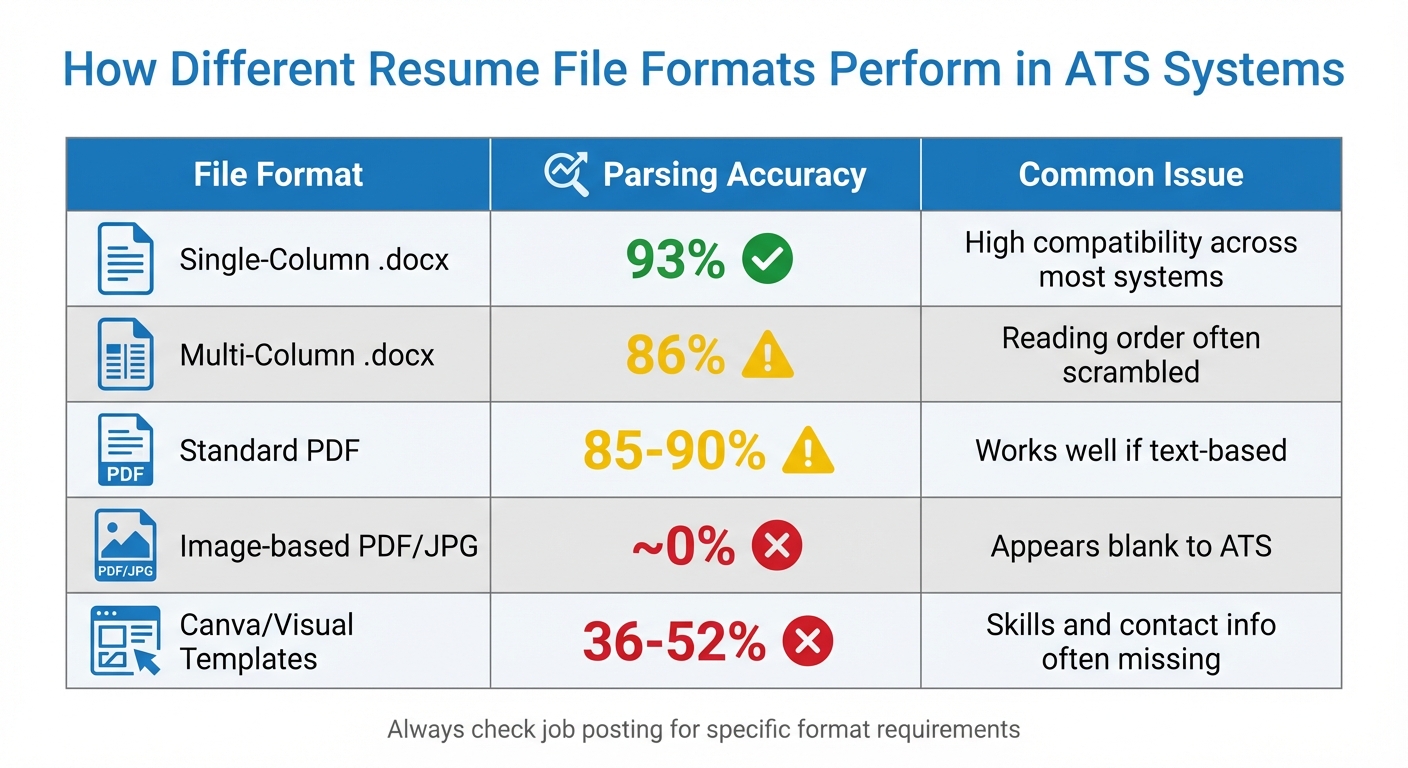
ATS Resume File Format Compatibility Comparison Chart
To avoid having your resume dismissed by an Applicant Tracking System (ATS), it’s essential to understand the technical reasons behind these rejections. These systems don’t make subjective decisions; they rely on algorithms to parse and filter resumes before a recruiter ever sees them. Below are the key technical issues that often lead to rejection.
1. Missing Job-Specific Keywords
ATS software scans resumes for exact keyword matches from job descriptions. For example, terms like "budget forecasting", "stakeholder management", or "Agile methodology" are often essential for scoring. If your resume doesn’t include these phrases, it might not pass the initial screening.
Compounding the issue is the variation in terminology between companies. One employer may look for "customer success manager", while another uses "client relationship specialist." This is why a one-size-fits-all resume often fails. While newer ATS platforms are starting to incorporate AI for context, most still rely heavily on direct keyword matching. Along with keywords, proper formatting also plays a critical role, as discussed below.
2. Incompatible Resume Formatting
Certain formatting choices can confuse ATS systems, leading to errors in how your information is read and categorized. For instance:
- Multi-column layouts can cause work history and contact information to be read in the wrong order. A two-column resume might result in a garbled output like: "John Smith, Senior Analyst, [email protected], ABC Corp, 555-1234, 2020-2023."
- Tables and text boxes are often skipped entirely by ATS systems, meaning any content inside them - like skills or achievements - may not be processed.
- Headers and footers are another common issue. If you’ve placed your contact details in these areas, the ATS might not capture them, leaving your resume incomplete.
- Visual elements such as skill bars, star ratings, or icons can also cause parsing failures. Similarly, using non-standard section headers like "My Journey" instead of "Work Experience" can confuse the system, leading to misclassification or skipped sections.
File format errors are another frequent culprit, as explained in the next point.
3. Wrong File Format
ATS platforms vary in their ability to process different file types. Submitting your resume in the wrong format can result in rejection before it’s even reviewed. Here’s how different formats perform:
| File Format | Parsing Accuracy | Common Issue |
|---|---|---|
| Single-Column .docx | 93% | High compatibility across most systems |
| Multi-Column .docx | 86% | Reading order often scrambled |
| Standard PDF | 85-90% | Works well if text-based |
| Image-based PDF/JPG | ~0% | Appears blank to ATS |
| Canva/Visual Templates | 36-52% | Skills and contact info often missing |
To maximize compatibility, always check the job posting for file format instructions. If it specifies PDF, use PDF. If it asks for .docx, submit .docx. Avoid formats like .pages or .odt, as they often fail to upload correctly.
4. Vague Language Without Context
Buzzwords like "team player", "results-driven", or "detail-oriented" might sound good, but they don’t align with the specific, measurable criteria ATS systems prioritize. For example, instead of saying "managed projects", write "managed 12 cross-functional projects with budgets exceeding $500,000." Using real-life resume examples and this level of detail helps the ATS identify your qualifications.
Even minor details like date formatting can affect parsing accuracy. Nonstandard formats, such as using em dashes ( - ) instead of hyphens (-) or writing out "January 2024" instead of "01/2024", can disrupt how the system reads employment timelines. Stick to standard formats like "01/2020 - 03/2023" or "Jan 2020 - Mar 2023" to avoid errors.
If your resume continues to face ATS rejection despite your qualifications, consider using a job application service or tools like an AI resume builder to ensure your resume is optimized for machine readability. In the next section, we’ll outline actionable steps to make your resume ATS-friendly while maintaining a professional look.
How to Make Your Resume ATS-Compatible
Fine-tuning your resume to pass ATS (Applicant Tracking System) screening is essential to ensure it reaches a recruiter. The steps below tackle common parsing issues and help improve your chances of standing out.
1. Use ATS-Friendly Resume Templates
Begin with a simple, single-column layout that’s text-based. Templates from graphic design platforms like Canva or Adobe Spark might look great but often include images or intricate formatting that ATS systems struggle to interpret. Stick to a standard .docx or PDF format with clearly labeled sections such as "Work Experience", "Education", "Skills", and "Certifications." Avoid using creative section titles, as ATS systems may fail to categorize your information correctly.
Opt for clean, professional fonts like Arial, Calibri, or Times New Roman in sizes between 10 and 12 points. Refrain from using headers, footers, text boxes, or tables, as these can disrupt ATS parsing. If you’re listing skills, use plain bullet points instead of visual elements like star ratings or progress bars, which ATS systems often ignore.
Once your template is in place, tailor the content to align with specific job postings.
2. Tailor Your Resume for Each Job
Generic resumes rarely make it past ATS keyword filters. To improve your chances, start by analyzing the job description for frequently mentioned skills, certifications, and responsibilities. Tools like word frequency analyzers can help you identify key terms that should be prioritized.
Use the exact phrasing from the job posting. For example, if the job description mentions "budget forecasting", use that term instead of a synonym like "financial planning." Include both acronyms and their full forms where applicable, such as "SEO (Search Engine Optimization)" or "HIPAA (Health Insurance Portability and Accountability Act)." Integrate these keywords into results-driven statements, like "Managed 12 projects with budgets exceeding $500,000", to showcase measurable achievements while satisfying ATS requirements.
3. Test Your Resume with ATS Tools
Before submitting your resume, test it with an ATS scanner to identify any formatting issues, missing keywords, or parsing errors. Tools like Jobscan.co and Rezi.ai offer automated scans, but they might miss some nuances or flag irrelevant issues. For a more reliable option, try scale.jobs’ free ATS Checker, which combines automated scans with human reviews to catch problems like misaligned contact details or incorrectly parsed dates.
If issues persist, consider working with a professional resume writer or writing service can optimize your document for ATS compatibility while ensuring it appeals to recruiters. This can save you time and effort while increasing your chances of landing an interview.
How scale.jobs Solves ATS Rejection Problems
Many ATS (Applicant Tracking Systems) tools stop at simply identifying issues - highlighting formatting problems or missing keywords - leaving you to fix everything on your own. scale.jobs takes a different path, tackling the root causes of ATS rejection with a blend of AI-powered resume customization and human oversight. Instead of just pointing out problems, scale.jobs ensures your resume and applications are optimized to pass ATS filters effectively. Here's how it stands out compared to competitors like Rezi.ai, LazyApply, and Sonara.ai.
1. Why scale.jobs Outshines Other ATS Tools
• Human-verified formatting ensures your resume is free from hidden errors. While tools like Rezi.ai rely solely on algorithms, which can unintentionally introduce formatting issues or non-standard characters, scale.jobs employs trained human assistants to manually craft ATS-friendly resumes with standardized layouts and section headers.
• Manual application submission avoids bot-detection filters that reject most automated submissions. Unlike LazyApply or Sonara.ai, which rely on bots often flagged by employers, scale.jobs uses human assistants to manually complete each application, ensuring authenticity.
• Contextual keyword integration takes keyword optimization a step further. While tools like Jobscan provide keyword match scores, they don't rewrite your content. scale.jobs' experts seamlessly incorporate job-specific keywords into achievement-focused bullet points. For example, "managed projects" becomes "managed 12 projects with budgets exceeding $500,000 using Agile methodology."
• Proof-of-work transparency ensures accountability. scale.jobs provides daily updates via WhatsApp, complete with time-stamped screenshots of every job submission. This way, you know exactly where and how your applications are being sent.
• Flat-fee pricing with unused credit refunds offers a more flexible and affordable alternative. Unlike subscription-based competitors, scale.jobs charges a one-time fee per campaign and refunds any unused application credits, eliminating the need for recurring payments.
2. Feature Comparison: scale.jobs vs Other Services
| Feature | DIY Tools (Jobscan, Rezi) | Bot Tools (LazyApply, Sonara) | scale.jobs |
|---|---|---|---|
| Human Involvement | None (user implements fixes) | None (bot submits) | Human assistants format, customize, and submit |
| Resume Customization | Keyword matching score only | Generic mass submission | Custom resume per posting with contextual keywords |
| ATS Handling | Identifies issues; user fixes | High bot-detection risk | Manual formatting + manual submission |
| Application Execution | User applies manually | Automated bot (often flagged) | Human assistant applies by hand |
| Transparency | Match score report | Minimal visibility | Daily WhatsApp updates with screenshots |
| Pricing Model | Monthly subscription | Monthly subscription | One-time fee + unused credit refunds |
Who Should Use DIY or Bot Tools
DIY tools like Jobscan or Rezi are a good fit if you:
- Have the time to manually address formatting and keyword suggestions.
- Prefer full control over every application and customization.
- Are applying to fewer than 10 jobs per week and can handle the workload yourself.
- Possess strong writing skills to naturally integrate keywords into your resume.
Bot tools like LazyApply or Sonara might work for you if you:
- Focus on quantity over quality, even if it means lower response rates.
- Apply to roles where employers aren't using anti-bot detection systems.
- Want to test the job market quickly without investing much time in customization.
Who Should Choose scale.jobs
scale.jobs is the right choice if you:
- Struggle with frequent ATS rejections despite having strong qualifications.
- Want human oversight to ensure applications are tailored and manually submitted.
- Value transparency and need proof-of-work updates for every submission.
- Prefer a one-time payment model instead of recurring subscriptions.
- Need ongoing support via WhatsApp to track progress and adjust your strategy.
Switch to scale.jobs if…
You might want to switch to scale.jobs if:
- Your automated applications aren't getting results. If bots are being flagged or ignored, manual submissions can help bypass detection filters.
- You're spending too much time customizing resumes but still facing rejections. scale.jobs' human assistants handle formatting and keyword integration for you.
- You’re unsure if your applications are being submitted correctly. Daily WhatsApp updates with screenshots provide complete transparency.
- You're stuck in costly subscription plans with little success. A flat-fee model and refunds for unused credits make scale.jobs a smarter option.
- You need resumes that appeal to both ATS systems and hiring managers. Contextual keyword integration ensures your resume works for both algorithms and recruiters.
scale.jobs stands out by bridging the gap between AI precision and human expertise, ensuring your applications are not only ATS-optimized but also carefully tailored to each job. If you're tired of endless tweaks and rejections, consider working with a Virtual Assistant for Job Applications that handles everything from resume optimization to application execution. With scale.jobs, your qualifications will reach the decision-makers without getting lost in the ATS shuffle.
Next Steps for ATS-Proof Job Applications
Now that you understand why ATS tools like Jobscan might overlook qualified resumes, it’s time to refine your approach. Start by removing any images, logos, charts, tables, or multi-column layouts from your resume. Stick to standard fonts like Arial or Calibri, and save your file as a .docx or .txt format - steer clear of PDFs with embedded graphics or intricate designs.
After simplifying your resume, the next move is to check its ATS compatibility. Use free ATS scanning tools such as Resume Worded or Jobscan to see how employers' systems might interpret your resume. Aim for a match score of 80% or higher by seamlessly integrating keywords from the job description into your bullet points. Be sure to spell out abbreviations along with acronyms (e.g., "PMP and Project Management Professional") to ensure the ATS recognizes both terms.
For every role, tailor your resume to reflect the job posting's language and include specific, measurable accomplishments. For example, instead of generic phrases, highlight achievements like "managed 12 projects with budgets exceeding $500,000 using Agile methodology."
If rejections persist despite these adjustments, you might benefit from a resume writing service that blends ATS optimization with human expertise. scale.jobs offers a hands-on approach, where trained assistants manually format and customize your resume for each job and submit applications directly to bypass bot-detection filters. Unlike automated tools, scale.jobs relies on human precision to ensure your resume is ATS-friendly. Their process includes daily updates via WhatsApp and time-stamped screenshots, giving you full visibility - without the hassle of recurring subscriptions. For those who find services like LazyApply lacking, scale.jobs’ manual adjustments and personal support can make a real difference.
Take these focused steps now to navigate ATS hurdles and connect directly with hiring managers.
FAQs
How can I tell if the ATS is misreading my resume?
If you're noticing a lack of responses to your job applications despite being qualified, it might be a sign that an Applicant Tracking System (ATS) is misreading your resume. Common issues include formatting problems, missing relevant keywords, or overly complex layouts. Resumes that use multi-column designs, graphics, or fail to include job-specific terms are often misunderstood by ATS software.
To address this, consider using ATS checkers to evaluate your resume's formatting and keyword alignment. These tools can help identify where adjustments are needed. If your resume consistently fails such tests or generates few responses, it’s a clear indicator that revisions are necessary to make it more ATS-friendly.
Should I submit a PDF or a .docx for best ATS results?
For the best results with an ATS (Applicant Tracking System), submit your resume as a Word (.docx) file. These systems tend to handle Word documents more effectively than PDFs, particularly older ATS versions. However, if the job posting specifically requests a PDF or you need to preserve formatting, opt for a straightforward, text-based PDF. Avoid including graphics or multi-column layouts, as they can complicate processing. Always adhere to the instructions in the job posting to ensure your resume is successfully processed.
What’s the fastest way to find the right keywords for each job?
The fastest way to pinpoint relevant keywords is to carefully examine the job description. Look for industry-specific terms and the key skills the employer highlights as essential. You can also use tools like ATS checkers or AI-driven services to identify these keywords effectively. Incorporating them naturally into your resume ensures it aligns with the employer’s expectations and enhances its compatibility with Applicant Tracking Systems (ATS). This method significantly boosts your chances of passing automated screenings and moving on to the next stage of the hiring process. For additional support, consider using an AI resume builder to streamline this process.