
Your Full Guide to Networking With Recruiters on Twitter

Sarah Mitchell
December 27, 2025

Twitter is a powerful tool to connect directly with recruiters and hiring managers, avoiding traditional job application barriers. This proactive method is a core part of reverse recruiting. Here's how you can use it effectively:
- Optimize Your Profile: Use a professional photo, write a clear bio with keywords, and pin a tweet about your career goals.
- Find Recruiters: Use Twitter's search and hashtags like #Hiring or #JobSearch to locate recruiters in your field. Follow relevant accounts and create private lists for organization.
- Engage Meaningfully: Retweet, reply, and comment thoughtfully on recruiters' posts. Share industry-related content to showcase your expertise.
- Send Direct Messages: After building rapport, send personalized DMs referencing specific posts or shared interests.
- Track Relationships: Use tools like Twitter Analytics or top job search automation tools to monitor interactions and maintain connections.
Consistency is key. Regularly engage, share updates, and follow up to strengthen relationships. Twitter, when paired with tools like scale.jobs, can streamline your job search and help you stand out.
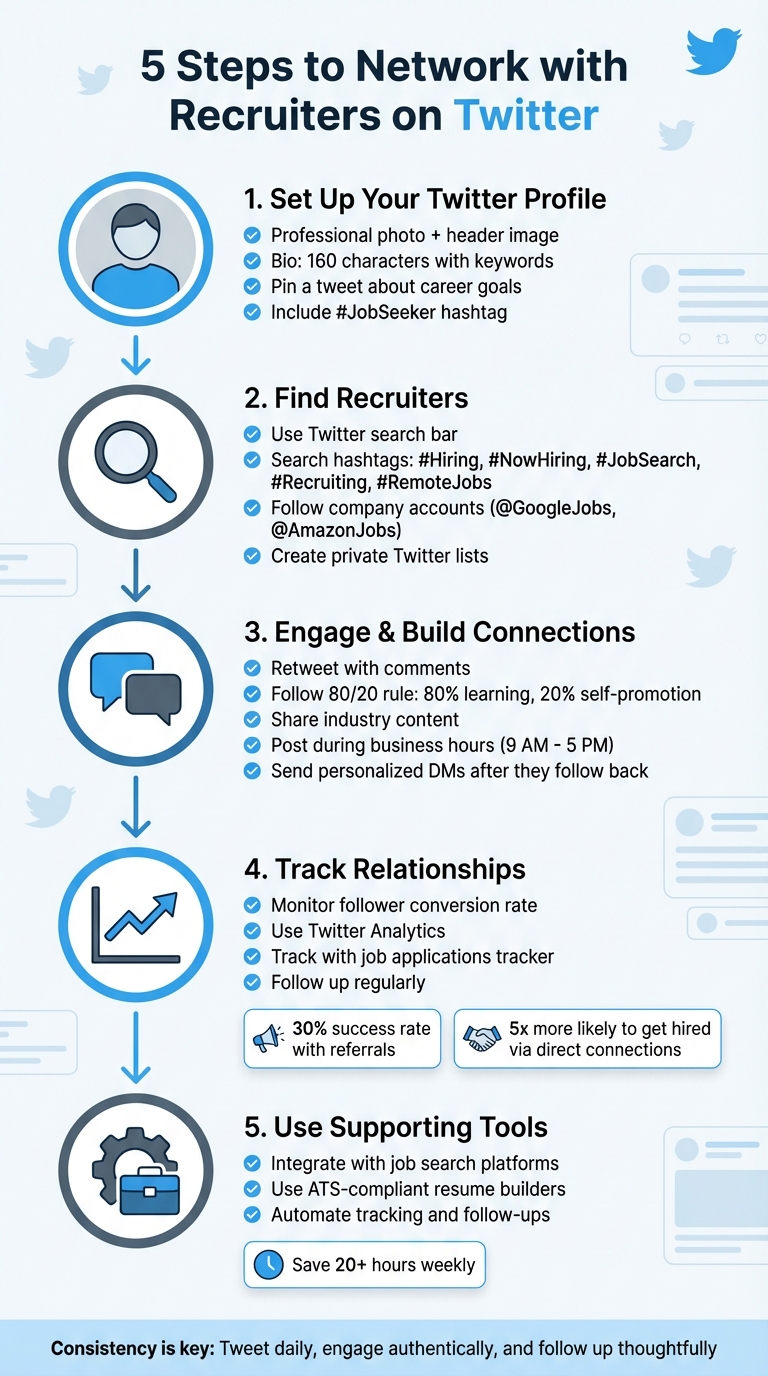
5-Step Guide to Networking with Recruiters on Twitter
How to Find a Job using Twitter with Twitter Job Search Expert: Jacob Share | How To Job Search
Step 1: Set Up Your Twitter Profile for Professional Use
Think of your Twitter profile as your digital storefront. When recruiters visit, they form opinions in seconds. An incomplete or sloppy profile can scream unprofessionalism and cost you potential opportunities.
Add a Professional Photo and Header Image
Your profile photo should match your LinkedIn image to create a consistent personal brand. A clear, professional headshot is essential - using the default avatar or a casual photo can make you seem unprepared.
For your header image, pick something that reflects your industry or interests. For example, a sleek tech graphic works well for someone in software, while a clean, minimalist design might suit a marketing professional. This image sets the tone for your profile before anyone even reads your bio.
Write a Clear Bio with Keywords
You only have 160 characters to make a strong impression, so use them wisely. Start with your profession and location - these are key terms recruiters search for. For instance: "Product Manager in San Francisco | SaaS & AI | MBA | Building better user experiences" combines industry keywords with a touch of personality.
"Keywords, the words used by recruiters and employers to find people with the right skills and accomplishments, are the KEYS to successful job search!" – Susan P. Joyce, Editor and Publisher, Job-Hunt.org
If you're job hunting, include hashtags like #JobSeeker or #Hiring to make your profile more discoverable. Add a link to your LinkedIn or portfolio for easy access. To stand out, balance professional highlights with a personal touch - mention a hobby or interest to show you're approachable.
Pin a Tweet About Your Career Goals
Pinned tweets stay at the top of your profile, making them prime real estate. Use this space to elaborate on what didn’t fit in your bio. Share a quick summary of your experience, the type of role you’re seeking, and a direct link to your LinkedIn or portfolio.
"For the icing on your profile, pin a tweet." – Katrina Collier, Founder, Winning Impression
This pinned tweet is like a billboard for recruiters. Make it count by clearly showcasing your expertise and availability.
| Profile Element | Character Limit | Best Practice |
|---|---|---|
| Username (@handle) | 15 characters | Use your name or professional brand |
| Account Name | 20 characters | Combine your real name with your profession for searchability |
| Bio | 160 characters | Highlight industry keywords, location, and a bit of personality |
| Pinned Tweet | 280 characters | Summarize your career goals or highlight a major project |
A well-crafted profile is the first step in leveraging Twitter for networking. Once this is in place, you’ll be ready to build stronger connections with recruiters and like-minded professionals.
Step 2: Find Recruiters in Your Industry
After polishing your profile, the next move is to connect with recruiters who can help you land your dream job. Thanks to Twitter's open network, you can engage with hiring professionals without needing formal introductions or connection requests.
Use Twitter Search and Hashtags
With your profile ready, start using Twitter's search bar to find recruiters posting about job opportunities. Try searching phrases like "hiring software engineer San Francisco" or "now hiring product manager remote" to uncover recent openings. Recruiters often include hashtags such as #Hiring, #NowHiring, #JobSearch, #Recruiting, and #RemoteJobs to share job listings.
For a more targeted approach, combine industry-specific hashtags with location tags. For example, if you're in tech, search for #BigData or #PHP alongside #NYC or #Austin to narrow down results.
"Through Twitter you can learn from your peers in whatever discipline you're in, or use it as a platform to share content so you can build awareness of you as a professional, and ultimately position yourself as a thought leader in a particular expertise." – Lars Schmidt, Senior Director of Talent Acquisition and Innovation, NPR
Take advantage of Twitter's advanced search filters to refine your results by location, engagement, or specific accounts. This saves you time by focusing on active recruiters rather than outdated or irrelevant posts.
Follow Recruiter and Company Accounts
Many recruiters, HR professionals, and company hiring accounts (like @GoogleJobs or @AmazonJobs) regularly post job updates. Before following, check their "Tweets & replies" section to ensure they actively engage with candidates.
Some companies even have separate Twitter accounts dedicated solely to job postings, which often update more frequently than their main accounts. Following these specialized handles ensures you see new opportunities as soon as they’re announced. To stay organized, create a private Twitter list of recruiters and hiring accounts. This allows you to monitor their activity without cluttering your main feed or alerting them that you're closely following their updates.
"Twitter is like the fast pass at the amusement park. It allows you to bypass the gatekeepers and go directly to the hiring manager." – Ryan Rhoten, Personal Branding Expert
For even better results, consider integrating Twitter with other networking tools.
Combine Twitter with Other Networking Tools
Twitter shines when paired with tools that help you manage your job search. For example, Hootsuite (free version available) lets you create custom streams to track specific keywords, hashtags, or company mentions in real time. Want to monitor job postings in Boston? Set up a stream for "Software Engineer" + "Boston" and catch updates as they happen.
Platforms like Scale.jobs offer additional resources to streamline your efforts. Their Networking Tools help you track recruiter interactions and follow-ups, while the Job Applications Tracker keeps everything organized across platforms. Unlike Twitter alone, Scale.jobs provides recruiter contact lists and tools to ensure you don’t miss any opportunities.
- Human assistants offer personalized job search support.
- ATS-friendly resumes and cover letters increase visibility with recruiters.
- Real-time updates via WhatsApp keep you informed every step of the way.
You can also use Followerwonk to search Twitter bios for specific job titles or locations that Twitter’s native search might overlook. Pair this with Buffer to schedule tweets, ensuring you maintain a consistent professional presence even when you're offline. Lastly, linking your Twitter bio to your LinkedIn profile or portfolio gives recruiters easy access to your full professional background, making it easier for them to assess your qualifications.
Step 3: Engage with Recruiters and Build Connections
Once you've polished your professional profile and started following recruiters, the next step is turning those online interactions into meaningful connections. Twitter's open platform makes this easier than LinkedIn since you can engage with anyone without waiting for connection requests to be accepted. The key is to build genuine relationships by offering value first.
Interact with Recruiters' Posts
One of the easiest ways to get noticed is by engaging with the content recruiters share. A retweet is one of the biggest compliments you can give on Twitter, as it not only amplifies their message but also puts your profile in front of their audience. To take it a step further, add a comment explaining why you found their post valuable - this shows you're genuinely interested and not just clicking buttons for attention.
When replying to tweets, consider the 80/20 rule shared by Lars Schmidt, Senior Director of Talent Acquisition and Innovation at NPR: spend 80% of your time learning from others and only 20% talking about yourself. Instead of generic replies like "Great post!" or "Thanks for sharing", reference a specific point from their tweet. For example, if a recruiter mentions challenges in finding qualified candidates, you could share a relevant article, tool, or resource that might help.
"You're not going to build a very good network if you just promote yourself." – Lars Schmidt, NPR
Another clever way to stand out is by creating a public Twitter list, such as "Top Tech Recruiters." When you add someone to this list, they'll get a notification, which can spark their curiosity and prompt them to check out your profile. It’s a low-pressure way to get noticed without sending a direct message.
| Engagement Type | Action | Impact Level |
|---|---|---|
| Problem Solver | Offer a solution to a challenge they tweeted about | Maximum impact |
| Common Interest | Start a conversation about a mutual hobby or interest | Medium |
| Information Provider | Share a helpful article or resource | Steady impact |
Share Content Related to Your Industry
Posting your own content is another way to establish yourself as knowledgeable in your field. Share articles about trends, comment on recent news, or post updates about projects you're working on. Use relevant hashtags like #WebDevelopment or #DataScience so recruiters searching those terms can find your posts.
Visual content tends to perform well on Twitter. If you're at a conference, share photos from the event. Working on a coding project? Post a screenshot of your progress. These posts subtly highlight your skills without explicitly saying "hire me." Keep your tone casual and approachable - for example, you might tweet something like, "Excited to be prepping for an interview today!" with these job interview preparation tips instead of repeatedly announcing that you're job hunting.
Timing matters, too. Stick to posting during business hours (9:00 AM to 5:00 PM in your time zone) to keep your networking professional and ensure recruiters see your content when they're most active. These public interactions can set the stage for more personal conversations later.
Send Personalized Direct Messages
Once you've built some familiarity through public engagement, you can take the relationship further with personalized direct messages (DMs). It’s best to wait until a recruiter follows you back - this indicates they see you as a valuable connection and are open to direct communication. As Katrina Collier, founder of Winning Impression, explains:
"When you regularly engage, you become known and trusted. And once other users see you as valuable, they'll likely follow you back, and you'll be able to communicate more freely by direct message."
When sending a DM, make it personal and specific. Reference a tweet, shared interest, or article they’ve posted. Avoid generic messages like "I'm looking for opportunities at your company." Instead, try something like: "I saw your tweet about the challenges of finding Python developers. I've been working with Python for three years and would love to learn more about what you're looking for."
"Twitter is about the conversation. It's not about a conversion." – Ryan Rhoten
Keep your message brief - two or three sentences max - and ask a clear, specific question. This approach shifts you from being just another job seeker to someone they already recognize and trust. Tools like Scale.jobs and other free AI job search tools can help you track conversations with recruiters, making it easier to stay organized and turn these interactions into real opportunities.
Step 4: Track and Maintain Recruiter Relationships
Building connections is only the first step; the real magic happens when you track those relationships and follow up consistently. Without a system in place, it’s easy to lose touch with recruiters who could open doors to exciting job opportunities. A good tracking method ensures your follow-ups are timely and effective.
Use Twitter Analytics to Understand Engagement
Twitter offers built-in tools to help you see who’s interacting with your content. One key metric to watch is your follower conversion rate - the percentage of users who follow you back after you follow them. This can reveal if your profile photo, bio, and recent tweets are leaving a strong professional impression. If recruiters aren’t following back, it might be time to tweak your bio or share more industry-focused content.
For more advanced monitoring, tools like Hootsuite can help. Set up alerts to get notified when recruiters post updates. Glen Cathey, Senior Vice President at Kforce, highlights the value of this approach:
"Twitter interactions are generally seen as less intrusive when compared to other forms of communication (emails, phone, text) and even other social networks." – Glen Cathey, Senior Vice President, Kforce
By keeping an eye on these interactions, you can identify which recruiters are regularly engaging with your content and prioritize building those connections further.
Stay in Touch and Keep the Conversation Alive
Once you’ve established a connection with a recruiter, don’t let it fizzle out. Regularly share updates on your job search or new skills you’ve developed. Instead of a vague question like, “Are there any jobs available?”, try something more specific: “I recently completed a certification in cloud architecture - does your team have any openings in that area?”
Here’s why it matters: referrals and direct connections result in a 30% success rate, and candidates sourced directly by companies are 5x more likely to land the job than those applying through general job boards. Keeping these relationships warm can significantly boost your chances.
Be on the lookout for opportunities to engage meaningfully. For instance, if a recruiter tweets about a hiring challenge, respond with a thoughtful comment or resource. Balance professional updates with personal touches - like sharing a great book you’ve read or an industry event you attended. Recruiters are more likely to remember someone who feels approachable and relatable.
To stay organized, use tools like Scale.jobs and their job application tracker templates. This can help you log conversations, follow-up dates, and outcomes, ensuring you never lose track of where you stand with each recruiter.
Step 5: Use Additional Tools to Support Your Twitter Networking
Once you’ve built and nurtured relationships with recruiters on Twitter, the next step is to make your job search more efficient by integrating advanced tools. While Twitter is fantastic for networking, managing conversations, tailoring resumes, and tracking applications manually can eat up a lot of time. By combining Twitter networking with specialized job search tools, you can streamline your workflow, stay organized, and focus on what matters most - building meaningful connections and preparing for interviews.
Explore Free Tools from scale.jobs
scale.jobs offers a range of free tools designed to complement your Twitter networking efforts. Their Job Applications Tracker provides a centralized dashboard to log recruiter interactions, track follow-ups, and monitor application statuses - eliminating the need for spreadsheets and manual organization. The ATS-compliant Resume Builder ensures your resumes pass automated screening systems, which is crucial given that 91% of employers now use social media for hiring.
With their free plan, you can create up to two base resumes and use the AI Assistant to generate tailored versions for specific roles (limited to two per day). Additional tools, like the Cover Letter Generator and Interview Questions Predictor, round out the package, equipping you with everything you need to turn Twitter connections into actionable job opportunities.
Twitter Networking Alone vs. scale.jobs Tools
Here’s a quick comparison of managing your job search solely through Twitter versus integrating scale.jobs tools:
| Feature | Twitter Alone | With scale.jobs Tools |
|---|---|---|
| Contact & Engagement Management | Manual hashtag searches, list-building, and taking notes | Organized contact management with automated dashboards and follow-up reminders |
| Application Management | Spreadsheets and email folders for tracking | Centralized tracker linking Twitter conversations to applications, with instant updates via WhatsApp |
| Resume Tailoring | Manually customized for each job post | AI-assisted tailoring (2 free per day, or unlimited with Pro at $9/month) |
| Time Investment | Hours spent tracking and applying | Saves over 20 hours weekly with Human Assistant plans (starting at $199) |
"Twitter is an incredibly valuable job search tool and very few people capitalize on it. Why spend hours searching Internet job boards... when you could be making valuable connections on sites like Twitter?" – Louise Fletcher, Blue Sky Resumes
For those navigating visa sponsorships - like H1B, F1 CPT, or TN visas - scale.jobs offers a Human Assistant service to simplify the process even further. This service includes tailored, ATS-optimized resumes and cover letters crafted by virtual assistants. You’ll also get time-stamped proof-of-work screenshots and instant WhatsApp updates for full transparency. Starting at $199 for 250 applications, this flat-fee service even offers refunds for unused credits if you secure a job early. When paired with your Twitter outreach, these tools create a seamless and highly efficient job search experience.
Conclusion
Networking with recruiters on Twitter isn't a quick fix - it’s a strategy that pays off over time. As personal branding expert Ryan Rhoten says:
"Twitter is like the fast pass at the amusement park. It allows you to bypass the gatekeepers and go directly to the hiring manager."
The formula is simple: keep your profile professional, engage actively with recruiter content, and follow up thoughtfully. Over time, this approach can help you stand out and create opportunities.
Once your profile is optimized and you’ve started connecting with recruiters, the real work begins - staying consistent. Make it a habit to tweet daily, participate in relevant Twitter chats, and use retweets to show professional appreciation. If a recruiter doesn’t respond right away, don’t give up. Strengthen the connection by commenting on their blog posts or engaging with them on LinkedIn or networking in LinkedIn groups. As Rhoten wisely puts it:
"Twitter is about the conversation. It's not about a conversion."
Twitter is a fantastic platform for building relationships, but managing a job search manually can easily eat up 20+ hours a week. That’s where scale.jobs comes in. This platform simplifies your job search by centralizing recruiter interactions and automating key parts of the application process. It offers tools like a centralized tracker, ATS-friendly documents, and human support to save you valuable time. For those navigating visa sponsorships (H1B, F1 CPT, TN), scale.jobs’ Human Assistant service handles the entire process - from application to updates - starting at $199 for 250 applications. You’ll even get time-stamped proof-of-work and updates via WhatsApp.
FAQs
How can I optimize my Twitter profile to attract recruiters?
To make your Twitter profile catch a recruiter's eye, focus on crafting a professional and polished presence. Start with a handle that incorporates your name or aligns with your personal brand. Your bio should include keywords that emphasize your skills, industry, and location - for example, "Software Engineer • AI • San Francisco." Use a clear, professional headshot and choose a header image that reflects your field or interests.
Consistent posting is key. Share updates on industry trends, offer insights, or highlight your projects to showcase your expertise. Engage actively with recruiters and hiring managers by liking, commenting, or retweeting their posts. This interaction helps build connections and keeps you visible. Ensure your profile is public, use hashtags like #JobSearch or #TechJobs to increase discoverability, and pin a tweet that showcases your skills or links to your portfolio. These steps will make your profile more appealing and accessible to recruiters.
What are the best ways to connect with recruiters on Twitter?
To make meaningful connections with recruiters on Twitter, start by polishing your profile to appear professional and easy to find. Use your real name or a work-appropriate handle, include industry-specific keywords in your bio, and add a link to your LinkedIn profile or portfolio. This way, recruiters can locate you effortlessly when they're scouting for talent.
Once your profile is in good shape, focus on engaging purposefully. Follow recruiters and hiring managers from the companies you're interested in and enable notifications to stay up-to-date with their updates. Join conversations around industry hashtags like #TechJobs or #HiringNow to increase your visibility. Show genuine interest by liking, retweeting, or thoughtfully commenting on their posts. You can also share your own short, insightful content - whether it's advice, project highlights, or industry trends - to showcase your expertise and establish your personal brand.
When you've built some familiarity, consider sending a brief, personalized direct message. Reference something they recently posted and explain, in a few sentences, how your skills align with what their company might need. By staying consistent and engaging meaningfully, you can turn Twitter into a valuable tool for expanding your professional network and boosting your job search efforts.
How can I effectively connect with and stay organized with recruiters on Twitter?
To make meaningful connections with recruiters on Twitter, start by refining your profile to clearly showcase your career goals and expertise. Use hashtags like #TechJobs or Twitter's search tools to find recruiters in your field, and enable notifications for their posts to stay in the loop.
Keep your networking organized by creating private Twitter Lists, such as "Recruiter Connections", to easily follow their activity without overwhelming your main feed. To stay on top of your interactions - whether it’s comments, direct messages, or shared posts - track them in a simple spreadsheet or use tools like scale.jobs’ Job Applications Tracker. Engage regularly with their content by liking, retweeting, or leaving thoughtful comments, and don’t hesitate to follow up with updates or questions to keep the conversation going. A consistent and sincere approach can transform online interactions into tangible job opportunities.