
Cold Emailing Hiring Managers: Templates That Actually Work in 2026

Sarah Mitchell
June 29, 2026

Most cold emails fail for three simple reasons: they are too long, too vague, or too automated. In 2026, the notes that still get replies are short, specific, and easy to read on a phone.
If I were doing this now, I’d keep the whole process tight:
- write 75 to 125 words
- use one company-specific opening
- include one proof metric
- ask for one small next step
- skip attachments in the first email
That matters whether I’m trying to Apply for jobs, follow up after an application, explain a layoff, or target visa-friendly roles.
What I’d take from this guide
The article makes one point clear: template quality matters, but execution matters just as much.
Here’s the short version:
- Job application automation tools can help with volume.
- Human review helps when wording, timing, and document quality need more care.
- A cold email works better when the application behind it is clean, ATS-safe, and tied to the role.
- Follow-ups should add new proof, not just ask for updates.
- Visa and layoff outreach work better when the language is direct and factual.
sbb-itb-564272e
Quick comparison
| Option | Best use case | Main tradeoff |
|---|---|---|
| Scale.jobs | Targeted outreach with human help | Less about volume, more about execution |
| LazyApply | High-volume applying | Low personalization |
| LoopCV | Broad automated outreach | Low control over message quality |
| Jobright.ai | Matching and coaching support | You still handle much of the execution |
| Find My Profession | Senior-level coaching and resume help | Higher-touch, higher-cost service |
My practical takeaway
If I were sending cold emails in 2026, I would use this playbook:
- Apply first. (Follow these essential job search tips to ensure your application is ATS-ready.)
- Send a short note tied to one company signal.
- Add one metric like “improved conversion by 18%”.
- Ask for a 15-minute call.
- Keep my resume ready with an ai resume builder or ai cover letter builder if I need a clean draft before outreach.
- If I need help with execution, use a job application service or a job search platform instead of relying on automated job applications alone.
FAQ-style answers
Do cold emails to hiring managers still work in 2026?
Yes, but only when they are short, specific, and written like a person wrote them.
Should I attach my resume in the first cold email?
No. It is better to wait until there is interest.
As you track job application responses, you'll notice that brevity is key. ### What length works best?
The article points to 75 to 125 words as the sweet spot.
What should I avoid?
I’d avoid:
- generic intros
- stacked achievements
- “just checking in” follow-ups
- attachments in the first email
- spammy subject lines
My bottom line
I would not copy these templates word for word. I’d use them as a framework.
The main lesson is simple: one clear signal, one hard number, one direct ask.
That approach gives you a better shot than mass outreach alone, whether you’re chasing full time jobs, deciding between job search assistants and coaches, or using a job search virtual assistant to keep the process moving.
The Email Structure That Gets Replies
Every template in this guide uses the same five-part setup: a specific subject line, a personalized opener, one proof metric, a role-fit statement, and a simple close.
That structure matters. Tools that automate outreach but skip these basics often get fewer replies. If you’re trying to Apply for jobs in a way that feels direct and human, use this as your default format for every template that follows.
Subject lines that stand out in a crowded inbox
Keep subject lines short: 3 to 7 words. Use lowercase.
That style tends to feel direct, not salesy.
Patterns that work:
[Role Title] + [Specific Result] + [Your Name]Applied for [Role] - quick note from [Your Name][Role] + [h1b-ready](https://scale.jobs/blog/smart-way-track-h1b-sponsoring-companies-2026) + [your name]Question about [Specific Team/Project] at [Company]Idea for [Company]'s [Specific Area]
Skip subject lines like “Job Application,” anything in ALL CAPS, emojis, or wording that looks like a bulk send. Use this same format in the four scenarios below.
Openings, metrics, and closes that respect a hiring manager's time
Start with one specific signal from the company: a recent product launch, a new hire, a funding round, or a post the manager shared. “I noticed you work at [Company]” was weak before, and it gets ignored in 2026.
Your second sentence should include one metric tied to what the team cares about right now. For example: “reduced customer drop-off by 18% over two quarters.” That’s specific enough to sound grounded. Once you stack too many wins into one note, the message gets muddy. Pick one and let it do the work.
Then close with a low-friction ask, like “Would you be open to a 15-minute call next week?” That’s easy to answer. Avoid lines like “Let me know if you have any opportunities” or anything that pushes the work back onto the reader.
Keep the full email between 75 and 125 words.
Also, don’t attach a resume or portfolio in the first email. Wait until there’s interest. If you need help tightening those docs before outreach, tools like an ai resume builder or ai cover letter builder can help you get the basics in shape without slowing down your search.
Next, apply this structure to the templates for each job-search scenario. If you’re using a job search platform or working with a job search coach, this framework still holds up because it keeps your outreach short, pointed, and easy to reply to.
| Component | Do This | Avoid This |
|---|---|---|
| Subject line | 3–7 words, lowercase, role-specific | "Job Application", emojis, all-caps |
| Opening | Recent company signal or specific content | "I hope this email finds you well" |
| Proof metric | One metric tied to team's current priorities (e.g., "reduced drop-off by 18%") | Vague claims or stacked achievements |
| Close | "Would you be open to a 15-minute call next week?" | "Let me know if anything opens up" |
| Attachment | None in first email | Resume or portfolio file |
Cold Email Templates for 4 Real Job Search Scenarios
Template 1: Applying without a referral and Template 2: Following up after an application
These email outreach strategies cover the four moments most likely to turn a cold email into a reply. Each one is built to get a response fast, not to tell your full career story.
Use one specific hook, one measured result, and one low-friction CTA.
Template 1: No referral, cold outreach
Subject: product ops at [company]
Hi [Hiring Manager's First Name],
I saw your recent [product launch / post / company update] and noticed the team is hiring for Product Ops. In my last role, I reduced drop-off by 18% by rebuilding [process or workflow]. I applied on [date] and wanted to reach out directly. Would you be open to a 15-minute call next week?
[Your Name] | LinkedIn: [link]
Why it works: it opens with something specific, gives one clear metric, and ends with a simple CTA.
What to cut before sending:
- Remove "I'm passionate"
- Remove "great fit"
- Remove filler that pushes the email over 125 words
Template 2: Following up after an application
Subject: following up on [role] - [date]
Hi [First Name],
I applied for the [Role] on [Date]. I wanted to add one thing I didn't include: I recently completed [project], which reduced drop-off by 18% and maps directly to the challenge in your job post. I'm still interested and can send the project details if useful.
[Your Name]
Template 1 starts the thread. Template 2 reopens it with new value, not a check-in. That one added detail gives the hiring manager a reason to reply that did not exist before.
If you're trying to Apply for jobs at scale, this matters a lot. Most follow-ups fail because they repeat the first message instead of adding something new.
The next two templates fit cases where tone matters more than volume: layoffs and visa-friendly roles.
Template 3: Reaching out after a layoff and Template 4: Targeting visa-friendly roles
Template 3: Post-layoff outreach
Subject: open to new role - [your name]
Hi [First Name],
My role at [Company] ended in a layoff on [Date]. In that role, I built [system or process] that improved [metric]. I'm actively looking and available to start within [timeframe]. Would a 15-minute call this week work?
[Your Name] | Portfolio: [link]
One sentence on the layoff. One sentence on the result. One sentence on availability. That keeps the layoff as a logistics point, not the whole story.
What to cut:
- Remove "Unfortunately, due to company-wide layoffs…"
- Remove any apology
- Remove any sentence that explains why the layoff wasn't your fault
Template 4: Visa-friendly role targeting
Subject: frontend eng - sponsorship-ready
Hi [First Name],
I saw [Company] has a history of H-1B sponsorship. I'm currently on [visa or work authorization], valid through [date], and my sponsorship timeline is clear. In my current role at [Company], I reduced [metric] by [amount]. Would you be open to a 15-minute call to see if there's a fit?
[Your Name] | Portfolio: [link]
State visa status as a fact with dates, not as a question. Then pair it right away with a result. That framing saves time on both sides.
What to cut:
- Remove "I understand this may be a concern…"
- Remove vague timelines like "sometime next year"
- Remove any sentence that frames sponsorship as a burden
This is where a job application service or Virtual Assistant for Job Applications can help. When the message has to be precise, small wording mistakes can cost you the reply.
Use the table below to match each outreach type to the right tool workflow.
Scenario-to-tool fit table
| Scenario | Best-Suited Tool | Human Review | Personalization Risk | ATS Handling |
|---|---|---|---|---|
| Applying without a referral | scale.jobs | Human assistants customize message and documents | Low | ATS-safe documents aligned per role |
| Following up after an application | scale.jobs | Human assistants customize message and documents | Low | ATS-safe documents aligned per role |
| High-volume job discovery | LazyApply / LoopCV | Low - automated form fills | High | Low - keyword-based only |
| Job matching + career coaching | Jobright.ai | Medium - AI matching with some guidance | Medium | Medium |
| Post-layoff targeted outreach | scale.jobs | Human assistants customize message and documents | Low | ATS-safe documents aligned per role |
| Visa-friendly role targeting | scale.jobs | Human assistants customize message and documents | Low | ATS-safe documents aligned per role |
| Executive / senior-level search | Find My Profession | Very high - full-service concierge | Very low | High |
LazyApply and LoopCV help when you need to cast a wide net fast, especially for repetitive form fills. The tradeoff is simple: they are not built for manual personalization or for emails where the message itself has to do the hard work.
If your plan is pure volume, those tools may fit. If you need tighter targeting for full time jobs, outreach after a layoff, or more careful follow-up, a job search virtual assistant is often the better setup.
People looking for Part time jobs near me can use the same outreach logic too, but the message usually needs to move even faster. Shorter note, direct availability, and one clear proof point.
The next section compares these tradeoffs against scale.jobs, LazyApply, LoopCV, Jobright.ai, and Find My Profession.
scale.jobs vs LazyApply, LoopCV, Jobright.ai, and Find My Profession
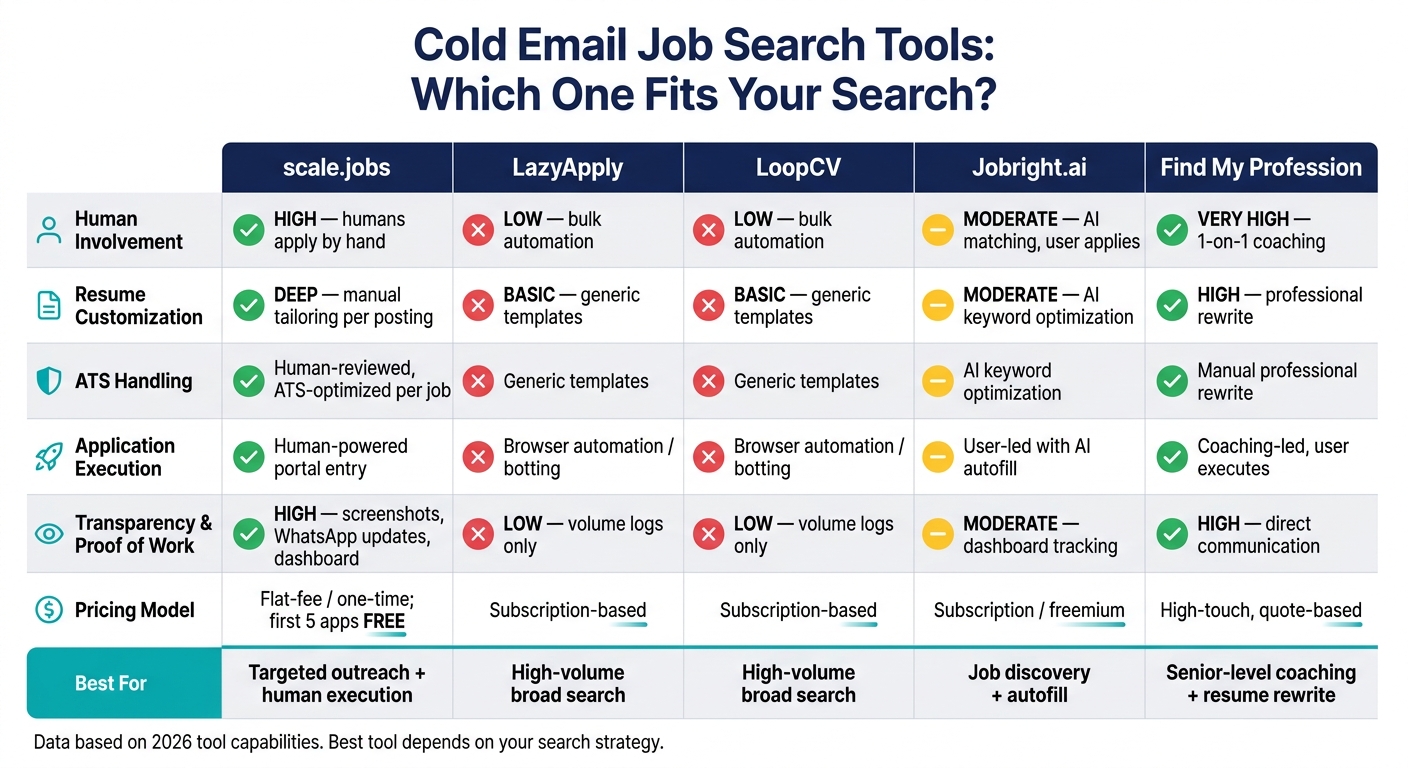
Cold Email Job Search Tools Compared: scale.jobs vs LazyApply vs LoopCV vs Jobright.ai vs Find My Profession
If your cold email plan depends on how cleanly each application gets done, compare these tools by workflow, not by sheer send volume. For candidates sending targeted outreach in 2026, the main question is simple: does the tool help you send reply-worthy applications, or does it just help you send more of them?
That difference matters a lot when you're trying to Apply for jobs in a way that supports personalized outreach instead of mass spraying resumes.
LazyApply vs scale.jobs and LoopCV vs scale.jobs: when bulk automation helps and when it hurts
LazyApply and LoopCV are built for volume-heavy searches. scale.jobs is built for cases where personalization, accuracy, and visible execution matter more.
Both LazyApply and LoopCV can save time if your goal is to submit to a large number of roles fast. That can work well for broad searches across the best job boards. But bulk automation helps with output, not replies. And if your cold email needs a tailored opener and LinkedIn cold outreach tips for a clean follow-up path, that gap starts to hurt.
scale.jobs takes a different route. Human assistants apply by hand, tailor documents for each posting, and send proof-of-work screenshots with WhatsApp updates. The pricing is a flat one-time payment, and the first 5 applications are free.
Why scale.jobs wins here:
- Human assistants apply by hand instead of using automation scripts.
- Documents are tailored for each posting for ATS safety, with screenshots and dashboard visibility as proof of work.
- Dedicated WhatsApp support keeps the process visible.
- One-time pricing with the first 5 applications free.
When your outreach depends on a polished application sitting behind the email, human review often matters more than raw speed. That’s where a managed job application service can make more sense than browser bots.
Who should use LazyApply or LoopCV: Candidates who want to maximize application volume and don't need custom submission handling.
Who should choose scale.jobs: Candidates going after high-value roles where tailored documents, human oversight, and proof of submission matter more than volume.
The same decision pattern shows up with Jobright.ai and Find My Profession, but those tools help earlier in the process.
Jobright.ai and Find My Profession vs scale.jobs: job matching and coaching versus human-powered apply
Jobright.ai is strongest at discovery and autofill. Find My Profession is strongest at coaching and resume rewriting. Both can help before outreach starts. Neither replaces execution once your email is ready and you need the application done the right way.
Jobright.ai does not center on verified submission handling. It helps you find roles and move faster, but much of the actual application work still lands on you. Find My Profession focuses more on prep and coaching than on submission volume.
scale.jobs adds human execution, ATS-tuned documents, WhatsApp updates, and proof-of-work screenshots. If you also need help rebuilding your documents before you start, the resume writing services include a professionally written resume, LinkedIn makeover, and direct 1-on-1 Zoom support. You can pair that with an ai resume builder or ai cover letter builder if you want to tighten your materials before handing off applications.
Why scale.jobs wins here:
- It handles application execution, not just discovery or coaching.
- Proof-of-work screenshots show what was submitted.
- WhatsApp updates and a dashboard keep the process visible.
- Flat-fee, one-time pricing instead of recurring subscriptions.
Who should use Jobright.ai: Candidates whose main bottleneck is job discovery and autofill.
Who should use Find My Profession: Candidates who want career strategy, coaching, and a professionally rewritten resume before they begin outreach.
Who should choose scale.jobs: Candidates who already know which roles they want and need a managed team to execute applications correctly with ATS-safe documents and proof of work.
This is also where the gap between a discovery tool and a job search platform becomes pretty clear. One helps you find openings. The other helps you get the application finished cleanly.
Comparison table: human involvement, ATS handling, transparency, and pricing
Use the table below to match the tool to your outreach process.
| Feature | scale.jobs | LazyApply | LoopCV | Jobright.ai | Find My Profession |
|---|---|---|---|---|---|
| Human Involvement | High - human assistants apply by hand | Low - bulk automation | Low - bulk automation | Moderate - AI matching, user applies | Very high - 1-on-1 coaching |
| Resume Customization | Deep - manual tailoring per posting | Basic - generic templates | Basic - generic templates | Moderate - AI-optimized keywords | High - professional rewrite |
| ATS Handling | Human-reviewed, ATS-optimized per job | Generic templates | Generic templates | AI keyword optimization | Manual professional rewrite |
| Application Execution | Human-powered portal entry | Browser automation / botting | Browser automation / botting | User-led with AI autofill | Coaching-led, user executes |
| Transparency & Proof of Work | High - screenshots, WhatsApp updates, dashboard | Low - volume logs only | Low - volume logs only | Moderate - dashboard tracking | High - direct communication |
| Pricing Model | Flat-fee / one-time payment; first 5 applications free | Subscription-based | Subscription-based | Subscription / freemium | High-touch, quote-based pricing |
The big split is human execution plus proof of work. scale.jobs combines hand-submitted applications, tailored documents, and visible proof. The others lean more toward volume, discovery, or coaching.
Decision Summary: When to Stay with Your Current Tool and When to Switch to scale.jobs
Use volume tools for broad search. Use scale.jobs when the application behind the email needs human handling.
Who should use LazyApply or LoopCV: people who want to Apply for jobs at scale across a broad search and don’t need custom submission handling.
Who should use Find My Profession: people who need job matching, coaching, and career strategy before they start outreach. If you need more hands-on guidance, a job search coach can help shape the plan before execution begins.
Who should choose scale.jobs: people who already know which roles they want and need a managed team to execute applications with ATS-safe documents, human review, and proof of work. That setup makes sense if you want a job application service instead of another self-serve tool.
If your outreach is already written, the next question is who can execute it cleanly. Once the email is ready, the deciding factor is execution quality.
Switch to scale.jobs if your cold emails need human review, ATS-safe documents, and visible execution
Use these rules to decide if your current tool still fits:
- You need ATS-safe documents tailored for each role.
- You want human-reviewed outreach that doesn’t sound like bulk automation.
- You’re dealing with a layoff or relocation and need human judgment to frame that context clearly in both the email and the application.
- You’re targeting visa-friendly roles where sponsorship language needs to stay consistent across every document.
- You want one-time pricing, WhatsApp updates, and proof-of-work screenshots so you can see what was submitted.
If document quality is the blocker, scale.jobs can handle that handoff too. It also offers resume and LinkedIn help if you need to rebuild your materials before outreach. For example, you might start with an ai resume builder or an ai cover letter builder, then hand things off for human review and submission.
Key takeaways for every outreach campaign
Template choice matters less than execution quality. A strong email paired with a sloppy or ATS-rejected application can waste the reply you worked hard to get.
Choose volume tools for broad searches. Choose scale.jobs for targeted outreach that depends on human review and visible execution. If you want one place to manage that process, a job search platform with human support can make the work a lot cleaner.