
Common ATS Resume Mistakes That Kill Your Job Applications

Sarah Mitchell
March 2, 2026

Did you know most resumes never reach a recruiter? Applicant Tracking Systems (ATS), used by over 99% of Fortune 500 companies, screen resumes before they’re seen by humans. These systems reject up to 75% of resumes due to formatting errors, missing keywords, or incompatible file types. Even small mistakes, like using tables or the wrong file format, can make your application invisible.
To improve your chances of landing interviews, here’s what you need to know:
- Avoid complex formatting like columns, tables, or graphics. Use a clean, single-column layout with standard fonts.
- Use job-specific keywords directly from the job description. Generic terms won’t cut it.
- Submit the right file type - stick to .docx or properly exported PDFs.
This guide explains the top ATS resume mistakes and how to fix them. Whether you're applying for full-time jobs or exploring part-time jobs near you, optimizing your resume can boost your chances of getting noticed. Tools like an AI resume builder or professional services can simplify the process. Let’s dive into actionable steps to make your resume ATS-friendly.
Your Resume Is Getting REJECTED by ATS (Here’s How to FIX IT) + FREE TEMPLATE INSIDE!
7 ATS Resume Mistakes That Get You Rejected
Even with the right experience, a poorly formatted resume or missing keywords can lead to rejection by an Applicant Tracking System (ATS). Below, we break down the most common mistakes and how to fix them, so your resume stands a better chance of making it through.
Complex Formatting That ATS Can't Read
Using tables, text boxes, headers, footers, or graphics can confuse ATS software. For instance, if your contact details are in a header or your resume uses a multi-column layout, systems like Taleo or iCIMS may fail to process critical information. These systems convert resumes into plain text, which often scrambles content in non-standard formats. This could mean your phone number is lost, job titles are jumbled, or your skills section becomes unreadable.
To avoid this, stick to a single-column layout with clear section headers like "Work Experience", "Education", and "Skills." Use standard fonts such as Arial, Calibri, or Times New Roman, and skip decorative elements like icons or shaded backgrounds. If you're unsure about formatting, consider professional help from platforms like Scale.jobs, or use an AI resume builder to ensure your resume is ATS-ready.
Missing Job-Specific Keywords
ATS software scans resumes for specific keywords from the job description. If your resume uses generic terms like "team leadership" instead of "project management", or "database queries" instead of "SQL", your match score will drop. Vague phrases like "responsible for" or "worked on" also underperform because they lack the exact terms the system is looking for.
To fix this, match the language in the job posting. For example, if the listing mentions "Salesforce CRM", use the full term instead of just "CRM." Platforms like Scale.jobs offer human-driven resume customization, ensuring keywords are aligned without overloading your resume with irrelevant terms. This approach is far more effective than automated keyword stuffing, which can sometimes trigger ATS spam filters.
Wrong File Format
Using the wrong file format, such as .jpg, .png, or scanned PDFs, often leads to instant rejection because ATS systems can’t read images. Similarly, files like .pages or improperly created PDFs can result in parsing errors, making your resume invisible to recruiters. Even some PDFs fail if they’re created using "Print to PDF" instead of "Save As" or "Export", which removes the text layer necessary for ATS processing.
For online applications, always submit your resume in .docx format, as it’s the most compatible with ATS software. If emailing directly to a recruiter, a properly exported, text-based PDF works well. A quick way to test your file is to try highlighting text - if it’s not possible, the format is unsuitable. Before submitting, run your resume through an ATS checker to ensure it’s readable.
| File Format | ATS Compatibility | Best Use |
|---|---|---|
| .docx | High; text is easily read | Ideal for online job applications |
| Text-based PDF | Moderate; proper export needed | Best for direct emails or networking |
| .jpg, .png, scanned PDF | None; unreadable by ATS | Avoid completely |
| .pages | Low; parsing issues common | Not recommended for job applications |
How to Fix Your Resume for ATS
Creating a resume that works seamlessly with ATS systems requires a clean design, precise keyword alignment, and thorough testing. The aim is to ensure that your resume not only passes ATS filters but also appeals to recruiters. Below, we’ll walk through actionable steps to optimize your resume for ATS, along with insights into how Scale.jobs stands out compared to competitors like Jobscan and Resume Genius.
Start With an ATS-Friendly Template
Begin with a simple, single-column layout using standard fonts such as Arial, Calibri, or Times New Roman. Stick to conventional section headings like "Work Experience", "Education", and "Skills", arranged in reverse chronological order. Avoid unconventional labels like "My Journey" or "What I Bring to the Table", as these can confuse ATS systems. Place your contact details at the very top of your resume.
If you’re looking for an easy solution, Scale.jobs offers a free resume builder that automatically generates ATS-optimized templates. These templates are designed to avoid common pitfalls like tables, text boxes, or graphics, ensuring your content is parsed correctly. For those creating resumes manually, use horizontal lines to separate sections and stick to black text on a white background for clarity. Additionally, include both the full term and its acronym for technical skills - write "Search Engine Optimization (SEO)" instead of just "SEO" - to ensure the ATS picks up both variations.
Match Keywords From the Job Description
Keywords are the backbone of ATS optimization. Carefully review the job description and highlight recurring terms, essential skills, and specific tools. For example, if "risk analysis" is mentioned multiple times, use that exact phrase in your resume instead of alternatives like "risk management" or "financial assessment." Focus on the "Requirements" section of the job posting to identify must-have terms.
Integrate these keywords naturally into your resume, weaving them into your professional summary, experience bullets, and skills section. Using tools like Jobscan or Scale.jobs can help you compare your resume against the job description. These tools provide a match percentage and point out missing keywords, often helping users improve their match rate significantly - from around 40% to 80% after adjustments. Once your keywords are in place, testing your resume for ATS compatibility is the next critical step.
Test Your Resume Before Applying
Before submitting your resume, run it through an ATS checker like the free scanner offered by Scale.jobs. This tool identifies formatting issues, unreadable sections, and missing keywords, simulating how systems like Taleo or iCIMS will process your resume. The scanner provides a detailed, color-coded report showing matched terms (in green) and missing ones (in red), along with actionable suggestions such as "move contact info out of the header" or "add 'SQL' to the skills section."
Another quick test is to paste your resume into Notepad. If all sections appear intact and readable, your formatting is likely ATS-friendly. Always save your resume as a .docx file for online applications unless a PDF is explicitly requested. Also, check that you can highlight all the text in your document - if you can’t, the ATS may struggle to read it.
If this process feels overwhelming, professional resume services can simplify the task. These services handle everything from formatting to keyword optimization, ensuring your resume is ATS-ready before it reaches recruiters.
Scale.jobs vs Jobscan vs Resume Genius vs Rezi.ai for ATS Optimization
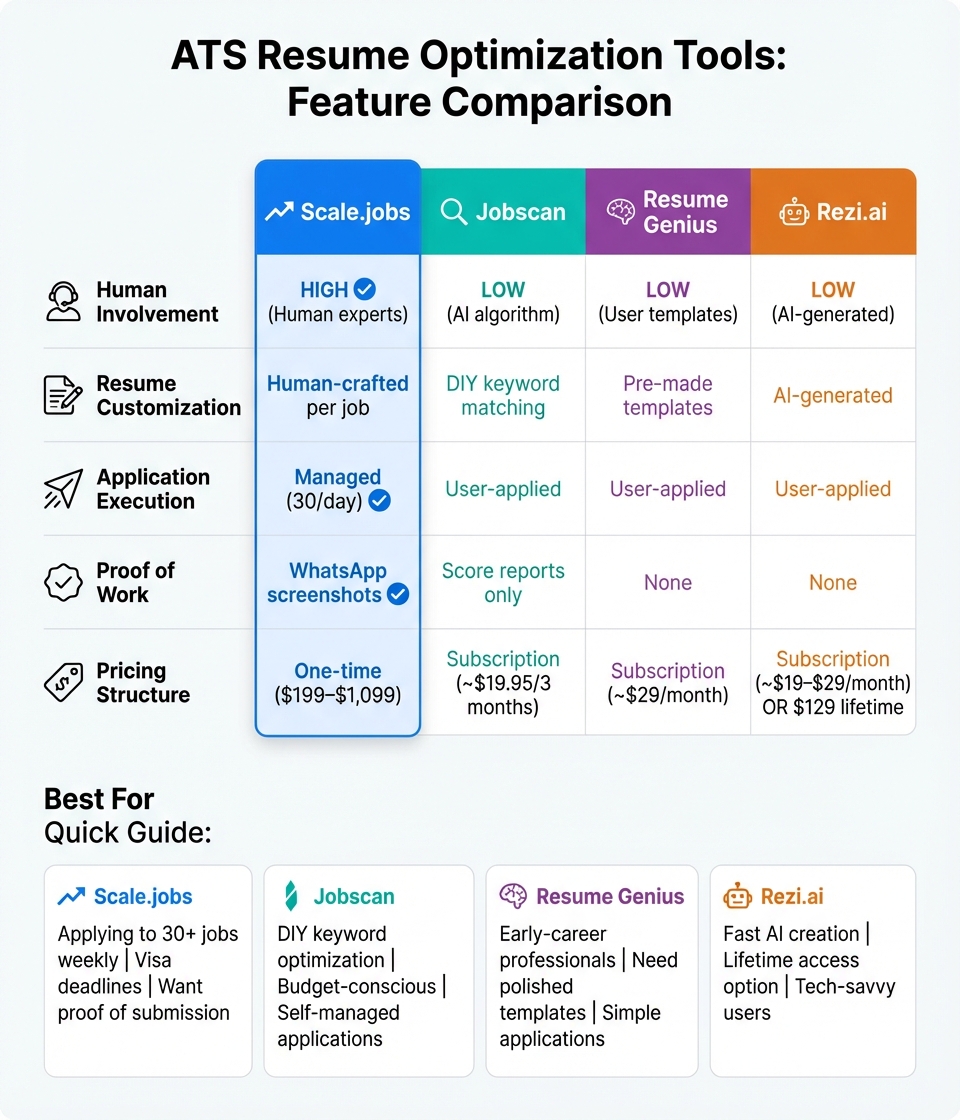
ATS Resume Optimization Tools Comparison: Scale.jobs vs Jobscan vs Resume Genius vs Rezi.ai
When it comes to picking the right tool for ATS (Applicant Tracking System) optimization, the choice often depends on whether you want to manage the process yourself or let someone else handle it. Here's a quick breakdown of what each platform brings to the table:
- Jobscan: Known for its precise keyword match scoring, it uses AI to simulate ATS platforms and provides a percentage match score for your resume.
- Resume Genius: Offers a library of templates with high parsing accuracy, giving users a polished starting point for their resumes.
- Rezi.ai: Acts as an AI-powered resume builder that focuses on speed, generating tailored bullet points and conducting ATS checks.
- Scale.jobs: Stands out by involving human experts who create customized resumes and manually submit up to 30 applications daily, avoiding the pitfalls of automated tools.
Why Scale.jobs Wins for ATS Applications
Scale.jobs sets itself apart with its human-driven approach, offering features that are particularly valuable for job seekers managing large-scale application campaigns. Here’s what makes Scale.jobs a standout:
- Personalized Resumes: Human experts craft job-specific resumes within 24 hours, ensuring no formatting errors or awkward AI-generated phrasing.
- Proof of Work: Applicants receive WhatsApp screenshots showing exactly when and where their applications were submitted, a level of transparency that DIY tools lack.
- One-Time Payment: Pricing ranges from $199 to $1,099 based on the number of applications, avoiding recurring subscription fees.
- Dedicated Support: Direct WhatsApp access to a personal assistant ensures quick responses, not automated replies.
- Manual Submission: Applications are submitted manually, reducing the risk of bot-detection systems flagging automated submissions.
For individuals applying to a high volume of positions - especially those on tight deadlines due to visa requirements or career shifts - this service can save over 20 hours a week, freeing up time for networking and preparing for interviews. For those needing more than just resume optimization, Scale.jobs professional resume services offer end-to-end support.
What Competitors Do Well
Each competitor has its strengths:
- Jobscan: Excels at identifying hard skill gaps and provides the most accurate keyword match scoring, offering five free scans per month.
- Resume Genius: Features a wide range of templates that ensure professional presentation and ATS compatibility.
- Rezi.ai: Focuses on speed with its tailored bullet points and offers a lifetime access option for users comfortable managing their own applications.
Where Scale.jobs stands out is in execution and accountability. While competitors provide the tools for optimization, Scale.jobs handles the entire process, from resume customization to application submission, and provides daily updates with timestamps for full transparency.
Feature Comparison: Scale.jobs vs Jobscan vs Resume Genius vs Rezi.ai
| Feature | Scale.jobs | Jobscan | Resume Genius | Rezi.ai |
|---|---|---|---|---|
| Human Involvement | High (Human experts) | Low (AI algorithm) | Low (User templates) | Low (AI-generated) |
| Resume Customization | Human-crafted per job | DIY keyword matching | Pre-made templates | AI-generated |
| ATS Handling Method | Manual verification | Automated scoring | Template-based | AI optimization |
| Application Execution | Managed (30/day) | User-applied | User-applied | User-applied |
| Proof of Work | WhatsApp screenshots | Score reports only | None | None |
| Pricing Structure | One-time ($199–$1,099) | Subscription (~$19.95/3 months) | Subscription (~$29/month) | Subscription (~$19–$29/month) or $129 lifetime |
When to Choose Scale.jobs
Switching to a managed service like Scale.jobs makes sense if:
- You're applying to 30+ jobs weekly and need to save time for networking and interviews.
- You value proof-of-work transparency with submission screenshots.
- You're dealing with visa deadlines or career changes, requiring fast, tailored applications.
- You want to avoid bot-detection issues caused by automated tools.
- You prefer a one-time payment rather than ongoing subscription fees.
Decision Summary
- Scale.jobs: Ideal for those seeking a fully managed, human-assisted application process with clear proof of work and one-time pricing.
- Jobscan: Best for DIY users who need quick keyword analysis to optimize their resumes.
- Resume Genius: Perfect for early-career professionals who want polished templates for straightforward applications.
- Rezi.ai: A good choice for users looking for fast, AI-driven resume creation with lifetime access options.
Each tool has its place, but if you're juggling multiple applications and need a hands-off approach, Scale.jobs offers a comprehensive solution that can save you significant time and effort.
When to Use Scale.jobs for ATS-Optimized Applications
Navigating the challenges of Applicant Tracking Systems (ATS) can be overwhelming, especially when you're applying to dozens of roles weekly. Manual errors like typos, inconsistent formatting, and mismatched keywords often lead to missed opportunities - issues that become even more critical when tackling high-volume applications.
Scale.jobs steps in to address these challenges, particularly when you're applying to 30+ positions each week. Their process ensures each resume is crafted and manually reviewed for ATS compatibility. Unlike automated tools, Scale.jobs submits applications manually, bypassing bot-detection systems. To give you peace of mind, they even provide proof-of-submission via WhatsApp screenshots, confirming your resume has successfully passed through the ATS and landed with a recruiter.
This service proves especially useful when targeting roles with large applicant pools - think 250+ candidates - where generic resumes are quickly filtered out. If you're dealing with visa deadlines, switching careers, or simply managing a high volume of applications, Scale.jobs offers a one-time pricing model ($199–$1,099). This eliminates recurring subscriptions while saving you over 20 hours a week, time you can redirect toward networking and interview preparation. For those who require more than just ATS optimization, their professional resume services can take care of the entire application process.
Consider Scale.jobs if:
- You're applying to 30+ positions weekly and need to focus on networking and interviews.
- You're targeting roles with 250+ applicants, where precision in resume formatting and content is critical.
- You face tight deadlines, such as visa requirements or career transitions.
- You want transparent, human-verified submission reports instead of relying on automated tools.
- You're frustrated with testing your resume in plain-text editors, only to find formatting errors or disorganized sections.
Scale.jobs is particularly effective for professionals applying to mid-sized or large U.S.-based employers, where accuracy and ATS compatibility outweigh flashy resume designs. For those who prefer managing their own applications, tools like Jobscan for keyword optimization or Rezi.ai for AI-generated templates are solid alternatives. However, if you prioritize execution, accountability, and human oversight, Scale.jobs offers an end-to-end solution, ensuring your application reaches the right hands.
Who Benefits Most from Scale.jobs?
Applicants overwhelmed by the sheer volume of applications, under tight deadlines, or seeking error-free submissions will find Scale.jobs invaluable. Their hands-on, expert-driven approach directly addresses the common pitfalls of ATS, giving you a better shot at making it to a recruiter’s inbox.
FAQs
How can I tell if my resume is ATS-friendly?
When crafting an ATS-friendly resume, keep the formatting straightforward. Opt for a single-column layout with clearly labeled sections such as "Work Experience" or "Education." Avoid using tables, graphics, or multi-column designs, as these can confuse applicant tracking systems. Incorporate relevant keywords directly from the job description to align with the role’s requirements. Save your resume in standard file formats like .docx or PDF, and ensure dates are formatted consistently, such as MM/YYYY.
To ensure your resume is compatible with ATS software, consider testing it using ATS tools. This step helps verify that the system can correctly parse your information and that your keywords are effectively highlighted for recruiters.
How many keywords should I include without overdoing it?
When optimizing your resume for an Applicant Tracking System (ATS), it's important to focus on relevant and specific keywords. Aim for 10 to 20 carefully selected terms that align with the job description. This balance ensures your resume is both effective and professional. Overloading your resume with unnecessary keywords can backfire, as ATS systems may flag it for keyword stuffing. Instead, prioritize quality over quantity by incorporating terms that genuinely reflect your skills and experiences, such as those mentioned in the job posting. For instance, if you're applying for full time jobs or roles listed on the best job boards, tailor your language to match the desired qualifications.
Should I submit a PDF or .docx for online applications?
When applying online, it's usually best to submit your resume as a .docx file. Many Applicant Tracking Systems (ATS) process .docx files more effectively than PDFs, reducing the chances of formatting errors or overlooked keywords. This ensures your resume is accurately analyzed and increases your chances of moving forward in the hiring process.