
How to Get Recruiters to Find You on LinkedIn (2026 Algorithm Guide)

Sarah Mitchell
June 23, 2026

If recruiters are not finding you on LinkedIn, sending more applications will not fix it. In 2026, LinkedIn search is driven by your headline, current title, skills, location, and recent activity.
Here’s the short version:
- Search match beats application volume
- Your first 80 headline characters matter most
- Search Appearances + Profile Views tell me what to fix
- LazyApply is better for broad testing
- scale.jobs is better when I need tighter submissions and closer resume/profile match
If I want more recruiter messages, I start with profile search terms first, then I fix activity, then I look at how I Apply for jobs. That order matters.
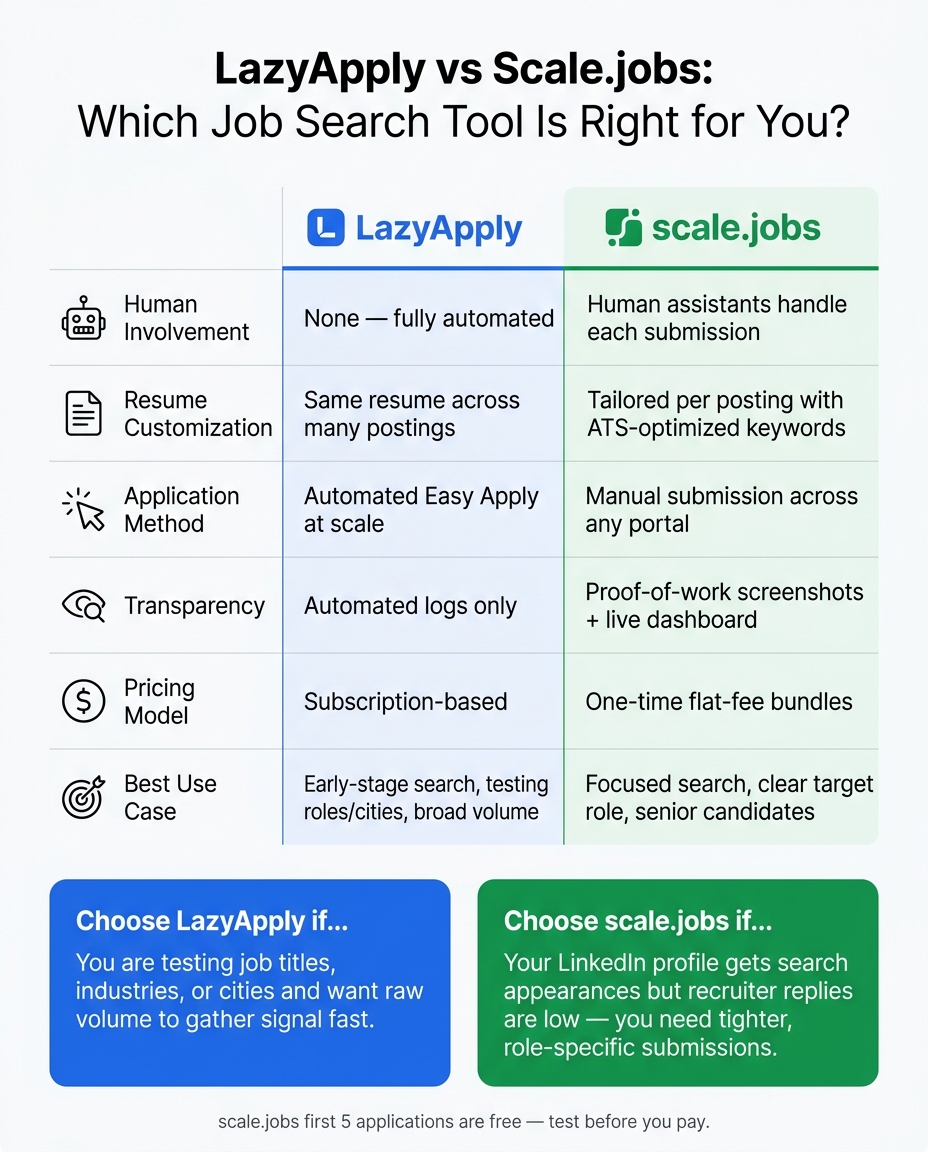
LazyApply vs Scale.jobs: Which Job Search Tool Is Right for You?
LinkedIn Profile Optimization for Job Seekers in 2026
The answer in one view
Recruiters use LinkedIn Recruiter filters. If my profile does not match the words they search, I will not show up often, even if I apply to 100+ roles. The fix is simple: line up my headline, About, Experience, Skills, location, and target titles with live job descriptions.
Quick Comparison
| Topic | What matters most | What I do |
|---|---|---|
| LinkedIn visibility | Headline, title, skills | Put target role first |
| Recruiter clicks | Headline + proof | Add numbers and clear results |
| Search growth | Weekly activity | Comment, post, react each week |
| Broad application testing | Volume | Use a tool like LazyApply |
| Targeted application quality | Resume/profile match | Use human help like scale.jobs |
My playbook to get found on LinkedIn
I keep it simple:
- Fix search fields first
- Track LinkedIn analytics weekly
- Match resume language to profile language
- Pick the right application workflow
- Change only one or two things every 2–4 weeks
That is the whole system.
What I’d fix first on LinkedIn
The biggest mistake I see is a profile that sounds fine to people but does not match recruiter search filters.
1) Rewrite the headline for search, not style
I use this format:
Target Role | Specialty | Proof | Location
Example:
Senior Product Manager | B2B SaaS | Grew ARR from $2M to $12M | Remote or Austin
Why this works:
- The role shows up first
- The specialty narrows fit
- The proof gives a reason to click
- The location helps with recruiter filters
If my headline starts with a vague phrase or only my current title, I waste the part recruiters see first.
2) Tighten the About section
I treat the first 300 characters like ad copy. I include:
- target title
- top 3 skills
- one proof point
- one short call to action
Example:
Data Analyst with 5+ years in SaaS. Strong in SQL, Tableau, and Python. Built reporting that cut manual work by 18 hours per week. Open to full-time remote roles in the U.S.
That is easier to scan than a long personal story.
3) Fix job titles in Experience
If my company gave me a strange internal title, I translate it.
Example:
- Bad: Customer Success Ninja
- Better: Customer Success Manager
If needed, I can combine both:
Customer Success Manager | Internal title: Customer Success Ninja
This helps LinkedIn search and helps recruiters understand fit fast.
4) Fill all 50 skill slots
Many people stop too early here. I would not.
I pin the top 3 skills to match my target job, then fill out the rest with related terms from current job postings. This matters whether I want full time jobs or I am testing lighter options like Part time jobs near me.
5) Set filters recruiters use
I check these before anything else:
- Open to Work in recruiter-only mode
- up to 5 target job titles
- target seniority
- city or metro recruiters search for
- contact info that works
A profile can get views and still lose interviews if recruiters cannot contact me fast. A digital business card maker can help job seekers create a shareable professional profile with their contact details, LinkedIn URL, and portfolio link, making it easier for recruiters and networking contacts to connect with them.
The weekly LinkedIn workflow I’d use
I do not need to post every day. I just need a steady pattern.
Weekly cadence
- 2–3 comments on recruiter or hiring manager posts
- 1 short post about work, learning, or a project
- 3–4 reactions across the week
That is enough to keep the profile active.
If I work in data, I naturally use words like SQL, Python, or Tableau when they fit. I do not stuff terms into comments. I just use the same language I see in job descriptions.
A simple example
If I want product roles at fintech companies, I might:
- comment on a PM post about user retention
- share one short post on an A/B test I ran
- react to hiring posts from target companies
This keeps my profile pointed in one direction. That is what I want recruiters to see.
How I read LinkedIn analytics
LinkedIn gives me enough data to spot the weak point.
If Search Appearances are low
My keywords are off.
I update:
- headline
- current title
- skills
- first lines of About
If Search Appearances are high but views are low
My click-through is weak.
I update:
- headline wording
- profile photo
- proof in the headline
If views are there but messages are low
My profile is not closing the gap.
I update:
- proof in Experience
- numbers in About
- contact details
- target role clarity
I would review these numbers once a week for 2–4 weeks before changing more.
LazyApply vs Scale.jobs
If my LinkedIn profile is already getting found, the next question is simple:
Can my application process turn visibility into interviews?
Quick take
- LazyApply helps with broad volume
- Scale.jobs helps when I need tighter submissions and closer alignment
Is LazyApply worth it?
Yes, if I am still testing the market.
LazyApply makes more sense when I am:
- trying many titles
- testing cities
- checking response patterns
- looking for raw application volume
That can help early in a search.
But there are limits. If my LinkedIn profile says one thing and my resume says another, I send mixed signals. That can hurt search fit and application quality at the same time.
If I want to test volume first, I can do that. But if I already know my target role, I would not rely only on browser automation.
sbb-itb-564272e
LazyApply vs Scale.jobs: which one fits better?
This depends on where the breakdown is happening.
| Factor | LazyApply | Scale.jobs |
|---|---|---|
| Best use case | Broad testing | Focused search |
| Submission type | Automated Easy Apply | Manual submissions |
| Resume match | Usually lighter | Closer match to each role |
| Human review | No | Yes |
| Tracking | App logs | Proof-of-work screenshots |
| Best for | Early-stage search | Clear target roles |
If I need a more hands-on job application service, the second route makes more sense.
When I would switch from automation to human help
I would switch if two or more of these are true:
- Search Appearances are up
- Profile Views are up
- Recruiter replies are still low
- I do not have time to tailor applications
- My resume does not line up with my LinkedIn profile
- I want proof that each application was sent
That is usually the point where a Virtual Assistant for Job Applications or a job search virtual assistant makes more sense than more volume.
My step-by-step fix plan
If I had to clean this up in one week, I would do this:
Day 1: Profile rewrite
- Rewrite headline
- Fix current title
- Update first 300 characters of About
- Fill skill slots
Day 2: Experience cleanup
- Translate internal titles
- Add 2–4 bullets per role
- Add numbers where I can
Day 3: Recruiter settings
- Turn on Open to Work
- Add target titles
- Set metro location
- Check contact info
Day 4: Resume match
- Pull terms from 10 live job descriptions
- Make sure profile and resume use the same language
- Use an ai resume builder if I need help tightening phrasing
Day 5: Activity setup
- Leave 2 comments
- Post 1 short insight
- Follow target companies
Day 6–7: Track and review
- Check Search Appearances
- Check Profile Views
- Check viewer fit
If I also need better documents, an ai cover letter builder can help me clean up the basics before I send more applications.
A plain example
Let’s say I want a remote data analyst role.
Bad setup:
- Headline says: Open to Work
- Current title says: Business Wizard II
Build a LinkedIn Profile Recruiters Can Actually Find
Once you’ve picked a tool to help you Apply for jobs, fix the LinkedIn fields recruiters search first. In 2026, your headline and current title carry the most weight. Sending out tons of applications won’t do much if your profile doesn’t line up with recruiter filters.
Write a headline that matches recruiter search filters
Use a simple formula: Target Role | Specialty | Proof | Location.
For example: "Senior Product Manager | B2B SaaS | Grew ARR from $2M to $12M | Open to Remote or Austin".
The first 80 characters show up in search before LinkedIn cuts the rest off. That means your target role and specialty should come first. Don’t waste that space on a headline that only repeats your current job title.
After that first glance, recruiters usually move to your About, Experience, and Skills sections to check whether the title holds up.
Fix your About, Experience, and Skills sections for search relevance
Each section has a very specific job in recruiter search.
- About: The first 300 characters matter most in search and are the only part people see before clicking “see more.” Start with your target title and top three skills. Then add proof with numbers, a short skills cluster, and a brief call to action. If you’re using a job search platform or working with a job search coach, this is one of the first places worth tightening.
- Experience: Use job titles recruiters type into search. If your company gave you a quirky internal title, translate it into plain language. For example: "Customer Success Manager | Internal title: Customer Success Ninja". Add 2–4 bullets for each role. A clean pattern works best: problem, action, result. Use real numbers when you can, like revenue added, money saved, or team size managed.
- Skills: LinkedIn connects related keywords, not just exact matches. Fill all 50 skill slots. Pin your top three so they match your main job function, then group related skills around them. This matters a lot if you want more matches for full time jobs or even Part time jobs near me, since recruiter searches often stack title + skill filters together.
Set Open to Work, location, and contact fields to attract the right recruiters
Search visibility isn’t only about keywords. Recruiters also filter by settings you control. Three moves do most of the work:
- Turn on Open to Work in Recruiter-only mode. Add up to five target job titles and your target seniority levels.
- Set your location to the city or metro area recruiters are searching for, not just where you happen to live right now.
- Update your contact info so recruiters can reach you fast. If they find your profile but can’t contact you, they may move on.
If you’re using a job application service or a Virtual Assistant for Job Applications, these settings are worth double-checking before any applications go out.
Next, use activity and profile analytics to see which updates lead to more search appearances.
Use Activity and Analytics to Get Found by More Recruiters
A weekly activity pattern that supports search visibility
Once your profile fields are set up well, weekly activity helps keep those keywords active in LinkedIn search. Recent posts, comments, and profile engagement can help your profile stay visible when recruiters look for candidates. Some recruiters also filter for recent activity, so a quiet profile can drift down the list. That said, activity helps a strong profile travel farther. It won't rescue weak keyword targeting.
A simple weekly rhythm is often enough:
- 2–3 relevant comments on posts from recruiters or hiring managers in your target field
- 1 short insight post based on something you've shipped, learned, or noticed at work
- 3–4 light check-ins with reactions so your profile stays active
Keep your comments specific, and work in target-role keywords where they fit naturally. For data roles, that might mean terms like SQL, Tableau, and Python. No need to stuff them in. Just use the same language employers use in job descriptions.
One step many people miss: engage with posts from companies where you want to work. If a recruiter from that company checks your profile, they may already see signs that you're paying attention. It's a small thing, but it can help your profile feel more aligned with the role.
If you're trying to Apply for jobs in a more focused way, this kind of activity works best when it matches the same roles you're targeting elsewhere. The goal is simple: make your profile, comments, and outreach all point in the same direction.
Then check LinkedIn's own numbers to see if any of this is paying off.
Use LinkedIn search appearances and profile views as feedback
LinkedIn gives you two free signals worth checking every week: Search Appearances and Profile Views.
Here's the plain-English read:
- Low Search Appearances usually means your keywords don't line up with the jobs you want.
- High appearances but low views often means your headline isn't getting clicks.
- Views without messages usually means your About and Experience sections need stronger proof.
That gives you a clear way to decide what to change next. Maybe you need better keywords. Maybe your headline needs a sharper hook. Maybe your profile tells people what you did, but not how well you did it.
Track edits over a 2–4 week window before making more changes. LinkedIn data can be noisy from day to day, so give each update a little room to work. It also helps to check "Who's Viewing Your Profile" once a week. If the people viewing you don't match your target roles or target companies, swap out weak terms for phrases pulled from current job descriptions.
| Metric | What it signals | Fix if flat |
|---|---|---|
| Search Appearances | Keyword relevance | Add JD keywords to headline and skills. |
| Profile Views | Click-through appeal | Improve photo and headline hook. |
| Viewer Insights | Audience quality | Refine keywords for target roles. |
| Inbound InMails | Profile conversion | Add measurable results and a stronger About lead. |
This same feedback loop can help if you're using a job search platform, working with a job search coach, or testing a job application service. The tools may differ, but the pattern stays the same: check the signal, spot the drop-off, fix the weak point.
If visibility goes up but recruiter outreach still feels thin, the issue is usually execution, not profile setup. At that stage, the profile may be getting found, but your proof, positioning, or follow-through still needs work.
LazyApply vs scale.jobs: Which Tool Fits a LinkedIn-First Job Search
If your LinkedIn profile already gets search appearances, the next step is simple: can your tool turn that attention into interviews?
That’s where the split between automation and human support starts to matter. If you’re still figuring out what kind of roles to target, a high-volume tool can help you test the market. But if you already know what you want, the quality of each submission starts to matter more than the raw count.
Where LazyApply helps, and where it falls short
LazyApply can be useful when you’re in the early stage of a search. If you’re testing different job titles, industries, or cities, fast application volume can help you spot patterns. In that sense, it works as a rough testing tool for people trying to Apply for jobs fast before narrowing their focus.
That said, speed can become a problem when it turns into the whole plan.
Automated Easy Apply submissions give you limited control over how your resume language matches your LinkedIn profile. That matters because LinkedIn’s 2026 search system leans on semantic matching. If your profile talks about one set of skills while your application materials lean on another, those signals don’t back each other up.
And there’s another issue: LinkedIn also surfaces candidates based on recent activity in the last 30 days. An automated tool can submit at scale, but it can’t tune your application around those live platform signals. So yes, volume may help you cast a wide net. But volume without alignment often leaves people buried in crowded applicant pools.
This is why many people who use automation still end up looking for a job application service later. The bottleneck often isn’t effort. It’s fit.
Why scale.jobs works better for targeted recruiter discovery
The biggest difference is human involvement where it counts: keywords, positioning, and submission quality.
scale.jobs uses human assistants for each application, which helps align your resume language with your LinkedIn profile so both support the same skill clusters. That matters because your headline and current title carry a lot of weight in recruiter search. If those signals line up, your profile and your application tell the same story.
That’s hard for an automated tool to do well, especially if you’re aiming for a narrow set of full time jobs or a more focused search path through a job search platform.
scale.jobs also adds a few practical features that software alone usually can’t match:
- Proof-of-work transparency: Time-stamped proof shows each submission.
- Dedicated WhatsApp support: Real-time updates make it easier to adjust targeting as your search changes.
- ATS-optimized documents: Tailored resume and cover letter versions match each role.
- Manual submission across ATSs and niche boards: Human assistants handle company ATS systems and niche boards across different workflows.
If your LinkedIn profile already gets impressions but recruiter messages are still light, the issue usually isn’t that you need more applications. It’s that your submissions may not be strong enough, tight enough, or aligned enough. That’s the point where a Virtual Assistant for Job Applications can make more sense than another automation stack.
Who should use LazyApply and who should choose scale.jobs
Use the table below to match the tool to your current search plan.
| Factor | LazyApply | scale.jobs |
|---|---|---|
| Human involvement | None; fully automated | Human assistants handling each submission |
| Resume customization | Lower-depth customization; often uses the same resume across many postings | Tailored per posting with ATS-optimized keywords |
| ATS handling | Basic keyword matching | Matching keywords across LinkedIn and the submitted resume |
| Application method | Automated Easy Apply at scale | Manual submission across any portal |
| Transparency | Automated logs | Proof-of-work screenshots and live dashboard |
| Pricing model | Subscription-based | One-time flat-fee bundles |
LazyApply fits job seekers who are early in the process, testing several roles or locations, and mainly want raw volume to gather signal fast. It’s a fair starting point if you haven’t narrowed your target role or industry yet. The same goes for people casually browsing Part time jobs near me or trying broad search patterns before getting more focused.
scale.jobs fits job seekers with a clear target: a specific role, industry, location, or seniority level. It works better when your applications need to match the quality of your LinkedIn profile and support recruiter discovery, not just submission count. That’s often the better path for senior candidates, selective searches, or anyone who’d rather work with a job search coach or hands-on support model than rely on mass automation.
Decision Summary and Switch Criteria
Decision Summary: choose the tool that matches your search method
Pick the tool that fits how you Apply for jobs.
Choose LazyApply if your goal is speed, broad reach, and high application volume through Easy Apply. It works best when you want to send a lot of applications fast and cover more ground across a job search platform.
Choose scale.jobs if your LinkedIn profile shows search appearances, but recruiter replies stay low. That usually points to a follow-through problem, not a discovery problem. In plain terms: people may be finding you, but your applications may not be specific enough for the role or clean enough for ATS review.
The signals to watch are simple: search appearances, profile views, and recruiter replies. Those numbers tell you which tool is helping and which one is just keeping you busy.
Switch to scale.jobs if your LinkedIn profile is strong but interviews are still low
Use this checklist. If two or more fit your situation, switching is probably the more practical move:
- Search appearances are going up, but recruiter replies are still low
- You're sending generic applications instead of tailoring each resume to the posting
- You don't have time to tailor each application one by one
- You want proof-of-work tracking and time-stamped submission updates
- You prefer flat-fee pricing over a recurring subscription
This is where scale.jobs starts to make more sense than a high-volume tool. It focuses on manual, role-specific submissions with human help and ATS-tuned documents. If your profile already gets attention, that extra care can matter more than sending another 200 clicks into the void.
If you're also thinking about updating your resume, their resume writing and career support packages can work alongside the job application service. And if you need stronger application materials first, tools like an ai resume builder or ai cover letter builder can help tighten up the basics before you send anything out.
The first 5 applications are free, so you can test the workflow before paying. That makes it easier to see whether a Virtual Assistant for Job Applications is a better fit than staying on autopilot.
FAQs
How long should I wait before changing my LinkedIn profile again?
There’s no required waiting period between LinkedIn profile updates. In fact, updating your profile can give you a short visibility bump, since LinkedIn may treat those changes as a sign that you’re active and engaged in your career.
So if you spot a better way to match your headline, About section, or skills to the keywords tied to your target role, make the change now. That matters whether you’re trying to Apply for jobs more often, improve your profile for a job search platform, or line up with what recruiters search for on the best job boards.
The bigger risk isn’t updating too often. It’s leaving your profile stale, off-target, or missing the terms that show you fit the role. If you’re also using tools like an ai resume builder, your LinkedIn profile should stay in sync with that story.
Which keywords should I copy from job descriptions into my profile?
Review 10–15 job posts for your target role and note the skills, tools, methods, and industry terms that keep showing up. LinkedIn doesn’t just scan for exact matches. It also reads context and meaning. That said, using the same wording recruiters use still helps a lot.
Focus on four parts of your profile:
- Headline: your target job title plus 2–3 main skills
- About: put your title and top keywords near the beginning
- Experience: work keywords into results with numbers
- Skills: add 15–20 skills that fit the roles you want
Here’s the simple idea: if job posts keep saying SQL, stakeholder management, and A/B testing, your profile should say those exact terms where they fit. Don’t swap them for vague phrases if recruiters aren’t using those phrases.
For example, instead of writing:
Helped teams make better business decisions
write something closer to:
Used SQL, Excel, and A/B testing to support business decisions and improve campaign performance by 18%
That approach makes your profile easier to match and easier for a recruiter to scan in seconds.
If you’re trying to Apply for jobs at scale, this step matters even more. The same goes if you use a job application service or work with a job search coach, because your profile and your applications should use the same language.
A quick workflow helps:
- Open 10–15 job posts for the same role
- Highlight repeated titles, tools, and skill phrases
- Group them into must-have and nice-to-have terms
- Add the top phrases to your Headline, About, Experience, and Skills sections
This is also a good step before using an ai resume builder or ai cover letter builder, since those tools work better when your source language is tight and role-specific.
Why am I getting profile views but no recruiter messages?
You’re getting seen, but that attention isn’t turning into recruiter interest. People land on your profile, then move on because it doesn’t make the fit obvious.
Common reasons:
- Your headline or photo earns the click, but your About section and work history feel too generic.
- Your summary doesn’t quickly spell out your target role, core skills, and what you bring to the table.
- Your Open to Work settings or keywords are too narrow, off-target, or so broad that they blur your focus.
This is where a lot of job seekers get stuck. They show up in search, but their profile doesn’t close the gap between visibility and interest. If you’re trying to Apply for jobs more effectively, your profile needs to do one simple thing fast: tell recruiters who you are, what you do, and where you fit.
A strong profile should make it easy for someone to say, “Yes, this person matches what I need.” If that’s not happening, a job search coach or virtual assistant for job seekers can help tighten the message and line it up with the roles you want.
If your profile is getting views but not replies, don’t assume the market is the only problem. Sometimes the issue is just positioning. And fixing that can improve results across your whole job search platform workflow.