
Why Your Resume Gets Ignored & What Professionals Do Differently

Sarah Mitchell
March 4, 2026

In today’s job market, 75% of resumes never make it past Applicant Tracking Systems (ATS), meaning your application might not even reach a recruiter. Common mistakes like missing keywords, generic content, or formatting issues can lead to automatic rejections. Professionals, however, use proven strategies to overcome these hurdles.
Here’s what they do differently:
- Use ATS-friendly templates: Simple, single-column layouts with standard section headers like "Work Experience."
- Optimize keywords: Match job-specific terms precisely, e.g., "Search Engine Optimization (SEO)" instead of just "SEO."
- Highlight achievements: Showcase measurable results that align with job requirements, such as “Reduced processing time by 30%.”
For those struggling with the process, tools like Jobscan.co and services like scale.jobs can help. While Jobscan.co analyzes keyword gaps, scale.jobs goes further by managing applications, tailoring resumes, and providing proof of submissions.
Quick tip: Avoid creative layouts, images, and text boxes that confuse ATS systems. Stick to .docx or text-based PDFs for better results. Want to save time? Consider a job application service to handle the heavy lifting.
Below, we’ll dive into actionable tips, compare Jobscan.co vs scale.jobs, and share how you can create a resume that gets noticed with real-life examples.
Why Most Resumes Get Rejected
Missing the Right Keywords
Even if you're fully qualified for a job, your resume might never make it to a recruiter's desk because of how Applicant Tracking Systems (ATS) work. These systems are designed to scan for specific keywords from the job description. If your resume doesn't use the exact phrasing or terminology, the ATS may fail to recognize your qualifications. For instance, if a job posting mentions "Search Engine Optimization" and your resume only says "SEO", the system might not make the connection.
Simple errors like typos - writing "Javscript" instead of "JavaScript" - can also prevent your skills from being recognized. Similarly, using company-specific jargon or internal job titles instead of widely accepted industry terms can reduce your chances of passing the ATS filters. To improve your odds, carefully match your resume's language to the job description, using precise, industry-standard terms.
Beyond keyword optimization, failing to showcase tailored achievements can also hurt your chances.
Using Generic Content
Recruiters can quickly spot a generic resume, and it often signals a lack of effort or interest in the role. If your resume doesn't clearly link your accomplishments to the company's needs, it risks being dismissed outright. Generic resumes tend to list vague responsibilities rather than specific, measurable outcomes that demonstrate your value.
Additionally, sending the same resume to multiple companies without tailoring it is a common mistake. Many recruitment systems now flag mass applications as spam, further reducing your chances. If customizing each resume feels overwhelming, you might benefit from tools like an AI resume builder or a job application service to create role-specific versions efficiently and ensure ATS compatibility.
Formatting issues, however, can derail even the most carefully written resume.
Formatting Problems
While a visually creative resume might catch a recruiter's eye, it can cause major issues with ATS. Elements like multi-column layouts, text boxes, images, or unconventional section headers can confuse these systems, leading to critical information being misinterpreted or skipped entirely. For example, using a header like "My Journey" instead of "Work Experience" might prevent the ATS from properly categorizing your job history.
File type is another critical detail. Submitting your resume as an image file (like PNG or JPG) or in formats like Apple Pages can result in automatic rejection because ATS software can't extract text from these files. Even PDFs can pose problems if they are image-based rather than text-based. Additionally, placing your contact details in the header or footer can cause them to be overlooked.
To avoid these pitfalls, stick to a simple, single-column layout with standard section headers and save your resume as a .docx or text-based PDF. This ensures both ATS and human reviewers can easily read and evaluate your application. For extra help, consider using a job search virtual assistant or an AI resume builder to create a polished, ATS-friendly resume.
Your Resume Is Getting REJECTED by ATS (Here’s How to FIX IT) + FREE TEMPLATE INSIDE!
What Professionals Do to Get Noticed
Successful job seekers follow a three-step strategy - choosing ATS-compatible templates, optimizing with job-specific keywords, and aligning achievements with job requirements - to navigate ATS filters and grab the attention of hiring managers.
Choose ATS-Friendly Templates
Professionals stick to simple, ATS-friendly layouts. They use single-column, left-aligned formats with standard fonts to ensure compatibility. Elements like images, graphics, text boxes, and tables are avoided because they can confuse ATS systems, potentially causing important details to be missed.
Standard headers such as "Work Experience" or "Skills" are essential for ATS systems to correctly parse information. Contact details, including name, email, phone number, city, state, and LinkedIn profile, are placed in the main body of the document rather than in headers or footers, which many ATS systems overlook.
While some may attempt to balance visual appeal with ATS requirements, professionals focus on accuracy in parsing over design aesthetics. They use 1-inch margins and maintain sufficient white space, making resumes easy to read for both ATS systems and hiring managers. If formatting feels overwhelming, resume writing services can provide templates designed to pass ATS checks seamlessly.
Once the layout is ready, the next step is refining the content with the right keywords.
Add Job-Specific Keywords
Tailoring resumes with job-specific keywords is a key practice among professionals. They analyze job postings to identify recurring terms related to skills, software, certifications, and industry-specific language. For instance, if a job posting emphasizes "customer service support", they use that exact phrase instead of alternatives like "client assistance", as ATS systems don’t always recognize synonyms.
Professionals also include both phrases and acronyms where necessary - for example, writing "FP&A" alongside "Financial Planning & Analysis" to ensure the system captures either version. Keywords are seamlessly integrated into summaries, skills, and experience sections, making the resume both ATS-friendly and natural to read.
After embedding the right keywords, the final step is to showcase achievements that align with the job’s priorities.
Match Achievements to Job Requirements
Professionals highlight measurable achievements that directly tie to the job's requirements. They begin bullet points with strong action verbs and back up their claims with specific metrics. For example: "Managed 100+ vendor contracts and introduced a standardized process, cutting contract errors by 90%."
This method turns vague job descriptions into clear, quantifiable results. Professionals focus on their top three or four accomplishments for each role, prioritizing those that align with the job posting's key requirements. They also position the most impactful achievements near the top of the page, knowing recruiters spend only seconds scanning resumes. By presenting measurable results that address the employer’s needs, they make it easy for both ATS systems and hiring managers to recognize their qualifications.
Jobscan.co vs scale.jobs: Which Tool Works Better?
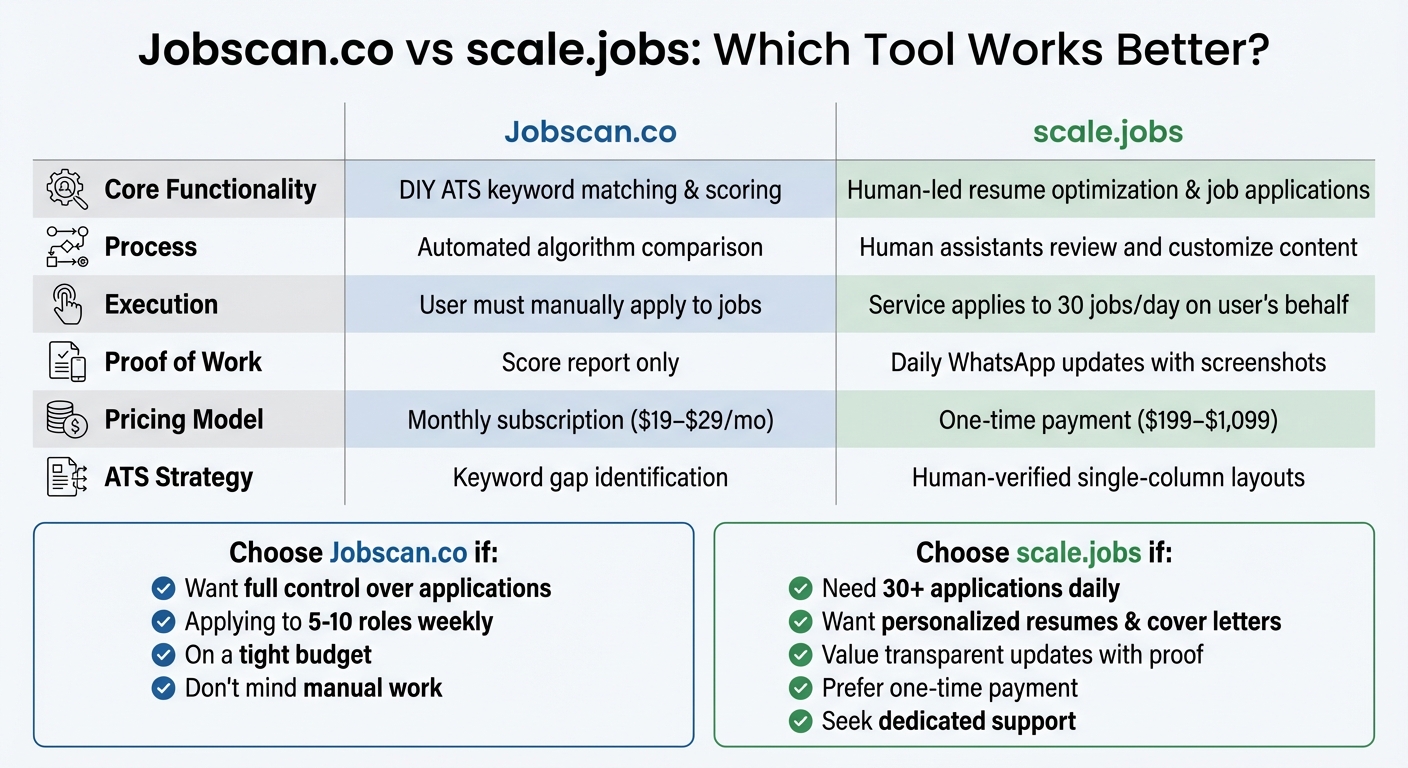
Jobscan.co vs scale.jobs Feature Comparison for Resume Optimization
This comparison dives into resume optimization strategies, helping you choose between a DIY keyword analysis tool and a full-service application management platform to tackle ATS hurdles and resume rejection challenges.
What Jobscan.co Does Well
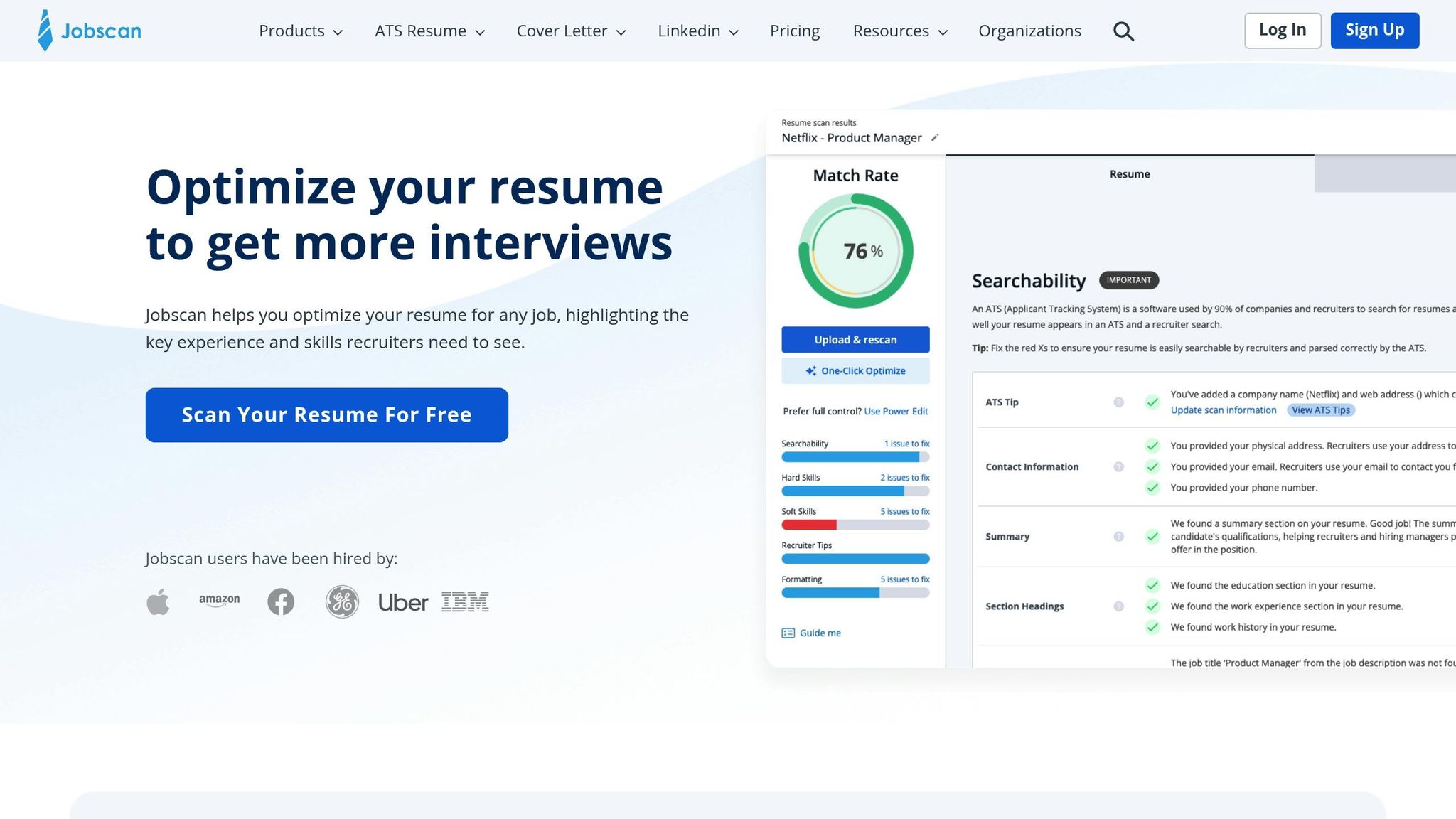
Jobscan.co lets you compare your resume against a job description, generating a match score (0%–100%) while highlighting missing keywords, formatting issues, and skill gaps. It’s perfect for job seekers who want instant feedback and prefer to manage their own applications. The process is simple: upload your resume, paste the job description, and receive a detailed match report.
One of its strengths is quickly identifying keyword gaps, showing where your resume doesn't align with the job posting. For those applying to just a few roles each week and comfortable making manual updates, this feedback loop can be quite helpful. However, Jobscan.co stops short of offering personalized resume revisions, application submissions, or human reviews.
While Jobscan.co focuses on keyword analysis, scale.jobs takes a more hands-on approach, integrating human oversight into the application process.
4 Reasons scale.jobs Outshines Jobscan.co
• Hands-free application management of up to 30 jobs per day. Unlike Jobscan.co, which leaves you to apply manually after providing a score, scale.jobs assigns virtual assistants to handle 30 applications daily. This eliminates the grind of filling out forms, uploading documents, and managing multiple job portals.
• Tailored resumes and cover letters reviewed by humans. Jobscan.co identifies keyword gaps but doesn’t rewrite your resume. scale.jobs ensures your resume and cover letter are tailored to each job’s requirements, going beyond just keywords to focus on content quality.
• One-time payment instead of recurring fees. Jobscan.co charges $19–$29 per month, which can add up during longer job searches. In contrast, scale.jobs offers flat-fee bundles starting at $199 for 250 applications, with refunds for unused applications - no monthly charges.
• Daily updates with proof of submission. Jobscan.co provides keyword match scores but doesn’t track your applications. scale.jobs sends daily WhatsApp updates, complete with time-stamped screenshots showing where and when your materials were submitted, ensuring transparency.
For job seekers ready to delegate the heavy lifting, scale.jobs offers a complete solution, combining professional resume writing with human-powered application support.
Feature Comparison Table
| Feature | Jobscan.co | scale.jobs |
|---|---|---|
| Core Functionality | DIY ATS keyword matching & scoring | Human-led resume optimization & job applications |
| Process | Automated algorithm comparison | Human assistants review and customize content |
| Execution | User must manually apply to jobs | Service applies to 30 jobs/day on user's behalf |
| Proof of Work | Score report only | Daily WhatsApp updates with screenshots |
| Pricing Model | Monthly subscription ($19–$29/mo) | One-time payment ($199–$1,099) |
| ATS Strategy | Keyword gap identification | Human-verified single-column layouts |
Next, let’s explore which candidates benefit most from each tool and when it makes sense to switch to scale.jobs.
Who Should Use Jobscan.co
Jobscan.co works best for job seekers who:
• Want full control over their applications. If you prefer to manage every step of the process and only need help optimizing keywords, Jobscan.co provides straightforward feedback.
• Apply to a limited number of roles weekly. For those targeting 5–10 specific positions each week, manually applying Jobscan.co’s suggestions is manageable.
• Are on a tight budget. With a cost of $19–$29 per month, Jobscan.co is a budget-friendly option for short-term job searches.
• Don’t mind manual work. If you’re comfortable revising your resume and submitting applications yourself, Jobscan.co delivers the insights you need.
Who Should Choose scale.jobs
scale.jobs is ideal for candidates who:
• Need end-to-end application management. If applying to 30+ jobs daily feels overwhelming, scale.jobs takes over the entire process.
• Want personalized resumes and cover letters. scale.jobs doesn’t just identify gaps - it creates tailored documents for each application, reviewed by professionals.
• Value transparent updates. Daily WhatsApp messages with screenshots provide proof of submission, ensuring you know exactly where your applications stand.
• Prefer a one-time payment. For extended job searches, scale.jobs’ flat-fee bundles eliminate recurring costs, offering better value over time.
• Seek dedicated support. With direct access to your assistant via WhatsApp, you can adjust your strategy and receive real-time guidance.
Switch to scale.jobs if…
Consider making the switch from Jobscan.co to scale.jobs if:
• Manual applications are eating up your time. Spending over 10 hours a week on repetitive tasks like filling out forms? scale.jobs automates this for you.
• High Jobscan.co scores aren’t leading to interviews. Matching keywords alone doesn’t guarantee results. scale.jobs ensures your resume resonates with hiring managers, not just ATS systems.
• You’ve been job searching for months. Monthly subscriptions can quickly add up. scale.jobs’ one-time payment model is more cost-effective for long-term searches.
• You want proof your applications are submitted. If you’re unsure whether your applications are reaching employers, scale.jobs provides daily updates with screenshots for peace of mind.
• You need strategic guidance. Beyond keyword reports, scale.jobs helps refine your approach based on response rates, making your job search more effective.
When to Switch to scale.jobs
In comparing scale.jobs with platforms like Jobscan.co, there are clear scenarios where scale.jobs stands out as the better choice.
When You Need Humans to Handle Applications
Automated tools often struggle with intricate application portals or unexpected fields. This is where scale.jobs excels, as trained assistants manually handle submissions. They carefully review job descriptions, craft ATS-friendly resumes, and incorporate precise keywords to ensure compatibility with applicant tracking systems (ATS). This approach eliminates common errors - like formatting issues or mismatched keywords - that can lead to rejection. In fact, 75% of resumes are rejected by ATS systems due to such errors, something scale.jobs actively avoids.
For job openings that require tailored cover letters, LinkedIn outreach, or applications on platforms with strict bot detection, human-submitted applications make all the difference. Assistants vary submission times and include personalized notes, mimicking genuine human behavior. This reduces the risk of triggering red flags and increases the chances of your application reaching a recruiter.
When You Want Proof of Submission
Transparency is another area where scale.jobs outshines competitors. While Jobscan.co offers keyword match scores, it doesn’t confirm whether your applications were successfully submitted. scale.jobs, on the other hand, provides timestamped screenshots via WhatsApp, showing exactly when and where your materials were sent. For instance, you might receive a message like, "Application submitted to Google at 2:15 PM EST", accompanied by proof of the tailored resume or cover letter uploaded to the ATS portal.
One example involved a marketing professional who received multiple screenshots confirming tailored submissions, which helped them secure more interviews. This level of transparency eliminates the uncertainty of whether your applications disappeared into a "black hole", giving you real-time updates and the ability to refine your strategy as needed.
When You Prefer a One-Time Payment Over Subscriptions
Subscription models, like Jobscan.co's $19–$29 monthly plans, can become costly during an extended job hunt. scale.jobs offers a straightforward, one-time fee starting at $199 for 250 applications, with the option for refunds on unused credits. This pricing model is not only predictable but also more economical over time.
For job seekers applying to 5–20 roles each month, this flat-fee approach can save up to 70% in costs compared to ongoing subscriptions. Plus, it frees up over 20 hours per week that you can dedicate to networking or interview preparation. If you’re considering professional help, such as resume writing services paired with hands-on application management, the one-time payment model eliminates the stress of recurring charges, making it a practical choice during unemployment.
Conclusion
Main Takeaways
Here's how you can stand out in today's competitive job market:
- 75% of resumes are rejected by ATS systems due to issues like missing job-specific keywords, overly generic content, or formatting that confuses the software.
- Successful applicants address these challenges by using precise language from job postings (e.g., including both "SEO" and "Search Engine Optimization"), keeping their resumes in simple single-column .docx formats, and customizing their achievements for each role.
- Execution matters: A polished resume requires both accurate keyword usage and human review. While tools like Jobscan.co help identify keyword gaps, they rely on manual application management, which can lead to mistakes.
- Human-assisted services like scale.jobs provide tailored, ATS-friendly applications with proof of submission via WhatsApp, ensuring your resume reaches recruiters without uncertainty.
With these points in mind, here's a quick comparison to help you decide between Jobscan.co and scale.jobs.
Decision Summary
Choose Jobscan.co if:
- You prefer handling applications manually while receiving keyword suggestions.
- You're applying to 5–10 targeted roles weekly and have the time to optimize your resume yourself.
- You don’t need submission tracking or proof that your applications were sent.
- You want a budget-friendly option with monthly costs ranging from $19 to $29 for short-term job searches.
Opt for scale.jobs if:
- You’re submitting a high volume of applications daily - up to 30 - and need trained professionals to manage them.
- You value time-stamped WhatsApp screenshots as proof of every submission.
- You prefer a one-time fee (ranging from $199 to $1,099) instead of recurring monthly charges.
- You need human-verified ATS compliance and tailored resumes for each job.
- Saving 20+ hours per week and having full transparency in your job search process are priorities.
For job seekers who want more than just automated keyword analysis, scale.jobs bridges the gap by combining expert resume writing with hands-on application support and complete visibility into where your resume is sent.
FAQs
How can I tell if an ATS is rejecting my resume?
Signs that your resume may be getting rejected by an ATS include a lack of callbacks or interview invitations, even when applying for positions that align with your skills and experience. This often happens due to issues like improper formatting - such as using graphics or multi-column layouts - or failing to include keywords specific to the job description. To check if your resume is ATS-friendly, try running it through an ATS parsing tool. If the tool struggles to read or extracts incorrect information from your resume, it’s a clear sign that it needs adjustments. If you're consistently facing rejection despite being well-qualified, it might be time to refine your resume for better ATS compatibility.
Should I submit my resume as a .docx or PDF?
Submitting your resume in a PDF format ensures that the layout and design stay intact, giving it a polished and professional appearance. On the other hand, a .docx file can be easier for Applicant Tracking Systems (ATS) to scan, provided it’s straightforward and well-organized. To decide which format to use, consider the balance between maintaining a professional look and ensuring compatibility with the employer’s job application system.
How many keywords are enough without sounding forced?
Including 10 to 15 role-specific keywords in your resume is a smart approach. It helps you strike the right balance between making your resume friendly for Applicant Tracking Systems (ATS) and keeping it personalized for the role. Choose keywords that match the job description and showcase your qualifications in a way that feels natural and relevant, avoiding the temptation to overstuff your resume with unnecessary terms.