
How Recruiters Filter Resumes Using ATS (Insider Breakdown)

Sarah Mitchell
March 2, 2026

Applicant Tracking Systems (ATS) play a crucial role in modern hiring, with 75% of resumes never reaching a recruiter due to ATS filters. These systems scan resumes for keywords, formatting, and structure to rank candidates. Small adjustments, like using the right keywords and avoiding complex layouts, can significantly improve your chances of passing ATS filters. For example, aligning your resume with job descriptions and avoiding errors like inconsistent dates or unconventional headers can boost your ATS score. Services like scale.jobs offer human-assisted optimization to ensure resumes are ATS-friendly, especially for high-volume applications. Read on for actionable tips, common mistakes, and how to improve your job search strategy.
Your Resume Is Getting REJECTED by ATS (Here’s How to FIX IT) + FREE TEMPLATE INSIDE!
How ATS Reads and Ranks Your Resume
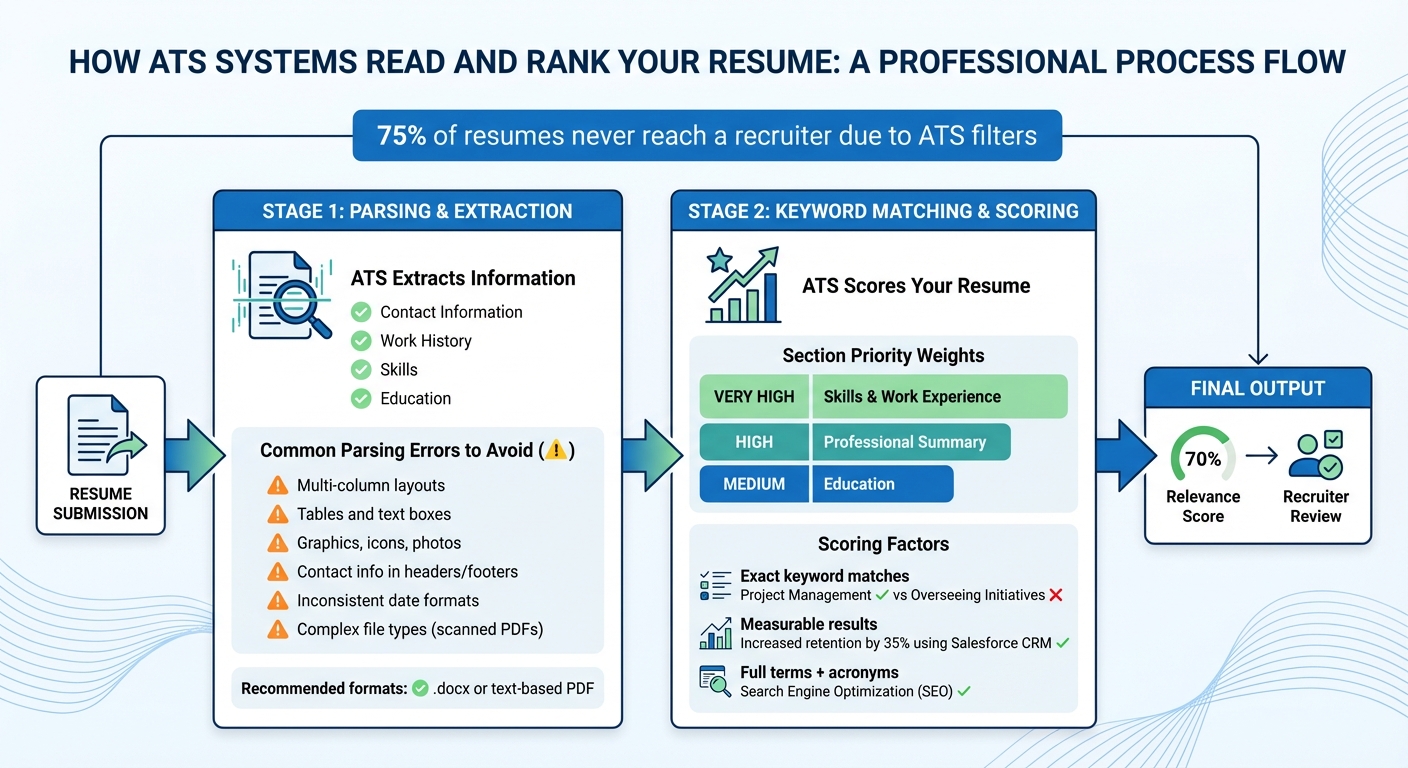
How ATS Reads and Ranks Your Resume: Complete Process Flow
How ATS Extracts Information From Your Resume
Applicant Tracking Systems (ATS) are designed to convert your resume into searchable data by scanning for specific fields like contact information, work history, skills, and education. This process, known as parsing, works best when your resume follows a predictable layout.
ATS relies on standard section headers such as "Work Experience", "Skills," and "Education" to organize your information accurately. Using unconventional headings like "My Journey" can confuse the system, potentially causing important details to be overlooked. For example, if the ATS can't locate where your skills are listed, it might lower your relevance score - even if you're highly qualified for the role.
File format also plays a big role. While many modern ATS can process PDFs, older systems like Taleo or iCIMS often work better with .docx files. Additionally, resumes with complex layouts - such as multi-column designs, tables, or graphics - can disrupt the system's reading order. This might result in errors like pulling your job title from the wrong section or skipping your employment dates entirely, leaving your resume flagged as "unparseable."
Small details matter too. Avoid placing contact information in headers or footers, as older ATS may not read these areas. Similarly, inconsistent date formats (e.g., mixing "March 2023" with "03/2024") can cause confusion. Once the ATS extracts your data, it moves on to keyword matching and scoring.
How ATS Matches Keywords and Scores Candidates
After extracting your resume's data, the ATS scans for exact keyword matches in areas like skills, job titles, and tools. For instance, a specific term like "Project Management" will match, but a vague phrase like "Overseeing Initiatives" might not. The system then assigns a relevance score based on how closely your resume aligns with the job description.
Not all sections of your resume carry the same weight in the ATS scoring algorithm. Sections like Skills and Work Experience are given "Very High" priority, while the Professional Summary is considered "High" priority, and Education is rated "Medium" priority. This means placing a keyword in your Skills section will boost your score more than burying it in your Education section.
ATS algorithms also favor keywords tied to measurable results. For example, a bullet point like "Increased customer retention by 35% using Salesforce CRM" will score higher than simply listing "Salesforce" in the skills section. The system recognizes both the tool and the quantifiable achievement.
To improve keyword matching, include both full terms and their acronyms - for example, "Search Engine Optimization (SEO)." Many ATS also use Boolean searches or knockout questions to filter candidates. If critical keywords are missing, your application might be automatically rejected before it even reaches a recruiter.
If you're finding it challenging to tailor your resume for ATS, consider using a professional resume writing service. These services can help ensure your resume is properly formatted and keyword-optimized while remaining easy for recruiters to read.
Resume Mistakes That Cause ATS Rejections
Formatting Errors That Break ATS Parsing
Even the most qualified candidates can be rejected if their resume formatting interferes with ATS (Applicant Tracking System) parsing. Elements like multi-column layouts, tables, or text boxes often confuse the system, leading to skipped details such as work history or employment dates. These formatting choices might look sleek to human eyes but can wreak havoc on ATS functionality.
Visual elements such as graphics, icons, photos, or skill bars are another common pitfall. ATS systems don’t interpret these elements, often skipping over them entirely. Worse, they can sometimes cause errors in nearby text, further reducing your chances. Placing contact details in headers or footers is another risky move, as some older ATS versions may not process these sections at all.
To ensure your resume is ATS-friendly, maintain consistent date formats - this helps the system calculate your experience accurately. Additionally, avoid using file types that ATS systems struggle with, like PDFs created from scanned images or files with embedded graphics. Stick with text-based PDFs or .docx formats to ensure your resume is parsed correctly.
Content Problems That Lower Your ATS Score
Beyond formatting, content issues can also hurt your ATS score. One of the biggest mistakes is failing to use the right keywords. For example, if a job posting specifies "project management" and your resume says "overseeing initiatives", the ATS won’t recognize the match. Using generic or vague language reduces your chances of making it through the system.
Another common issue is the use of ambiguous acronyms. Always spell out terms like "Search Engine Optimization (SEO)" to ensure both the full term and the acronym are captured. Similarly, include both forms for terms like "Enterprise Resource Planning (ERP)" so the system can recognize either variation.
Additionally, ATS systems often give priority to resumes with a clearly labeled "Skills" section. If your resume lacks this section, it might rank lower in the system’s scoring. Including a dedicated skills section with relevant terms can dramatically improve your chances.
If balancing ATS optimization with readability feels overwhelming, consider using a professional resume writing service. These services can help craft a resume that appeals to both ATS systems and human recruiters.
Jobscan.co vs scale.jobs: Why You Should Switch to Human-Powered ATS Optimization
What Jobscan.co Does Well
Jobscan.co provides a quick way to align your resume with job descriptions using automated keyword scanning. It’s particularly helpful for those managing fewer than 50 job applications and who prefer a self-service approach. By calculating a match score, the platform helps you identify gaps between your resume and the job posting.
Additionally, Jobscan.co flags formatting issues that might disrupt ATS parsing, making it a practical choice for applicants who want to maintain full control over their resume adjustments.
Now, let’s explore how scale.jobs takes this a step further with personalized, human-driven application management.
Why scale.jobs Wins
Unlike Jobscan.co, scale.jobs doesn’t just provide a report for you to interpret. Instead, it offers a hands-on service where human assistants ensure your applications are tailored and error-free. This approach is ideal for those managing a high volume of applications and seeking a more polished, stress-free process.
What sets scale.jobs apart:
- Human expertise for nuanced optimization: Assistants understand industry-specific language and tailor resumes beyond simple keyword matching.
- Proof and transparency: You’ll receive screenshots of every customized resume and submitted application, along with real-time updates via WhatsApp.
- Time-saving application execution: Assistants handle over 30 applications daily, freeing up more than 20 hours per week.
- Straightforward pricing: One-time packages start at $199 for up to 250 applications, avoiding subscription fees.
- ATS-friendly formatting: Human-verified resumes combine visual appeal with ATS compatibility, ensuring your documents are both readable and effective.
| Feature | Jobscan.co | scale.jobs |
|---|---|---|
| Human involvement | None | Dedicated human assistants |
| Resume customization depth | Keyword matching | AI + human tailoring per job |
| ATS parsing and optimization | Scanner tool | Optimized submissions + checker |
| Application execution method | Self-apply | Human on any portal |
| Transparency and proof of work | Reports | Screenshots, WhatsApp updates |
| Pricing model | Subscription | One-time bundles ($199+) |
Who Should Use Jobscan.co vs scale.jobs
Go with Jobscan.co if you:
- Are applying to fewer than 50 jobs.
- Feel confident in your ability to implement technical recommendations and refine your resume on your own.
- Want a quick tool for keyword alignment before manually submitting applications.
- Prefer a self-service model where you maintain complete control.
Choose scale.jobs if you:
- Are tackling 100+ applications and need time for networking or interview preparation.
- Want human oversight to ensure your resume is properly formatted and contextually optimized.
- Require proof that applications were submitted correctly.
- Are applying across diverse industries with varying ATS configurations.
- Have faced repeated rejections despite trying to optimize your applications yourself.
Up next, we’ll see how scale.jobs compares to Simplify.jobs, diving deeper into ATS optimization strategies.
Simplify.jobs vs scale.jobs: Beat ATS Filters Without Automation Risks
What Simplify.jobs Does Well
Simplify.jobs provides a browser extension designed to streamline the job application process. By autofilling application forms, it allows users to quickly submit applications across multiple platforms. This feature is particularly helpful for entry-level candidates and those seeking internships, as its job-matching algorithm highlights opportunities tailored to their profiles - often uncovering roles they might have missed.
The platform's centralized dashboard is another major time-saver, consolidating all applications in one place. For those submitting 20–30 applications weekly, the autofill tool can significantly cut down on repetitive tasks, saving hours.
Next, let’s see how scale.jobs’ human-first approach addresses the challenges automation can’t fully resolve.
Why scale.jobs Outperforms
While Simplify.jobs focuses on speed through automation, scale.jobs takes a different route by relying on human oversight for every application. This approach eliminates the risks associated with automated submissions, such as being flagged by ATS platforms or job portals for bot-like activity. Instead, scale.jobs ensures every application is handled in a way that ATS systems recognize as genuine.
Here’s where scale.jobs stands out:
- No bot-detection issues: Applications are submitted manually by human assistants, ensuring compliance with ATS systems.
- Higher interview success rates: Human-managed, targeted applications achieve interview rates of 10–15%, far surpassing the 2–3% seen with untargeted automated submissions.
- Tailored ATS optimization: Submissions are customized for specific systems like Workday, Greenhouse, or proprietary platforms, ensuring better compatibility.
- Improved parsing accuracy: Human oversight reduces ATS parsing errors from 41% to just 2%, boosting the chances of your resume being properly reviewed.
- Proof of submission: You receive time-stamped screenshots of every application via WhatsApp, offering transparent proof that each submission was completed.
| Feature | Simplify.jobs | scale.jobs |
|---|---|---|
| Human involvement | Minimal | Full VA management |
| Resume customization depth | Basic autofill | AI-human tailored |
| ATS handling | Job matching | Portal-specific optimization |
| Application execution method | Autofill | Manual human submissions with WhatsApp proof |
| Transparency and proof of work | Dashboard | Live updates + screenshots |
| Pricing model | Subscription | One-time payment |
These differences highlight which platform is better suited for specific user needs.
Who Should Use Simplify.jobs vs scale.jobs
Choose Simplify.jobs if you:
- Submit fewer than 30 applications per week.
- Are focusing on entry-level roles or internships with lower competition.
- Prefer to control each field in the application form.
- Have the time to monitor and adjust your submissions if bot flags occur.
Opt for scale.jobs if you:
- Need to submit 100+ applications while avoiding automation penalties. This is ideal for roles requiring precise, human-tailored submissions across various ATS systems.
- Are targeting senior positions, specialized roles, or companies with strict ATS compliance.
- Have faced repeated rejections despite meeting qualifications, indicating possible ATS filtering issues.
- Want guaranteed proof that every application was submitted and reached the employer’s system.
- Aim to save 20+ hours weekly for networking, interview prep, or refining your materials with tools like an AI resume builder.
- Are applying for roles requiring visa sponsorship, where accuracy and avoiding bot flags are critical to your timeline.
Switch to scale.jobs If
You're Applying to 250+ Jobs
Submitting hundreds of job applications manually can quickly become overwhelming, especially when dealing with various Applicant Tracking Systems (ATS) like Workday, Greenhouse, Lever, and others. Each system has unique formatting rules, and even small mismatches can result in your resume being rejected before a recruiter sees it. scale.jobs simplifies this process by having human assistants handle up to 30 applications daily, ensuring every submission complies with ATS requirements. This way, you can focus your energy on networking and interview preparation instead of battling system quirks.
With a one-time payment model ranging from $199 to $1,099 (depending on the number of applications), you avoid the recurring costs that come with subscription services. For those applying to a high volume of jobs, this service not only reduces manual effort but also minimizes errors. Human-verified formatting lowers ATS rejection rates dramatically - from 41% to just 2%.
Next, let’s explore how human oversight helps you avoid the pitfalls of automated tools.
Automated Tools Are Getting You Flagged
Automated tools may seem convenient, but they can backfire by triggering ATS bot-detection systems. Platforms like Workday and Taleo often flag autofill submissions as suspicious, which can hurt your chances of getting noticed. scale.jobs takes a different approach, relying on human assistants to manually complete every application field. This avoids detection issues and ensures submissions follow the natural patterns these systems are designed to process.
This hands-on method is especially critical for senior-level positions, visa-sponsored roles, or highly competitive industries where companies actively filter out bulk submissions. By removing hidden characters and template artifacts that automated tools often leave behind, scale.jobs significantly reduces parsing errors and boosts your likelihood of passing ATS screening.
You Need Proof of Every Application
One of the standout features of scale.jobs is the transparency it offers. For every application, you’ll receive time-stamped screenshots via WhatsApp, confirming that your submission successfully reached the employer's system. This level of proof goes beyond what automated dashboards typically provide.
This documentation is invaluable when applications seem to disappear into "black holes." It also supports strategic follow-ups by showing exactly when and where your application was submitted. If you’re working with resume writing services or career coaches, these screenshots can provide actionable insights to refine your application strategy and improve your chances of securing interviews.
Conclusion: Using ATS Knowledge to Get More Interviews
Understanding how Applicant Tracking Systems (ATS) process resumes - by parsing keywords, ranking candidates, and filtering applications - can significantly boost your job search success. With over 95% of large companies relying on ATS, many resumes are rejected not due to lack of qualifications but because of simple, avoidable mistakes like improper formatting or missing critical keywords. By tailoring your resume with precise keywords, using standard fonts, and sticking to a chronological layout, you can dramatically increase your chances of being seen by recruiters - potentially improving visibility by up to eight times.
However, the complexity grows when you're submitting applications across multiple ATS platforms like Workday, Greenhouse, or Lever. Each system has its quirks, and even minor mismatches in formatting or keyword usage can hurt your ranking. While automated tools like Jobscan.co or Simplify.jobs can speed up the process, they come with risks such as parsing errors and bot-detection issues. This highlights the importance of a more refined, human-driven approach to resume optimization.
scale.jobs addresses these challenges by combining ATS expertise with personalized, human support. Their services include dedicated assistants, ATS-optimized resumes, one-time payment options, WhatsApp communication, and transparent proof of work. Unlike automated solutions, trained assistants manually fine-tune your resume to align with job-specific keywords while maintaining the natural language recruiters prefer. They also ensure compliance with formatting guidelines across major ATS platforms, eliminating the parsing errors that lead to 70-80% of application rejections. With up to 30 applications submitted daily and timestamped proof provided via WhatsApp, you get the efficiency of automation without the risks of detection or errors.
For job seekers applying to hundreds of positions, this method delivers tangible results. For instance, one client achieved a 40% interview rate after submitting 200 applications by addressing formatting issues and aligning 90% of keywords with job descriptions - compared to just 5% success with automated tools. If you're already working with resume writing services or career coaches, the detailed proof of work from scale.jobs can help refine your strategy further and secure more interviews.
The key to success lies in the details that human oversight can capture. When your job search depends on navigating ATS filters effectively at scale, a human-powered approach becomes indispensable.
Decision Summary: Choose scale.jobs if you're applying to 250+ positions, need human expertise to avoid ATS errors, and value proof of application submissions. Automated tools may suffice for smaller-scale job searches (fewer than 50 applications) if you're confident in self-correcting formatting and keyword issues.
FAQs
How can I tell if an ATS is rejecting my resume?
If you're not hearing back or landing interviews after applying for jobs that seem like a good match, your resume might be getting filtered out by an ATS (Applicant Tracking System). Common reasons include formatting issues like multi-column layouts, embedded graphics, or tables that ATS software struggles to read. Additionally, failing to include job-specific keywords or using overly generic language can hurt your chances.
To improve your odds, opt for ATS-friendly resume templates that avoid complex designs. Make sure to tailor your resume to the specific job description by incorporating relevant keywords and skills. Finally, consider using ATS checkers to test your resume for compatibility and make necessary adjustments before you hit "submit." These steps can help ensure your application gets through the initial screening process.
What’s the safest resume format for ATS parsing?
When it comes to creating a resume that works well with ATS (Applicant Tracking Systems), simplicity is key. Stick to a single-column layout to avoid any parsing issues. Use standard fonts like Arial or Calibri for readability, and organize your information with clear section headings such as Work Experience and Skills. Avoid using graphics, tables, or multi-column designs, as these elements can confuse ATS software. A clean, straightforward design ensures your resume is parsed accurately by automated systems.
How many keywords should I match without sounding forced?
When tailoring your resume, aim to naturally incorporate 3 to 5 key terms or phrases from the job description. This approach helps ensure compatibility with Applicant Tracking Systems (ATS) while keeping your resume polished and easy to read. The key is to weave these keywords smoothly into your content, maintaining a professional tone without sounding forced or repetitive.