
The Job Application Checklist That Gets 3x More Callbacks

Sarah Mitchell
March 15, 2026

Most job seekers send out dozens of applications but hear back from only a handful of employers. Why? Many resumes are filtered out by Applicant Tracking Systems (ATS) before a recruiter even sees them. Others fail because they lack customization, include formatting errors, or don't align with the job description. This article breaks down a simple, step-by-step checklist to help you secure more callbacks by improving your resume with real-life examples, cover letter, and submission process.
Key Takeaways:
- Tailor your resume and cover letter to match job-specific keywords and skills.
- Use ATS-friendly templates with clean formatting to avoid automated rejections.
- Highlight measurable achievements with numbers to stand out to recruiters.
- Submit applications carefully, double-checking details and using tools or services for complex portals.
- Choose the right tools for your job search, whether automated platforms or human-assisted services like Scale.jobs.
This guide will walk you through actionable steps to improve your job application strategy, helping you move from one callback for every 50 applications to three callbacks for every ten. Let’s dive in.
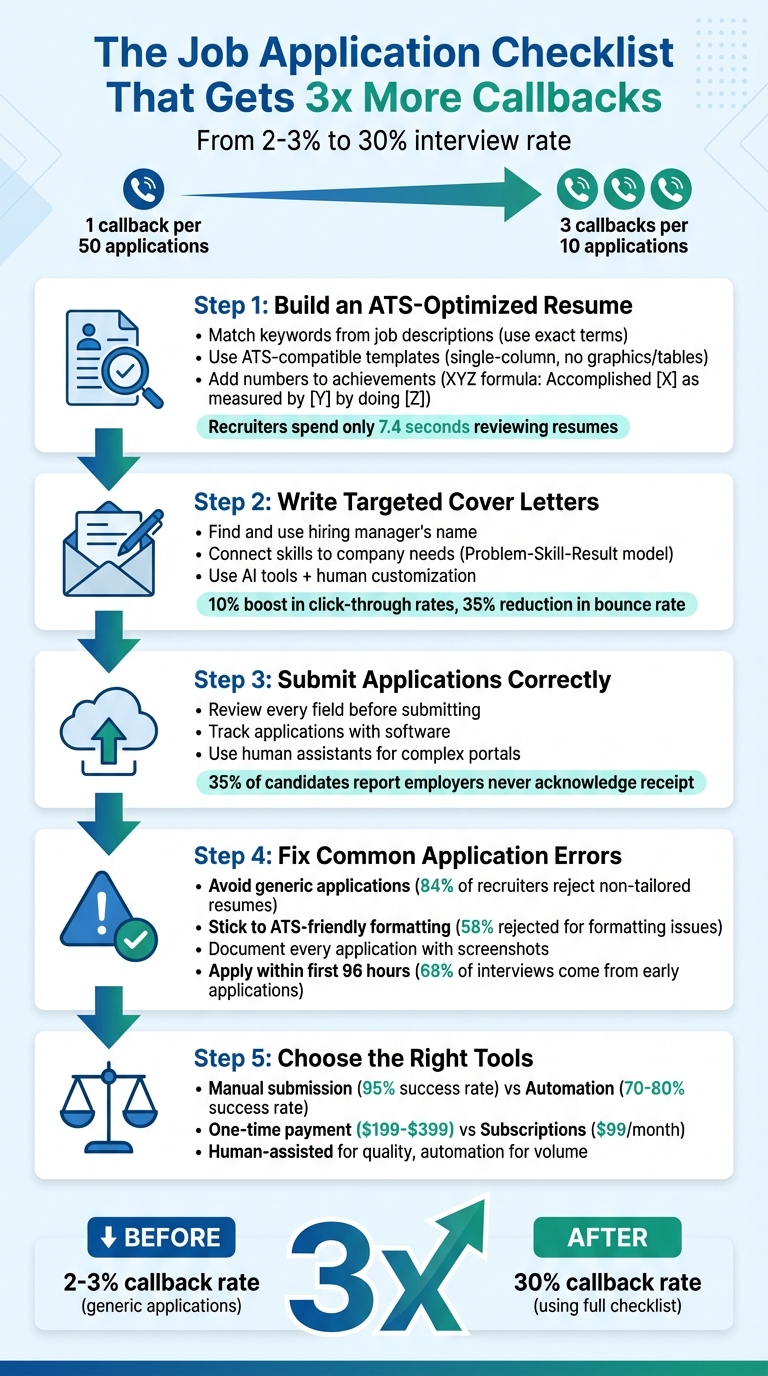
5-Step Job Application Checklist to Triple Your Callbacks
How to Make a Resume That Gets YOU HIRED in 2026
Step 1: Build an ATS-Optimized Resume
Your resume needs to pass automated screening systems. Applicant Tracking Systems (ATS) are designed to scan resumes for specific keywords related to technical skills, certifications, and tools mentioned in job postings. By tailoring your resume to reflect the exact language used in the job description, you can boost your chances of getting shortlisted.
Match Keywords from Job Descriptions
Use the exact terms listed in the job posting, not your interpretations. For instance, if the job description specifies "AWS Lambda", include "AWS Lambda" in your resume rather than a general term like "cloud functions." ATS tools are programmed to identify precise matches, so this detail matters.
Start by carefully analyzing the job description. Highlight the required skills, certifications, and tools, then incorporate these terms naturally throughout your resume. For example, instead of writing "Improved backend performance", try "Developed Python-based backend services deployed on AWS using Docker." This method integrates keywords seamlessly within real accomplishments rather than simply listing them.
Use ATS-Compatible Templates
Avoid using graphics, tables, or complex layouts that might confuse ATS software. Stick to standard headings such as "Experience", "Education", and "Skills" to ensure your information is categorized correctly by the system. Elements like text boxes, columns, images, or headers and footers can disrupt how ATS parses your resume.
Choose a simple, single-column layout with clear section breaks. If you're unsure whether your template is ATS-friendly, consider using tools like Jobscan or Teal, which offer free ATS-compatible resume templates. Alternatively, professional resume writing services can ensure your resume is both ATS-compliant and effectively showcases your qualifications.
Add Numbers to Your Achievements
Quantified achievements make resumes stand out and improve your chances of landing interviews. Recruiters typically spend just 7.4 seconds reviewing a resume, and metrics like percentages, dollar amounts, or time frames immediately catch their eye. ATS systems also prioritize resumes with numerical data when ranking candidates.
Use the XYZ formula to structure your bullet points: "Accomplished [X] as measured by [Y], by doing [Z]." For instance, instead of saying "Improved server performance", write, "Reduced server response time by 40% by implementing Redis caching, enhancing user experience for 50,000+ daily active users." Always lead with the metric at the start of each bullet point, such as "Increased sales by 25%" rather than burying the number later in the sentence. If exact figures aren’t available, use ranges like "Managed 50-75 accounts" or "Oversaw a team of roughly 12 engineers."
Once your resume is optimized, the next step is to focus on creating cover letters that directly engage hiring managers.
Step 2: Write Targeted Cover Letters
Craft cover letters that specifically address the employer's needs. A one-size-fits-all approach won't cut it. Instead, take time to understand the company by exploring their website, social media, and even employee reviews. Look for clues about their priorities - whether they emphasize innovation, teamwork, or community engagement - and reflect those in your letter.
Find and Use the Hiring Manager's Name
Personalize your greeting by addressing the hiring manager directly. Start by checking the job listing for a name. If it's not listed, dig a little deeper - search the company's website or LinkedIn. If all else fails, use a department-specific greeting like "Dear Marketing Hiring Manager" instead of the generic "To Whom It May Concern." This small detail can make a big impression.
Connect Your Skills to Company Needs
Use examples to show how your skills align with the job requirements. A proven way to structure these examples is the Problem-Skill-Result model. For instance, web developer Anne Galindo demonstrated her fit with a company's focus on innovation by sharing how she built a responsive website ahead of schedule. She included specific metrics, noting that her efforts "boosted click-through rates by 10% and cut the landing page bounce rate by 35% through AB testing." Similarly, hotel manager Chuck Ferris highlighted his experience at Serenity Inn to address Palladium Suites' focus on luxury, explaining how he "improved customer satisfaction ratings by 11% while managing employee schedules and vendor meetings."
Whenever possible, use the exact phrases from the job description. For example, if the job mentions "cross-functional collaboration", work that phrase into your story. Build a "story bank" of 5–6 examples that showcase your skills, so you can easily tailor your cover letter to each role. Instead of saying "I am a leader", show leadership by describing how you "led a diverse team of 12 engineers to complete a project ahead of schedule."
Use AI Tools to Speed Up Drafting
AI tools can help you draft faster, but human input or a virtual assistant is key for customization. Tools like AIApply and TealHQ can provide a starting point, but their output often feels generic and overloaded with keywords. Scale.jobs, on the other hand, combines AI efficiency with human expertise to create tailored cover letters that align with both ATS requirements and recruiter expectations. For those seeking professional assistance, resume writing services offer fully customized documents that reflect your skills and the employer's needs.
Unlike tools such as LazyApply, which rely on templates, Scale.jobs ensures every cover letter is reviewed by experts to match your experience with the job's unique demands.
"Your cover letter is where you have the chance to tell your story. It's not just about listing experiences; it's about weaving a narrative that connects your career journey to the company's mission." - Career Vision Coaching
Once you've written a targeted cover letter, ensure your application is submitted flawlessly.
Step 3: Submit Applications Correctly
Submitting your application without errors is crucial. Even small mistakes, like typos or outdated details, can derail your chances. Kat Boogaard, a freelance writer, once shared how a simple error in her email signature - "Kart" instead of "Kat" - could have cost her opportunities. To avoid similar missteps, run your documents through a word processor to catch errors and ensure all links work as intended.
Review Every Field Before Submitting
Double-check that your documents are tailored to the specific job and employer. Make sure the hiring manager's name, company details, and job title are accurate. Your resume and cover letter should reflect the role you're applying for, not a generic version from another application. Before uploading, disable "track changes" to avoid showing edits, and confirm the required file format - some companies prefer PDFs, while others might request Word documents. Also, use professional file names like "FirstName_LastName_Resume" to maintain a polished impression.
Track Applications with Software
Keep a detailed record of each submission to avoid confusion and track your progress. Use a tracking tool to log the job title, company name, and submission date. This helps you monitor callback rates and avoid duplicate applications. If your callback rate falls below 10%, consider focusing on quality over quantity by personalizing your applications more. Save timestamped screenshots as proof that your application was received by the employer’s system. This step is vital, as 35% of candidates report that employers never acknowledge receiving their applications. Tracking these details ensures you're not left wondering if your effort went unnoticed.
Use Human Assistants for Complex Portals
For intricate application systems, human expertise can make all the difference. Platforms like Workday, Taleo, Greenhouse, and Lever are designed to detect and flag automated scripts or AI-generated submissions. Scale.jobs offers trained virtual assistants who manually complete each step of the application process. They handle custom screening questions, ensure portfolio links are correctly integrated, and navigate complex portals seamlessly. This is particularly valuable for mid-to-senior-level roles where personalized achievement narratives are more impactful than high-volume submissions.
When you use services like Scale.jobs, you'll receive WhatsApp updates with timestamped screenshots of the final submission page. This ensures your application is securely submitted and avoids triggering spam filters. Such a meticulous approach can significantly improve your chances of getting callbacks, as outlined in our comprehensive job application checklist.
Here’s a comparison of automated tools versus human-assisted submission methods:
| Feature | Automated Tools (LazyApply, AIApply) | Human Assistants (Scale.jobs) |
|---|---|---|
| Execution | Scripts or browser extensions | Manual, detailed form completion by trained assistants |
| Bot Detection Risk | High likelihood of being flagged | No risk; submissions appear manual |
| Complex Portal Handling | Struggle with systems like Workday | Navigate all portals and custom questions seamlessly |
| Transparency | Basic metrics in dashboards | Timestamped screenshots via WhatsApp |
| Customization | Generic templates used | Tailored, role-specific narratives |
Step 4: Fix Common Application Errors
Once your submissions are error-free, it’s time to tackle common mistakes that could be holding you back. These small but impactful changes can significantly improve your chances of getting a callback.
Most rejections happen before a recruiter even sees your application. Research shows that 73% of job applications are filtered out by automated systems. The good news? Many of these errors are easy to fix once you know what to look for.
Avoid Generic Applications
Recruiters can easily recognize a generic resume or cover letter. Submitting the same materials for every role shows a lack of effort, and it’s a major red flag. In fact, 84% of recruiters admit they won’t consider a resume that isn’t tailored to the specific job. Customization, on the other hand, can boost your callback rate to 11.7%, compared to just 4.2% for generic submissions.
To stand out, align your application with the job description. For instance, if the role emphasizes "project lifecycle management", don’t just write "managed projects" on your resume - use the exact phrasing. Similarly, tweak your job titles to match the posting. If your previous role was "Customer Success Manager" and the job lists "Client Success Lead", adjust your title accordingly to align with the language used.
Also, take time to research the company. Check their "About Us" page and weave their values, like "innovation" or "customer-first", into your resume or cover letter. If you’re transitioning careers, address potential concerns by highlighting how your unique background equips you with fresh insights or transferable skills that other candidates might not offer.
"Hiring managers don’t just want to hire someone - they want to avoid making the wrong hire." - JobEase Team
Timing matters too. Aim to apply within the first 96 hours of a job posting, as 68% of interviews come from applications submitted during this window. If you’re struggling to tailor applications quickly, consider using a job application service to help create customized, ATS-friendly documents.
While customization is key, proper formatting is just as important.
Stick to ATS-Friendly Formatting
Even the best resumes won’t get through if they’re not ATS-compatible. Formatting issues are a major reason 58% of applications are rejected before a recruiter even sees them. Applicant Tracking Systems (ATS) often struggle with complex layouts or unusual file types, so keeping it simple is essential.
Save your resume as a .docx or PDF, depending on the job’s instructions. Use standard fonts like Arial, Calibri, or Times New Roman in 10-12 point size. Keywords are crucial, but avoid overloading your resume - aim for a keyword density of 2-4% to stay relevant without triggering spam filters. Additionally, ensure your document is easy to read by achieving a Flesch-Kincaid score above 70, making it accessible for both ATS and human reviewers.
| Formatting Element | ATS Risk | Recommended Fix |
|---|---|---|
| Headers/Footers | High – often ignored by systems | Keep all content in the main body |
| Tables & Text Boxes | High – disrupts data parsing | Stick to standard paragraphs |
| Images & Graphics | Critical – completely unreadable | Use text only |
| Unusual Fonts | Medium – may not render properly | Stick to standard fonts like Arial or Calibri |
| Multiple Columns | Medium – confuses reading order | Use a single-column layout |
Once your documents are customized and formatted correctly, the next step is to track your submissions.
Document Every Application
Keeping records of your applications is crucial for effective follow-ups. Without proof, it’s hard to hold employers accountable or even know when to check back.
Always take a screenshot of the confirmation page after submitting your application. Make sure the timestamp is visible, as this can serve as evidence if there’s ever a dispute about whether your application was received.
Set up a simple tracking system to log key details like the job title, company name, submission date, and any confirmation numbers. Save your screenshots in a well-organized folder, sorted by company and date. This system not only helps you stay on top of your applications but also ensures you can follow up at the right time - typically 7-10 business days after submission.
Step 5: scale.jobs vs LazyApply, Simplify, and Other Competitors

Once you've addressed common application errors, the next step is choosing the right tool to maximize your chances of landing interviews. The decision often boils down to automated platforms like LazyApply and Simplify versus the human-assisted service offered by scale.jobs. Each option has its strengths and weaknesses, so understanding these differences can help you make an informed choice.
Manual Submission vs Automation
LazyApply and Simplify rely on automation - using browser extensions or bots to submit applications in bulk. While this method can process hundreds of applications daily, it comes with risks. Automated submissions often trigger spam filters, face compatibility issues with applicant tracking systems (ATS), and may not comply with portal-specific requirements. Users of LazyApply report rejection rates of 20–30% due to bot detection, and Simplify struggles with enterprise ATS systems that require CAPTCHAs or multi-step verifications.
On the other hand, scale.jobs takes a manual approach. Trained virtual assistants handle each application individually, ensuring compliance with specific portal requirements and avoiding IP bans. This method results in a 95% success rate for submissions - significantly higher than the 70–80% success rates seen with automated tools. For professionals targeting senior roles or positions in regulated industries like finance or government, the manual process minimizes the risk of blacklisting, making it the better choice for tailored and precise campaigns. While automation works well for high-volume, entry-level applications, more specialized roles benefit from the accuracy and care of human-assisted submissions.
Comparison Table
| Feature | scale.jobs | LazyApply | Simplify |
|---|---|---|---|
| Submission Method | Human Virtual Assistants | Automated Bot (Job GPT) | AI Browser Extension |
| Resume Customization Depth | High (Tailored per job) | Low (Generic templates) | Medium (Stored profile data) |
| ATS Handling | 95% success rate (human-verified) | 70–80% success rate | 75–85% success rate |
| Application Execution | Manual, portal-specific | Bulk automated | One-click automation |
| Transparency & Proof-of-Work | Timestamps, screenshots, email confirmations in dashboard | Basic logs | Dashboard tracking only |
| Pricing Model | One-time flat fee ($199–$399 range) | Subscription ($99/month) | Subscription ($49–$99/month) |
This breakdown illustrates why scale.jobs stands out for candidates who prioritize precision, compliance, and accountability in their job applications.
ATS-Ready Documents with Submission Proof
Automation tools often fall short when it comes to optimizing resumes for ATS. LazyApply provides basic templates, and Simplify tracks applications via a dashboard, but neither offers robust customization. In contrast, scale.jobs creates tailored, ATS-friendly resumes and cover letters for each application. These documents use clean formatting, job-specific keywords, and single-column layouts to ensure compatibility with parsing systems. Additionally, scale.jobs provides proof of submission, such as email confirmations and portal receipts, all accessible via a dashboard. This feature is particularly useful for following up with hiring managers. If you need professional help crafting your documents, check out the AI resume builder for custom solutions.
Pricing: One-Time Payment vs Subscriptions
LazyApply charges $99 per month for unlimited applications, while Simplify offers plans ranging from $49 to $99 per month. Over a year, these subscriptions can cost job seekers upwards of $500. In contrast, scale.jobs offers a flat-fee pricing model - $199 for 250 applications or $399 for 1,000 applications - eliminating recurring costs. For those with smaller, targeted campaigns, this can result in savings of 60–80% compared to subscription-based services.
Who Should Use LazyApply/Simplify
- High-Volume Applicants: Ideal for entry-level job seekers aiming to submit as many applications as possible in a short time.
- Automation-Friendly Users: Suitable for those who are comfortable with generic submissions and willing to accept some compliance risks for faster processing.
Who Should Choose scale.jobs
- Quality-Focused Candidates: Best for mid-to-senior level professionals or those applying to niche roles that demand tailored, ATS-compliant applications.
- Detail-Oriented Applicants: Perfect for individuals who value submission proof to aid in follow-ups.
- Cost-Conscious Job Seekers: A practical choice for those looking to avoid recurring subscription fees while maintaining high-quality applications.
Decision Summary
If you're prioritizing volume over precision - especially for entry-level roles - automation tools like LazyApply and Simplify might suffice. However, for those who value quality, need verifiable proof of submission, and want to avoid ongoing subscription costs, scale.jobs provides a more reliable and cost-effective solution.
Conclusion: Use This Checklist to Triple Your Callbacks
The five steps - polishing your resume, crafting targeted cover letters, ensuring flawless submissions, fixing errors, and selecting the right tools - work together to tackle the common challenges that can prevent your application from standing out. By aligning with job-specific keywords, using clean and readable formatting, personalizing each application, and keeping proper documentation, you can significantly improve your chances of getting noticed.
This checklist doesn’t just list strategies - it also demonstrates how scale.jobs enhances each step. The platform combines AI-powered resume optimization, human-assisted submissions, and comprehensive tracking tools to streamline the process. Its AI quickly creates ATS-friendly resumes and cover letters tailored to each job posting, ensuring the inclusion of relevant keywords and clear formatting. Meanwhile, human virtual assistants handle the nitty-gritty of submissions, navigating tricky portals and multi-step verifications that automated tools often struggle with. A centralized tracking dashboard keeps everything organized with time-stamped screenshots, email confirmations, and receipts, empowering you to follow up strategically.
This blend of human expertise, fast AI optimization, and reliable tracking has proven results. Users who follow the full checklist with scale.jobs have reported securing interviews from 30% of their applications - a stark contrast to the 2–3% response rate many job seekers experience. These numbers highlight how effective this approach can be in reshaping your application strategy.
If you’re ready to kickstart your job search with expertly crafted documents, the resume writing services offer personalized resumes, LinkedIn profile optimization updates, and cover letters, complete with strategy sessions. For those managing their own applications, the free toolkit provides ATS scanning, tracking software, and AI-powered customization to help you implement Steps 1 through 4 right away.
Download the checklist and start using scale.jobs to see up to three times more callbacks within just a few weeks. With a one-time payment model ranging from $199 to $399, you can achieve all this without worrying about recurring subscription fees.
FAQs
How can I tell if my resume is truly ATS-friendly?
An ATS-friendly resume keeps things simple and easy for software to read. Stick to basic formatting - no tables, images, or graphics - and make sure to naturally include keywords from the job description. Avoid overloading your resume with unnecessary terms or "keyword stuffing", as this can backfire. Use clear headings like Summary, Skills, Experience, and Education to organize your sections, and keep the design clean and straightforward.
If you're unsure about your resume's compatibility, tools like Jobscan can help pinpoint missing keywords or formatting issues, ensuring your resume aligns with ATS requirements and catches a recruiter's attention.
How many keywords are too many on a resume?
When it comes to using keywords on your resume, there’s no hard-and-fast rule about the exact number. However, stuffing your resume with too many keywords can backfire. Most applicant tracking systems (ATS) prioritize relevance and context over sheer keyword volume. To make your resume effective, integrate keywords naturally and ensure they align with the job description. This approach not only helps you pass ATS checks but also keeps your resume clear and readable for hiring managers.
What should I track for each application to improve callbacks?
To improve your chances of getting callbacks, it's crucial to keep track of specific details for every job application. These include the company name, job title, application date, current status, and any recruiter contact information. Make it a habit to set follow-up reminders about 1–2 weeks after submitting an application - this small step can significantly increase your chances of receiving a response.
Using a job application tracker is an excellent way to stay organized. It ensures you don’t miss follow-ups, helps you spot patterns in what’s working, and allows you to see which strategies or job platforms, like the best job boards, are leading to the most callbacks. This level of organization can make your job search more efficient and effective.