
Proven 10 Ways to Beat the ATS Bot in 2026

Sarah Mitchell
June 1, 2026

Getting past an ATS can feel like navigating a maze, but it’s essential for landing interviews in today’s job market. In 2026, over 90% of Fortune 500 companies rely on ATS to filter resumes, with nearly 75% of applications rejected before a recruiter even sees them. The good news? You can optimize your resume to improve your chances.
Key Takeaways:
- Match Job Titles and Keywords: Tailor your resume to match the job description exactly.
- Use ATS-Friendly Formatting: Stick to single-column layouts, standard fonts, and avoid graphics.
- File Type Matters: Submit resumes in
.docxformat unless specified otherwise. - Customize for Each Role: Create a master resume and tailor it for every application.
- Highlight Measurable Results: Use action verbs and specific achievements in bullet points.
- Test Before Applying: Run your resume through ATS scanners like Jobscan to check compatibility.
By following these steps, you can ensure your application isn’t filtered out prematurely. For those seeking expert help, services like Scale.jobs offer tailored resume writing and application support to maximize your chances.
Let’s dive deeper into actionable strategies to optimize your resume for ATS in 2026.
How to Write an ATS-Friendly Resume in 2026
1. Match the Job Title and Core Keywords Exactly
Applicant Tracking Systems (ATS) like Workday, Greenhouse, and iCIMS rely on Boolean searches to filter resumes. These searches might look something like this: ("Product Manager") AND (A/B testing) AND (SQL OR "data analysis"). If your resume doesn’t include the necessary terms, it won’t make it through the system.
To improve your chances, focus on these four keyword categories from the job description:
- Exact job title (e.g., "Marketing Specialist" or "Software Engineer")
- Essential hard skills and tools (e.g., "Salesforce", "Tableau", "AWS")
- Certifications (e.g., "PMP", "CPA", "CISSP")
- Industry-specific terms (e.g., "HIPAA", "SOC 2", "GAAP")
Incorporate these keywords strategically into your resume. Include them in your headline, professional summary, recent job titles, and Skills section. For instance, a headline like "Senior Data Analyst – SQL, Python, Tableau, A/B Testing" immediately signals relevance to both the ATS and recruiters.
If your previous job title doesn’t match the one in the posting but is equivalent, adjust it thoughtfully. Combine titles, such as "Client Relationship Manager / Customer Success Manager", rather than outright replacing your title. You can clarify further with a bullet point like this: "Served as Customer Success Manager, overseeing onboarding, QBRs, and renewals for 60+ SMB clients." This approach ensures accuracy for background checks while including the keywords the ATS is scanning for.
Lastly, weave keywords naturally into your bullet points, headline, and summary. For example, a bullet like "Led Agile project management for 5+ concurrent software initiatives in Jira, achieving 95% on-time delivery" not only includes relevant keywords but also provides measurable achievements for recruiters. If you’re looking for tailored keyword optimization, Scale.jobs' resume writing and application services can help bridge the gap between ATS requirements and recruiter expectations.
2. Use ATS-Safe Formatting, Fonts, and File Types
Even the most polished resume can fall short if an ATS (Applicant Tracking System) can't interpret it correctly. Formatting errors are a common reason qualified candidates get overlooked - not because they lack the skills, but because the ATS misreads key sections.
Stick to single-column layouts. While multi-column designs, sidebars, and text boxes might look visually appealing, they often confuse ATS software. For instance, a two-column resume could lead to the system pulling your skills section before your job titles, resulting in disorganized data. To avoid this, opt for a clean, left-aligned, single-column format with standard section headers like "Work Experience", "Education", "Skills", and "Certifications." Unconventional headings can cause the system to misinterpret or skip over important information.
When it comes to fonts, Arial, Calibri, Times New Roman, Verdana, and Georgia are your safest bets. Keep body text between 10–12 pt and headings between 12–14 pt. Avoid using decorative or script fonts, as these can appear as blank spaces or symbols in the ATS view. For bullet points, stick to simple symbols like solid circles (•) or hyphens. Avoid custom icons, star-rating graphics, or checkmarks for skills, as these often go unrecognized by ATS software and take up space that could be used for keywords.
Save your resume in the right file format. In 2026, DOCX remains the most reliable option for U.S. job applications. While PDFs are sometimes acceptable, image-based or scanned PDFs are essentially unreadable to most ATS platforms.
According to Jobscan, over 98% of Fortune 500 companies use ATS software, and DOCX files are still the most consistently parsed format.
Unless a job posting specifically requests a different format, submitting a DOCX file is your safest choice.
Another important detail: avoid placing your contact information in headers or footers. Many ATS tools don’t scan these areas, meaning your name, email, and phone number could be missing from your profile. Instead, include this information as plain text in the main body of your resume. Make sure your name, city/state, phone number, email, and LinkedIn URL are clearly visible and properly formatted.
To ensure your resume is ATS-friendly, test it by copying the text into a plain text editor. If sections appear out of order or symbols look garbled, the ATS will likely encounter the same issues. For added assurance, consider using a resume writing and optimization service to fine-tune your resume before submitting it.
3. Build a Master Resume and Tailor It Per Role
One of the biggest mistakes job seekers make is using the same resume for every application. Research from TopResume shows that 54% of applicants stick to a single resume, even though Applicant Tracking Systems (ATS) prioritize candidates whose resumes align closely with the job description. A generic resume often falls short, making it crucial to adopt a more personalized approach.
A master resume serves as your comprehensive career archive. This internal document, typically 3–5 pages long, includes all your roles, achievements, certifications, tools, and keywords. You never submit this version directly. Instead, think of it as your go-to resource for creating a targeted, 1–2 page resume tailored to each job application.
How to Structure Your Master Resume
Organize your master resume into modular sections. For each past role, include 8–15 bullet points grouped by themes like:
- Results and impact
- Tools and technologies
- Leadership experience
- Process improvements
In the skills section, categorize tools (e.g., "Data & Analytics", "Project Management Tools", "Marketing Platforms"). Additionally, prepare 2–3 summary variations for the types of roles you frequently apply for. This modular design allows you to quickly assemble a customized resume - usually in 10–20 minutes - by selecting the most relevant sections for a specific job posting.
Tailoring Your Resume for Each Role
Tailoring involves aligning your resume with the job description through precise keyword matching. Start by scanning the job posting for key terms, tool names, certifications, and phrases in the responsibilities section. Then, reflect this language in your headline, summary, skills list, and bullet points.
For example, a general bullet point like:
"Managed paid digital campaigns to drive lead generation"
can be tailored for a performance marketing role as:
"Managed $1.2M annual budget across Meta Ads Manager and Google Ads, running A/B tests that improved ROAS by 28% and increased qualified leads by 35% year over year."
This customized approach ensures your resume mirrors the job's specific requirements, improving your ATS score. Experts like Jobscan recommend aiming for at least an 80% keyword match for competitive roles.
ATS Score Benchmarks
- Below 60%: Likely automatic rejection.
- 70–80%: Minimum threshold for consideration.
- 85–95%: Strong chance of reaching a human reviewer.
If managing this process feels overwhelming, tools like Jobscan can automate keyword matching. Alternatively, scale.jobs offers a hands-on approach. Their professional resume writing service not only builds your master resume but also creates tailored versions optimized for ATS, covering keyword mapping and formatting. This ensures you don’t have to start from scratch for every application, saving you time while maximizing your chances.
4. Write Bullet Points With Measurable Results
Once you've tailored your resume with the right keywords, the next step is to highlight your impact in the experience section. Applicant Tracking Systems (ATS) prioritize specific, measurable achievements over generic job duties. To craft effective bullet points, follow this formula: action verb + keyword-rich task + measurable result + timeframe. This method not only improves your ATS ranking but also gives recruiters a clear picture of your accomplishments.
For instance, a vague statement like "Managed email marketing campaigns" won't stand out. Instead, try: "Managed weekly email campaigns for 50,000+ subscribers, increasing open rates from 18% to 27% and driving an additional $75,000 in Q4 revenue through targeted segmentation." This version not only incorporates multiple ATS keywords - email campaigns, segmentation, open rates - but also provides tangible results that catch a recruiter's attention.
This strategy works across all roles. Take a customer support representative, for example. Instead of writing "Answered customer calls and emails", a stronger version might say: "Handled 70+ inbound calls and 20–30 emails per day, maintaining a 4.8/5.0 customer satisfaction rating and resolving 87% of issues without escalation." Keywords like customer satisfaction, ticket resolution, CSAT make this bullet ATS-friendly while showcasing real performance data.
If you don’t have exact numbers, use reasonable estimates, ranges, or comparative results. Examples include: "Processed approximately 80–100 invoices per week", "Reduced onboarding time from 4 weeks to 2.5 weeks", or "Led quarterly training sessions for a 20-person team."
Keep your bullet points concise - one to two lines max. Use standard bullet symbols (• or -) and write in past tense for previous roles. If you're unsure about optimizing your resume for specific roles, consider using a resume writing service. They can refine your bullet points to align with job descriptions, ensuring your resume is both ATS-friendly and appealing to recruiters.
5. List the Right Skills and Tools for 2026 ATS Searches
Crafting an ATS-friendly resume for 2026 involves more than just tailoring your content - it’s about strategically listing the right skills and tools. When it comes to Applicant Tracking Systems (ATS), precision in keyword use is far more effective than simply stuffing your resume with terms. ATS platforms focus on four key categories: hard or technical skills, software and tools, industry-specific terminology, and soft skills. Missing even one essential keyword from a job description can lower your ATS relevance score, potentially putting your application below the threshold set by recruiters.
To ensure your resume aligns with ATS requirements, start by carefully analyzing the job posting. Extract specific tools, platforms, methodologies, certifications, and competencies mentioned in the description. For example, if the listing includes "Customer Relationship Management (CRM)" and specifies "Salesforce", include both terms on your resume. Avoid generic phrases like "client database software" since ATS systems are programmed to match exact keywords and phrases. Research from Jobscan indicates that resumes with an 80% keyword match significantly improve their chances of passing ATS filters.
Here are some of the most frequently scanned skills and tools across various U.S. industries:
| Category | Common ATS-Scanned Skills and Tools |
|---|---|
| Data & Analytics | SQL, Python, Excel (pivot tables, Power Query), Tableau, Power BI, Google Analytics 4 (GA4) |
| Cloud & DevOps | AWS, Azure, GCP, Docker, Kubernetes, Terraform, CI/CD |
| CRM & Marketing | Salesforce, HubSpot, Marketo, Google Ads, Meta Ads Manager |
| Project & Collaboration | Agile, Scrum, Jira, Asana, Confluence, MS Project |
| AI & Automation | ChatGPT, generative AI, marketing automation, Zapier, prompt engineering |
When listing your skills, placement matters. Include them in three key areas of your resume:
- A dedicated "Technical Skills" or "Skills" section near the top of your resume.
- Within the bullet points under your work experience, linking skills to specific results or achievements.
- In a certifications section, especially for credentials like PMP, AWS Certified Solutions Architect, or CISSP.
This layered approach ensures that your resume not only meets ATS keyword requirements but also provides meaningful context for human reviewers.
Keep your skills section straightforward and in plain text. While some resume builders focus on visually appealing designs, clarity is critical for ATS compatibility. For example, using a heading like "Technical Skills" is more effective than creative alternatives such as "What I'm Awesome At", which many ATS systems fail to recognize. If you’re unsure whether your resume is formatted correctly for ATS parsing, consider a professional resume review to identify any gaps or formatting issues.
To stay current with ATS trends and requirements, periodically update your skills list. Reviewing 15–20 relevant job postings every few months can help you identify emerging tools and keywords specific to your field.
Now that your skills section is optimized, the next step is to address common ATS red flags that could still impact your application. Up next, learn how scale.jobs outshines tools like Jobscan and LazyApply in ensuring your resume gets the attention it deserves.
6. Fix the ATS Red Flags That Get Resumes Rejected
Even if your resume is packed with relevant keywords and formatted in a single-column layout, small technical mistakes can still prevent it from passing an Applicant Tracking System (ATS). According to TopResume, up to 75% of resumes never make it to a recruiter, with formatting and keyword errors often being the culprits - not a lack of qualifications. Below, we break down common ATS red flags and how to address them to improve your chances.
One of the most overlooked issues is placing text in headers, footers, or text boxes. For example, if your contact details are in the header, some ATS software may skip over them entirely. To avoid this, ensure all content is in the main body of your resume. Stick to standard section titles like "Work Experience", "Skills", and "Education" instead of creative headings such as "My Journey" or "What I Bring", as these may not be recognized by ATS.
Another issue arises with visual elements like icons, charts, or images. While these might look impressive, ATS software cannot read text embedded in images. For instance, skill charts or logos won't translate into readable data. Instead, use plain bulleted lists to present your skills and achievements. If you use color for section headings, make sure it contrasts well and remains readable when converted to plain text.
File type is another critical factor. Always save and submit your resume as a .docx file or a text-based PDF to ensure compatibility with ATS systems.
Consistency in dates is equally important. Missing or inconsistent date formats can confuse ATS software, which often ranks resumes lower when it can't clearly map your work history. For every role, include the employer's name, job title, location (city/state), and a consistent date range, such as "Jan 2021 – Mar 2024." If there are gaps in your employment, address them directly with entries like "Career Break – Caregiving, Jun 2022 – Feb 2023." This approach shows intention and avoids leaving unexplained gaps.
If you're unsure whether your resume meets ATS standards, consider a professional resume review to catch hidden issues that generic scanning tools might miss.
Here’s a quick reference table summarizing these red flags and their fixes:
| Red Flag | Why It Hurts | Fix |
|---|---|---|
| Content in headers/footers | Often skipped by ATS parsers | Move all info to the main body |
| Icons, charts, images | Essential text lost in parsing | Replace with plain bulleted text |
| Non-standard section headings | ATS can't map content correctly | Use "Work Experience", "Skills", "Education" |
| Missing or inconsistent dates | Confuses chronology parsing | Use "Mon YYYY – Mon YYYY" format throughout |
| Wrong file type | Resume may not import at all | Submit .docx or text-based PDF |
sbb-itb-564272e
7. Write Cover Letters and Screening Answers That Pass ATS Filters
Many candidates mistakenly view cover letters as a creative writing task and treat screening questions as an afterthought. Unfortunately, these missteps can result in missed opportunities. By 2026, Applicant Tracking Systems (ATS) will scrutinize every aspect of your application, including cover letters and screening responses, for keyword alignment.
Think of your cover letter as an extension of your resume. Begin with the exact job title mentioned in the job posting. For example: "I'm applying for the Senior Data Analyst position at Acme Corp." Within the first paragraph, incorporate 2–3 key skills from the job description. For instance, if you're applying for a B2B SaaS Product Manager role, you could write: "In my current role as a Product Manager at a B2B SaaS company, I lead cross-functional teams to deliver features that improved user engagement by 27% and contributed to a 12% lift in net revenue retention." This approach not only aligns with ATS keyword requirements but also provides measurable outcomes that appeal to recruiters. It's a strategy that mirrors scale.jobs' focus on creating ATS-friendly documents that work for both automated systems and human reviewers.
Formatting is critical for cover letters. Many job portals strip formatting when you paste your cover letter into their text fields, potentially turning a well-structured document into a confusing block of text. To avoid this, convert your cover letter to plain text before submission. Steer clear of text boxes or columns, and keep your letter concise - 250 to 400 words across three to four paragraphs is ideal.
Screening questions also demand precision. Treat each one as a critical filter that could determine whether your application moves forward. For short-answer prompts like "Describe your experience with Salesforce", provide specific details: "I have 5+ years of experience with Salesforce, including building custom dashboards, managing lead routing rules, and collaborating with RevOps to enhance forecast accuracy." For behavioral questions, use the STAR method (Situation, Task, Action, Result) and prioritize keywords. For example: "In 2024, I led an email campaign in HubSpot that increased open rates from 18% to 27% and generated $240,000 in pipeline revenue." With character limits, focus on the required keyword, tools used, and measurable outcomes.
Consistency across all application materials is essential. If your resume states that you managed a $500,000 annual budget, your cover letter and screening answers should reflect the same figure. Any discrepancies can raise red flags during ATS checks or with recruiters during manual reviews. For a professional touch, scale.jobs offers services that go beyond tools like Jobscan by providing personalized guidance via WhatsApp and transparent progress tracking. If you're looking to ensure your resume, cover letter, and screening answers are perfectly aligned and ATS-ready, consider using their professional resume and application review services to catch details that might slip through self-editing.
8. Run Your Resume Through ATS-Style Scanners Before Applying
Using an ATS-style scanner can give you a better understanding of how automated systems evaluate your resume. Tools like Jobscan, Resumeworded, and SkillSyncer mimic the functionality of popular ATS platforms such as Taleo, Workday, iCIMS, and Greenhouse. These tools provide a match score, highlight missing keywords, and flag formatting issues, giving you the chance to refine your resume before it’s seen by a recruiter.
Here’s how it works: simply paste the job description into the tool, upload your resume (preferably in .docx format), and let the scanner analyze it. You’ll receive a match score (on a scale of 0–100%) along with a detailed report of areas to improve. For example, Jobscan suggests aiming for a score of 80% or higher for roles you’re targeting. According to data from SkillSyncer, candidates who address the keyword gaps flagged by these tools often see 2–3 times more interview callbacks compared to their initial results. This process not only ensures your resume is aligned with the job description but also helps identify formatting issues that could hinder ATS compatibility.
When addressing flagged keywords, revise your resume naturally. For example, instead of saying, "Managed digital campaigns", you could write, "Managed $85,000/year in Google Ads, improving conversion rates and reducing cost-per-lead by 22%." This approach strengthens your resume by combining relevant keywords with measurable results.
Pay close attention to formatting warnings, as ATS systems often struggle with multi-column layouts, tables, text boxes, and headers or footers containing contact details. If the scanner shows that key sections like job titles or employers are being misread, simplify your layout immediately. After making updates, re-scan your resume to confirm that your score and parsing have improved.
While these tools are excellent for catching technical issues, they can’t assess how compelling your resume is to a human reader. For a more balanced approach, consider services like Scale.jobs' professional resume writing and review. These services combine ATS optimization with personalized feedback, ensuring your resume appeals to both automated systems and hiring managers.
9. Pair Automation Tools With Human-Handled Applications
Building on strategies that refine ATS keywords and formatting, a hybrid approach effectively tackles the issue of generic submissions. Automation tools excel at tasks like identifying job postings, tracking deadlines, and filtering roles by criteria such as salary or location. However, relying entirely on automated "one-click apply" systems often results in generic resumes being sent to multiple positions. This approach typically leads to weak keyword matches and low ATS relevance scores. Additionally, many ATS platforms and recruiters now recognize bot-like patterns - such as identical applications across postings, rapid completion times, or unusually high submission volumes - and deprioritize or even blacklist such candidates. A hybrid workflow combines automation's speed with the precision of human review, enhancing the chances of success.
This method involves using automation for repetitive tasks, like aggregating job postings and identifying common keywords. Then, for roles you’re genuinely interested in, human oversight ensures the application is tailored. For example, a person can review the job description, adjust the resume to reflect specific language, answer screening questions thoughtfully, and manually submit the application through the employer's ATS portal. Tailored applications, as previously discussed, are more likely to pass ATS filters and catch the attention of recruiters.
Why scale.jobs stands out:
- Human involvement ensures each application is customized.
- Documents are optimized for ATS systems, improving relevance scores.
- Offers a one-time payment for full-service application assistance.
- Provides dedicated WhatsApp support and transparent proof-of-work.
This approach is especially crucial for senior, specialized, or high-stakes roles - such as Director-level positions, niche technical jobs, or applications to Fortune 500 companies. These roles often involve advanced ATS configurations, detailed screening questions, and specific file submission instructions (e.g., "combine resume and cover letter into one PDF" or "include the job ID in the file name"). Automation tools often overlook these nuances, leading to incomplete or flagged submissions.
Career advisors often recommend limiting applications to 10–15 tailored submissions per day, as opposed to mass-applying to 50–100 roles with a generic document. Focused, human-reviewed applications are more likely to result in interviews and leave a stronger impression on recruiters.
Who Benefits from Automation Tools vs. scale.jobs
- Automation tools: Ideal for job seekers aiming for high-volume exposure with minimal effort or customization.
- scale.jobs: Perfect for candidates who prioritize precision and need human-assisted, customized applications.
When to Switch to scale.jobs
- Your industry demands a high level of resume customization for each application.
- You encounter sophisticated ATS systems that generic tools struggle to navigate.
- You value a transparent, human-reviewed application process with verifiable proof of submission.
Automation Tools vs. scale.jobs: A Side-by-Side Comparison
| Feature | Automation Tools | scale.jobs |
|---|---|---|
| Human involvement | None or minimal | Trained professionals handle each application |
| Resume customization depth | Generic; same resume for all | Fully tailored to each job posting |
| ATS handling | Basic keyword matching; bot risks | Advanced ATS-optimized documents |
| Application method | Automated one-click submission | Manual submission through employer's ATS portal |
| Transparency and proof-of-work | Limited or none | Time-stamped screenshots and real-time updates |
| Pricing model | Subscription-based | One-time payment |
For those who want the efficiency of automation but without the risks of ATS rejection, Scale.jobs' professional resume and application service offers the best of both worlds. Their trained human assistants customize resumes and cover letters for each job, complete screening questions accurately, and verify submissions before sending. Additionally, they provide time-stamped proof-of-work screenshots and real-time WhatsApp updates, ensuring you’re always informed about your application status.
Next, explore how scale.jobs' human-centered approach consistently outperforms standard automation tools in a detailed comparison.
10. Make ATS Optimization a Repeatable Process, Not a One-Time Fix
To keep up with changing ATS algorithms, think of resume optimization as an ongoing process rather than a one-time task. Many job seekers update their resume once, apply to multiple roles, and then wonder why the responses slow down. The issue lies in treating ATS optimization as a static effort. Algorithms evolve, employers update job postings with new keywords, and your own skills grow over time - your resume needs to reflect all these changes.
A good habit is to schedule a monthly 60–90 minute review of your resume. Just like incorporating the right keywords and maintaining ATS-friendly formatting, regular updates ensure your resume stays aligned with both market demands and algorithm updates. Start by reviewing 3–5 recent job descriptions for roles you're interested in. Look for recurring skills, tools, or terms that aren't currently on your resume but match your experience. For instance, if you notice keywords like "Workday", "Salesforce", or "Python" appearing frequently and you have experience with them, make sure they’re included. Also, refresh a few bullet points with updated metrics (e.g., "Reduced onboarding time by 22%, saving $40,000 annually"). This approach keeps your resume relevant and impactful for every application.
Tracking your results is key to improving your strategy. Use a simple spreadsheet to log details like the date you applied (e.g., 05/15/2026), the job title, the version of your resume you used, your ATS scanner score, and whether you got an interview. After a month or so, you’ll start to see patterns. Maybe one version of your resume consistently gets callbacks, or certain keyword combinations lead to better results. This data helps you refine your approach without starting from scratch every time.
Your master resume can be a powerful tool for this process. Keep a detailed version in a cloud document, listing every role, project, and achievement - even if it’s more information than you’d typically include in a submission. When tailoring your resume for a specific job, pull relevant details from this master version. Add new accomplishments as they happen to keep it current. This method not only keeps your resume ready to go but also saves time when preparing applications.
For those looking for a hands-off approach, scale.jobs' professional service offers comprehensive support. From resume updates and tailored cover letters to ATS scanning and application submissions, their team of trained assistants provides real-time WhatsApp updates and time-stamped proof of their work.
Comparison Table
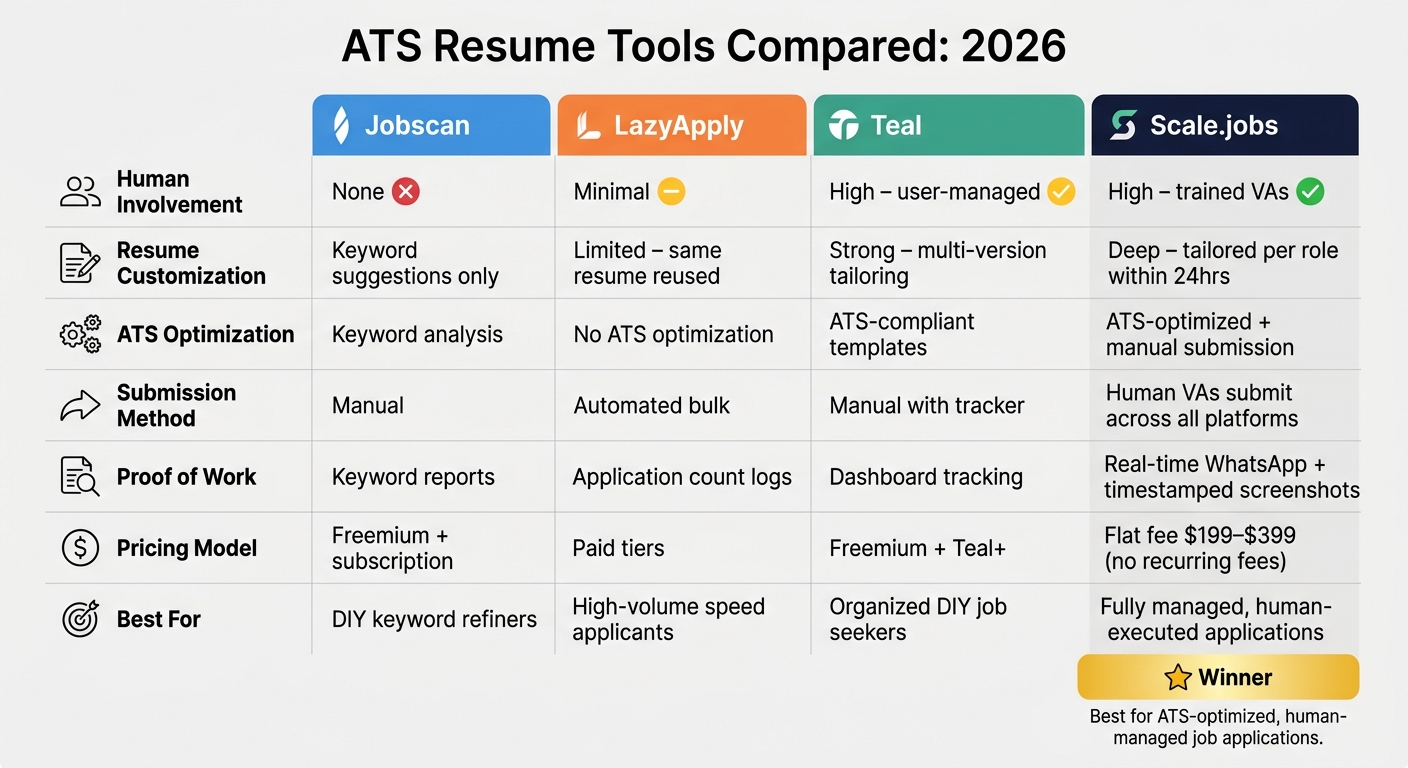
ATS Resume Tools Compared: Jobscan vs LazyApply vs Teal vs Scale.jobs (2026)
In 2026, when Applicant Tracking Systems (ATS) meticulously analyze every detail of your resume, picking the right tool can make or break your job search. While platforms like Jobscan, LazyApply, and Teal offer useful features, scale.jobs stands out with its human-powered approach that delivers tailored, ATS-optimized results. Unlike tools such as Jobscan, which focus solely on keyword insights, scale.jobs ensures personalized, role-specific document creation and submission. Using a tool that doesn’t align with your goals could cost you valuable opportunities and time. Here's a detailed comparison to help you choose wisely.
| Feature | Jobscan | LazyApply | Teal | scale.jobs |
|---|---|---|---|---|
| Human Involvement | None – you manually edit based on tool insights | Minimal – bot auto-fills and submits applications | High – manual resume tailoring by the user | High – trained human VAs manage applications individually |
| Resume Customization Depth | Strong keyword suggestions; manual rewriting required | Limited – same resume reused for bulk applications | Strong – quick multi-version tailoring with ATS-safe templates | Deep – tailored resume and cover letter for each role, delivered within 24 hours |
| ATS Handling | Matches ATS parsing with keyword analysis | Automated form-filling without ATS optimization | ATS-compliant templates and keyword fields | ATS-optimized documents, manually submitted to avoid automation penalties |
| Method of Submission | Manual application after resume optimization | Automated bulk submission via browser extension | Manual application with job tracker support | Human VAs handle submissions across all platforms, including niche boards |
| Transparency & Proof of Work | Keyword reports and match scores | Logs of application counts | Dashboard tracking job applications | Real-time WhatsApp updates with time-stamped proof-of-work screenshots |
| Pricing Model | Freemium with subscription options | Paid tiers, often marketed as lifetime or one-time plans | Freemium with optional advanced features via Teal+ | Flat-fee bundles - $199 (250 applications) to $399 (1,000 applications); no recurring fees |
Ideal Use Cases for Each Tool
Jobscan
Best for candidates who want to refine their resumes and improve keyword alignment before manually applying.
- Why scale.jobs excels: While Jobscan focuses on keyword optimization, scale.jobs goes further by having human assistants tailor and rewrite your resume for each role. It also provides dedicated WhatsApp support, proof-of-work documentation, and a one-time payment model - eliminating manual effort on your part.
LazyApply
Works for high-volume applicants who prioritize speed over customization, though users report lower response rates and potential issues with platform policies.
- Why scale.jobs excels: Unlike LazyApply, which sends the same resume to multiple roles, scale.jobs customizes every application to avoid ATS penalties and bot flags. You also receive real-time updates and documented proof of submission - all for a flat, one-time fee.
Teal
Ideal for mid-career professionals seeking an organized system to create multiple ATS-friendly resume versions quickly.
- Why scale.jobs excels: While Teal helps you stay organized, it requires you to handle all the work. scale.jobs takes care of everything - tailoring resumes, submitting applications, and tracking follow-ups - while providing proof-of-work and WhatsApp support, so you’re always in the loop.
scale.jobs
Perfect for job seekers who need human-managed submissions, role-specific documents, and clear proof of every application.
Why Choose scale.jobs?
- You’re spending hours editing and submitting applications with minimal results.
- Bulk applications yield quantity but fail to generate callbacks.
- You need verifiable proof that applications were submitted correctly.
- Your target roles involve complex ATS systems or detailed screening questions that automation tools often miss.
- You prefer a one-time payment model without recurring subscription fees.
Decision Summary
- Jobscan: Best for self-sufficient candidates who want keyword analysis and manual application management.
- LazyApply: Suitable for those who value speed and volume over customization.
- Teal: Ideal for organized, DIY job seekers who want ATS-friendly resume templates and tracking tools.
- scale.jobs: The go-to choice for fully customized, human-executed applications with ATS-optimized documents, real-time updates, and proof of submission - no subscription required.
Ready to experience the difference? Check out scale.jobs' resume writing and application services to streamline your job search today.
Conclusion
Optimizing your resume for Applicant Tracking Systems (ATS) isn’t a one-and-done activity. The 10 strategies outlined above offer a framework you can revisit and refine as the job market shifts. Job descriptions change, ATS platforms evolve, and employers’ priorities adapt to new trends. For instance, a resume that worked for a project manager role in early 2025 might fall short today if the job now emphasizes AI fluency, data literacy, or familiarity with updated compliance tools.
Think of these strategies as part of a continuous cycle: research the role, customize your master resume, check for ATS compatibility, polish your bullet points, and monitor which versions lead to callbacks. With each cycle, your applications become sharper and more efficient. While this process sets a solid foundation, it’s the combination of technology and human insight that truly drives success.
No tool or template can replace the value of human judgment. As Jobscan highlights, many resumes never make it past the ATS screening - but ultimately, a human makes the hiring decision. That’s why pairing ATS-ready resumes with clear, precise language that resonates with recruiters is essential.
If you’re dedicating 20+ hours a week to job applications but seeing little progress, the issue likely lies in your approach, not your qualifications. Services like scale.jobs' resume writing and application services bridge the gap by offering ATS-optimized resumes alongside human review. This ensures your documents are effective both for algorithms and the recruiters who evaluate them.
FAQs
How do I know which keywords matter most?
To identify the key keywords for your resume, closely examine the job description for terms that highlight both hard and soft skills, as well as any industry-specific jargon. Tools like an ATS score checker can help pinpoint any missing keywords or alternative terms (e.g., "CRM" versus "customer relationship management"). Platforms such as Scale.jobs can assist in customizing your resume with these job-specific keywords, boosting your chances of passing ATS filters by as much as 40%.
Should I submit a DOCX or PDF resume?
When it comes to modern Applicant Tracking Systems (ATS), both DOCX and PDF formats are compatible. That said, PDF tends to be the safer choice since it locks in your formatting, ensuring your resume appears exactly as designed. Whichever format you choose, stick to a clean, single-column layout with standard fonts and headers to avoid any parsing errors. Platforms like Workday, Greenhouse, and Taleo are supported by Scale.jobs, which ensures your resume meets ATS-friendly standards for seamless compatibility.
What ATS mistakes cause instant rejection?
Applicant Tracking Systems (ATS) can reject resumes for reasons like formatting problems or the absence of key job-specific terms. To ensure your resume passes through these systems, opt for a straightforward, single-column layout in either DOCX or PDF format. Avoid using tables, graphics, icons, or non-standard fonts, as these elements can confuse ATS software. Stick with standard section titles such as Work Experience or Education, and make sure to include the exact keywords from the job description to avoid being filtered out automatically.