
How to Create a Survival Budget During Unemployment

Sarah Mitchell
June 14, 2026

If you’re out of work, your first job is to protect cash. I’d do three things right away: find my monthly shortfall, count how many months of bills I can still cover, and cut any job-search cost that does not lead to interviews.
Here’s the short version:
- If a service eats into rent, food, insurance, or phone money, I’d pause it.
- If my runway is under 3 months, I’d stick to free options first. However, remember that DIY job hunting has hidden costs in time and missed opportunities.
- If I still want help to apply for jobs, I’d compare high upfront fees against pay-later pricing.
- For tight budgets, the main split is simple: FindMyProfession charges upfront, while scale.jobs starts with 5 free applications and may use a $1,500 success fee for eligible candidates.
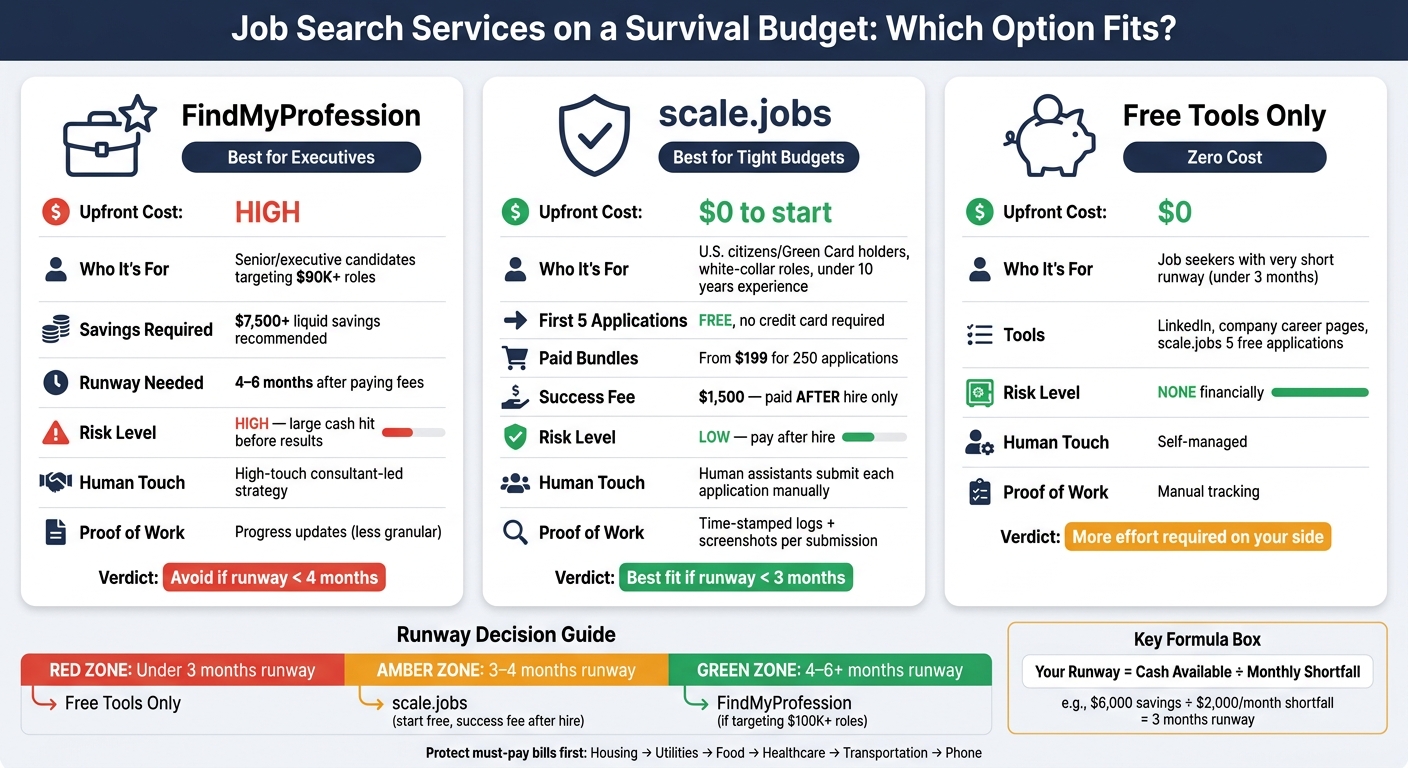
FindMyProfession vs scale.jobs vs Free Tools: Survival Budget Comparison
How To Budget While Unemployed | Living on Savings & Staying Sane
sbb-itb-564272e
Quick comparison
| Option | Best for | Upfront cost | Main risk |
|---|---|---|---|
| FindMyProfession | Senior and executive job seekers who want close support | High | Large cash hit before results |
| scale.jobs | Eligible white-collar job seekers who want lower cash outlay first | $0 to start | Success-fee obligation after hire |
| Free tools only | Job seekers with very short runway | $0 | More work on your side |
If I were budgeting during unemployment, I would pick the option that keeps my search active without cutting into must-pay bills.
1. Calculate your unemployment runway before paying for any job-search service
Before you pay for any tool to apply for jobs, get one number first: how many months can you cover your bills without a paycheck? That number shapes every choice you make, from whether to keep a job application service to whether you should stick with free options for now.
List all monthly dollar amounts
Start with every source of monthly income. Include unemployment insurance, severance, final pay, partner income, and freelance work.
If your unemployment benefit is weekly, convert it to a monthly number with WBR × 4.33.
That gives you a cleaner baseline. Without it, your budget can look better on paper than it is in real life.
Separate survival expenses from discretionary expenses
Now list survival expenses only. Keep this tight:
- Rent or mortgage
- Groceries
- Health insurance or COBRA premiums
- Utilities
- Required transportation
Leave everything else out.
Put all other spending into a discretionary column and review it right away. This is where people often find silent budget leaks: streaming plans, app renewals, and paid job search platform tools they signed up for in a panic.
Flag every recurring job-search subscription for review now. That includes resume tools, premium alerts, and any ai resume builder or ai cover letter builder plan that charges monthly.
Calculate your runway and decide which paid tools to keep
Subtract your total survival expenses from your total monthly income.
If your expenses are higher than your income, the gap is your monthly shortfall. That’s the amount coming out of savings each month.
Runway = cash you can use now ÷ monthly shortfall.
Here’s the plain-English version: if you can use $6,000 from savings and you’re short $2,000 each month, your runway is 3 months.
If your runway is under 3 months, use free tools only. Use scale.jobs' free tools only if they help you preserve cash.
Once you know your runway, cut every nonessential subscription before the next billing date.
2. Set a spending order and cut job-search subscriptions fast
Pay survival categories first, then review everything else
Start with one rule: protect your basics before you pay for job-search tools.
Once you know your runway, sort every expense by what keeps housing, food, and your job search moving. Use this order:
- housing
- utilities
- food
- healthcare
- transportation
- phone/internet
- minimum debt payments
- everything else
After that, look hard at every subscription. If a tool does not clearly lead to more interviews, it belongs below survival spending. Cut any tool that shortens your runway by more than a week unless it has a clear, direct effect on interview volume.
This is where people get tripped up. A few small monthly charges can look harmless on their own, but together they can add up to an extra month of cash burn. That’s money you may need for rent, groceries, or a phone bill so employers can still reach you.
If you’re paying for a job search platform, a resume tool, and a coaching service at the same time, pause and ask a simple question: Is this helping me get interviews now, or just making me feel busy?
When FindMyProfession may still fit your budget and when it likely does not

This spending order makes the FindMyProfession call pretty simple: keep it only if the fee fits inside your runway without putting core bills at risk.
FindMyProfession tends to make more sense for senior and executive searches because it offers high-touch reverse recruiting. If your runway is long enough, the fee can be easier to justify. A higher target salary can offset that cost more easily.
It gets much harder to defend when your salary target is below $90,000, your liquid savings are under $7,500, or the fee would push back rent, utilities, or health insurance. If any of that applies, treat FindMyProfession as a later option, not a current one.
That’s also the right moment to compare top reverse recruiting companies by service type, not just price. A premium concierge offer can sound helpful, but if cash is tight, you may need a lower-cost job application service that still helps you Apply for jobs without locking you into a heavy upfront hit.
Why scale.jobs fits a lean budget
scale.jobs fits a lean budget for one main reason: it starts free, then uses a $1,500 success fee for eligible U.S. white-collar candidates with under 10 years of experience instead of monthly recurring billing.
The free tier includes your first five human-run applications with no credit card required. If you want more volume, paid tiers add more human-run applications, and there’s no recurring billing beyond what you choose to turn on.
That setup is easier to carry on a survival budget because the spend stays tied to action, not a monthly charge that keeps running in the background.
If you're weighing options, compare them this way:
- Cash drain: How much does it cost this month?
- Work removed: How much manual effort does it take off your plate?
- Interview effect: Is it helping you get more replies?
For many job seekers, that’s where a Virtual Assistant for Job Applications or Job search virtual assistant can beat a monthly subscription model. You’re not just buying software. You’re buying execution.
And that matters when you’re applying across many roles, trying to land full time jobs, and watching every dollar.
3. FindMyProfession vs scale.jobs: which is more practical on a survival budget?
What FindMyProfession does well and where scale.jobs differs
Once you know how long your cash runway lasts, the next step is simple: pick the option that keeps your job search moving without draining your bank account.
FindMyProfession offers a high-touch, done-for-you service. Their U.S.-based team handles job sourcing, resume tailoring, applications, and outreach. If you're a senior-level or executive candidate and want someone else to manage most of the search, that setup can be a good fit.
But on a survival budget, cash flow matters more than polish. FindMyProfession's managed search packages usually come with a large upfront payment before you have an offer in hand. scale.jobs takes a different route. It starts free and offers a $1,500 success fee for eligible U.S. citizens and Green Card holders in white-collar roles with under 10 years of experience. Since that fee is due only after you land a job, you keep your money available while you're still trying to get hired.
That changes the risk math in a big way.
There’s also the question of proof. When you pay for a job application service, you want to know what was done. scale.jobs gives you time-stamped proof-of-work logs, screenshots for each submission, and WhatsApp updates. So instead of hoping applications went out, you can check each one. If you're watching every dollar, that kind of visibility matters.
Why scale.jobs works better for budget-conscious job seekers
For job seekers trying to stretch savings, scale.jobs has a few plain advantages over high-upfront services like FindMyProfession.
- Free to start: The first 5 human-run applications are free, with no credit card required.
- Human-powered, not fully automated: Trained assistants fill out application forms by hand, which helps cut down on bot errors and ATS issues that show up with fully automated tools like LazyApply or Sonara.
- ATS-optimized documents: Resumes and cover letters are formatted for common U.S. applicant tracking systems, which helps with online applications for white-collar roles. If you also need document support, tools like an ai resume builder and ai cover letter builder can help tighten your materials before applications go out.
- Proof of work you can verify: Time-stamped logs and screenshots show each submission, so you're not paying on blind trust.
- Cash-flow-friendly pricing: Paid bundles start at $199 for 250 applications. The $1,500 success-fee option keeps upfront costs low until you're back at work.
In plain English, FindMyProfession leans toward premium managed help. scale.jobs leans toward volume, visibility, and lower upfront spend. If you're trying to Apply for jobs while unemployed, that difference hits hard.
Comparison table: FindMyProfession vs scale.jobs for unemployment budgeting
| Feature | FindMyProfession | scale.jobs |
|---|---|---|
| Human involvement | High-touch, consultant-led strategy and branding | Human assistants focused on execution, supported by AI software |
| Resume customization depth | Deep, bespoke branding for senior roles | ATS-optimized customization per posting, efficient for white-collar candidates with under 10 years of experience |
| ATS handling | Resume writing includes ATS considerations | Built around ATS keyword matching and formatting at scale |
| Application execution method | Targeted outreach and curated search | Human-verified submissions across portals |
| Transparency and proof of work | Progress updates and communication, but less granular logs by default | Time-stamped logs, screenshots, and application dashboard for every submission |
| Pricing model | High upfront packages, typically in the multi-thousand-dollar range | Free toolkit + one-time bundles + optional $1,500 success fee |
| Typical budget fit during unemployment | Better for professionals with substantial savings or severance | Built for strict survival budgets and low cash outlay before re-employment |
If you're comparing services from a pure budget angle, this is the core split: FindMyProfession asks you to spend first and wait for results later. scale.jobs is built more like a low-risk job search platform, where you can keep cash on hand while the applications keep moving.
For someone chasing full time jobs after a layoff, that can be the difference between staying in the search and having to pause it.
4. How scale.jobs compares to other automation and resume tools
If managed-service pricing still feels out of reach, the next comparison is usually between auto-apply tools, resume tools, and a done-for-you job application service.
LazyApply, LoopCV, and Sonara vs scale.jobs: ATS risk, human oversight, and total cost
The big draw with LazyApply, LoopCV, and Sonara is simple: speed. They can push out dozens of applications a day with very little work from you. On paper, that sounds great. In a tight job search, though, the tradeoff can sting.
These tools depend on browser bots, scripts, or background automation. Some job portals may flag bot-like behavior, including near-duplicate submissions or form fills that happen too fast to look human. Then there’s the money side. LoopCV and Sonara charge monthly, so if your search lasts a few months, the bill keeps growing.
scale.jobs takes a different path. It starts free for U.S. citizens and Green Card holders in white-collar roles with under 10 years of experience, then charges a one-time $1,500 success fee only after you get hired. No monthly charge. No subscription drain while you search for full time jobs or your next role.
Why scale.jobs wins:
- Human assistants submit each application by hand, which cuts bot-flagging risk
- ATS-ready resume and cover letter are tailored to each role instead of filled from a generic template
- Time-stamped logs and screenshots show each submission
- Dedicated WhatsApp support keeps you updated without making you live inside a dashboard
- One-time success fee only, with no monthly charge eating into your runway
| Feature | LazyApply / LoopCV / Sonara | scale.jobs |
|---|---|---|
| Human involvement | Minimal - software-driven | High - trained human assistants submit each application |
| Customization depth | Template-based or basic keyword insertion | ATS-optimized resume and cover letter per role |
| ATS handling | ATS-compatible but at risk of bot-flagging | Human-like submission patterns; ATS-friendly formatting |
| Execution method | Browser bots, scripts, or extensions | Manual, human-guided execution |
| Transparency | Aggregate dashboards; limited per-application detail | Time-stamped logs and screenshots per submission |
| Pricing model | Monthly/recurring subscriptions | Free for eligible users; $1,500 success fee only after hire |
If you want the short version, this is the split: auto-apply tools help with volume, while scale.jobs leans into human execution. That matters if you care about proof of work, role-by-role edits, and keeping costs from stacking up.
Teal, Jobscan, Rezi, Resume.io, and TopResume vs scale.jobs for a lean job-search stack
If you’re building your own stack, monthly subscriptions are usually where the budget starts leaking.
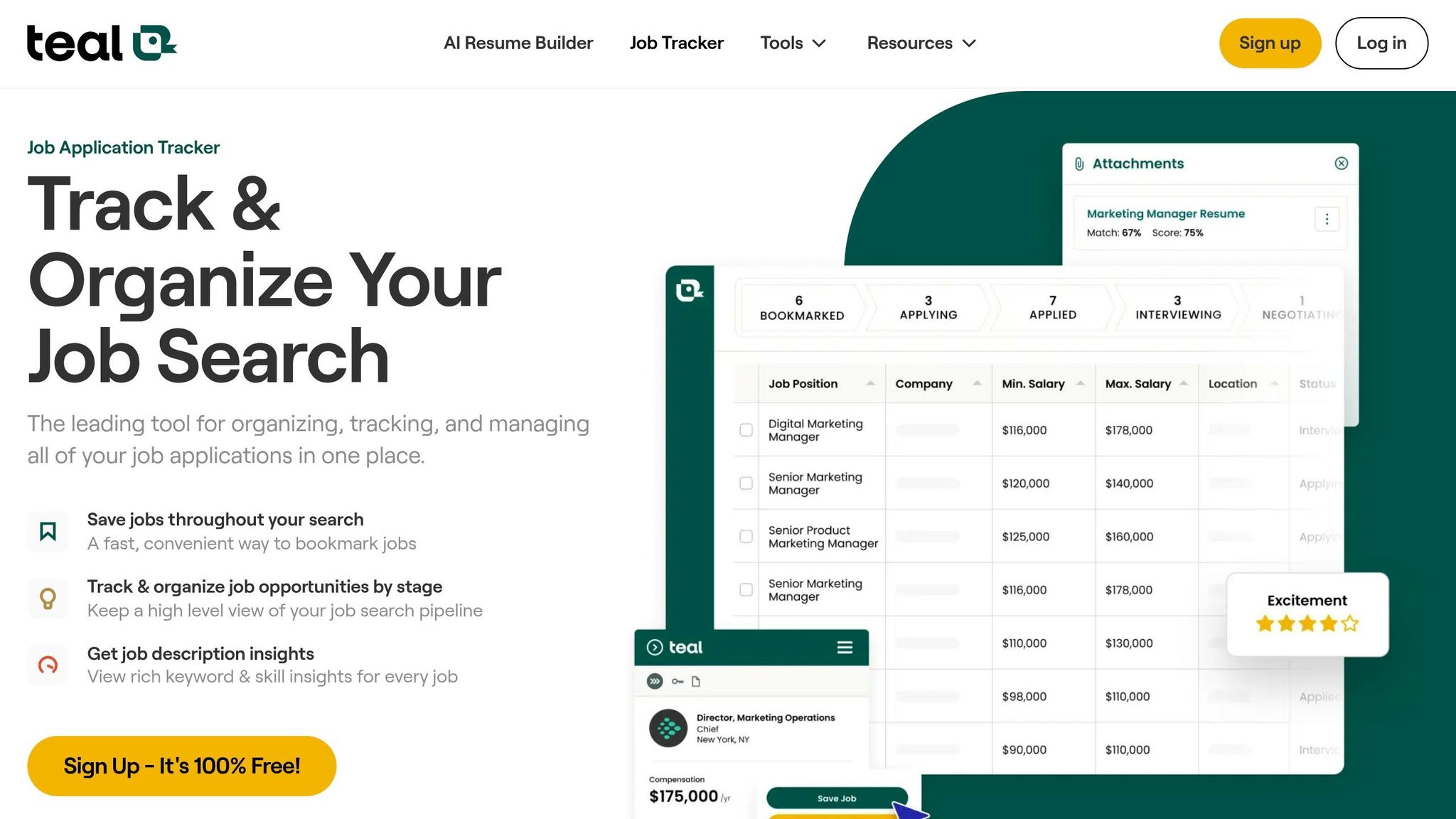
Teal, Jobscan, Rezi, Resume.io, and TopResume each handle one part of the process. One helps with tracking. Another scores your resume for ATS. Another helps write it. Another gives you templates or rewrite help. The problem is that once you combine two or three of them, you’re paying several monthly fees before a single application is sent. And you still have to do the applying yourself.
scale.jobs rolls tracking, ATS tailoring, and human submission into one workflow. Its resume packages include a written resume, cover letter, and LinkedIn makeover, with human applications bundled in. So instead of patching together tools, you get one system that covers several parts of the search.
This matters for people who want an ai resume builder but also need actual follow-through. Software can help write. It usually doesn’t execute.
Why scale.jobs wins:
- One workflow replaces a multi-tool stack with overlapping subscriptions
- Human assistants submit applications, so you are paying for execution, not just software
- Built-in ATS resume builder and job tracker are included, with no add-on fees
- Dedicated WhatsApp support replaces scattered dashboards
- No monthly recurring charge; the one-time payment model protects cash runway
| Feature | Teal + Jobscan + Rezi + Resume.io stack | scale.jobs |
|---|---|---|
| Job tracking | Teal (separate subscription) | Built-in tracker included |
| ATS optimization | Jobscan (separate subscription) | Built-in ATS resume builder + AI tailoring |
| Resume content | Rezi / Resume.io (separate subscriptions) | AI-generated or professionally written |
| Application execution | Manual - user applies themselves | Optional human assistants submit for you |
| Proof of work | Limited dashboard visibility | Time-stamped logs and screenshots per submission |
| Pricing model | Multiple monthly fees stacking up | Free for eligible users; $1,500 success fee only after hire |
In plain English, the stack approach can work if you don’t mind managing tools and handling every application yourself. scale.jobs fits better if you want one job search platform that covers both document prep and submission help.
Who should use FindMyProfession and who should choose scale.jobs
Use the comparisons above to match the model to your budget, target roles, and how much hands-on help you want.
Who should use FindMyProfession:
- Senior or executive candidates targeting roles above $90,000
- Job seekers with large savings or severance who can handle a high upfront fee
- Professionals who want consultant-led strategy, personal branding, and high-touch outreach
Who should choose scale.jobs:
- U.S. citizens and Green Card holders in white-collar roles with under 10 years of experience
- Laid-off professionals and recent graduates on a tight survival budget
- Job seekers who need human-assisted applications, ATS-ready documents, WhatsApp support, and per-submission proof of work - without a monthly subscription
If your top goal is strategy and brand polish at the senior end, FindMyProfession may fit better. If your top goal is to Apply for jobs with human help, ATS-ready documents, and a payment model that doesn’t keep billing you every month, scale.jobs is the better fit.
5. Decision summary: when to switch to scale.jobs, stay with a competitor, or use free tools only
When to choose FindMyProfession, scale.jobs, or free-only tools
If your runway is already mapped, use that as your filter. Keep the option that gives you the lowest cash risk your budget can handle.
Stay with FindMyProfession if you still have at least 4–6 months of must-pay expenses covered after paying their fees, and you're aiming at director, VP, or executive roles above $100,000 in pay. In that case, the higher upfront cost may still fit your plan.
If your runway is tighter, it usually makes more sense to move away from upfront pricing and toward success-fee pricing.
Choose scale.jobs if you're a U.S. citizen or Green Card holder in a white-collar role with under 10 years of experience. You can start free, and the $1,500 success fee kicks in only after you get hired. Human assistants handle your applications manually, not through bots. You also get ATS-tuned documents, WhatsApp updates, and proof-of-work screenshots. If you're comparing a job application service with a lower cash-risk setup, that's the main pull here: you pay after a hire, not before.
If paid help puts pressure on your must-cover bills, stop there and use free channels.
Use free tools only if your budget can't take on any paid service right now. Stick with LinkedIn, company career pages, and scale.jobs' 5 free human-assisted applications. For many people trying to apply for jobs while keeping costs near zero, that's the safer move.
Switch to scale.jobs if these conditions apply
Use these criteria:
- Your survival budget can't handle recurring subscriptions, and you want human assistants sending applications manually instead of bots that may get flagged
- You want one success fee instead of stacked charges across multiple tools
- You're a U.S. citizen or Green Card holder in a white-collar role with under 10 years of experience and want the $1,500 after-hire option
- You want help from a Virtual Assistant for Job Applications instead of relying only on software
- You'd rather use a job search platform that keeps costs low at the start
If you're not sure about service quality yet, the first 5 applications are free. That gives you enough room to test the human assistant workflow, see how communication feels, and check the output before spending anything.
Conclusion: protect cash, keep applications moving, and avoid paying for the wrong tool
Pick the option that protects your cash and keeps your job search moving. If your budget is tight, don't make the process harder by paying too early for the wrong setup. A job search virtual assistant can help, but only if the pricing fits your runway.
FAQs
What if my income changes month to month?
If your income changes from month to month during your job search, a flat-fee option like scale.jobs can make budgeting a lot simpler. Instead of monthly charges of $19.90–$39.90, scale.jobs uses a one-time price that ranges from $199 to $1,099.
That means your costs stay more predictable while you apply for jobs. There’s also a practical safety net: scale.jobs offers pro-rated refunds for unused application credits if your search ends early or your money situation shifts.
How much cash should I keep untouched?
Keep at least $199–$399 set aside during your job search. That amount covers Scale.jobs flat-fee packages for 250–1,000 applications, paid upfront, with human-assisted applications and proof-of-work transparency.
That setup helps you avoid recurring subscription costs. If you get hired early, Scale.jobs also offers pro-rated refunds for unused credits.
When does a success fee make more sense?
A success fee makes more sense when landing a job faster and with fewer misses matters more than the upfront cost. That’s often the case in crowded markets and ATS-heavy hiring, where small mistakes can bury an application before a recruiter even sees it.
It tends to work best for longer job searches, especially when personalized, human-assisted applications can lift callback rates. If you’ve been sending out applications for weeks with little to show for it, paying only after you get results can feel a lot more reasonable than paying a large fee at the start.
For eligible U.S. job seekers, Scale.jobs offers a free service with a $1,500 success fee, which can make budgeting simpler and easier to plan for than a large upfront payment. That setup may also appeal to people who want a more hands-on job application service or a Virtual Assistant for Job Applications during a long search.