
Crack the ATS Code: Resume Tips That Get You Interviews

Sarah Mitchell
March 3, 2026

Most resumes are filtered out before reaching a recruiter, thanks to Applicant Tracking Systems (ATS). These systems scan for keywords, formatting, and relevance to the job description. To make sure your resume passes, focus on:
- Simple formatting: Use single-column layouts, standard fonts (Arial, Calibri), and text-based PDFs or .docx files.
- Keyword alignment: Match your resume language with the job description, using specific terms like "project management" instead of vague alternatives.
- Measurable results: Replace generic phrases like "helped with" by showing outcomes, e.g., "Managed $2M budgets, reducing costs by 18%."
- Tailored applications: Customize your resume for every job, incorporating industry-specific terms and job-specific keywords.
Tools for ATS Optimization
- Jobscan: An AI tool for keyword matching and optimization.
- Scale.jobs: A job application service that combines AI with human review, offering tailored resumes and up to 30 applications daily.
Quick Comparison: Jobscan vs. Scale.jobs
| Feature | Jobscan | Scale.jobs |
|---|---|---|
| Method | AI-driven, self-service | Human-reviewed applications |
| Customization | Keyword-focused | Contextual tailoring |
| Application Handling | Manual | Managed (up to 30/day) |
| Turnaround | Instant feedback | 24 hours for documents |
| Pricing | $49.95/month | $199 for 250 applications |
Choose Jobscan for DIY resume refinement and Scale.jobs for hands-off, high-volume applications.
Key Takeaways
- Test your resume’s compatibility by pasting it into Notepad. If it’s unreadable, reformat it.
- Use tools like Jobscan for quick keyword analysis or Scale.jobs for full-service application management.
- track your applications to measure success and refine your strategy with automation.
If you’re overwhelmed by high-volume applications, consider a virtual assistant for job seekers like Scale.jobs to save time and improve your chances of landing interviews.
How to Write an ATS-Friendly Resume in 2026
How to Build an ATS-Optimized Resume
Creating a resume that gets through Applicant Tracking System (ATS) filters is a balancing act between machine readability and human appeal. The aim is to craft a document that meets ATS criteria while still engaging recruiters. This involves specific formatting, careful word choice, and selecting templates that work well with ATS software. Below are actionable steps to help you achieve this balance.
1. Format Your Resume for ATS Compatibility
The layout of your resume plays a key role in ATS readability. Stick to simple, single-column formats. While multi-column designs or graphics might look appealing, they often confuse ATS algorithms. Clear section separation is essential for proper parsing.
Use standard section headings like "Work Experience" and "Education" instead of creative alternatives. ATS software is programmed to recognize common terms, and unconventional headings can lead to errors. For fonts, stick with professional options like Arial, Calibri, or Times New Roman and avoid script or decorative fonts that may not render correctly.
When submitting your resume, choose a .docx file or text-based PDF. Avoid formats like image-based PDFs or .jpg files, as these are often unreadable by ATS systems.
| Feature | ATS-Friendly Choice | Avoid These Elements |
|---|---|---|
| Layout | Single-column | Multi-column, sidebars |
| File Type | .docx or text-based PDF | .jpg, .png, scanned PDF |
| Graphics | None | Logos, photos, charts |
| Fonts | Arial, Calibri, Times New Roman | Script, decorative fonts |
| Headings | Standard (e.g., "Experience") | Creative (e.g., "My Journey") |
2. Match Keywords from Job Descriptions
ATS systems rely heavily on keywords to evaluate resumes. If a job description mentions "project management", use that exact phrase instead of alternatives like "project coordination." These systems assess keyword density and relevance, so aligning your language with the job posting is crucial.
Incorporate keywords naturally throughout your resume, not just in a single section. For instance, instead of saying "Responsible for managing budgets", write, "Managed annual budgets exceeding $2.5M, reducing operational costs by 18%." This approach integrates the keyword "managed" and demonstrates your impact with measurable results.
Replace vague terms like "helped with" or "contributed to" with action verbs and metrics. Modern ATS algorithms analyze context, so phrases that connect your responsibilities to specific outcomes will score higher than generic statements.
3. Use Job-Specific Language
Customizing your resume for each application isn't just helpful - it's necessary. Generic resumes often fail because they don't align with the unique requirements of each role. If a job posting emphasizes "SEO" or "content strategy", ensure those terms appear in your resume where relevant.
Pay attention to industry-specific terminology. For example:
- In tech roles, include terms like "JavaScript", "Agile", or "DevOps."
- In healthcare, use phrases such as "patient care", "clinical trials", or "RN."
- For marketing positions, highlight skills like "SEO", "content strategy", and "analytics."
Tailoring your language shows you understand the role and have the right experience. If you’re applying to many positions and find it challenging to customize each resume, consider using a job application service like scale.jobs. They combine AI tools with human expertise to create ATS-friendly resumes tailored for individual applications, often within 24 hours.
4. Choose ATS-Compatible Templates
The structure of your resume should simplify ATS parsing. Reverse chronological format is the most compatible, as it lists your work history from most recent to oldest, which ATS software easily understands. This is especially important since nearly all Fortune 500 companies rely on ATS systems.
For templates, Microsoft Create offers free, customizable options that are ATS-friendly. If you’re looking for more advanced features, platforms like Rezi provide AI-powered keyword suggestions for optimization. Tools like Jobscan and Resume Worded analyze your resume against job descriptions to ensure alignment.
| Recommended Source | Best For | Key Features |
|---|---|---|
| Microsoft Create | General Job Seekers | Customizable Word templates |
| Rezi | Tech-Savvy Users | AI-driven keyword optimization |
| Jobscan | Targeted Applications | Job description keyword matching |
| Resume Worded | General Optimization | Resume impact and phrasing analysis |
Even with an ATS-friendly template, always review your resume for readability and engagement. While algorithms can help you pass initial screenings, recruiters ultimately make the hiring decisions.
Once your resume is optimized, consider exploring ATS tools like Jobscan or scale.jobs to find the best fit for your job search needs.
Jobscan vs scale.jobs: Which ATS Tool Should You Use?
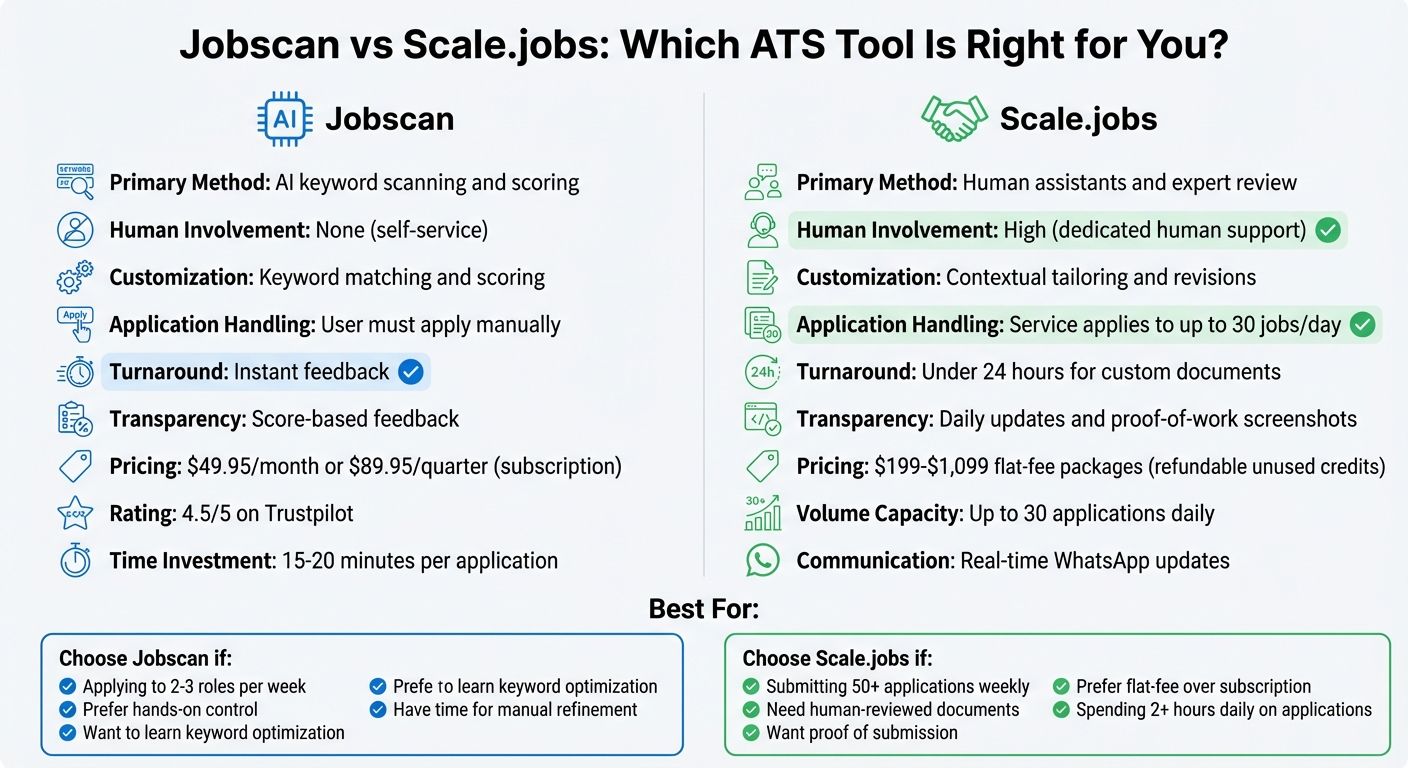
Jobscan vs Scale.jobs Feature Comparison for ATS Resume Optimization
Deciding between Jobscan and scale.jobs comes down to whether you prefer to handle resume optimization yourself or delegate the entire application process. Jobscan offers AI-powered keyword analysis to refine your resume manually, while scale.jobs provides human assistants to prepare tailored keywords and documents and submit applications on your behalf. Both platforms address ATS-related challenges but cater to different user needs and application strategies.
What Jobscan Does Well
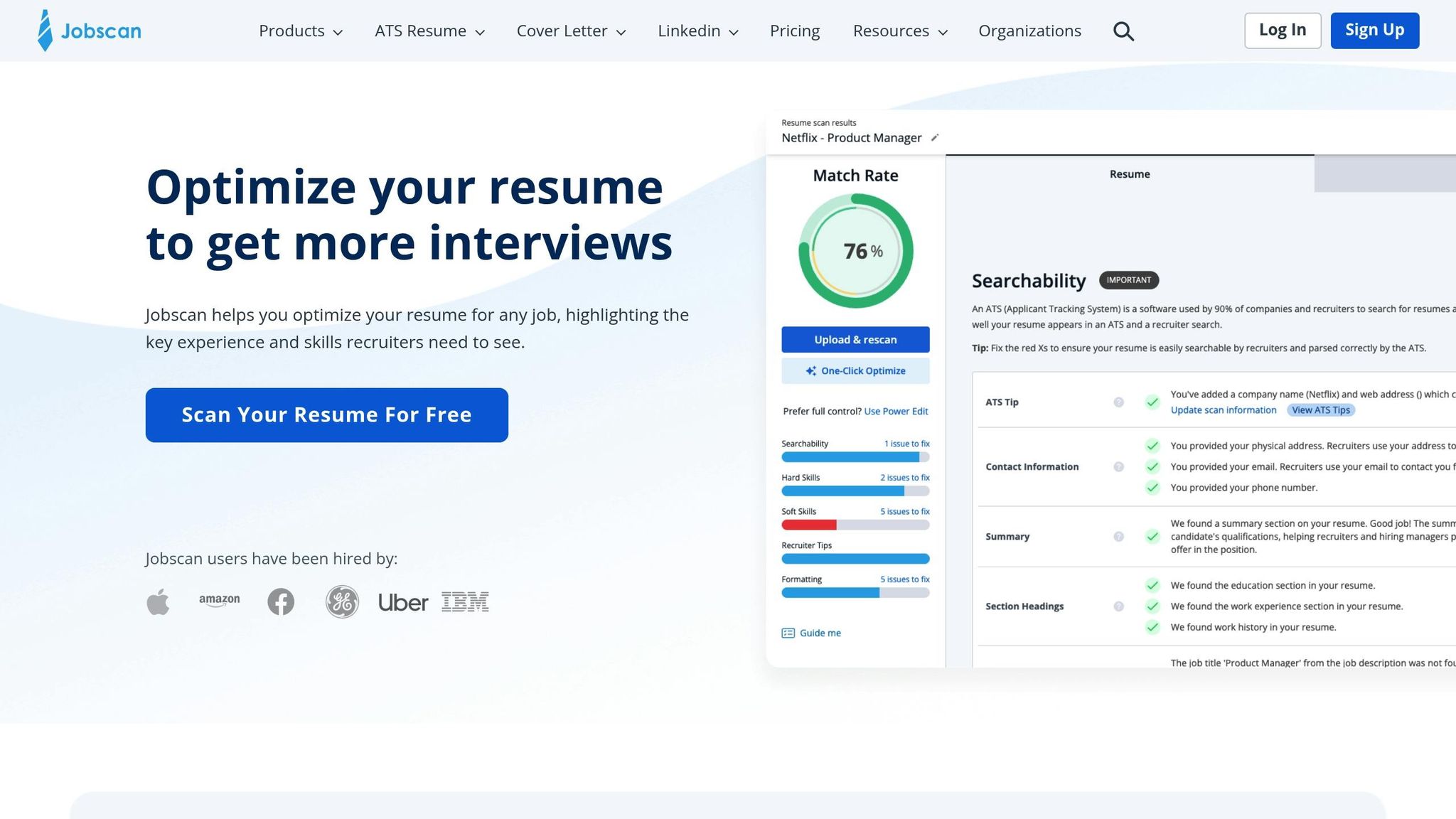
Jobscan specializes in identifying keyword gaps between your resume and job descriptions. It scans job postings, assigns a match score, and highlights missing keywords, helping you refine your documents for better ATS compatibility. This feedback is particularly helpful for job seekers aiming to align their resumes with industry-specific language.
The platform holds a 4.5/5 rating on Trustpilot, noted for its ease of use in keyword analysis. However, its focus on match scores can sometimes encourage users to over-optimize, potentially diluting the resume's authenticity. On average, users spend 15–20 minutes per application fine-tuning their resumes based on Jobscan's insights. Subscription pricing is $49.95 per month or $89.95 per quarter.
"Jobscan excels at keyword analysis but focuses heavily on match scores... none [of these tools] were built specifically for fast customization while maintaining your authentic voice."
– LandThisJob
While Jobscan provides AI-driven insights, scale.jobs offers a more hands-on approach.
Why scale.jobs Works Differently
scale.jobs acts as a job application service rather than a DIY tool. Human assistants review your background, customize resumes and cover letters for specific roles, and handle up to 30 applications daily on your behalf. This eliminates the need for manual AI resume builder adjustments and time-consuming form submissions, which can take up to 2.5 hours per day for high-volume job searches.
The service ensures transparency by providing time-stamped screenshots and real-time updates via WhatsApp, showing exactly where and when applications were submitted. Pricing is straightforward, with packages ranging from $199 for 250 applications to $1,099 for 1,000 applications, and any unused credits are refundable. Custom documents are delivered within 24 hours.
Feature Comparison: Jobscan vs scale.jobs
Here’s a closer look at how Jobscan and scale.jobs stack up across key features:
| Feature | Jobscan | scale.jobs |
|---|---|---|
| Primary Method | AI keyword scanning and scoring | Human assistants and expert review |
| Human Involvement | None (self-service) | High (dedicated human support) |
| Customization Depth | Keyword matching and scoring | Contextual tailoring and revisions |
| Application Handling | User must apply manually | Service applies to up to 30 jobs/day |
| Turnaround | Instant feedback | Under 24 hours for custom documents |
| Transparency | Score-based feedback | Daily updates and proof-of-work |
| Pricing Model | Subscription ($49.95/month or $89.95/quarter) | Flat-fee packages ($199–$1,099) |
Who Should Use Jobscan?
- Ideal for job seekers applying to 2–3 roles per week
- Great for those who prefer hands-on control and manual resume refinement
- Useful for learning how to optimize resumes with ATS-friendly keywords
- Best for applicants with the time to spend 15–20 minutes per application
Who Should Choose scale.jobs?
scale.jobs is particularly well-suited for job seekers managing large-scale application efforts:
- Ideal for candidates submitting 50+ applications weekly
- Perfect for those who need human-reviewed, ATS-optimized documents with dedicated WhatsApp updates
- Great for applicants who value flat-fee pricing and proof-of-work transparency
- Suitable for job seekers who want to focus on networking and interview preparation instead of tedious application tasks by following job interview preparation tips that help you stand out.
Switch to scale.jobs if…
- You’re applying to more than 50 jobs per week and can’t afford the time for manual customization
- You want personalized, human-reviewed applications with contextual adjustments
- You need real-time updates and proof of submission through time-stamped screenshots
- You prefer a one-time payment over a recurring subscription
- You’re spending over two hours daily on job application forms and resume edits
Decision Summary
Choose Jobscan if you’re applying to a few roles each week and want to refine your resume while learning keyword optimization techniques. Opt for scale.jobs if you’re managing a high-volume job search and need human-tailored documents, transparent tracking, and a flat-fee structure to save time and effort. Both tools serve distinct needs, so your choice should align with how you approach your job search.
Advanced ATS Strategies for Multiple Applications
When applying to numerous jobs weekly, managing your documents to meet the varied requirements of Applicant Tracking Systems (ATS) becomes essential. Every ATS platform processes documents differently - some handle PDFs seamlessly, while others may distort the formatting. Modern ATS platforms now use AI to evaluate context and measurable outcomes rather than just scanning for keywords. This shift calls for a strategy that balances speed with accuracy across diverse platforms.
1. Make Your Cover Letters ATS-Friendly
Cover letters often face the same ATS filters as resumes, yet many job seekers overlook the importance of formatting and keyword optimization for these documents. ATS systems scan cover letters for role-specific terms, industry jargon, and contextual alignment. Generic templates, like those starting with "I am writing to express my interest", often fail to include the role-specific details that make an impression. A tailored cover letter not only complements your resume but also directly addresses the job's unique requirements.
Customizing cover letters for dozens of applications each week can feel overwhelming. While AI tools can generate drafts in seconds, they often produce repetitive and generic content that lacks depth. To strike a balance, consider using resume writing services that combine AI's speed with human expertise. This ensures your cover letters include the right keywords and maintain a personal, authentic tone.
2. Track Your Application Performance
Without tracking your applications, it's difficult to gauge what's working and what isn't. You might miss out on identifying patterns, such as which roles or industries generate higher response rates or which ATS platforms consistently reject your submissions. Tracking your performance can highlight these trends and help refine your approach.
Platforms like scale.jobs offer dashboards with time-stamped screenshots, showing exactly when and where applications were submitted. This level of detail eliminates any uncertainty about submission status and helps you identify which job boards or company portals are delivering better results. For those managing the process manually, a simple spreadsheet tracking company names, application dates, ATS types, and response statuses can provide valuable insights. This data helps you fine-tune your strategy and maximize results.
3. Pair AI Tools with Human Review
AI tools are excellent for quickly analyzing job descriptions and inserting relevant keywords, but they often fall short when it comes to understanding nuanced job requirements or formatting documents for ATS compatibility. Automated systems can sometimes miss subtle details or create layouts that confuse ATS software.
When to Switch to scale.jobs
There are moments in your job search when automation alone just can't keep up. If you're juggling a high volume of applications, need solid proof of submissions, or want to avoid the hassle of recurring subscriptions, scale.jobs’ human-driven approach fills the gaps that many DIY tools leave behind. Here are three specific situations where switching to scale.jobs makes practical sense.
You're Submitting 50+ Applications Per Week
Applying to 50 or more roles weekly is a daunting task, especially when you’re dealing with complex ATS requirements. DIY tools might help with keyword optimization, but they often fall short when it comes to personalizing documents or actually submitting applications. Some job portals require tedious manual data entry, others reject PDFs, and many have strict file size rules. Managing these variations can easily eat up over 20 hours a week - time better spent networking or preparing for interviews.
With scale.jobs, virtual assistants take over the heavy lifting. They handle everything from document formatting to answering application-specific questions and meeting deadlines. This allows you to focus on building connections and honing your interview skills while ensuring every application is submitted professionally and on time. The transparent, flat-fee structure paired with human oversight makes this service a standout choice for busy job seekers.
You Need Application Tracking and Proof
Reducing your workload is one thing, but tracking your applications and having proof of submission are equally important. Without a clear record, it’s tough to measure your job search progress or figure out what’s working. DIY tools might offer keyword analysis and formatting tips, but they don’t provide evidence that applications were actually submitted. This lack of transparency makes it hard to evaluate your return on investment or refine your strategy.
scale.jobs provides real-time updates via WhatsApp, complete with time-stamped screenshots showing when and where each application was submitted. Their dashboard keeps a detailed log of submission dates, company names, and portal types, giving you a clear picture of your efforts. This proof-of-work is especially valuable for identifying trends - like which industries or company sizes are responding most - and for meeting requirements tied to visas or unemployment benefits.
You Want Flat-Fee Pricing Without Subscriptions
Subscription services can quickly become a financial burden. For example, a 12-month Jobscan subscription costs between $120 and $180, and that only covers resume scanning - you’re still left to handle all the applications yourself.
scale.jobs offers a one-time payment model with refunds for unused credits. Their Basic plan costs $199 and covers 250 applications with one dedicated assistant, while the Standard plan at $299 includes 500 applications and two assistants. If you land a job before using all your credits, they’ll refund the remaining balance. This approach eliminates the stress of monthly renewals and ensures you only pay for what you use. For job seekers looking for a complete solution, combining resume writing and application services provides far better value than piecing together multiple subscriptions.
Summary: How to Beat ATS Algorithms
To successfully get past ATS algorithms, focus on clean formatting, relevant keywords, and language tailored to the specific role. Stick to a single-column layout, use standard fonts like Arial or Calibri, and place your contact details in the main body of the document. A quick test: paste your resume into Notepad. If the text appears scrambled, it’s time to reformat. Incorporate job-relevant keywords naturally 2–3 times and always spell out acronyms (e.g., Applicant Tracking System (ATS)). Tailor your resume for each application by tweaking your summary, reordering bullet points, and including terms from the job description.
For a blend of AI-driven efficiency and human precision, tools like Jobscan can provide instant keyword feedback, while platforms like scale.jobs offer more comprehensive services. Scale.jobs stands out by combining ATS optimization with human oversight. Their team reviews job descriptions, customizes resumes to meet specific requirements, and submits up to 30 applications daily - all while ensuring ATS compatibility. Resumes are typically ready in under 24 hours, allowing you to act quickly on new opportunities without relying on generic, fully automated systems.
These strategies are essential for managing high-volume applications. For job seekers targeting 50+ roles weekly, manually handling these optimizations can take over 20 hours. While DIY tools can help analyze keywords, they don’t manage submissions or provide proof of work. Scale.jobs addresses this gap with real-time WhatsApp updates, time-stamped screenshots, and a transparent dashboard to track every application. Their flat-fee pricing starts at $199 for 250 applications, eliminating recurring subscriptions. Plus, if you secure a job before using all your credits, they’ll refund the unused portion.
If you're navigating a high-volume job hunt, consider pairing ATS optimization with resume writing services. This ensures your documents are both ATS-friendly and appealing to recruiters. Effective resumes balance technical optimization with readability, using bullet points for quick scanning, highlighting specific achievements, and maintaining concise, professional language. By combining strategic formatting, targeted keywords, and human-managed submissions, you improve your chances of passing ATS filters and landing interviews. Keep these tips in mind when evaluating tools to ensure your approach aligns with both ATS systems and recruiter expectations.
FAQs
How can I tell if my PDF is ATS-readable?
To make sure your PDF resume is compatible with ATS (Applicant Tracking Systems), stick to a straightforward format. Avoid graphics, tables, or intricate designs, as these elements can often confuse the software. Incorporate keywords from the job description naturally throughout your resume to improve its chances of being picked up. Save your resume in an ATS-friendly format, such as .docx or a clean PDF. Tools like Jobscan or Resumeworded can help you identify formatting problems or keyword gaps, allowing you to refine your resume for better results.
How many times should I repeat key job keywords?
Including key job keywords multiple times in your resume can significantly improve its compatibility with Applicant Tracking Systems (ATS). However, it’s essential to use them thoughtfully. Instead of cramming your resume with repetitive terms, aim to integrate these keywords naturally into descriptive, achievement-focused bullet points. For instance, highlight specific skills or accomplishments relevant to the role by weaving keywords into your results-driven statements.
For example, if you're applying for a marketing role, phrases like "digital marketing strategy", "SEO optimization", or "content creation" should appear in the context of your achievements: "Developed and executed a digital marketing strategy that increased website traffic by 35% in six months." This approach ensures that your resume not only passes ATS filters but also resonates with recruiters by showcasing your impact and expertise.
Remember, the key is balance - keywords should feel relevant and role-specific while blending seamlessly into your resume's overall narrative. This strategy enhances both ATS recognition and recruiter interest without resorting to keyword stuffing.
What should I do if I’m applying to 50+ jobs a week?
If you’re sending out 50+ job applications each week, a service like Scale.jobs can make the process much smoother. With ATS-friendly resumes and support from real people, it helps ensure your applications meet the requirements of Applicant Tracking Systems (ATS). This means you can avoid common pitfalls like formatting errors or missing keywords that could lead to rejections. By outsourcing the application process, you’ll have more time to focus on networking and prepping for interviews. Plus, features like real-time updates through platforms like WhatsApp keep you informed every step of the way.