
Why your resume keeps getting rejected (and how to fix it today)

Sarah Mitchell
June 15, 2026

If you’re getting no replies, your resume is usually failing in one of 3 places: ATS parsing, keyword match, or weak results-based bullets. In many cases, you can fix it in 60–90 minutes by matching one resume to one job, removing formatting that breaks ATS, and rewriting a few bullets with numbers.
Here’s the short version:
- Your resume may be rejected before a recruiter reads it
- Fast rejection often points to ATS or formatting issues issues
- Silence after many applications often points to weak targeting
- Auto-apply tools can increase volume, but they can also repeat the same mistake at scale
- If your resume is fixed and replies are still low, the problem is often execution, not experience
Why Your Resume is Rejected by ATS (& How to FIX IT)
sbb-itb-564272e
What I’d do first
- Pick one live job post.
- Pull 15–30 keywords from it.
- Add those terms to your summary, skills, and top bullets.
- Remove tables, columns, icons, and header-only contact info.
- Rewrite 3–5 bullets with results and numbers.
- Submit that version before sending 20 more generic applications.
Quick comparison
| Tool type | Best use | Main limit |
|---|---|---|
| Scan tools like Jobscan or ResumeWorded | Find keyword and formatting gaps | You still rewrite and submit everything yourself |
| Build tools like Teal or Rezi | Draft or edit resumes | Limited hands-on help per job |
| Execution help like scale.jobs | customize your resume and submit applications | Better fit if you want done-for-you support |
If I had to sum up the article in one line: don’t send more resumes until you fix the one bottleneck that keeps getting you filtered out.
What is breaking your resume right now and how to fix it today
ATS mismatch and weak keyword alignment
A lot of resumes get filtered out for a simple reason: the wording doesn't match the job post.
If your resume says one thing and the posting says another, the ATS may rank you lower. The fix is simple, but it takes a bit of care. Open a live job description, spot the terms that show up more than once, and work those into your summary, skills, and the bullets that matter most.
Focus on items like:
- tool names such as Salesforce or HubSpot
- methods such as Agile or Scrum
- role phrases such as "cross-functional collaboration" or "stakeholder management"
This matters because ATS software often looks for direct matches. A hiring team may mean the same thing by two different phrases, but the system may not.
Tools like Jobscan and ResumeWorded can help you catch missing keywords. They’re useful for gap-checking. But there’s a catch: they can tell you what’s missing without showing you how to rewrite your experience so it sounds strong and role-fit. That part still takes human judgment.
If you’re using an ai resume builder, make sure you’re not stopping at keyword insertion. You still need bullets that sound like they belong to this role, not just any role.
Formatting problems that break ATS parsing
A resume can look polished and still fail inside an ATS.
The safest move is to keep formatting plain and easy to read. Use a one-column layout, standard section headings, a common font, contact details in body text, and date formatting that stays consistent from top to bottom.
One small detail trips people up all the time: put your contact information in the body of the document. Some ATS tools skip headers and footers, which means your email or phone number might not get picked up.
Here’s a fast test. Paste your resume into plain text and read it top to bottom. If your job titles, dates, and employer names still appear in the right order, your formatting is probably ATS-safe.
This is a big issue for people who are trying to apply for jobs at scale. If parsing breaks, even a strong background can get buried before a recruiter ever sees it.
Generic impact statements and poor role targeting
This is where many resumes lose steam.
A bullet that lists tasks tells the reader what you were around. A bullet that shows results tells them what changed because of you. That’s a huge difference.
Use this formula:
action verb + change + measurable result
For example:
Before: "Helped customers with inquiries and escalated issues to the team."
After: "Resolved an average of 45 customer inquiries per day and maintained a 4.8/5 satisfaction score while reducing escalation volume by 22%."
That second version works better because it shows output, quality, and business impact in one line.
This is also where role targeting comes in. The same work history can be framed in different ways depending on the job you want. An operations-heavy resume aimed at a Program Coordinator role should push scheduling, cross-functional coordination, and process tracking closer to the top. That same resume, if aimed at a Customer Success Manager role, should lead with client retention, account management, and renewal support.
Lead with the experience that best matches the posting. Don’t make the recruiter dig for it.
If you’re struggling to do that across many roles, a job application service or Virtual Assistant for Job Applications can help with the rewrite-plus-apply workflow. And if you need more hands-on support, a job search coach can help you tighten your positioning before you send out another batch.
If these fixes still don’t move your response rate, the next section looks at tools that handle the rewriting and application process for you.
Which resume tool actually fixes the problem
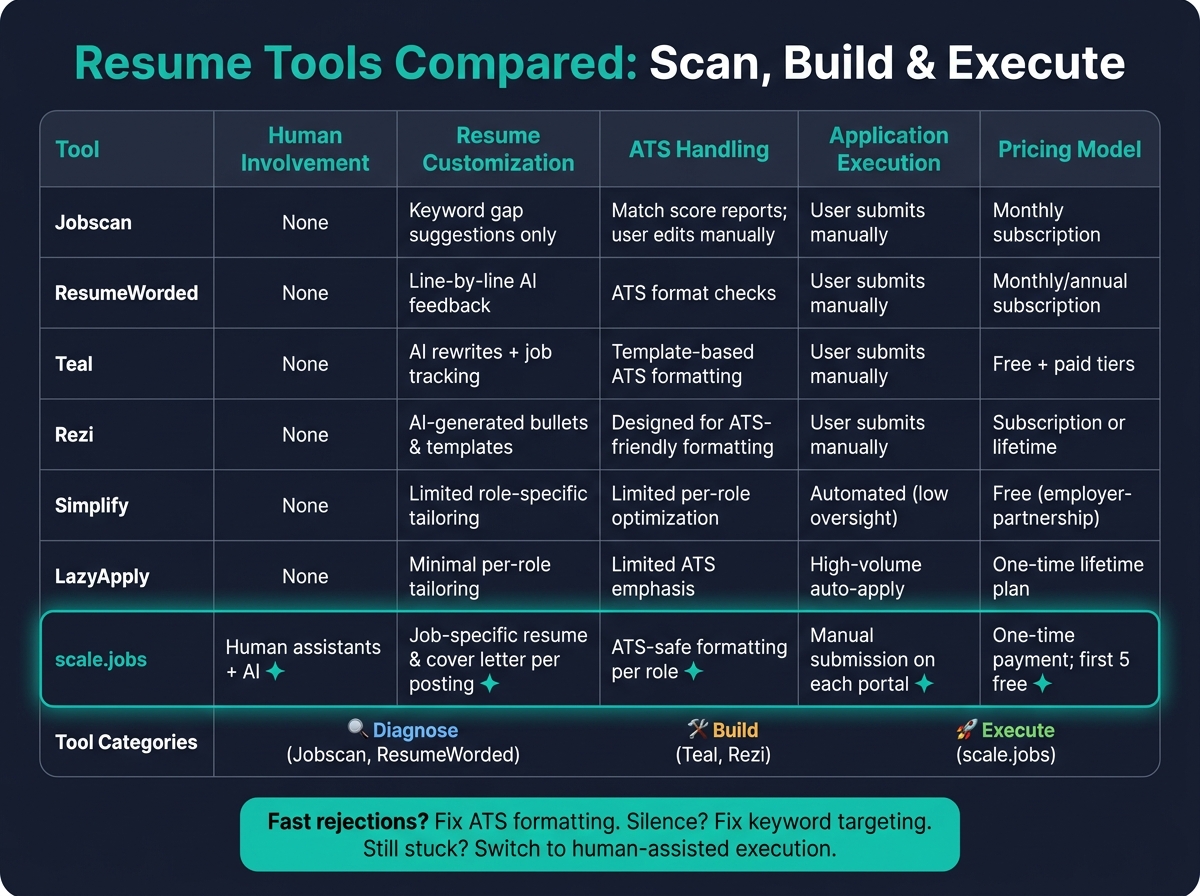
Resume Tools Compared: Scan vs Build vs Execute
If your resume is already readable by ATS software, the resume may not be the issue anymore. At that point, the better way to compare tools is by what they actually do with your application.
Most resume tools fall into three buckets:
- Diagnose: show gaps, scores, or formatting issues
- Build: help you write or rewrite the resume
- Execute: help submit applications
That distinction matters. If your resume scans fine but you still hear nothing back, you may not need another score. You may need help with the workflow itself.
If you're still doing all the editing and submitting on your own, a scan tool can only take you so far. A job application service or a Virtual Assistant for Job Applications starts helping at the part where most people get stuck: tailoring and sending applications role by role.
Comparison table: scale.jobs vs ResumeWorded, Jobscan, Teal, Rezi, Simplify, and LazyApply
The table below separates scan-only tools from build tools and human-assisted execution.
| Human Involvement | Resume Customization Depth | ATS Handling | Application Execution | Transparency & Proof of Work | Pricing Model | |
|---|---|---|---|---|---|---|
| Jobscan | None | Keyword gap suggestions only | Match score reports; user edits manually | User submits manually | Score reports | Monthly subscription |
| ResumeWorded | None | Line-by-line AI feedback | ATS format checks | User submits manually | Feedback reports | Monthly/annual subscription |
| Teal | None | AI rewrites + job tracking | Template-based ATS formatting | User submits manually | Application tracker | Free + paid tiers (monthly) |
| Rezi | None | AI-generated bullets, templates | Designed for ATS-friendly formatting | User submits manually | Document history | Subscription or lifetime access |
| Simplify | None | Limited role-specific tailoring | Limited per-role optimization | Automated (low oversight) | Minimal | Free to users; employer-partnership model |
| LazyApply | None | Minimal per-role tailoring | Limited emphasis on ATS | High-volume auto-apply | Minimal | One-time lifetime plan |
| scale.jobs | Human assistants + AI | Job-specific resume & cover letter per posting | ATS-safe formatting for each role | Manual submission on each application portal | Application screenshots and WhatsApp updates | One-time payment; first 5 applications free |
Use the table to decide whether you need feedback, document creation, or hands-on submission.
When a self-serve tool is enough and when it is not
A simple way to think about it:
- If you get fast rejections, focus on ATS-safe formatting.
- If you get silence, focus on keyword match and role targeting.
- If you're tired of fixing and submitting everything yourself, move to human-reviewed execution.
Jobscan and ResumeWorded are a good fit if you want to edit your own resume. Teal is more useful when tracking matters more than submission. Rezi works well if you want a fast ATS-friendly draft. An ai resume builder or ai cover letter builder can also help at this stage if your main problem is writing from scratch.
These tools help you move faster. They do not solve the full application workflow.
That gap shows up when you need someone to do the rewriting and the submission. scale.jobs mixes software with human support and ATS-safe execution for role-specific applications. If you prefer to stay hands-on, scan-first tools make sense. If you want human review, ATS-safe formatting, and manual submission, scale.jobs moves into a different lane.
Use scan-first tools if you edit your own resume. Use scale.jobs if you want human review, ATS-safe formatting, and manual submission.
Who should use Jobscan, ResumeWorded, Teal, or Rezi: Best for job seekers who want structured feedback and are willing to do their own editing. This works well if you have time to revise, track roles, and apply for jobs on your own.
Who should choose scale.jobs: Best for job seekers who want human review built into the workflow - from resume customization to ATS-safe formatting to manual submission with proof of every application sent. That setup is closer to using a job search virtual assistant than using a basic resume editor.
If scans look fine but responses stay low, execution is the bottleneck. Explore scale.jobs if you want human review built into the resume and application workflow - then see how it compares directly to the tools you're already using.
scale.jobs vs competitors: why job seekers switch
Job seekers switch when a tool points out the problem but doesn’t fix it.
That’s the big split here. Tools like Jobscan and Teal help you spot issues. scale.jobs goes further by handling the rewrite, applying ATS-safe formatting, and submitting the application. If you need more than advice, that difference matters.
Is Jobscan worth it? Reviews, alternatives, and when to switch to scale.jobs
If you think your resume has an ATS match problem, Jobscan can help. Its keyword gap analysis is easy to follow, and for a self-directed candidate who wants to tune their own resume, it can be a solid fit.
The catch is simple: Jobscan shows the gaps, but you still have to rewrite the resume and submit every application yourself. If you’re laid off and trying to Apply for jobs across 40 roles a week, manually rewriting bullets after each scan can turn into a second full-time job.
Why scale.jobs differs from Jobscan:
- A human assistant rewrites your resume for each role instead of just pointing out issues
- ATS-safe documents are made per role instead of only being scored
- Submission screenshots show what was submitted and when
- WhatsApp support lets you ask questions and get updates in real time
- Flat-fee pricing covers a set number of applications with no monthly renewal
Who should use Jobscan: Candidates who want keyword feedback and plan to rewrite the resume themselves.
Who should choose scale.jobs: Candidates who need the resume rewritten and the application submitted for them.
Switch to scale.jobs if…
- You’ve run the scans but still haven’t updated the resume
- You’re applying to more roles than you can tailor by hand
- You want a human to check the work instead of relying on software alone
Use Jobscan when you need a keyword check. Use Teal when you need organization. Use scale.jobs when you need the resume and application actually done.
Teal vs scale.jobs: when tracking and templates are not enough
Teal can help you stay organized. It’s useful for tracking roles and starting from a clean draft. But if you’re organized and still getting no replies, then organization is not the bottleneck.
That’s where Teal hits its limit. It doesn’t rewrite bullets or tailor the resume for each posting. You still have to adjust the language yourself. For many people, that’s the part that slows everything down.
Why scale.jobs differs from Teal:
- Human assistants rewrite resume content for each job posting instead of only organizing it
- ATS formatting is applied per role instead of being reused from one template
- Human assistants handle submission instead of just tracking
- Submission screenshots confirm what was sent and when
- One-time pricing is easier to judge than a recurring subscription
Who should use Teal: Organized DIY job seekers who want a central dashboard and a clean resume template to build from.
Who should choose scale.jobs: Job seekers who need tailored resume versions, human review, and direct application help. If you need help putting the whole process together, scale.jobs' resume writing service covers the workflow from rewrite to submission.
Tracking keeps things tidy. It does not handle the rewrite or the submit step.
Stop using LazyApply and Simplify until you check these ATS and oversight tradeoffs
If you’re applying fast but hearing nothing back, the problem may be common automation mistakes that trigger rejections.
Volume tools save clicks, but they don’t add judgment. LazyApply and Simplify can cut down application time, which sounds great on paper. But speed without review can lead to generic submissions, and generic submissions often disappear into the pile.
LazyApply can send applications across LinkedIn, Indeed, and ZipRecruiter at high volume with little effort. Simplify cuts form-filling down to seconds, which can help early-career candidates or internship seekers where volume matters more.
The tradeoff is oversight. When one resume gets sent to hundreds of roles without role-specific tailoring, the applications start to look the same. For senior roles, niche openings, or jobs with very specific requirements, that usually shows up as silence.
Why scale.jobs differs from LazyApply:
- Every application uses a resume tailored to that exact job description
- Human assistants fill out each application form by hand
- Submission screenshots confirm each application one by one
- WhatsApp updates keep you informed in real time
- One-time pricing covers a set number of applications with no hidden renewals
Why scale.jobs differs from Simplify:
- Applications are checked by a human before submission instead of being auto-filled
- ATS-safe formatting is applied per role instead of being reused from one base resume
- The workflow stays transparent with submission screenshots for every role
- Flat-fee pricing gives you a clear service outcome
Here’s the simple way to think about it:
| Tool | Best for | Main limit |
|---|---|---|
| LazyApply | High-volume application sending | Low role-by-role tailoring |
| Simplify | Saving time on repetitive forms | Less human review before submit |
| scale.jobs | Tailored applications with human support | Better fit for people who want done-for-you help |
Who should use LazyApply: Candidates who care most about volume and are fine with light customization.
Who should use Simplify: Early-career candidates or internship seekers who want to save time on repetitive forms.
Who should choose scale.jobs: Job seekers targeting mid-to-senior roles who want human review on each application instead of background automation. If that sounds like your situation, a Virtual Assistant for Job Applications or a job application service can make more sense than another auto-apply tool.
Switch to scale.jobs if…
- Your auto-apply results aren’t producing replies worth the volume
- You’re targeting mid-to-senior roles where generic applications get filtered fast
- You want a human to check quality on every application
If you’re comparing tools, it helps to match the tool to the actual bottleneck. A tracker helps you stay organized. A scanner helps you spot resume gaps. An auto-apply tool helps you move fast. But if you need tailored resumes, human review, and completed submissions, that’s where a job search platform, a job search virtual assistant, or a virtual assistant for job seekers starts to look a lot more useful.
What to do next if your current resume tool is not working
Your same-day resume repair checklist
Before you buy another tool or send out another batch, stop and fix one resume for one target role.
If your applications keep getting ignored, spend 60–90 minutes rewriting a single resume around a job description you’d apply to this week. Pull out 15–30 role keywords, including skills, tools, title variations, and core job duties. Then check whether those terms show up naturally in your headline, summary, and top bullets. If they don’t, that’s usually the first issue.
Next, remove anything that can break ATS parsing: tables, columns, text boxes, icons, and contact details placed only in the header or footer. A simple test helps here. Paste your resume into a plain text editor. If the text reads in the right order, the layout is likely safe. If it looks scrambled, fix that before you submit.
Then rewrite 3–5 bullets with this formula: action verb + task + method + measurable result. Use past tense for past roles and present tense for your current one.
That one role-specific version will often do more for you than sending the same generic resume to 30 jobs.
If the resume looks clean now but replies still don’t come in, the problem is no longer the document. It’s execution.
Switch to scale.jobs if your applications need human review and execution
If your resume is fixed but you still can’t keep up with tailoring and submitting, this is where human-assisted help starts to make sense.
A switch is practical when:
- You’ve sent 20+ targeted applications in the last 60–90 days and got zero interviews, even for roles where you match 80–90% of the listed requirements.
- You’re going after multiple role types at once and can’t tailor every resume by hand.
- You’ve tried keyword tools, but your bullets still sound generic or fail to show clear impact.
- You want a human to check what was submitted instead of relying on a software score.
- You’d rather pay a flat fee or one-time price than add another monthly bill.
scale.jobs helps close that execution gap with human resume rewrites, ATS-safe formatting, manual submissions, time-stamped proof, and WhatsApp support. If you need a base document first, start with the resume writing service. If you also need help with volume, a job application service can take the manual work off your plate. For people who want hands-on help during the process, a Virtual Assistant for Job Applications can make it easier to Apply for jobs at a steady pace without cutting corners.
The first 5 applications are free, so you can check the workflow before paying.
Match the tool to the actual bottleneck. If the issue is keyword gaps, fix the resume. If you can’t keep up with tailoring and submissions at the pace your search needs, a job search platform with human support can help you move faster and with more control.
FAQs
How do I know if ATS is rejecting my resume?
Watch for a few common problems: delayed or inaccurate parsing, missing must-have keywords, and formatting choices like graphics or tables that ATS software can’t read well. Inconsistent date formats, missing job locations, or skipped standard headers can also trip things up and cause the system to reject or overlook your resume.
A resume can still struggle in ATS scans even with strong Jobscan scores. That usually points to small formatting mistakes or missing context-based keywords. An ATS check, paired with expert feedback, can help spot those issues before you apply for jobs.
How many resumes should I tailor for different roles?
It depends on how many roles you plan to target and how focused your search is.
If you’re going after a small set of specific roles, tailor each resume. That gives you a better shot at matching the job description and getting through ATS filters.
If you plan to <a href="/apply-for-jobs">apply for jobs</a> at a higher volume, take a split approach. Use tailored resumes for your top-choice roles, and keep a broader ATS-ready version for the rest. That way, you protect your time without sending the same generic resume everywhere.
The goal is simple: balance quality with speed. If you want help managing that mix, a <a href="/job-search-virtual-assistant">job search virtual assistant</a> or <a href="/job-application-service">job application service</a> can help you stay organized and keep your applications moving.
What if I don’t have numbers for my bullet points?
If you don’t have exact numbers, focus on impact. Show results through the work you owned, the skills you used, and the scope of your role.
For example, instead of “Managed a team,” write “Led a team of 10 to deliver projects on time and within budget.” That small shift adds context. It shows what you did and why it mattered.
Even without hard metrics, you can still make your resume stronger by adding details like:
- What you were responsible for
- Who you worked with or supported
- What outcome you helped drive
- Which job-relevant terms match the role you want
Clear scope and the right keywords can make a big difference, especially when you’re trying to Apply for jobs through a crowded job search platform or improve your materials with an ai resume builder.