
Job Search Mistakes That Can Increase Financial Stress

Sarah Mitchell
June 18, 2026

Every extra week without an offer can cost about $1,538 on an $80,000 salary. From what I see, the biggest money drains in a job search are simple: applying too late, sending the same resume everywhere, and paying for tools that do not fix follow-through.
If you want the short answer, here it is:
- Apply within 24 to 48 hours
- Tailor your resume to each role
- Track every application and follow-up
- Stop stacking monthly tools that overlap
- Pick help based on your bottleneck: editing, tracking, or execution
This also changes how I’d look at tool choices. LazyApply, Simplify, Jobscan, Teal, Rezi, and TopResume each fix one part of the process. scale.jobs is more about getting applications sent with human help and proof of submission.
🔴 [LIVE] Job Search Mistakes That Are Destroying Your Confidence (and Costing You Money in 2026!)
sbb-itb-564272e
Quick Comparison
| Tool | Best for | Main limit | Pricing style |
|---|---|---|---|
| scale.jobs | People who need applications sent and tracked | Less DIY control than doing all steps yourself | One-time fee |
| LazyApply | High-volume entry-level applications | Low review per role | Subscription/lifetime |
| Simplify | Fast form filling | You still do the applying | Free + paid tiers |
| Jobscan | Matching resume keywords to job descriptions | No application handling | Monthly |
| Teal | Tracking pipeline | No submission help | Free + paid tiers |
| Rezi | Building a base ATS resume | You still tailor and apply | Free + paid tiers |
| TopResume | One-time resume rewrite | No execution help | One-time package |
What I’d do first
- Use a tracker right away
- Fix resume match rate next
- Add a job application service only if volume or deadlines are the issue
If you are missing deadlines, losing track of follow-ups, or spending too much time trying to Apply for jobs, your process likely needs fewer tools and more structure.
Job search mistakes that make financial stress worse
Applying too slowly and depending only on job boards
Speed matters more than most people think. Apply within 24–48 hours of a job going live. TalentWorks found that applications sent within 96 hours were much more likely to land interviews. In the U.S., many employers start screening early, often well before the posting closes.
That means waiting a few days can cost you the best shot at being seen.
If you're trying to Apply for jobs, set job alerts, check openings every day, and send applications daily instead of batching everything at the end of the week. It also helps to go beyond the best job boards. Use company career pages and networking at the same time, so you're not stuck waiting for results from one channel.
Slow applications miss the first review window. And if the few applications you do send use the same broad resume, the odds get even worse.
Using a generic resume that keeps getting filtered out
Most large employers use an ATS before a recruiter ever looks at your application. That filter is brutal in a quiet, boring way: if your resume doesn't match the role well enough, it may never reach human eyes.
A generic resume usually fails for three simple reasons:
- It misses role-specific keywords
- It confuses ATS parsing with poor formatting
- It sounds too broad to match one clear opening
The result is painful but common: more rejections, more time spent applying, and more savings burned while you wait.
A better move is to keep one core resume, then tailor it for each job. Mirror the exact language from the job posting in your summary, skills, and experience sections. Use standard headings. Keep the layout clean and single-column. And make your bullets concrete with numbers like percentages, dollar amounts, or time saved.
If you want a faster workflow, an ai resume builder can help shape each version, and an ai cover letter builder can keep your documents aligned with the role. You can also use a checklist or get a second set of eyes from a job search coach before sending the next round out.
Even a strong resume loses power when versions get mixed up, tracked badly, or sent too late.
Paying for low-value services while running a disorganized process
The average active job seeker can easily rack up $60–$150 per month in subscriptions without seeing better interview rates. That might not sound huge at first. But over a long search, it adds up fast, especially when paired with duplicate applications, missed follow-ups, and no clear record of what went where.
That's where the mess starts costing more than the tools.
Miss one follow-up window on a strong application, and you may end up stretching your search by another month. That's another month of rent, groceries, and bills while your pipeline stalls out. A plain spreadsheet can prevent a lot of that. Track:
- Company
- Role
- Source
- Date applied (MM/DD/YYYY)
- Status
- Follow-up date
It costs nothing and gives you one place to see what you've done. Pair that with a simple file naming rule like Lastname_Firstname_Role_Company_MMYY.docx so you don't send an old version by mistake.
If you're paying for a job application service, a job search platform, or a Virtual Assistant for Job Applications, keep it only if it helps you do one of three things: apply faster, apply with fewer mistakes, or track follow-ups better. If it doesn't do that, it's probably just another monthly charge.
This is also where a job search virtual assistant or virtual assistant for job seekers can make sense for some people. Not because outsourcing is magic, but because a tight system cuts rework. And when you're chasing full time jobs or even searching for Part time jobs near me, less rework means less wasted time and less money leaking out each month.
That sets up the next section: which tools cut friction, and which ones just make your wallet lighter.
Tool comparison: scale.jobs vs LazyApply, Simplify, Jobscan, Teal, Rezi, and TopResume
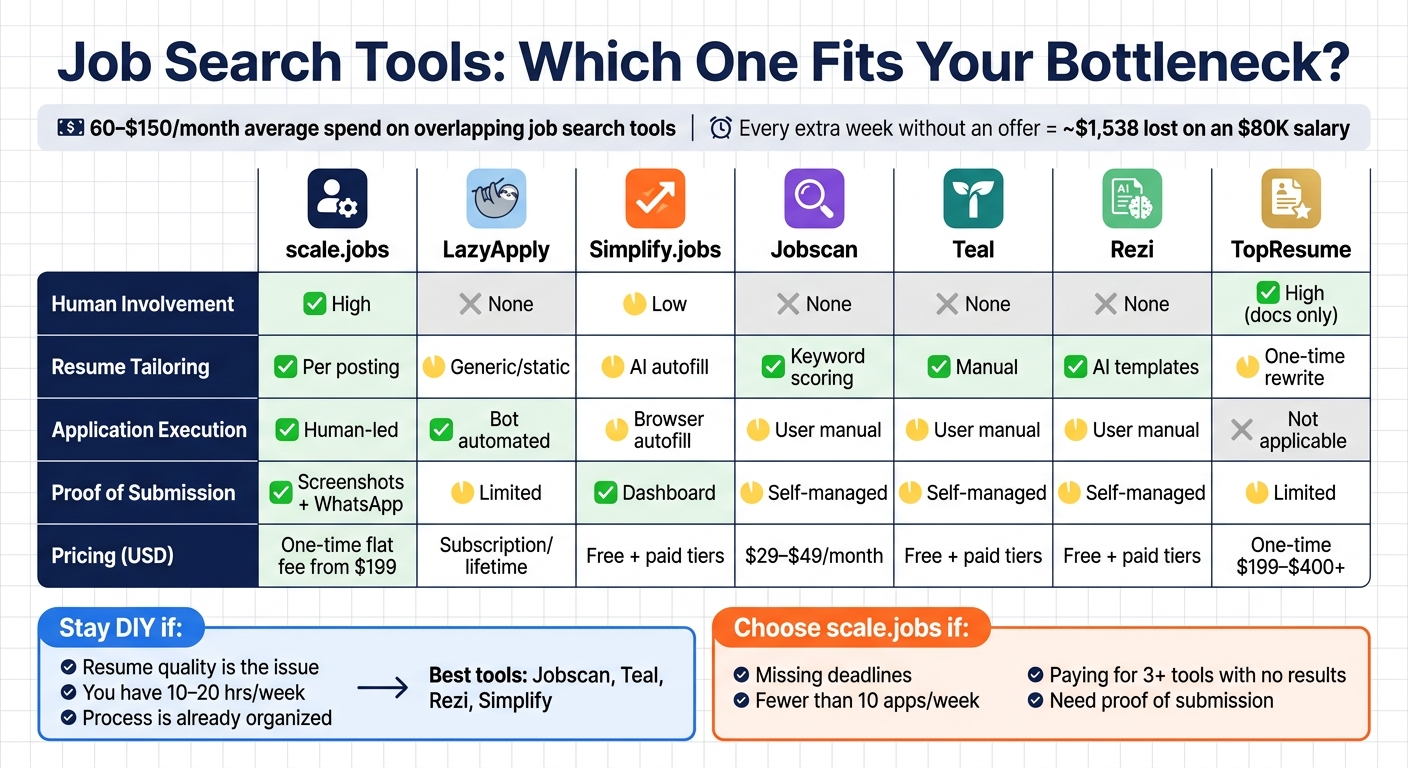
Job Search Tools Compared: Features, Pricing & Best Use Cases
If you're deciding whether to switch, compare tools on three things: application speed, how much hands-on work is still left to you, and what the tool adds to your monthly spend.
That lens matters because each tool maps back to one of the same problems job seekers run into again and again: slow submissions, weak ATS resumes, or paying for tools that still leave most of the work on your plate. If your goal is to Apply for jobs with less friction, the best option is usually the one that removes the most rework.
Comparison table: which tools reduce rework, missed deadlines, and recurring costs
| Feature | scale.jobs | LazyApply | Simplify.jobs | Jobscan | Teal | Rezi | TopResume |
|---|---|---|---|---|---|---|---|
| Human involvement | High - trained human assistants handle applications | None - bot-driven | Low - user-triggered autofill | None - DIY scoring | None - DIY tracker | None - AI builder | High - professional writers, document-only |
| Resume customization depth | Tailored per posting by humans | Generic or static | AI-assisted autofill, not tailored | Keyword suggestions; user rewrites | Manual resume builder and saved versions | AI-generated templates and bullet points | One-time professional rewrite |
| ATS handling | Human-optimized per role; ATS-friendly tailoring | Algorithm-based; limited human review | Standard parsing | Strong keyword scoring; user applies manually | Basic resume support; user-managed | ATS-friendly templates | ATS-friendly rewrite; no ongoing tailoring |
| Application execution | Human-led, manual submissions across any portal | Automated bot | Browser autofill / one-click apply | User submits manually | User submits manually | User submits manually | Not applicable - document-only service |
| Transparency & proof-of-work | Time-stamped screenshots + WhatsApp updates | Limited visibility; no per-application proof-of-work | Dashboard tracking | Self-managed | Self-managed pipeline | Self-managed | Limited after delivery |
| Pricing model (USD) | One-time flat fee; campaigns start at $199 | Subscription or lifetime deal | Free core tools; paid tiers for extras | ~$29–$49/month subscription | Free plan; paid tiers available | Free tier; paid subscription | One-time packages; typically $199–$400+ |
Is LazyApply, Simplify, Jobscan, Teal, Rezi, or TopResume worth it? Reviews and alternatives
The differences below matter most when your search is already costing you weeks of lost pay.
LazyApply works best for high-volume entry-level applications with very little setup. If your only problem is throughput, that can help.
Where scale.jobs stands out:
- Human assistants screen for fit before submitting, which cuts down on wasted applications
- ATS-friendly tailoring is done per role, not through one static resume
- Time-stamped screenshots show proof of each submission
- Dedicated WhatsApp support makes mid-search changes simple
- One flat fee avoids another monthly charge
Who should use LazyApply: Early-career candidates applying to high-volume, entry-level roles where speed matters more than customization.
Simplify.jobs is useful for early-career candidates who are tired of filling out the same form fields over and over. The free core tools are a big part of the appeal.
Where scale.jobs stands out:
- Human assistants can shift with changes in salary targets, location, or visa filters during the search
- Resume and cover letter updates are made per posting, not just pasted into autofill fields
- Proof-of-work screenshots confirm what was submitted
- WhatsApp support lets you redirect the campaign without digging through a dashboard
- One flat fee covers execution, tailoring, and support
Who should use Simplify.jobs: Budget-conscious early-career candidates who have time to apply manually and mostly want help with repetitive forms.
Jobscan is the right DIY option when the main issue is document quality. It gives strong keyword scoring and ATS match feedback for people who want to improve their own resumes.
Where scale.jobs stands out:
- Jobscan helps improve the resume; scale.jobs also handles submission and tracking
- Human assistants tailor each application to the job posting, not just to a score
- Proof-of-work screenshots show what was actually sent
- WhatsApp support helps when deadlines get tight
- One-time pricing replaces a $29–$49 per month subscription
Who should use Jobscan: Candidates who want to sharpen resume-editing skills and still have the time and bandwidth to manage submissions on their own.
Teal is one of the better options for search organization. Its tracker and reminders help if your main issue is keeping a pipeline in order. The split is simple: Teal tracks; scale.jobs executes.
Where scale.jobs stands out:
- Saved roles in a tracker still need manual submission; scale.jobs removes that step
- Human assistants apply on deadline, not only when you have spare time
- Proof-of-work screenshots replace self-managed notes
- WhatsApp support helps catch missed follow-up windows before they hurt your chances
- One flat fee can be easier than stacking free and paid tools together
Who should use Teal: Candidates whose main gap is organization, not getting applications out on time.
Rezi is a decent starting point if you need an ATS-friendly base resume fast and at a low cost. That works for a draft, but one template doesn't usually fit a broad set of roles.
Where scale.jobs stands out:
- Human assistants adjust the resume and cover letter for each posting instead of leaning on one template
- ATS-friendly tailoring happens at the role level, not only at the document level
- Proof-of-work screenshots confirm every submission
- WhatsApp support makes it easier to react when target roles change
- One-time pricing replaces another recurring subscription
Who should use Rezi: Candidates who need a clean base resume fast and plan to handle tailoring and submission themselves. If you're comparing resume tools, an ai resume builder can help with a starting draft, but it won't run the rest of the process for you.
TopResume makes sense when you need a one-time professional rewrite and your resume is the main bottleneck. It helps with documents, not execution.
Where scale.jobs stands out:
- Ongoing human-assisted submission after documents are ready
- Resume and cover letter are tailored per posting throughout the campaign
- Proof-of-work screenshots are provided for every application sent
- WhatsApp support allows real-time changes during an active search
- One flat fee covers both document tailoring and application execution
Who should use TopResume: Candidates starting from scratch or using old materials who already have a solid application workflow and only need a document upgrade. If you only need help with resume and letter creation, an ai cover letter builder or job application service may fit better than a document-only rewrite.
Who should use each competitor, and who should choose scale.jobs
Use the summaries below to match the tool to your bottleneck, not just to a feature chart.
Stay with a competitor if:
- You're early-career, dealing with standard forms, and have enough time to apply manually each day (Simplify, Teal, Rezi)
- You want to improve your own resume-editing skills and can run the process yourself (Jobscan)
- Your resume is the only issue and you already have a solid application workflow (TopResume)
- You're applying to high-volume, entry-level roles where speed matters more than role-by-role tailoring (LazyApply)
Choose scale.jobs if:
- You're post-layoff and working within a severance window, so you need steady, high-volume applications without spending hours on forms
- You're dealing with H-1B, F-1, OPT, or TN visa needs where timing and employer wording matter
- You're getting very few interviews and suspect the issue is the process, not just the resume
- You want proof of every submission, not just a dashboard you manage yourself
- You're tired of stacking subscriptions and want one flat fee that covers execution, tailoring, and support
For job seekers in that second group, a Job search virtual assistant or virtual assistant for job seekers can remove a lot more manual work than a tracker, scorer, or resume template alone. If your main problem is that you're missing deadlines on full time jobs or even local searches like Part time jobs near me, execution usually matters more than one more tool in the stack.
A lean job search workflow that cuts costs and reduces delays
After the comparison, the next move is a workflow that cuts delays and trims repeat costs.
A weekly application system that cuts delays and catches deadlines
Shorten unemployment by running your search on a weekly rhythm, not random bursts. The goal is fewer unpaid weeks, not a prettier job hunt. This setup fixes three common leak points: speed, resume quality, and tool sprawl.
On Monday, pull 10–15 roles posted in the last 24–72 hours from company career pages, LinkedIn, and one or two of the best job boards. Stay focused on your top 2–3 roles and a salary band that fits your market. Tuesday through Thursday are for tailoring and submitting. Friday is for follow-ups and a quick review of what got stuck.
For every role you choose to pursue, submit within 24 hours of finding it. Many U.S. employers review applications as they come in and stop when a shortlist takes shape. If you apply late, your application may never be seen.
A weekly rhythm only works if every application is logged the same day. A simple Google Sheet should include:
- company
- role
- source
- date applied
- status
- follow-up date
- resume version
That last column matters most. If a role has been sitting for 7–10 business days with no reply, send a short, direct follow-up email. Without a tracker, those windows vanish fast.
If you're trying to apply for jobs at scale, this kind of log is the difference between a system and a scramble.
How to spend selectively on resumes, tools, and application support
Most job seekers spend too much because they buy tools in the wrong order. The better sequence looks like this:
- Use free ATS and tracking tools first.
- If match rates stay low, pay for one resume rewrite.
- Add human-assisted application help only when volume or deadlines make manual applying too slow.
Add paid help only after free tools show you the bottleneck. Don’t stack subscriptions. One tool per function is enough.
For example, if your resume isn’t getting traction, start with an ai resume builder or an ai cover letter builder before paying for extra software you may not need. If writing isn’t the issue and the real problem is volume, a job application service may make more sense than another monthly dashboard.
If your current setup still has you paying for overlap or missing deadlines, the tool is the problem.
Switch to scale.jobs if your current tool is still creating avoidable money pressure
If you’re already using a tool and still not getting results, the problem usually falls into one of five buckets:
- High volume, low replies: static automation may be slowing you down.
- Missed deadlines or lost records: use proof-of-work screenshots and WhatsApp updates.
- Bot risk or audit needs: switch to human-led submissions.
- Stacked monthly fees: replace multiple subscriptions with one flat-fee bundle.
- Severance, benefits, or visa deadlines: use a faster, accountable process during these time-sensitive periods.
This is where a job search virtual assistant or a Virtual Assistant for Job Applications can help. Instead of juggling tools, tabs, and deadlines on your own, you shift the manual work into a process that’s easier to track.
If you're comparing options, it helps to think in plain terms: Is your current tool helping you move faster, or just giving you more admin work? That’s the heart of X vs Scale.jobs and Is X Worth It? comparisons. If a tool adds cost but still leaves you missing follow-ups, redoing resumes, or losing track of submissions, it’s probably not worth keeping.
Decision summary: when to stay DIY and when to switch
The wrong setup gets expensive fast when applications sit untouched and unpaid weeks start piling up. After looking at the options, the key issue is simple: is your problem resume and cover letter editing, or is it getting applications out the door on time?
Choose a DIY tool stack if your main gap is resume and cover letter editing, not application execution
A DIY setup makes sense if you have 10–20 steady hours each week, already manage your applications in a spreadsheet, and almost never miss deadlines. In that case, tools like Jobscan, Teal, Rezi, or Simplify may be enough.
These tools help most when the weak spot is a generic resume or poor ATS alignment. They do not fix follow-through on their own. At about $9–$50/month, depending on the tool, a lean DIY stack can keep costs down if you stay organized and stick to your routine.
This path works best when you have:
- A stable weekly schedule
- A clean tracker
- Enough time to keep your pipeline moving
If that sounds like you, a few focused tools such as an ai resume builder or ai cover letter builder may be all you need to strengthen your materials before you Apply for jobs.
Choose scale.jobs if your main gap is fast submissions, consistent follow-up, and human review
If you're sending fewer than 10 applications per week, missing priority windows, or paying for three or more tools without getting more interviews, the bigger problem is probably execution.
That usually shows up in ways that are hard to ignore: a layoff, savings getting tighter, or strong roles slipping by because you didn't apply in time. At that point, DIY may be stretching out the search instead of helping you move faster. That's where scale.jobs starts to make more sense.
If you're there now, it's worth looking at resume writing and job search services to see what a managed process looks like before you commit. You can test the workflow before paying.
Use the summary below to match the tool to the bottleneck, not the brand.
- Stay DIY if your main issue is resume quality, you have time each week, and your process is already organized.
- Switch to scale.jobs if your main issue is missed deadlines, low application volume, or friction that keeps slowing your search.
If you're weighing a full support setup, it can also help to compare a job application service, a job search coach, or a virtual assistant for job seekers based on where your process breaks down most.
FAQs
How many jobs should I apply to each week?
Quality and targeting beat volume. Sending hundreds of generic resumes might feel productive, but it often leads nowhere. A better move is to focus on 10 to 20 well-matched applications each week. Research shows that this range tends to produce better callback rates because each application gets the attention it needs.
That approach also gives you room to do the other work that lands offers: networking, follow-ups, and interview prep. If you want extra help without turning your search into a copy-paste grind, human-assisted services like scale.jobs can help you scale while keeping each application tailored. That can cut down on ATS rejections and make the process far less draining.
If you're trying to Apply for jobs in a more focused way, this is usually the sweet spot: fewer applications, better fit, stronger execution. And if you need hands-on help, a job application service, job search virtual assistant, or Virtual Assistant for Job Applications can take repetitive work off your plate without losing the human touch.
When should I pay for job search help?
Consider paying for professional job search help when your DIY process starts wearing you down or keeps ending in ATS rejections. At that point, doing everything yourself can cost more than it saves.
The math is pretty simple. If manual searching is eating up 20–25 hours a week, and being out of work may cost you more than $300 per day in lost salary, paying for support can be a smart move. A good job application service or job search virtual assistant can take a big chunk of that admin work off your plate so you can focus on interviews, networking, and better-fit roles.
Pay for help if you’re:
- Struggling to balance application volume with role-specific personalization
- Dealing with visa sponsorship, career pivots, or executive-level searches where the process gets more complex
- Spending 10–20 hours a week on form-filling, resume edits, and repeat application tasks
This is also where tools like an ai resume builder or support from a virtual assistant for job seekers can help cut down the busywork without slowing your search.
What should I track for each application?
Track every application in one place with clear, usable details. That keeps you from missing follow-ups, repeating the same work, or losing track of where things stand.
At minimum, your system should include:
- Submission confirmation with a timestamp or screenshot so you can prove the application went through
- Application status and follow-up reminders so you know when to check in
- Customization details for each resume or cover letter version, especially if you use an ai resume builder or ai cover letter builder
- An audit trail to avoid duplicate applications and stay organized, whether you're managing your own search or using a job application service
This can be as simple as a spreadsheet or as structured as a dashboard inside a job search platform. The point is simple: every application should leave a paper trail you can scan in seconds.
If you're trying to Apply for jobs at scale, this step is a must. Without it, it's easy to send the wrong resume, miss a deadline, or apply twice to the same role.