
Why Software Engineers Struggle With ATS: How to Fix The Resume

Sarah Mitchell
March 3, 2026

Software engineers often face challenges with Applicant Tracking Systems (ATS), which filter resumes before they reach recruiters. Despite strong technical skills, resumes can get rejected due to formatting issues, keyword mismatches, or excessive jargon. ATS systems strip resumes to plain text, ignoring visuals and complex layouts, making it crucial to use simple formatting and job-specific keywords. For example, using "Kubernetes" instead of "K8s" or aligning terms like "React" directly from job descriptions can improve ATS compatibility. To avoid common pitfalls, engineers should prioritize clear formatting, match job-specific keywords, and ensure measurable results in their work history.
Key Takeaways:
- Formatting matters: Stick to single-column layouts, avoid tables or graphics, and use standard fonts like Arial or Calibri.
- Keyword alignment: Tailor your resume to match job descriptions exactly, including both full terms and abbreviations (e.g., "Amazon Web Services (AWS)").
- Test compatibility: Use the plain text test or ATS score checker to ensure the resume parses correctly.
If managing these details feels overwhelming, services like Scale.jobs offer tailored solutions, optimizing resumes for ATS and even managing job applications. Whether you're targeting full-time jobs or part-time jobs near me, an ATS-friendly resume is essential for success.
Also Read: 10 Reasons ATS Rejects Your Resume Before a Human Sees It
Optimize your resume: ATS keywords, PDF format & avoiding summary mistakes
sbb-itb-564272e
How ATS Parses Software Engineering Resumes
ATS systems do not understand resumes the way humans do. Most ATS software converts resumes into structured database fields such as:
- Name
- Skills
- Work experience
- Job titles
- Education
- Certifications
For software engineers, parsing problems often happen because of:
- GitHub links are placed incorrectly
- technical stacks written in tables
- icons instead of text
- project-heavy resume layouts
- overloaded skills sections
For example, if your skills are written like this: Python | React | Node.js | AWS
Inside a table or graphic layout, some ATS systems may fail to extract those skills properly. That is why many resumes with strong technical experience still receive a low ATS score.
Why Software Engineers Fail ATS Screening
Understanding why software engineers often fail ATS (Applicant Tracking System) screenings boils down to three main issues: how technical details are presented, the document's formatting, and whether the language aligns with the employer's specific requirements. These challenges are avoidable once you know what to address.
Too Much Technical Jargon and Abbreviations
While ATS software can detect standard terms, it often misses proprietary names or uncommon acronyms. For instance, using "K8s" instead of "Kubernetes" or skipping context for internal tools can hurt your visibility. ATS systems rely on exact keyword matches or close variations, so relying solely on abbreviations limits your chances of being found.
To improve, use dual terminology. For example, write "Amazon Web Services (AWS)" the first time, then alternate between the full term and abbreviation. This approach ensures the ATS captures the keyword, no matter how recruiters set up their searches. For niche or internal tools, include a short description, such as "proprietary deployment tool", to provide context while keeping things clear.
Formatting That ATS Can't Read
ATS systems process resumes linearly, from top to bottom. Unfortunately, complex layouts - like multi-column designs, tables, or text boxes - can scramble or omit critical information. Even placing contact details in headers or footers can lead to them being skipped entirely, leaving recruiters without your phone number or email address.
Using nonstandard headers or adding visuals like graphics, skill bars, and star ratings can also disrupt how ATS software categorizes and reads your resume. Even small details, such as using em dashes ( - ) instead of standard hyphens (-) in dates, can confuse the system when parsing your work history.
"Design doesn't beat compatibility." - Kevin Matteson, HR Tech Analyst
A good way to test your resume's ATS compatibility is the plain text test: paste your resume into a plain text editor like Notepad. If the content appears disorganized, missing, or jumbled, the ATS will likely encounter the same issues. Stick to simple fonts like Arial, Calibri, or Times New Roman, use clear headers like "Work Experience" and "Education", and keep your text left-aligned. If formatting feels like a challenge, consider professional resume services for software engineers to ensure your resume meets ATS standards, so you can focus on showcasing the importance of technical skills in your resume.
Missing Keywords From Job Descriptions
ATS systems rely heavily on keywords from job descriptions to rank resumes. For example, if a job posting specifies "React" but your resume only mentions "front-end development", the system may rank your application lower - even if you have extensive React experience. Similarly, if a job description lists "CI/CD pipelines" and your resume says "automated deployment processes", the ATS might not make the connection.
To avoid this, match the job description's language exactly. This doesn't mean stuffing your resume with keywords - it’s about using the same terminology the employer is searching for. By aligning your language with the job posting, you ensure the ATS recognizes your qualifications and ranks your application higher.
How to Fix Your Resume for ATS
To make your resume ATS-friendly, you need to adjust its format and content to ensure it can be parsed correctly by applicant tracking systems while still appealing to human recruiters. These four steps address common issues that software engineers and other professionals face when dealing with ATS.
Use Simple Formatting ATS Can Parse
Start by keeping your resume layout straightforward. Use a single-column format with standard fonts like Arial, Calibri, or Times New Roman. Make sure your contact details are part of the main body text and avoid placing them in headers or footers, as many ATS systems fail to read information in those areas. Stick to traditional section headers like "Work Experience", "Education," and "Technical Skills" to help the system categorize your information correctly.
Steer clear of tables, text boxes, and graphics, as these elements can confuse ATS software and result in missing or misinterpreted data. Even visual elements like skill bars or icons can cause issues. Instead, use bullet points and clearly defined date ranges (e.g., "January 2020 - December 2022") to make your resume easy to process.
Match Keywords to Each Job Posting
Tailor your resume to each job by incorporating keywords directly from the job description. For example, if the posting specifies "CI/CD pipelines", use that exact term instead of a more general phrase like "automated deployment processes." When mentioning acronyms, spell them out the first time they appear (e.g., Amazon Web Services [AWS]) to ensure the ATS picks up all relevant terms.
Focus on the "Requirements" or "Qualifications" sections of the job posting to identify the skills, tools, and technologies the employer is looking for. By customizing your resume for each application, you increase the chances of ranking higher in ATS searches.
Choose ATS-Compatible Resume Templates
Select a resume format that works well with ATS systems, such as a reverse-chronological layout where your most recent job is listed first. This structure is widely understood by ATS software. Tools like ResumeGemini offer ATS-friendly templates, including options like the "Modern Minimal" design, which balances simplicity and professionalism.
If you’re unsure about formatting, you can also consider professional services like Scale.jobs, which specialize in creating resumes that meet ATS standards. Avoid using overly complex templates with intricate designs, as these can lead to parsing errors. In some older ATS systems, up to 50% of your resume data could be lost due to such formatting issues.
Add Measurable Results to Your Work History
Beyond formatting and keywords, make your work experience stand out by including quantifiable achievements. Replace generic statements with specific metrics. For instance, instead of saying "Improved deployment process," write "Reduced deployment time by 35% by implementing automated CI/CD pipelines using Jenkins and Docker." Numbers and measurable outcomes not only boost your credibility but also align with ATS keyword requirements.
Whenever possible, highlight the scope of your work, team size, and measurable improvements. For example, "Led a team of 5 engineers to migrate 200+ microservices to Kubernetes, reducing infrastructure costs by $120,000 annually" combines technical details with tangible results, making your contributions more impactful.
Also Read: How to Optimize Your Resume for ATS in 2026 (Updated Guide)
Common ATS Resume Mistakes Software Engineers Make
Using GitHub as the Main Resume
Many engineers rely too heavily on GitHub profiles instead of clearly explaining their impact in the resume itself.
ATS systems cannot analyze GitHub repositories deeply.
Listing Too Many Skills
Adding 40–50 technologies in a giant skills section can dilute keyword relevance.
Instead, prioritize:
- core stack
- tools mentioned in the job description
- recently used technologies
Using Fancy Resume Templates
Creative templates from Canva often break ATS parsing.
Even if the resume looks visually impressive, ATS systems may:
- skip sections
- merge job experiences
- misread dates
Not Customizing Resume for Every Job
One generic resume rarely performs well in ATS systems.
Different companies search for different keyword combinations.
Example:
- one company may search “React.js”
- another may search “Frontend Engineer”
- another may search “JavaScript UI Development”
scale.jobs vs Other ATS Resume Tools
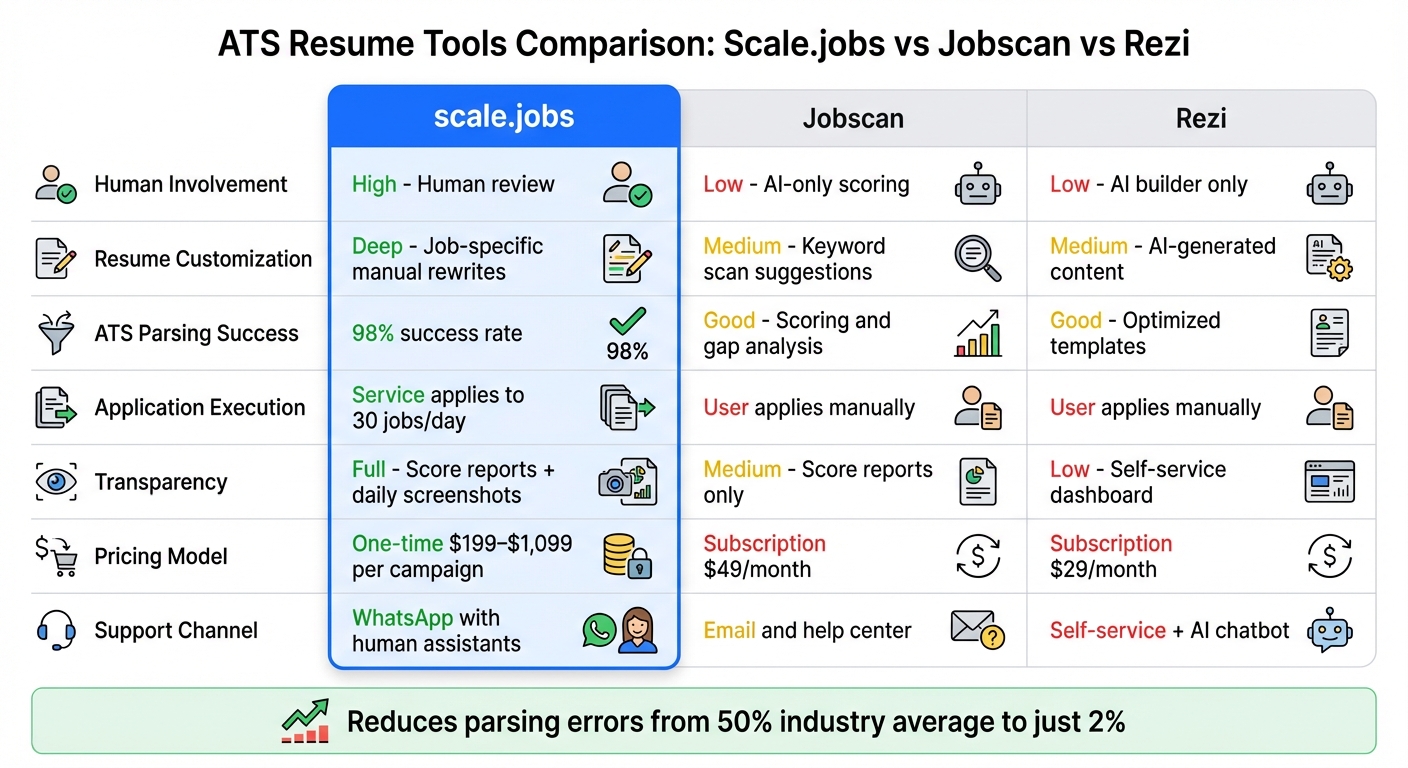
ATS Resume Tools Comparison: Scale.jobs vs Jobscan vs Rezi
When it comes to dealing with ATS misreads and formatting challenges, selecting the right resume tool is essential. Most ATS tools fall into two main categories: automated keyword scanners like Jobscan, which analyze your resume against job postings, and AI-powered builders like Rezi, which use templates to generate content. These tools are helpful for identifying missing keywords and fixing formatting issues, but they leave you with the responsibility of customizing and submitting applications. scale.jobs takes a different approach by combining human expertise, ATS-optimized templates, and full application management.
Why scale.jobs Stands Out
The key difference with scale.jobs is human involvement at every step. Once you upload your resume and the job postings you're targeting, their experts tailor your work experience to fit each role. They don’t just suggest keywords for you to add - they ensure your resume is fully optimized. For example, if you’re a software engineer, they’ll determine whether technical terms like "CI/CD pipelines" or "continuous integration and deployment" are better for a specific ATS and adjust your resume accordingly. Within 24 hours, you’ll receive your updated resume via WhatsApp, complete with ATS score reports showing over 95% parsing success across platforms like Workday and Taleo.
But scale.jobs doesn’t stop at resume optimization. Their assistants manually fill out application forms to avoid triggering bot-detection systems, submitting up to 30 applications per day. You’ll receive time-stamped proof-of-work screenshots, ensuring full transparency. Updates are sent directly to your WhatsApp, offering real-time progress tracking. Unlike competitors that charge recurring fees, scale.jobs uses a one-time payment model, starting at $199 for 250 applications. This approach saves users over 20 hours per week, freeing up time for networking and interview preparation, especially if you’re already working with professional resume services.
Next, let’s compare these features with what tools like Jobscan and Rezi bring to the table.
What Jobscan and Rezi Bring to the Table
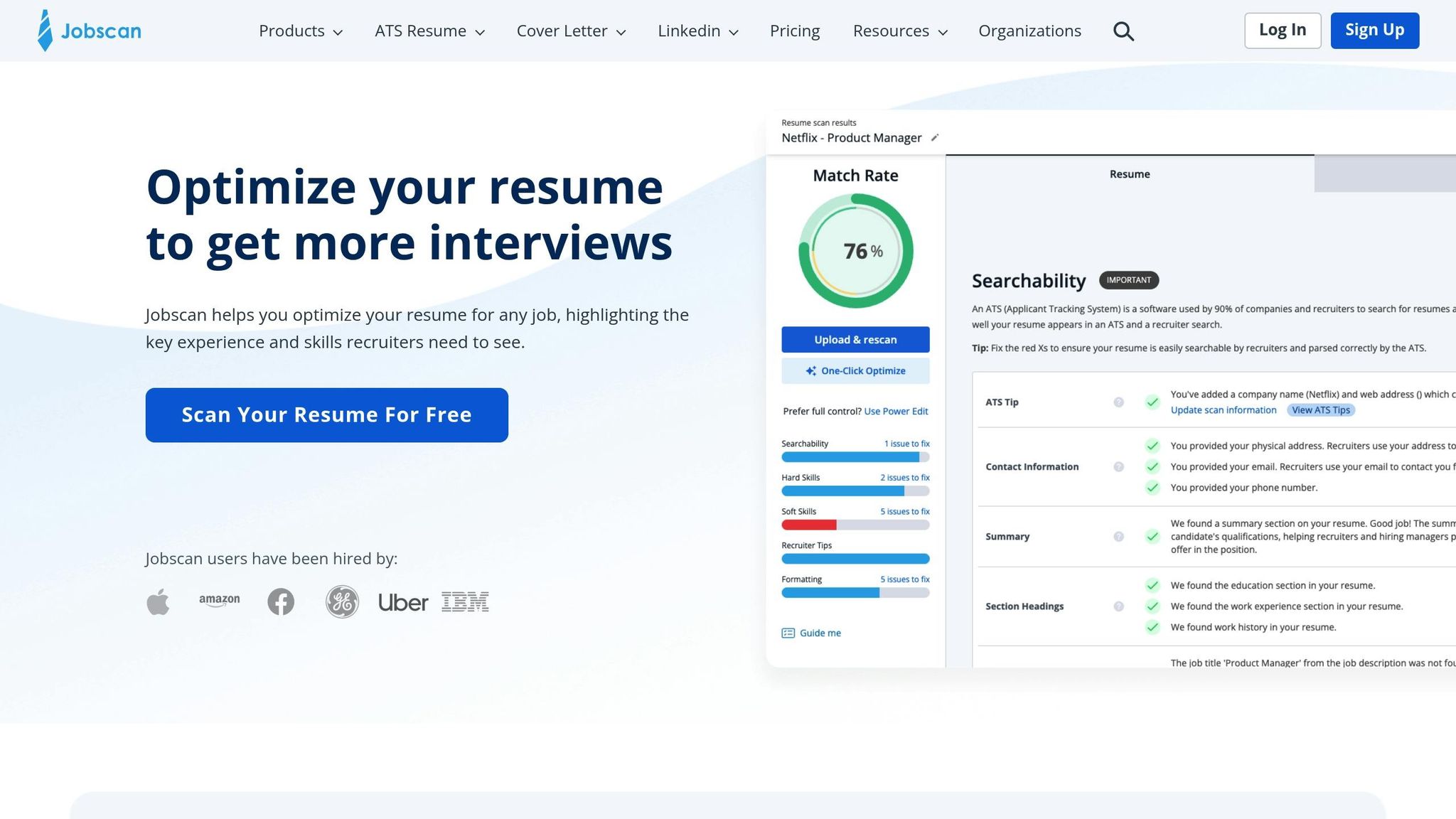
Jobscan is well-known for its keyword matching capabilities. It scans your resume against job descriptions and provides match scores, recommending an 80% or higher match for optimal ATS results. Its Chrome extension integrates with LinkedIn, allowing you to optimize your profile alongside your resume. Many users report an average score improvement of 40% after implementing its suggestions.
Rezi focuses on ATS-optimized templates and offers one-click keyword extraction from job postings, along with real-time content scoring. It’s particularly useful for software engineers who need help turning technical achievements into measurable results, such as "Optimized code reducing load time by 30%." Rezi supports engineer-specific sections for skills like Docker and React and ensures high parsing success for both PDF and .docx formats. These tools are ideal for users who prefer a DIY approach to resume optimization.
Feature Comparison: scale.jobs vs Competitors
Here’s a breakdown of how scale.jobs compares to Jobscan and Rezi:
| Feature | scale.jobs | Jobscan | Rezi |
|---|---|---|---|
| Human Involvement | High: Human review | Low: AI-only scoring | Low: AI builder only |
| Resume Customization | Deep: Job-specific manual rewrites | Medium: Keyword scan suggestions | Medium: AI-generated content |
| ATS Handling | Tested templates + parse proofs (98% success) | Good: Scoring and gap analysis | Good: Optimized templates |
| Application Execution | Service applies to 30 jobs/day | User applies manually | User applies manually |
| Transparency | Full: Score reports + daily screenshots | Medium: Score reports only | Low: Self-service dashboard |
| Pricing Model | One-time: $199–$1,099 per campaign | Subscription: $49/month | Subscription: $29/month |
| Support Channel | WhatsApp with human assistants | Email and help center | Self-service + AI chatbot |
This table highlights the differences between scale.jobs and its competitors. While Jobscan and Rezi excel as self-service tools for keyword optimization and template building, scale.jobs offers end-to-end execution. If you’re looking for a service that handles the tedious work of tailoring resumes and submitting applications - especially for roles requiring complex ATS forms - scale.jobs minimizes parsing errors, reducing the industry average of 50% to just 2%, based on their internal testing.
Also Read: Check Your ATS Score Before You Do
Next Steps: Choosing the Right ATS Solution
Now that we've gone over the common ATS resume mistakes and their solutions, it’s time to figure out which approach works best for your needs and schedule. While tools like Jobscan focus on keyword suggestions, scale.jobs goes a step further by combining human expertise with complete application management to tackle the parsing and customization issues that often lead to ATS rejections.
When to Use scale.jobs
If you’re applying for a high volume of positions - think 30 or more per day - and don’t have 20+ hours a week to dedicate to tailoring applications, scale.jobs could be your ideal solution. This service is particularly valuable for engineers facing tight deadlines, whether due to layoffs, visa constraints (H-1B, OPT, TN), or balancing a full-time job that leaves little room for manual application work.
Here’s why scale.jobs stands out compared to tools like Jobscan or Rezi:
- Human customization: Each resume is tailored to match job descriptions, rather than just providing keyword suggestions for you to implement.
- Transparent pricing: A one-time payment model ($199–$1,099) avoids the hassle of recurring subscriptions.
- Proof of work: You’ll receive time-stamped screenshots via WhatsApp, giving you full visibility into the process.
- Improved parsing accuracy: By handling form submissions directly, scale.jobs reduces parsing errors from 50% to just 2%.
- Quick turnaround: ATS-optimized resumes are delivered within 24 hours, with a 98% success rate across platforms like Workday and Taleo.
If you’ve been using tools like Jobscan or Rezi and still aren’t landing interviews despite high match scores, the issue might be parsing errors that automated tools fail to catch. Problems such as scrambled contact details, incorrect date formats, or hidden formatting glitches are common culprits. With scale.jobs, human reviewers identify and fix these issues before submission, and any unused credits are refunded.
That said, DIY tools like Jobscan or Rezi are a good fit if you’re applying to fewer than 10 jobs per week, have a tight budget, and enjoy managing every detail yourself. These platforms work well for engineers who have the time and patience to optimize each application manually. If you’re looking for broader support, you might also want to check out professional resume services for expert advice on presenting your technical skills effectively.
Quick Tips for Passing ATS Screening
Before you hit "submit", take a moment to fine-tune your resume with these tips to improve ATS compatibility:
- Use .docx or LaTeX-compiled PDFs for the best parsing results. Avoid flashy PDFs from Canva or scanned documents.
- Stick to single-column layouts with standard fonts like Arial or Calibri, and use conventional section headers such as "Work Experience" instead of creative titles.
- Match job posting keywords throughout your resume. Include both abbreviations and full terms (e.g., "Continuous Integration/Continuous Deployment (CI/CD)") to ensure the parser picks up both.
- Write measurable bullet points. For instance, "Optimized Python backend using AWS Lambda, reducing API response time by 40%" is far more effective than "Responsible for backend optimization."
- Keep your technical skills list concise - no more than 12 items - to avoid overwhelming the parser. Limit each job entry to 4–6 bullet points.
- Use free ATS scanners to test your resume before submitting it to employers, ensuring it parses correctly.
FAQs
Should I submit my resume as PDF or .docx?
Submitting your resume as a .docx file is a smart choice since it's widely compatible with Applicant Tracking Systems (ATS). Stick to simple formatting and use standard section headings, as this helps the ATS accurately read and process your information, boosting your chances of making it through initial screenings.
How can I tailor keywords without keyword stuffing?
When tailoring your resume, weave relevant keywords seamlessly into your content by aligning them with the job description. Highlight your skills, qualifications, and measurable achievements, incorporating keywords naturally within your listed responsibilities and accomplishments. Steer clear of repetitive keyword lists that can make your resume feel forced or cluttered. To strike the right balance between readability and ATS compatibility, consider using tools like ATS checkers to review keyword placement. This method ensures your resume remains professional while improving its chances of passing ATS scans effectively.
What’s the fastest way to test if my resume parses correctly?
The fastest way to ensure your resume is ATS-friendly is by using an ATS testing tool. These tools review your resume for critical factors like keywords, formatting problems, and overall structure, giving you a compatibility score to indicate how well it aligns with ATS requirements. They also highlight errors or missing details, allowing you to address issues before submitting your application. Options like Jobscan or Rezi can help you optimize your resume to navigate ATS filters successfully.