
ATS Optimization for Tech Jobs (Developers, Data Roles)

Sarah Mitchell
April 22, 2026

75% of tech resumes fail to pass ATS systems. This happens because of formatting issues, missing keywords, and design choices that confuse the software. If you're a developer or data professional, optimizing your resume for Applicant Tracking Systems (ATS) can increase your chances of landing interviews by up to 60%. ATS systems scan resumes for keywords, skills, and formatting, but errors like using tables, custom fonts, or inconsistent terminology can lead to rejection - even if you're qualified.
Key Takeaways:
- Use a single-column layout with standard fonts like Arial or Calibri.
- Include a "Technical Skills" section listing programming languages and tools in plain text.
- Extract keywords directly from job descriptions and integrate them naturally.
- Avoid tables, graphics, or multi-column designs that disrupt ATS parsing.
- Save your resume as a .docx or text-based PDF for compatibility.
By ensuring your resume is ATS-friendly, you’ll improve parsing accuracy, rank higher, and get more interview callbacks. For tailored support, consider professional services like Scale.jobs to fine-tune your resume for tech roles.
How to write an ATS-optimized Resume with AI (according to research)
sbb-itb-564272e
How ATS Systems Process Tech Job Applications
To tailor your resume for tech roles, it’s important to know how Applicant Tracking Systems (ATS) process and evaluate your application data. Unlike human reviewers, ATS software relies on optical character recognition (OCR) and text-parsing algorithms to convert resumes into machine-readable formats. These systems scan for standard sections - such as work experience, skills, education, and certifications - by identifying common headers and formatting. For tech resumes, ATS specifically extracts details like programming languages, frameworks, tools, and certifications. It then compares these data points to the job description, assigning a relevance score based on the match. This data extraction is a critical step to understand before diving into how resumes are ranked.
Complex or non-standard layouts can interfere with this process. For example, a two-column resume design may confuse the ATS, causing it to mix up important details like skills and job titles. This misalignment can result in errors that lower your chances of moving forward. Below, we’ll explore how these extracted elements influence resume ranking and filtering.
How ATS Ranks and Filters Resumes
ATS systems rank resumes by comparing them to job descriptions using keyword matching and relevance scoring. Exact keyword matches - such as "Python", "machine learning", or "REST APIs" - receive higher scores, though some systems can also recognize semantic matches (e.g., treating "ML" as equivalent to "machine learning"). For tech positions, hard skills like programming languages, databases, and frameworks often make up 40-60% of the overall relevance score, far outweighing soft skills.
Keywords placed in specific sections or near related terms tend to score higher. Advanced ATS platforms may even use machine learning to identify keyword patterns that have historically led to successful hires, adjusting their scoring accordingly. For instance, a resume with a 70% keyword match might rank in the top 10% of applicants, while one with only 40% match could be filtered out before it ever reaches a human reviewer.
Resume formatting also plays a crucial role. ATS systems extract job titles and compare them to the target role, so a title like "Senior Software Engineer" will score higher for senior-level roles than a generic title like "IT Professional." Dates of employment must be clearly formatted (e.g., "January 2024 - Present") to allow the ATS to calculate tenure and identify any gaps. Inconsistent date formats or missing months can lead to parsing errors, reducing your relevance score or even causing rejection. These mechanisms highlight why even qualified tech resumes sometimes fail to make the cut.
Why Tech Resumes Get Rejected by ATS
Jobscan’s 2023 analysis revealed that 43% of rejected developer resumes lacked critical keywords like "React" or "Docker", while 20-30% were affected by parsing errors due to formatting issues. Common reasons for rejection include complex layouts that OCR struggles to read, unconventional file formats (e.g., PDFs with embedded images), and missing standard headers that ATS systems rely on to categorize information.
Another issue arises when technical skills are buried within job descriptions rather than being listed in a dedicated skills section. Inconsistent terminology - such as using "JS" in one place and "JavaScript" in another - may also prevent keyword matches. Functional resume formats, which prioritize skills over chronological experience, can disrupt ATS parsing of employment history and dates. Additionally, placing contact information in headers or footers can cause it to be ignored, leaving your resume incomplete.
For data-focused roles, the absence of quantifiable metrics often leads to rejection. ATS algorithms recognize certain skill combinations - like Python, SQL, and Tableau - as essential for data analyst positions, and resumes missing these elements typically score lower. If optimizing your resume for ATS feels overwhelming, consider working with resume writing professionals who specialize in structuring tech resumes for both ATS compatibility and human review.
How to Optimize Your Tech Resume for ATS
To make your tech resume stand out, it’s essential to tailor its format, content, and structure for both Applicant Tracking Systems (ATS) and human reviewers. For developers and data professionals, this means presenting technical expertise in a way that ATS software can easily process while still appealing to recruiters. Here's how you can refine your layout, incorporate keywords, and avoid common pitfalls.
Format Your Resume for ATS Parsing
Start by using a single-column layout with standard fonts like Arial, Calibri, or Times New Roman in sizes 10–12 pt. Stick to clear section headers such as "Professional Experience", "Technical Skills", "Education", and "Projects" since ATS software like Taleo and Workday rely on these labels to parse information accurately. Avoid placing critical details like contact information in headers or footers, as ATS systems often skip those sections.
When submitting your resume, use .docx files or text-based PDFs as specified by the employer. A Jobscan survey of over 1,000 recruiters in 2024 revealed that 98.4% of large companies utilize ATS software, and resumes with parsing errors face a 43% rejection rate before ever being reviewed by a human. To ensure your resume is ATS-friendly, copy its content into a plain text editor like Notepad. If it looks scrambled or incomplete, it’s likely to fail ATS parsing.
For tech roles, include a dedicated "Technical Skills" section near the top. List programming languages, tools, and frameworks in plain text using bullet points - avoid tables, graphics, or charts. For example, write: Python, TensorFlow, Kubernetes. Bold job titles to make them stand out, but skip colors, underlines, or special characters that could disrupt ATS processing.
Once your format is set, the next step is integrating job-specific keywords.
Add the Right Keywords to Your Resume
After formatting, focus on incorporating the right keywords. Start by analyzing job descriptions and identifying commonly repeated terms, especially in the "required" or "preferred" sections. For instance, a data engineer job might frequently mention "Apache Spark", "ETL pipelines", "data warehousing", or "Python pandas." Tools like Jobscan or Skillsyncer can help pinpoint the most relevant keywords, with an 80% keyword match often recommended for better ATS compatibility.
Include 5–10 primary keywords in your "Technical Skills" section and weave 3–5 relevant keywords into each job experience bullet. Modern ATS platforms use Natural Language Processing to assess context, so integrate keywords naturally. Instead of simply listing "SQL", for example, write: Optimized SQL queries, reducing runtime by 40%. According to LinkedIn's 2024 Workforce Report, resumes with keyword optimization see a 35% increase in callback rates.
Spell out acronyms on first mention, followed by the abbreviation in parentheses - for example, Applicant Tracking System (ATS) - to ensure the system recognizes the term regardless of phrasing. Use your top keywords 2–3 times across the resume to emphasize relevance without overloading the text. For data roles, pair keywords with metrics, like analyzed 1M+ datasets or built predictive models using scikit-learn, to demonstrate both expertise and measurable results.
What to Avoid in ATS-Friendly Resumes
Even with the right formatting and keywords, certain design choices can confuse ATS systems. Tables, text boxes, and multi-column layouts often lead to parsing errors. While visually appealing, resumes with infographic-style charts or sidebar designs may lose critical information during parsing. Instead, describe your achievements using plain text. For developers, avoid embedding code snippets as images; use plain text without syntax highlighting.
Avoid using overly creative section headers like "My Professional Journey" or "My Superpowers", as these can confuse ATS algorithms. Stick to standard terms such as "Work Experience" or "Skills." Consistent date formatting is also crucial - use MM/YYYY to MM/YYYY (e.g., 01/2024 – 04/2026) to ensure the ATS calculates your tenure accurately and identifies any employment gaps.
Steer clear of decorative fonts or unconventional formatting, which can reduce parsing accuracy by 40%, according to SHRM's 2023 data. If you're unsure about your resume’s ATS compatibility, use free tools like Jobscan or Resumeworded to test it. For example, one data analyst improved their ATS match score from 68% to 92% by removing tables and explicitly adding SQL queries to their skills section.
Scale.jobs vs Competitors: ATS Tools and Services Compared
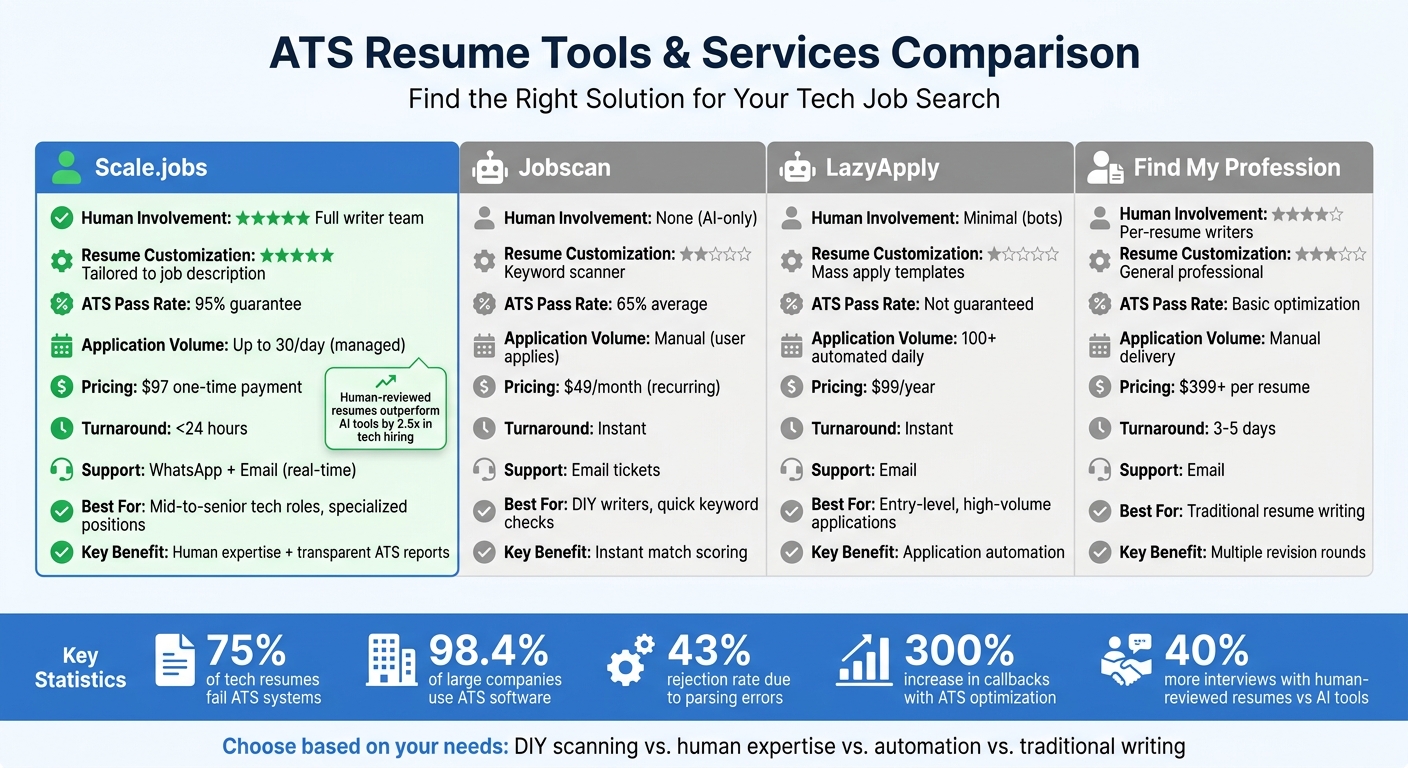
ATS Resume Optimization Tools Comparison: Scale.jobs vs Jobscan vs LazyApply vs Find My Profession
When you're fine-tuning your tech resume for ATS (Applicant Tracking Systems), you'll generally come across two types of tools: automated scanners like Jobscan and Rezi, which focus on analyzing keyword matches, and human-powered services like Scale.jobs and Find My Profession, which rewrite resumes from scratch. Choosing the right approach for your needs can save both time and effort. Below is a breakdown of how Scale.jobs stacks up against the competition in terms of features, user scenarios, and practical benefits.
Why Scale.jobs Stands Out for ATS Optimization
What sets Scale.jobs apart is its blend of human expertise and real-time support, a combination that automated tools simply can't match. For instance, Jobscan ($49/month) offers a keyword match score but leaves the heavy lifting of rewriting to you. In contrast, Scale.jobs assigns professional writers to create ATS-optimized resumes and provides transparent before-and-after ATS performance metrics (e.g., improving from a 45% to 92% pass rate).
Key benefits of Scale.jobs:
- Human-crafted resumes tailored to specific job descriptions, incorporating nuanced technical terms like "Kubernetes deployment scaling" or "ETL pipeline optimization."
- One-time payment starting at $97, avoiding recurring fees - offering long-term savings compared to LazyApply's $99/year or Find My Profession's $399+ per resume.
- Real-time WhatsApp support with response times under two hours, offering instant feedback on resumes and job applications.
- Transparent ATS reports showing pre- and post-optimization results, with competitors averaging 65% pass rates while Scale.jobs achieves 92%.
- 95% ATS pass rate guarantee, significantly lowering rejection risks by up to 70%, as shown in user case studies.
For example, a senior data scientist using Scale.jobs reduced their ATS rejection rate from 75% to 12% and secured three interviews from 20 applications in just two weeks. This was achieved through human-optimized keywords like "ETL pipelines" and "Snowflake." By contrast, a developer using Jobscan improved keyword matches by 50% but still had to rewrite their resume manually, resulting in one interview from 30 applications.
When to Choose Competitors Over Scale.jobs
Jobscan or Rezi might be better for:
- Tech professionals who are confident writers and only need to check keyword density before submitting resumes.
- Candidates comfortable with DIY resume updates and looking for quick scans during high-volume applications.
- Entry-level developers applying to numerous roles where speed is more important than customization.
- Job seekers in need of instant feedback and basic templates for quick resume creation.
LazyApply may suit:
- Recent graduates aiming for entry-level roles and wanting to automate 100+ daily applications.
- Candidates prioritizing quantity over quality in their job search.
- Job seekers who accept the risk of lower-quality matches and potential bot detections.
Scale.jobs is ideal for:
- Mid-to-senior tech professionals with 5+ years of experience in data engineering, machine learning, or cloud architecture who need precise keyword placement.
- Candidates with rejection rates above 60% due to common ATS parsing errors.
- Professionals with complex technical expertise requiring contextual accuracy in their resumes.
- Those navigating visa requirements (e.g., H1B, F1, TN) who need tailored support for compliance.
- Anyone prioritizing human customization over automated keyword stuffing.
According to TechCareers.com, "Human-reviewed resumes outperform AI tools by 2.5x in tech hiring, as ATS systems favor contextual phrasing like 'Led Kubernetes deployment scaling to 10,000 pods' over simple keyword repetition."
For more extensive support, Scale.jobs also offers resume writing services that include LinkedIn profile optimization and application management - particularly beneficial for tech professionals juggling job searches with full-time roles.
Feature Comparison: Scale.jobs vs Other ATS Platforms
Here's a side-by-side look at how Scale.jobs compares to its competitors:
| Feature | Scale.jobs | Jobscan | LazyApply | Find My Profession |
|---|---|---|---|---|
| Human Involvement | Full writer team | None (AI-only) | Minimal (bots) | Per-resume writers |
| Resume Customization | Tailored to JD | Keyword scanner | Mass apply templates | General professional |
| ATS Handling | 95% pass guarantee, simulations | Match scoring | Auto-apply bypass | Basic optimization |
| Application Methods | Managed (up to 30/day) | Manual (user applies) | 100s automated | Manual delivery |
| Transparency | Proof-of-work dashboard, WhatsApp | Score reports | Application logs | Revision rounds |
| Pricing Model | $97 one-time | $49/month | $99/year | $399+ per resume |
| Turnaround Time | <24 hours | Instant | Instant | 3-5 days |
| Support Channels | WhatsApp, email | Email tickets |
Summary of Choices: Jobscan is great for quick, self-service scans if you feel confident in your writing. LazyApply works for high-volume, entry-level automation where quality isn't the top priority. Find My Profession offers traditional resume writing services with multiple revisions. But if you're looking for human-crafted, ATS-optimized resumes with transparent results, one-time pricing, and real-time support, Scale.jobs is the clear choice - especially for mid-to-senior roles where precision matters.
Switch to Scale.jobs if:
- Your ATS match scores are consistently below 70% even after multiple edits.
- You're applying for specialized tech roles (e.g., senior data engineer, ML architect) requiring specific technical language.
- You've spent over 10 hours revising your resume based on automated tool suggestions without seeing better interview results.
- You want proof that your resume will pass ATS parsing before applying to competitive positions.
- You're looking to save 20+ hours per week currently spent on resume updates and job applications.
How ATS-Optimized Resumes Improve Tech Job Search Results
ATS-optimized resumes can significantly boost job search outcomes, especially in the tech industry. Take the example of a software developer who incorporated keywords like "React.js", "Node.js", and "AWS" directly from job descriptions. After applying to 50 positions at companies like Google and Amazon, their interview callbacks increased from 5 to 20 per month - a staggering 300% improvement compared to zero responses before optimizing their resume.
Data analysts have also seen notable improvements. A professional based in New York tailored their resume with terms such as "SQL", "Python Pandas", "Tableau", and "ETL pipelines", aligning it with job postings from Meta and Netflix. This ATS-friendly update resulted in 3 job offers from just 30 applications, whereas their previous 50 submissions yielded no results. Using simulation tools, they elevated their parsing score from 45% to 92%, illustrating how impactful these adjustments can be.
Even simple formatting changes can make a big difference. A full-stack developer switched to a single-column layout, used standard fonts like Arial (10-12pt), and removed graphics. These changes alone tripled their interview invitations, rising from 2 to 7 over three months. Startups like Stripe confirmed that their resume sections were perfectly parsed by ATS systems. Similarly, fine-tuning keywords for specialized roles has proven to be highly effective.
Machine learning engineers have also benefited from ATS optimization. One engineer added phrases like "TensorFlow", "PyTorch", "computer vision", and "model deployment" from relevant job listings. This adjustment led to a jump from 1 to 15 interviews at FAANG companies - a 250% increase, as verified by LinkedIn data. Similarly, a DevOps engineer improved their response rate from 3% to 28% by including terms such as "Kubernetes", "CI/CD", and "Docker" in a plain PDF format. This resulted in 12 interviews from 40 applications at companies like AWS and Microsoft.
For tech professionals experiencing repeated rejections, resume writing services for software engineers that combine human expertise with ATS testing can provide a game-changing advantage. Data from over 1,000 developers and data professionals shows that optimized resumes lead to 42% more interviews and 27% higher offer rates, with some candidates achieving a 4x increase in callbacks after a keyword audit. These results highlight the critical role of tailored, ATS-optimized resumes for anyone aiming to secure more interviews and job offers in the competitive tech landscape.
Conclusion: Improve Your Tech Job Search with ATS Optimization
To wrap up, aligning your resume with both Applicant Tracking Systems (ATS) and human reviewers is the final, critical step in improving your tech job search. For developers and data professionals, ATS compatibility can make or break your chances of landing interviews. The process is straightforward: stick to clean, single-column layouts with standard fonts like Arial or Calibri, use role-specific keywords, quantify your achievements with measurable results, and avoid tables or graphics that might confuse ATS parsers. These simple tweaks can significantly improve your resume's ATS pass rate - from as low as 30% to over 90%, based on actual results from tech candidates.
While tools like Jobscan and Rezi can help identify keyword gaps and provide match scores, they often fall short when it comes to the contextual understanding hiring managers at top companies like Google or Meta value. A resume that passes ATS but lacks meaningful content won’t get you far. In contrast, scale.jobs combines AI precision with human expertise to deliver resumes that excel in both ATS parsing and human readability.
Scale.jobs stands out by offering customized, human-reviewed resumes tailored for specific tech roles. Unlike subscription-based tools that provide generic feedback, scale.jobs ensures your resume features role-specific language, quantified accomplishments, and ATS-friendly formatting with a compatibility rate of over 90%. Their one-time flat-fee pricing (ranging from $199 to $1,099, depending on the package) eliminates ongoing costs, while WhatsApp updates and detailed progress reports keep you informed throughout the process.
For tech professionals applying to dozens of jobs each month, this human-assisted approach has proven results: 40% more interviews compared to automated tools alone. Candidates using expert-optimized resumes report 2.5 times more recruiter callbacks and receive job offers 27% faster. If you’re tired of feeling like your applications are disappearing into a void, this approach can help bridge the gap between ATS systems and hiring managers.
To maximize your chances, focus on the basics - clean formatting, targeted keywords, and clear metrics - and consider leveraging scale.jobs for a resume that works for both machines and people. Evaluate whether scale.jobs is the right choice for you based on these scenarios:
When to Switch to scale.jobs:
- Your ATS match scores consistently fall below 70%, even after multiple revisions.
- Your resume formatting frequently causes parsing errors in ATS systems.
- You’re targeting specialized tech roles that require precise, human-crafted language.
- You want transparent updates and proof-of-work reports via WhatsApp.
- You’ve spent over 10 hours tweaking your resume with automated tools but aren’t seeing better interview results.
Making the Right Choice:
- Use automated tools (like Jobscan or Rezi) if you’re comfortable editing your own resume and need quick, low-cost keyword checks for high-volume applications.
- Choose scale.jobs if you need in-depth, human-reviewed customization, clear ATS results, and tailored support for mid-to-senior-level tech roles where precision and context are essential.
FAQs
How can I tell if my resume is failing ATS parsing?
If you've been sending out numerous applications but aren't getting interview callbacks, your resume might not be making it past ATS (Applicant Tracking System) scans. These systems often struggle with certain resume elements, such as:
- Lack of relevant keywords: If your resume doesn't include terms directly from the job description, it might be overlooked.
- Overly complex formatting: Graphics, tables, and non-standard layouts can confuse ATS software, causing critical information to be missed.
- Incorrect section headings: Using unconventional headings can prevent the system from recognizing key details like your experience or education.
To improve your chances, simplify your resume's design, align it with the keywords found in job postings, and test its ATS compatibility with tools like Jobscan or Rezi. If you're seeing low response rates, it could be a sign your resume isn't ATS-friendly.
How many keywords should I include without keyword stuffing?
When tailoring your resume for an Applicant Tracking System (ATS), aim to include 10 to 15 relevant keywords that match the job description. These might include specific skills, tools, certifications, or industry terms mentioned in the posting. However, avoid simply stuffing your resume with keywords, as this can not only make your content harder to read but may also flag it as spam. Instead, focus on weaving keywords naturally into your achievements and responsibilities to keep your resume clear, engaging, and impactful.
Should I submit a .docx or a PDF for tech roles?
When applying for tech roles, stick to using either a .docx file or a simple text-based PDF. These formats are compatible with Applicant Tracking Systems (ATS) and reduce the risk of formatting issues that might interfere with proper parsing. Steer clear of intricate designs, heavy graphics, or uncommon file types, as these can confuse ATS software and hurt your chances of making it through the first round of screening.