
11 ATS Score Checker Errors Hidden In Your Resume

Sarah Mitchell
April 1, 2026

When your resume doesn't align with Applicant Tracking System (ATS) standards, it often gets rejected before reaching a recruiter. Common errors like missing keywords, inconsistent formatting, or using graphics can confuse ATS software, reducing your chances of landing an interview. Tools like Jobscan.co and scale.jobs can help address these issues: Jobscan identifies gaps and provides DIY fixes, while scale.jobs offers human-assisted resume optimization and application submissions for a flat fee.
Key takeaways:
- Missing Keywords: ATS prioritizes exact matches from job descriptions. Tools like Jobscan highlight gaps, while scale.jobs integrates them for you.
- Inconsistent Formatting: Issues like mixed date formats or text in headers can confuse ATS. Standardize your resume with tools or professional services.
- Wrong File Type: DOCX is safer for ATS than some PDFs. Always test your file for compatibility.
- Graphics and Fonts: Avoid complex resume templates with tables, skill bars, and decorative fonts. Stick to clean, ATS-friendly layouts.
- Vague Job Descriptions: Use quantifiable achievements and action verbs to improve ATS parsing.
For high-volume applications or complex resumes, scale.jobs simplifies the process by customizing resumes and managing submissions, while Jobscan.co suits those who prefer DIY fixes.
Quick Comparison:
| Error | Solution |
|---|---|
| Missing Keywords | Review job descriptions; use tools like Jobscan or scale.jobs for fixes. |
| Inconsistent Formatting | Standardize dates (MM/YYYY), avoid headers/footers for text. |
| Graphics and Fonts | Replace tables, graphics, and decorative fonts with plain text layouts. |
| Wrong File Type | Save as DOCX; test PDFs for ATS compatibility. |
| Vague Job Descriptions | Focus on measurable results and action-oriented language. |
Both automated tools and human-assisted services can boost your ATS compatibility. Choose based on your needs: quick DIY fixes or comprehensive professional help.
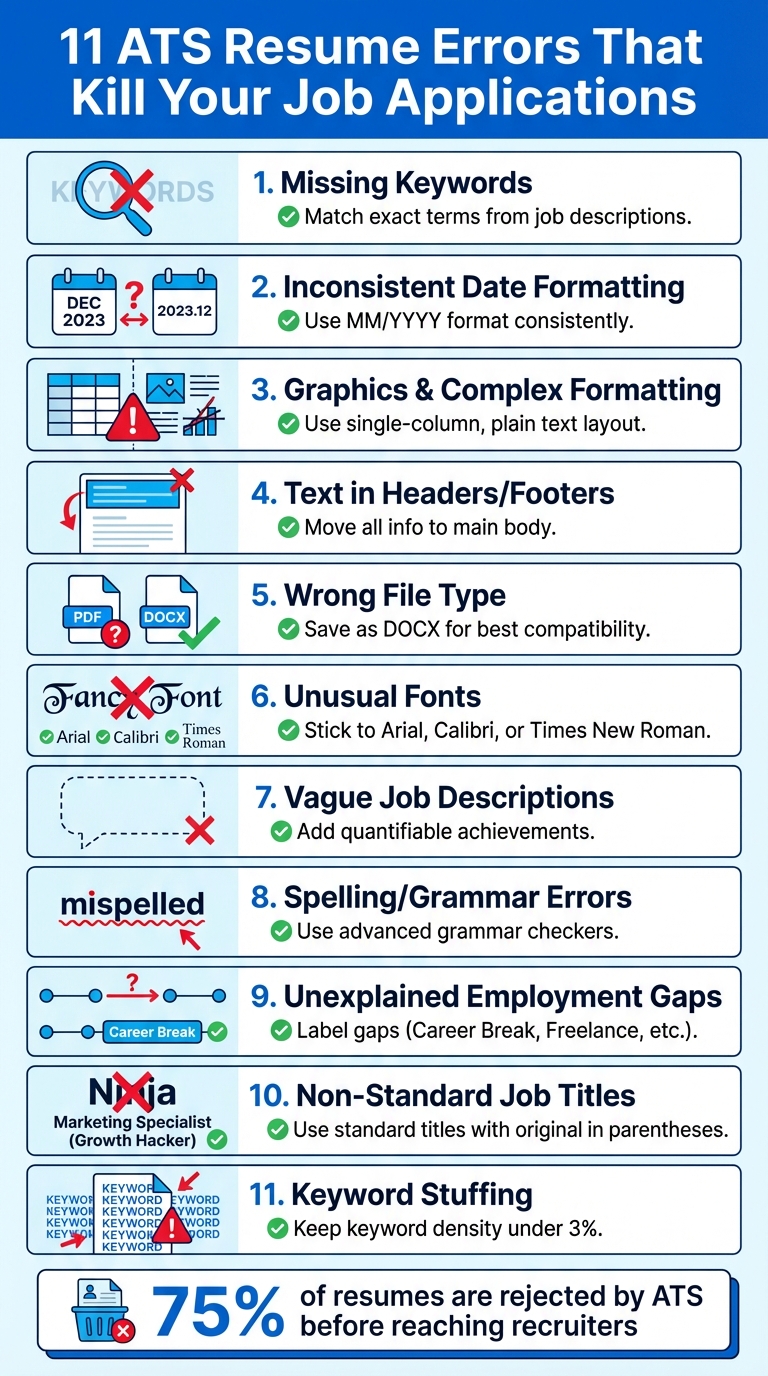
11 Common ATS Resume Errors and Quick Fixes
Cracking the Code: How to beat applicant tracking system resume screening bots
1. Missing Keywords from Job Descriptions
Your ATS ranking hinges on precise keyword matches. If your resume lacks the exact terms from a job description, it can result in a lower compatibility score and even automatic rejection.
ATS Compatibility
Applicant Tracking Systems (ATS) are programmed to scan for specific phrases and terminology directly from job descriptions. For instance, if a job description mentions "Search Engine Optimization (SEO)" or "led cross-functional team", your resume must include these terms exactly as written. If they’re missing or phrased differently, the ATS may overlook your resume entirely. Tools like Jobscan.co help flag such gaps, while scale.jobs takes it a step further by using human experts to integrate these exact terms into your resume. Both platforms address keyword issues, but their methods differ - more on that later.
Impact on Resume Parsing
When keywords are missing, ATS software struggles to parse your qualifications accurately. These systems scan your resume’s summary, experience, and skills sections for specific terms. If the keywords aren’t there, the ATS might fail to recognize your suitability for the role. Modern ATS tools also evaluate how naturally keywords are incorporated, so overloading your resume with keywords (known as keyword stuffing) can lead to penalties.
Ease of Fixing the Error
Fixing this issue starts with carefully reviewing the job description and mirroring its language. For example, if the job post specifies "Agile project leadership", avoid substituting it with a generic phrase like "team management." Using the exact wording improves your chances of passing ATS filters. Jobscan.co provides keyword match scores and suggests terms to add, but it requires manual adjustments on your part. On the other hand, scale.jobs simplifies the process by offering custom resume revisions, saving you the effort of making these changes yourself.
Up next, we’ll look at how inconsistent formatting can further complicate ATS parsing.
2. Inconsistent Date Formatting
Inconsistent date formats are one of the most common reasons ATS systems misread resumes. This issue can prevent qualified candidates from even reaching a recruiter’s desk. For example, using a mix of formats like "January 2020", "01/2020", and "2020" can confuse the ATS, making it difficult to calculate your total years of experience.
How ATS Systems Handle Dates
Applicant Tracking Systems (ATS) rely on date parsing to validate your employment history and ensure you meet minimum experience requirements. If your resume includes inconsistent formats - such as "03/2024" in one section and "March 2024" in another - the ATS may fail to interpret your timeline correctly. This could result in an automatic rejection for "Insufficient Experience", even if you're fully qualified. Misinterpreted dates can lead to errors like:
- Incorrect calculation of employment duration.
- Overlooking entire positions.
- Flagging your resume for incomplete or unclear work history.
To avoid these issues, it's essential to use a consistent format, such as MM/YYYY (e.g., "03/2024" for March 2024). This format is widely recognized by ATS systems and ensures your dates are processed accurately.
A Simple Fix
To resolve this, review your resume and ensure all dates follow the MM/YYYY format. Check every entry to confirm consistency. If this feels overwhelming, consider using professional resume writing services to handle these adjustments for you. While tools like Jobscan.co can identify inconsistencies, you'll still need to fix them manually. Alternatively, platforms like scale.jobs offer human-reviewed revisions, ensuring your resume is not only consistent but also optimized for ATS systems.
Up next, we'll discuss how graphical elements and headers can disrupt ATS parsing.
3. Graphics, Tables, and Complex Formatting
While visual elements can make your resume look appealing to human readers, they often confuse ATS software, putting your application at risk. Features like tables, text boxes, skill bars, and graphics can cause parsing errors, potentially removing you from the candidate pool before a recruiter even sees your resume.
ATS Compatibility
Most ATS systems process resumes by reading text from left to right, completely ignoring the structure of tables or text boxes. If you use a two-column table to organize your details, the ATS merges the text from both columns, resulting in jumbled, unreadable data. Similarly, graphics and charts - like those skill bars that visually depict your expertise - are interpreted as blank spaces by the software. This means those visually appealing elements add no value when it comes to ATS parsing.
Impact on Resume Parsing
The issues don’t stop at misreading; they can lead to outright rejection. Non-standard bullet points, such as checkboxes, arrows, or emojis, can confuse the system. A layout with overlapping text boxes or a multi-column design might cause the ATS to reject the resume automatically. Even contact details placed in headers or footers are often ignored, which means recruiters may not be able to contact you, no matter how qualified you are.
How to Fix These Issues
Adjusting your resume formatting to an ATS-friendly layout involves some careful restructuring. Here’s how you can make your resume compatible:
- Replace tables with a single-column layout and use tabs or alignment tools for spacing.
- Swap out graphic elements like skill bars for plain text descriptions, such as "Proficient in Python" or "Fluent in Spanish."
- Stick to standard bullet points like solid circles (●) or squares (■) to ensure readability.
- Move all contact information from headers or footers into the main body of the document.
- Use standard section headings like "Work Experience" or "Education" to make it easier for ATS to categorize your details.
If you’re unsure how to make these changes, tools like scale.jobs offer human-assisted revisions to convert your resume into an ATS-compatible format. Alternatively, professional resume writing services can handle the technical adjustments for you, ensuring your resume remains impactful while meeting ATS standards.
4. Text in Headers and Footers
When formatting your resume, one often-overlooked detail is the placement of text in headers and footers. Placing critical information like your contact details in these sections can lead to ATS systems completely ignoring them. Applicant Tracking Systems (ATS) such as Taleo, Lever, and iCIMS typically bypass content in headers and footers, meaning essential details might never reach the recruiter.
ATS Compatibility
ATS software reads resumes in a linear fashion, scanning the main document body for information. Headers and footers, however, exist in a separate layer of the file's structure. As a result, many ATS platforms either skip over these sections or fail to extract their content accurately. If your name, phone number, email address, or LinkedIn profile is tucked away in a header or footer, the ATS might not register it at all. This could leave your resume without any contact details, making it impossible for recruiters to follow up, even if you're a top candidate for the job.
Impact on Resume Parsing
The issue doesn’t stop at missing contact details. Keywords - those vital terms that align your resume with the job description - can also go unnoticed if they’re tucked into headers or footers. Since ATS systems rely on keyword matching to determine your fit for a role, hiding these terms in ignored sections can drag down your relevance score. By keeping all keywords and vital information in the main body of your resume, you ensure the ATS captures every detail, giving you a better chance of moving forward in the hiring process.
Ease of Fixing the Error
The good news? This is an easy fix. Simply move all essential details - such as your name, phone number, email address, and LinkedIn profile - into the main body of your resume. Use clear labels like "Email: [email protected]" to make the information easy to spot. If your resume spans multiple pages, avoid placing page numbers in the footer. Instead, include them as part of the main text or aim to condense your resume to a single page for simplicity. If you’re unsure how to restructure your resume without headers and footers while keeping it professional, consider using a professional resume writing service to ensure your document is both ATS-friendly and visually appealing.
5. Wrong File Type (PDF vs. DOCX)
Submitting your resume in the wrong file format can make or break your chances of landing an interview. The file type you choose plays a crucial role in whether an ATS (Applicant Tracking System) can read and process your resume effectively. While PDF and DOCX are the most common formats, they don't perform equally in ATS environments.
ATS Compatibility
When it comes to ATS platforms like Lever or iCIMS, DOCX files are generally more reliable. DOCX is a text-based format that allows ATS software to extract information such as text, formatting, and data fields with precision. PDFs, however, can pose challenges. Some PDFs are text-based and ATS-friendly, but others - like those created in design software or scanned as images - are unreadable to these systems. An ATS might treat such PDFs as images, completely bypassing your hard-earned skills, experience, and education.
Impact on Resume Parsing
The wrong file type can lead to immediate problems. Imagine a candidate submitting a PDF resume that included an embedded photo. The ATS flagged it as incompatible, but when the same resume was converted to DOCX, the system processed it correctly. Even text-based PDFs can sometimes fail if they include layered designs or complex formatting, leaving recruiters with incomplete or scrambled information. This underscores how the choice of file type directly affects whether your qualifications are accurately captured.
Ease of Fixing the Error
To avoid this pitfall, use ATS-friendly resume formatting by saving your file as a DOCX. If a job posting specifically requests a PDF, ensure it's text-based by trying to highlight and copy the text. If you can select the text, the PDF should work fine. If not, convert it to DOCX or recreate it entirely. Before submitting, test your file by uploading it to a free ATS simulator to verify that it parses correctly. Avoid using password-protected files or PDFs exported from design software without proper checks, as these often fail in ATS systems. With the file format issue resolved, it’s time to address other common resume challenges.
6. Unusual Fonts and Special Characters
Using decorative fonts or special characters can harm your ATS score. While an unconventional font might catch the eye on a screen, Applicant Tracking Systems (ATS) like Lever and iCIMS rely on optical character recognition (OCR) and text extraction. These systems often struggle with anything that deviates from standard typefaces.
ATS Compatibility
ATS platforms are designed to work best with standard fonts such as Arial, Calibri, Times New Roman, or Helvetica in sizes between 10 and 12 points. These fonts have clean, easily recognizable characters that parsing software can read accurately. Fonts like Comic Sans, Papyrus, Brush Script, or anything cursive create readability issues. Similarly, special characters - such as accented letters (é, ñ), symbols (★, ◆), or non-standard bullet points - can lead to misinterpretation or even complete omission of sections during the parsing process.
| ATS-Friendly Fonts | Fonts to Avoid |
|---|---|
| Arial (10-12pt) | Script or decorative fonts (e.g., Brush Script) |
| Calibri (10-12pt) | Comic Sans or similar non-standard fonts |
| Times New Roman (10-12pt) | Fonts in unusual sizes (<10pt or >14pt) |
Impact on Resume Parsing
When ATS software encounters unusual fonts, it may misread text, skip words, or replace characters, which disrupts keyword matching. For example, a skills section formatted with star ratings like "Python ★★★★★" might be unreadable or omitted entirely. Similarly, using decorative bullets like diamonds or stars can confuse the system, merging bullet points into a block of text. This disrupts the ATS's reading flow, which typically follows a left-to-right, top-to-bottom order. Even if you’ve included critical keywords from the job description, poor formatting can prevent the ATS from recognizing them, significantly lowering your match score despite your qualifications.
How to Fix This Issue
Correcting this problem is straightforward. Start by selecting all text in your resume and switching the font to Calibri 11pt (or another ATS-friendly option). Use the find-and-replace function to remove special characters - replace symbols like ★ with standard black dot bullets (•), eliminate emojis, and avoid non-standard dividers or symbols. Stick to one standard font throughout your resume and use simple punctuation.
To ensure your resume parses correctly, test it using tools like Jobscan’s scanner. If you’re unsure about formatting or want expert assistance, consider using professional resume writing services. With a clean, ATS-friendly format, you’ll be better positioned to focus on other aspects of your job search, like tailoring your content for specific roles or exploring the best job boards.
7. Vague or Missing Job Descriptions
When job descriptions on your resume lack detail or specificity, they can significantly lower your ATS (Applicant Tracking System) score. Statements like "Responsible for team management" or "Handled customer service" don't provide the concrete data these systems need to match your qualifications with job requirements. ATS platforms are designed to scan for quantifiable achievements and relevant keywords, not broad or generic phrases.
ATS Compatibility
ATS platforms are programmed to identify structured resumes that emphasize measurable accomplishments. They look for action verbs paired with specific outcomes. For example, a vague statement like "Managed projects" doesn't offer enough detail. On the other hand, a description such as "Managed a 5-person sales team, increasing revenue by 15% through targeted strategies" provides actionable data points. This not only highlights leadership and project management skills but also demonstrates tangible results, making it easier for the ATS to align your experience with job requirements.
Impact on Resume Parsing
When job descriptions are too vague or lack key details, ATS systems may undervalue entire sections of your resume. These systems rely on keyword density and relevance to score applications. Generic phrases like "Worked with sales staff" fail to include the industry-specific terms and metrics that ATS algorithms prioritize. However, a more detailed entry like "Managed a 5-person sales team, increasing revenue by 15%" incorporates measurable outcomes and keywords, improving your chances of being flagged as a strong candidate.
Ease of Fixing the Error
The good news is that this is one of the easiest ATS-related issues to address. You don’t need to redesign your resume or use special tools. Start by reviewing the job description for the role you're targeting and identifying 4–6 key skills or outcomes it mentions. Then, update your work experience section to include these terms naturally, along with specific metrics.
For instance, replace "Handled customer service" with "Managed 50+ client accounts daily, resolving 95% of issues on first contact and achieving a 4.8/5.0 satisfaction rating." Use strong action verbs like "Led", "Increased", "Optimized", or "Streamlined" to begin each bullet point.
If you're unsure how to effectively quantify your achievements or need help refining your resume, consider using the best resume writing services. These services can help you turn vague descriptions into ATS-friendly content that showcases your skills and accomplishments. Up next, we'll look at other common mistakes that can hurt your ATS score.
8. Spelling and Grammar Mistakes
Errors in spelling and grammar can derail your resume by causing keyword mismatches, which in turn lower your ATS (Applicant Tracking System) score and reduce your chances of moving forward in the hiring process.
ATS Compatibility
Applicant Tracking Systems are designed to match exact keywords. A simple misspelling, like typing "project managment" instead of "project management", can lead to your qualifications being overlooked. The same goes for technical terms - writing "Sales Force" instead of "Salesforce" or "Java Script" instead of "JavaScript" can confuse the system, even if your skillset is a perfect match. While some ATS tools have become more sophisticated, many still rely heavily on precise text matching.
Impact on Resume Parsing
Mistakes in spelling or grammar can disrupt the ATS's ability to parse your resume correctly. Key details about your experience might be misread or skipped entirely, lowering your overall evaluation score. This is a key component of how ATS scoring algorithms function. Additionally, inconsistent verb tenses or other grammatical errors can give the impression of carelessness, which doesn't reflect well on your professionalism.
How to Fix These Errors
To catch these issues, rely on advanced tools like Resume Worded's Grammar Checker, which can identify errors that standard spell-checkers might miss. These tools can also highlight issues like passive voice, helping you maintain a polished and ATS-friendly tone. For acronyms, make sure to spell them out alongside their abbreviations - for example, "Customer Relationship Management (CRM)" - to improve ATS recognition. If the process feels daunting, consider using professional resume writing services to ensure your resume is error-free and optimized for both ATS systems and human recruiters.
Next, we'll look at how unexplained employment gaps can affect your resume's performance.
9. Unexplained Employment Gaps
Unexplained employment gaps can negatively impact your resume's score and visibility when processed by ATS (Applicant Tracking Systems).
ATS Compatibility
Maintaining a clear and consistent chronology is essential for ATS compatibility. Most ATS platforms focus on parsing the timeline of your work history rather than judging the nature of the gap itself. However, blank periods can confuse these systems, potentially leading to your resume being flagged as "unemployed", which may lower its ranking. As Resume Worded explains:
"If your work experience isn't detected correctly, an ATS may auto-flag you as unemployed - you want to avoid this since you might automatically get rejected."
Impact on Resume Parsing
The real issue lies in how these gaps interfere with the ATS's ability to calculate your total work experience. If your timeline is inconsistent or formatted poorly, the system may misinterpret your career history. For example, using complex layouts like two-column designs or tables to explain dates can render your timeline unreadable to the parser, leading to errors in experience calculation.
Ease of Fixing the Error
Addressing this issue is relatively simple. For any gap lasting more than nine months, add a brief label to explain the time period. Use terms like "Career Break", "Professional Sabbatical", "Freelance", or "Professional Development" to maintain a smooth chronological flow. Stick to a single-column layout with consistent date formatting (e.g., "Mar 2022 – Nov 2024") throughout your resume. If you're unsure how to structure these entries or want to ensure your resume is both ATS-friendly and visually appealing, consider using professional resume writing services for expert assistance.
Relevance to Job Descriptions
Strategically labeling gaps can even enhance your resume. Instead of leaving white space, describe what you accomplished during that time using keywords aligned with the job you're targeting. For instance, if you earned certifications, learned new skills, or worked as a freelancer, include those details. A gap labeled as "Professional Development – AWS Solutions Architect Certification" not only fills the blank but also highlights your commitment to growth and aligns with industry-specific keywords.
Next, let’s explore another frequent resume mistake: using non-standard job titles.
10. Non-Standard Job Titles
Quirky titles like "Content Ninja" or "Sales Rockstar" might sound fun, but they can create real problems when it comes to ATS (Applicant Tracking System) compatibility.
ATS Compatibility
ATS software is designed to match standard job titles with the requirements listed in job descriptions. For instance, if you list your role as "Growth Hacker" instead of "Marketing Manager", the system may fail to connect your experience with the database of recognized roles or recruiter search filters. This disconnect can result in your resume being ranked lower or ignored entirely. In fact, 55.3% of ATS rejections stem from non-standard job titles, making this a major obstacle in the hiring process.
Impact on Resume Parsing
When titles like "Code Ninja" are used in place of "Software Engineer", the ATS might misinterpret or deprioritize your experience. These systems are programmed to process exact or standard phrasing, and creative titles often fail to register correctly. This issue contributes to the 75% of resumes that don't make it to recruiters due to parsing errors or mismatched terms.
Ease of Fixing the Error
The good news? This is an easy fix. Replace unconventional titles with standard ones, and include your original title in parentheses for clarity. For example:
- Change "Social Media Guru" to "Social Media Manager (Internal: Social Media Guru)".
- Update "Code Wizard" to "Software Engineer (Team: Code Wizard)".
To ensure your resume aligns with ATS requirements, review job descriptions for the exact titles used and adjust your resume accordingly. You can also test your resume with an ATS checker or seek help from professional resume writing services for expert guidance tailored to your field.
Relevance to Job Descriptions
Using the exact job titles from a job posting can significantly improve your ATS match rate. For example, if a job description lists "Project Manager", avoid using an internal title like "Team Lead" without clarification. Instead, reframe it as "Project Manager (Internal: Team Lead)". This approach ensures the required keywords are included while maintaining transparency about your actual role, increasing your chances of passing ATS screening.
Next, we’ll dive into another common mistake that can harm your ATS score: keyword stuffing.
11. Keyword Stuffing
Keyword stuffing is one of the most common resume mistakes that can harm your chances of landing an interview. It occurs when you overload your resume with repetitive terms like "project management" or "Agile methodology" without incorporating them naturally into your content. This often results in a resume that feels forced and unnatural, undermining its overall effectiveness.
ATS Compatibility
Modern Applicant Tracking Systems (ATS), especially those powered by AI, are designed to identify and penalize resumes with excessive keyword repetition. These systems don't just count keywords - they evaluate the context in which they appear. Overloading your resume with keywords can trigger red flags, leading to lower rankings or even automatic rejection. Alarmingly, 75% of resumes are rejected by ATS before a recruiter even sees them, and keyword stuffing is a frequent culprit. With nearly all Fortune 500 companies using advanced ATS tools, attempting to manipulate the system through over-optimization is more likely to hurt than help.
Impact on Resume Parsing
When keywords make up more than 3% of your resume's content, ATS algorithms often classify it as spam. This not only reduces your chances of passing the initial screening but also makes your resume appear artificial to recruiters. For instance, stuffing phrases like "managed projects, project management, project manager" into a single bullet point disrupts the natural flow of your content. This can make your accomplishments seem exaggerated or even fabricated, damaging your credibility.
Ease of Fixing the Error
The good news is that fixing keyword stuffing is relatively simple. Start by scanning your resume for overused terms using keyword analysis tools. Then, focus on integrating keywords naturally into achievement-driven statements. For example, instead of mentioning "SEO" repeatedly, write something like: "Optimized SEO strategies, increasing organic traffic by 30% in six months." Aim for a keyword density under 3% while targeting a match score between 75–85% to balance ATS compatibility and readability. If you're unsure how to strike this balance, consider using a professional resume writing service to create a resume that appeals to both ATS and human recruiters.
Relevance to Job Descriptions
To effectively tailor your resume, identify 5–10 key terms from the job description and incorporate them into your content naturally. For example, instead of repeating "data analysis" multiple times, connect it to measurable results: "Conducted data analysis for 15+ client projects, reducing reporting time by 40%." Avoid using synonyms unless they are explicitly mentioned in the job description, as ATS systems may not recognize variations. By focusing on context and meaningful achievements, you can ensure that your resume is both optimized and authentic. This approach will also help as we explore tools like Jobscan.co versus scale.jobs in the upcoming sections.
Jobscan.co vs. scale.jobs: Feature Comparison
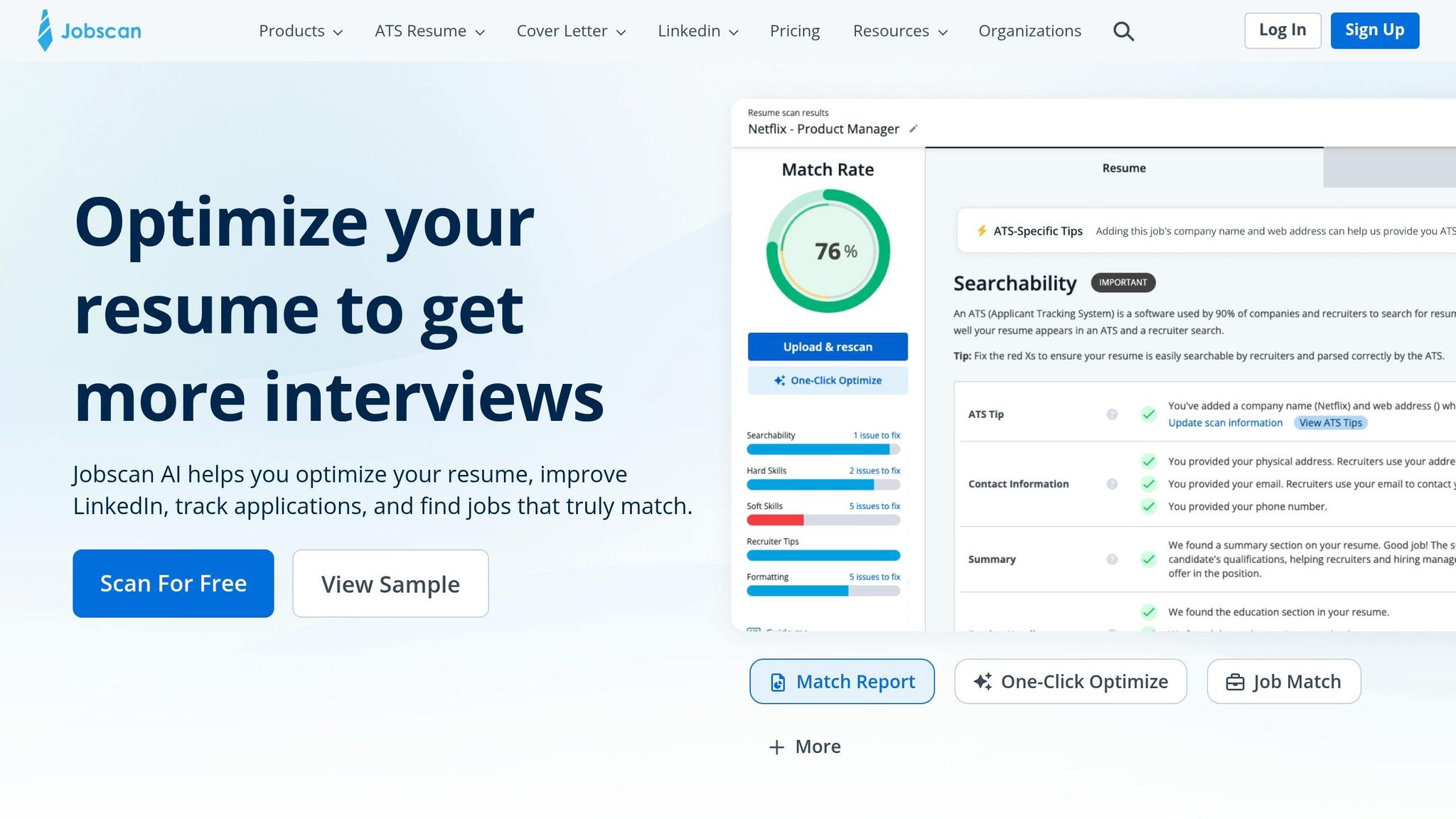
Jobscan.co and scale.jobs take different approaches to help job seekers optimize their resumes. Jobscan.co focuses on automated keyword matching and ATS compatibility scoring. Users upload their resume along with a job description to receive a match score, highlighting missing keywords, formatting problems, and warnings about keyword stuffing.
scale.jobs, on the other hand, combines software, AI, and human expertise across three tiers of service: free tools like an ATS resume builder and job tracker, an AI Assistant Pro subscription at $9/month, and human-assisted resume customization starting at $199 for 250 applications. Their trained virtual assistants (VAs) ensure resumes are customized, properly formatted, and submitted accurately, reducing the risk of being flagged by bots.
Here’s a side-by-side look at what each platform offers and how to decide which one suits your needs.
Why Choose scale.jobs for Personalized Support?
- Context-Specific Customization: Human assistants address nuanced issues like vague job descriptions or unconventional job titles that automated tools might miss.
- Transparent Updates: Real-time WhatsApp updates and timestamped screenshots provide clear proof of work.
- One-Time Payment: Unlike subscription models, scale.jobs offers flat-rate pricing ($199–$1,099 depending on the number of applications) and refundable unused credits.
- Balanced Approach: By combining human review with AI, resumes are optimized for ATS systems while staying appealing to recruiters.
Why Jobscan.co Stands Out
For those who prefer hands-on control, Jobscan.co offers immediate, automated feedback on keyword gaps and formatting issues. It’s particularly useful for job seekers who are confident in editing their resumes manually and want quick results without external involvement.
Who Should Use Jobscan.co?
Jobscan.co is best for those who:
- Prefer to handle resume edits themselves.
- Want a fast, automated analysis to identify ATS-related issues.
- Are comfortable applying for jobs manually after making adjustments.
Who Should Opt for scale.jobs?
scale.jobs is ideal if:
- You’re tired of dealing with ATS errors and want guaranteed, accurate application submissions.
- You’re applying to a high volume of jobs and need consistent, tailored resume updates.
- You value professional human oversight and want to save significant time (potentially over 20 hours per week).
- You prefer a flat-fee model with transparency, including proof of application submissions.
Feature Comparison Table
| Feature | Jobscan.co | scale.jobs |
|---|---|---|
| Human involvement | None - fully automated | Trained VAs ensure customization and submission |
| Resume customization depth | Keyword suggestions; self-edited | AI + human rewriting for each job posting |
| ATS handling | Identifies errors; no fixes | Manual submissions to avoid bot flags |
| Application execution | Manual application by user | VAs handle applications across platforms |
| Transparency & proof | Match score reports | WhatsApp updates with timestamped screenshots |
| Pricing model | Subscription-based | One-time fees ($199–$1,099); $9/month for AI-only tier |
Why scale.jobs Excels in ATS Optimization
scale.jobs addresses common ATS challenges by offering a blend of human and AI support. Their services resolve formatting issues, optimize keywords, and ensure accurate application submissions. The added transparency through WhatsApp updates and proof-of-work screenshots reassures users that their applications are handled with care.
Consider scale.jobs if:
- Automated tools haven’t led to interviews despite repeated efforts.
- You’re applying to over 50 jobs and want to avoid burnout from manual edits and submissions.
- Complex application forms with multiple fields are slowing you down.
- Refundable credits and verifiable submission proof are important to you.
Both platforms cater to different needs, so your choice depends on how much control you want and how much time you’re willing to invest in the job application process. If saving time and ensuring accuracy are priorities, scale.jobs offers a compelling solution. For those who enjoy a DIY approach, Jobscan.co provides a quick and efficient way to refine resumes.
Conclusion
Addressing these 11 ATS errors - from missing keywords to non-standard titles - plays a crucial role in boosting your resume's visibility. Choosing between Jobscan.co and Scale.jobs determines how effectively you tackle these challenges. Modern ATS systems evaluate resumes based on keyword relevance, clear formatting, and proper structure. Fixing these errors ensures your resume is parsed accurately and aligns with job requirements.
Jobscan.co offers a fast and efficient way to identify technical issues. It highlights keyword gaps, formatting errors, and structural flaws in seconds, making it a great option for individuals who are comfortable refining their resumes and applying on their own. However, automated tools fall short when it comes to evaluating whether your resume effectively tells your career story or strategically positions your skills for specific roles. That’s where the choice of tool - whether Jobscan.co’s automated approach or Scale.jobs’ human-driven service - becomes essential.
Human-assisted services provide a level of detail automated tools can’t match. For senior-level positions, complex career paths, or when seeking professionally tailored resumes that balance ATS compatibility with recruiter appeal, expert input is invaluable. Scale.jobs combines AI-driven keyword optimization with the expertise of trained virtual assistants who:
- Personalize resumes for each job with human review
- Submit applications manually to bypass bot detection
- Share regular updates via WhatsApp, complete with timestamped screenshots for transparency
- Offer flat pricing ($199–$1,099) without recurring fees
While Jobscan.co is perfect for those confident in editing their resumes independently, Scale.jobs caters to job seekers who need expert customization, especially for competitive roles or high-volume applications.
The right choice depends on your job search needs. If you’re applying to 10–20 roles with straightforward qualifications, automated tools can handle quick technical checks. For more complex searches - like targeting high-demand positions, managing 50+ applications, or addressing challenges with DIY optimization - human-assisted services provide the strategic edge and precision that software alone cannot. Both approaches can improve ATS compatibility, but human expertise ensures your resume not only passes the system but also stands out to recruiters.
FAQs
What’s the fastest way to tell if my resume is ATS-friendly before I apply?
The fastest way to determine if your resume is ATS-friendly is by utilizing tools such as Scale.jobs, Jobscan, or Resume Worded. These platforms help pinpoint formatting problems, missing keywords, and overall compatibility with Applicant Tracking Systems (ATS). To optimize your resume, stick to a clean design, use standard fonts, avoid tables or graphics, and save it in formats like .docx or plain PDF. These steps enhance ATS readability and increase your chances of making it through automated filters.
How can I tailor keywords to a job description without keyword stuffing?
To make your resume stand out, pull relevant keywords directly from the job posting and weave them naturally into your content. Add these terms to your summary, skills, and experience sections in a way that feels organic, especially within bullet points. Use the exact wording from the job description to boost recognition by Applicant Tracking Systems (ATS). However, be mindful not to overuse or include irrelevant terms, as this can disrupt the natural flow and readability of your resume.
Should I submit my resume as PDF or DOCX for the best ATS parsing?
Submitting your resume as a PDF is often the safest bet for ensuring proper formatting and readability. Most modern Applicant Tracking Systems (ATS) are equipped to handle PDFs without issues, preserving the layout across different devices. That said, if the job posting explicitly requests a DOCX file, it's important to follow those instructions to avoid compatibility problems. Always tailor your submission format to the employer's preferences.