
How to Get Through Workday’s Application System Successfully

Sarah Mitchell
April 24, 2026

Workday’s Applicant Tracking System (ATS) is used by over half of Fortune 500 companies to manage job applications. It processes resumes into structured profiles, which recruiters use to search for candidates. If your resume isn’t formatted correctly, parsing errors can make you invisible in searches. Around 75% of resumes fail ATS filters, and Workday’s autofill feature has an estimated 34% error rate.
To improve your chances:
- Use a single-column layout with standard headings (e.g., "Work Experience").
- Avoid tables, graphics, and text boxes that confuse the parser.
- Include keywords from the job description, such as certifications and skills, in both full and abbreviated forms.
- Double-check autofilled fields in the application form for accuracy.
- Complete all fields, even optional ones, to maximize visibility in recruiter searches.
- Submit applications early to stand out before filters tighten.
For applicants overwhelmed by these technical demands, services like scale.jobs offer ATS-optimized resumes and manual application management, ensuring error-free submissions. Their human oversight, tailored resumes, and transparent updates make them a strong choice for navigating Workday’s system effectively.
Overview on Job Application in Workday Recruitment | Workday Recruitment Training | CyberBrainer
sbb-itb-564272e
How Workday's ATS Works
Workday processes your application in two distinct ways. First, it retains your uploaded file (PDF or .docx). Second, it uses a parsing engine to create a structured candidate profile, which organizes your information into searchable fields like job titles, companies, skills, and education. Recruiters rely on this structured profile to search for candidates, not your original file. If the parser misinterprets your experience, it can effectively make you invisible to their searches. This dual-system approach highlights the importance of ensuring your resume is ATS-friendly.
Workday's system is advanced enough to recognize synonyms - for instance, "managed a team" and "led a department" might be treated similarly. However, it reads resumes from top to bottom, so the layout of your document plays a critical role. Using multi-column formats, tables, or text boxes can confuse the parser, potentially mixing up key information like skills and job descriptions into unreadable data.
How Workday Reads Your Resume
Nearly half of Fortune 500 companies - about 45% - use Workday as their primary hiring platform. The system emphasizes required skills and relevant experience when ranking candidates. For example, if a job posting specifies "Project Management Professional (PMP)" certification, the ATS looks for both the full term and its abbreviation in your structured profile. To ensure your resume aligns with these searches, it's wise to spell out acronyms alongside their shortened forms. This small adjustment can significantly improve keyword matching and ATS visibility.
However, Workday’s autofill feature isn’t perfect. It has an estimated error rate of 34%, meaning roughly one in three resumes experience parsing mistakes. These errors can include truncated job titles, incorrect dates, or missing skills, all of which can prevent your application from being seen by recruiters. Blake Crosley, VP of Design at ResumeGenius, emphasizes the importance of this structured data:
"The form data is your real application. Workday's recruiter search uses structured fields (job titles, companies, skills, education), not your uploaded resume file. If the form data is wrong, you are invisible."
If navigating these technical hurdles feels overwhelming, scale.jobs' resume writing services can help. They specialize in creating ATS-optimized resumes and managing the application process with human oversight to minimize errors.
Why Applications Get Rejected
Parsing errors aren’t the only reason applications fail. The most common cause of rejection in Workday is knockout questions. These are binary screening questions, such as "Are you authorized to work in the United States?" or "Do you have at least 5 years of experience in data analysis?" Answering "No" to these questions leads to automatic disqualification. For example, if a position requires 5 years of experience and you have 4 years and 10 months, answering "No" will immediately remove you from consideration.
Another frequent issue is overly complex resume layouts. As discussed earlier, multi-column designs, sidebars, and floating text boxes can confuse the ATS, resulting in skipped or scrambled information. Even creative section headers like "My Journey" or "Toolbox" can prevent proper data mapping. Additionally, placing contact information in headers or footers can lead to it being ignored, leaving recruiters without a way to reach you even if your profile passes the filters.
Inconsistent date formats can also cause problems. For instance, mixing formats like "Jan '22" and "01/2022" or using vague terms like "Spring 2023" can confuse the system, leading to errors in calculating your total years of experience. This is critical, as recruiters typically spend just 7.4 seconds reviewing a resume initially, and errors in key details can cost you the opportunity.
Building ATS-Compatible Resumes for Workday
Crafting a resume that aligns with Workday’s Applicant Tracking System (ATS) is about more than just listing your experience. It’s about ensuring your resume is formatted and optimized in a way that the system can accurately interpret and categorize. Even small formatting missteps can cause your resume to be overlooked by recruiters.
Choosing the Right File Format
When submitting your resume to Workday, stick to .docx or PDF formats. While both are generally reliable, .docx files often work slightly better due to their compatibility with different Workday versions. Steer clear of using graphics, tables, text boxes, or multi-column layouts, as these elements can confuse the system and lead to errors or omissions.
For the best results, use a single-column ATS-friendly resume, which ensures accurate parsing across all Workday configurations. Stick to standard section headings like "Work Experience", "Education", and "Skills." Avoid creative headings such as "My Journey" or "Toolbox", as these may not map correctly to the ATS database fields. Additionally, place your contact information - name, phone number, and email - at the top of the document in the main body, not in the header or footer.
Once your formatting is in order, the next step is to focus on incorporating the right keywords.
Adding Keywords That Match Job Descriptions
Proper formatting is only the first step. To ensure your resume ranks well in Workday’s system, you need to include keywords that align with the job description. Workday uses AI-driven contextual keyword recognition and semantic matching, meaning it evaluates not just the presence of keywords but their relevance to the job. However, exact keyword matches still carry more weight, so it’s crucial to closely mirror the language of the job posting.
Start by analyzing the job description. Identify and extract key skills, responsibilities, and certifications, then categorize them into two groups:
- Tier 1: Must-have skills or qualifications (6–12 items)
- Tier 2: Nice-to-have skills or qualifications (5–10 items)
Integrate these keywords seamlessly into your resume by applying the Action Verb + Task + Tool + Result formula. For example: "Managed Agile project teams using Jira, cutting delivery times by 22%."
Strategically place these keywords in key sections of your resume:
- Professional Summary: A concise overview of your qualifications.
- Work Experience: Use bullet points to highlight achievements.
- Skills Section: List technical and soft skills relevant to the role.
- Certifications: Include any required or preferred qualifications.
Use precise terminology when referencing tools or platforms. For instance, write "Google Workspace (G Suite)" or "Azure Data Factory (ADF)" to improve both parsing accuracy and searchability. Always spell out acronyms on first mention, followed by the abbreviation in parentheses, like "Certified Information Systems Security Professional (CISSP)."
Avoid overloading your resume with keywords, as Workday’s AI can detect unnatural patterns. Instead, focus on weaving keywords into context-rich, results-oriented bullets. As highlighted in the JobShinobi Guide:
"A keyword in Skills is good. A keyword in a bullet with measurable impact is better."
This approach not only improves ATS compatibility but also makes your resume more compelling to recruiters.
Checking How Workday Parsed Your Resume
After submitting your resume, it’s essential to verify how Workday has processed your information. The ATS extracts data into structured fields, which recruiters use to search for candidates. If the parsed data doesn’t match your resume, you may not appear in relevant searches.
To ensure accuracy, compare the auto-filled fields in Workday’s system with your original resume. Manually input any critical skills or qualifications that the parser might have missed. Blake Crosley, Founder of ResumeGenius, emphasizes this point:
"The form data determines whether you appear in search results. The resume file determines whether the recruiter is impressed once they click on your profile."
Additionally, log into the company’s career portal after submitting your application. Review your persistent candidate profile, as it remains visible to recruiters across all applications within the same Workday system. Inconsistencies between submissions can hurt your chances, so take the time to correct any errors.
Filling Out Workday Application Forms
Workday's multi-step application process plays a crucial role in how recruiters find you. Unlike traditional resume reviews, recruiters often rely on the structured data within these forms to filter candidates. If any field is incomplete or inaccurate, you may not even show up in search results, no matter how polished your resume is. After crafting an ATS-friendly resume, the next step is to ensure that every field in the application form aligns with your qualifications. This ensures you're fully visible to recruiters using Workday's system.
Completing Every Field (Including Optional Ones)
Leaving optional fields blank, like certifications, language skills, or your LinkedIn profile, can hurt your chances. Recruiters often search for specific details, and blank fields mean you won't appear in those filtered results. As Blake Crosley, VP of Design at ResumeGenius, explains:
"Every field you leave blank is a search query you will never appear in. Fill in everything."
After Workday auto-fills your application using your resume, take the time to review and correct every field. The system often misinterprets or truncates information, such as job titles, dates, or skills listed in creative layouts. Double-check each entry for accuracy and ensure your wording matches the job description. For example, if the job posting specifies "Project Management", use that exact term instead of abbreviations like "PM."
Pay special attention to knockout questions - those yes-or-no screening questions like "Do you have 3+ years of experience with Python?" Answer them carefully, as incorrect responses can lead to automatic disqualification.
Uploading Resumes from Mobile Devices
The device you use to upload your resume can also affect how well Workday processes your file. Mobile uploads, in particular, can introduce formatting issues that disrupt the parsing process. To avoid this, always use a text-based PDF or DOCX file under 5MB. Avoid using scanned images or photos of your resume, as Workday cannot extract text from image-based files, leaving critical fields blank.
Before uploading from your phone, test your resume by pasting its text into a basic notes app. If the text appears scrambled or out of order, Workday's parser will likely encounter the same issues. Stick to a clean, simple layout and avoid using tables, text boxes, or graphics. Additionally, place your contact information - name, phone number, and email - directly in the main body of your document, as Workday often ignores text in headers or footers.
Submitting Applications Early
Timing can significantly impact your chances. On average, a corporate job opening receives around 250 applications, but recruiters typically narrow that down to just 4–6 candidates for interviews. Submitting your application within the first 24–48 hours can give you an edge. Early submissions encounter fewer filtering hurdles and are more likely to catch a recruiter's attention.
As the volume of applications increases, recruiters often tighten their search filters to manage the influx, making it harder for late submissions to pass through. Marcus Johnson, a former Workday Implementation Consultant, highlights this challenge:
"Workday wasn't designed for job seekers - it was designed for enterprise HR. Understanding that helps you work with the system instead of against it."
Think of every field in the application form as a potential search filter. By completing every detail, verifying its accuracy, and submitting your application promptly, you maximize your chances of standing out in Workday's system. This approach ensures your hard work on your resume translates into visibility and opportunities.
scale.jobs vs Competitors for Workday Applications
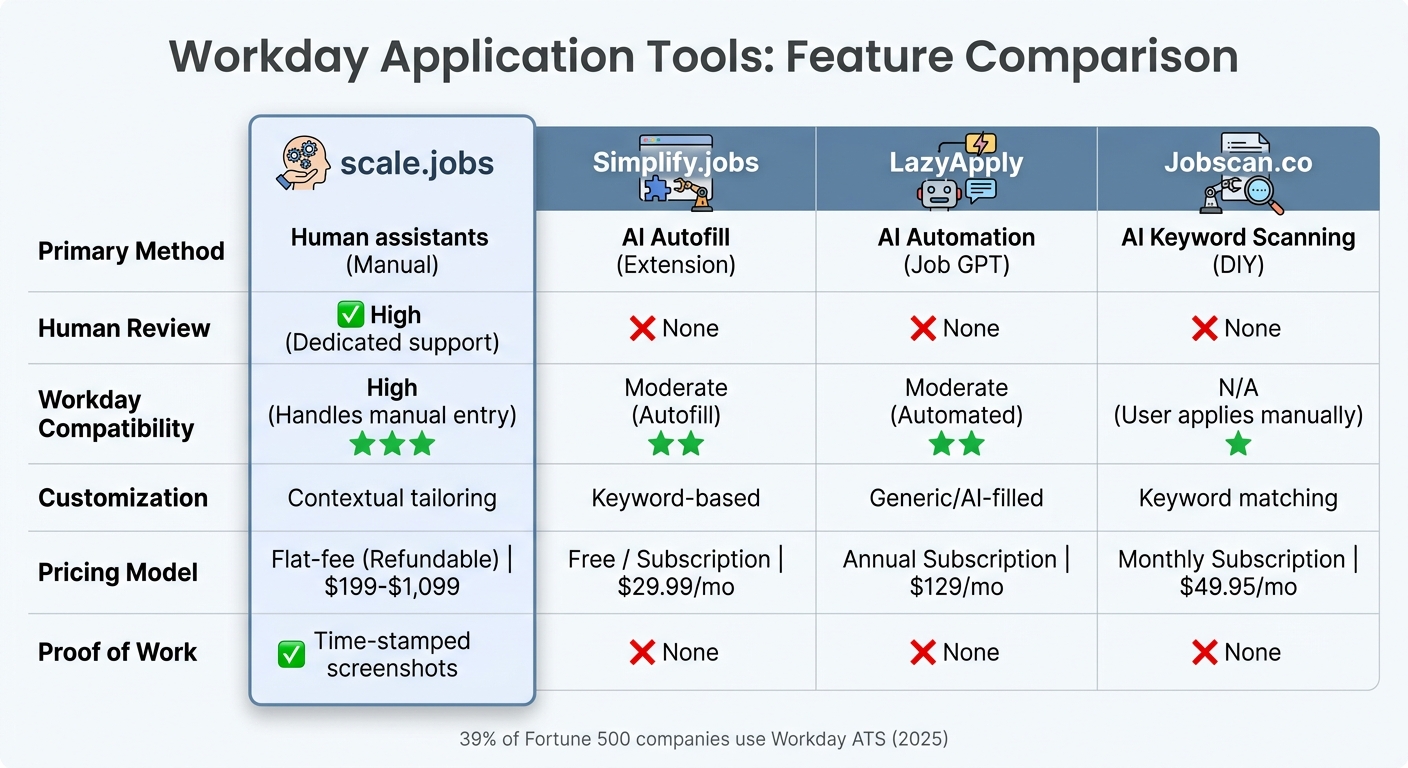
Workday Job Application Tools Comparison: scale.jobs vs Simplify.jobs vs LazyApply vs Jobscan.co
Navigating Workday's strict parsing rules can feel like trying to solve a puzzle with missing pieces. Precision is everything when it comes to ATS-friendly resumes and accurately completed forms. This section dives into how scale.jobs stacks up against its competitors, helping you choose the right tool for your Workday applications.
Workday's structured database system is unforgiving when it comes to errors. Many automated tools struggle to meet its demands, often leading to incomplete or poorly formatted submissions. Let’s explore how scale.jobs compares to Simplify.jobs, LazyApply, and Jobscan.co in this challenging landscape.
Simplify.jobs vs scale.jobs
Simplify.jobs provides a browser extension that autofills basic application fields, saving time for users tackling straightforward forms. It’s fast, easy to use, and free for basic features, making it a good fit for high-volume applications. But when it comes to Workday, speed often leads to errors. Misaligned data - like mismatched job titles or dates - can make your application invisible to recruiters.
Why scale.jobs stands out for Workday applications:
- Human oversight for every field: Dedicated assistants manually review and verify every entry for ATS compliance.
- Job-specific resumes: Each submission includes a single-column PDF tailored to Workday’s parser, not a generic autofill template.
- Manual form completion: Assistants handle complex questions and optional fields, avoiding bot-like patterns that Workday might flag.
- One-time payment model: Pay $199–$1,099 for 250–1,000 applications, with no recurring fees, compared to Simplify’s subscription tiers.
- Proof of submission: Time-stamped screenshots via WhatsApp ensure transparency, showing exactly what recruiters see.
Who benefits from Simplify.jobs: Ideal for applicants looking for quick autofill solutions on simpler ATS platforms.
Who should choose scale.jobs: Perfect for candidates focused on Workday’s complex systems, where precision and human input are non-negotiable.
LazyApply vs scale.jobs
LazyApply automates bulk applications with AI, enabling users to apply to hundreds of jobs with minimal effort. While this approach emphasizes speed, Workday’s system often flags automated submissions as spam. As Blake Crosley aptly points out:
"The form data is your real application. Workday's recruiter search uses structured fields and scoring algorithms... not your uploaded resume file. If the form data is wrong, you are invisible."
Why scale.jobs excels for Workday applications:
- Avoids bot detection: Human assistants manually submit applications, bypassing patterns that trigger Workday’s spam filters.
- Tailored responses: Assistants craft answers that align with specific job descriptions, rather than relying on generic AI-generated content.
- Accurate field completion: Optional fields like certifications or LinkedIn profiles are filled correctly, increasing visibility in recruiter searches.
- Quick turnaround: Custom resumes and cover letters are delivered within one business day.
- Refundable credits: Pay only for completed applications, with unused credits refunded.
Who benefits from LazyApply: Best for those prioritizing sheer application volume across less selective platforms.
Who should choose scale.jobs: A must for professionals targeting Workday-powered companies, where quality trumps quantity. With over half of Fortune 500 companies using Workday, precision is critical.
Jobscan.co vs scale.jobs
Jobscan.co focuses on keyword analysis and ATS scoring, helping users optimize their resumes for specific job descriptions. It’s a valuable tool for DIY applicants who are comfortable navigating application systems independently. However, it stops short of execution - you’re responsible for rewriting your resume, completing forms, and submitting everything.
Why scale.jobs leads for Workday applications:
- End-to-end service: Assistants handle resume writing, form completion, and submission, removing the guesswork.
- Manual customization: Resumes are tailored to each job, going beyond keyword matching to ensure relevance.
- Seamless platform handling: Assistants expertly navigate Workday’s multi-step forms and other niche application portals.
- Real-time communication: Dedicated WhatsApp support keeps you updated every step of the way.
- Flat-fee pricing: Starting at $199 for 250 applications, compared to Jobscan’s monthly subscription model.
Who benefits from Jobscan.co: Ideal for DIY job seekers who have the time to optimize and manage their own applications.
Who should choose scale.jobs: Perfect for busy professionals who need a comprehensive solution, combining resume writing with accurate, human-powered submissions.
Why Choose scale.jobs?
If you’re applying to companies using Workday’s ATS, scale.jobs offers unmatched precision and transparency. Here’s a quick comparison of the key features across these tools:
| Feature | scale.jobs | Simplify.jobs | LazyApply | Jobscan.co |
|---|---|---|---|---|
| Primary Method | Human assistants (Manual) | AI Autofill (Extension) | AI Automation (Job GPT) | AI Keyword Scanning (DIY) |
| Human Review | High (Dedicated support) | None | None | None |
| Workday Compatibility | High (Handles manual entry) | Moderate (Autofill) | Moderate (Automated) | N/A (User applies manually) |
| Customization | Contextual tailoring | Keyword-based | Generic/AI-filled | Keyword matching |
| Pricing Model | Flat-fee (Refundable) | Free / Subscription | Annual Subscription | Monthly Subscription |
| Proof of Work | Time-stamped screenshots | None | None | None |
When to switch to scale.jobs:
- You need human verification for every form field.
- Your target companies rely on complex ATS systems like Workday.
- You want tailored resumes and manual, error-free submissions.
- You value proof-of-work transparency through time-stamped screenshots.
- You prefer a one-time payment model with no hidden fees.
When to Use Each Tool
Selecting the right tool for your job application process depends on how many positions you're applying to, the customization required for Workday applications, and whether you’re comfortable managing submissions independently. Each tool caters to different needs, so here's a breakdown of when to use each option and why scale.jobs stands out for Workday applications.
When to Use Simplify.jobs, LazyApply, or Jobscan.co
Simplify.jobs is a good fit if you’re applying to a manageable number of jobs - around 10–20 per week - on platforms with simpler forms like Greenhouse or Lever. This browser extension can speed up data entry, though it may occasionally encounter minor autofill issues. It’s a practical choice for those who prioritize quick submissions over precision.
LazyApply is better suited for high-volume applications, particularly if you’re aiming for 100+ submissions weekly across platforms that don’t strictly monitor form accuracy. Its AI-driven automation can handle bulk applications efficiently. However, Workday’s system often flags automated submissions, making LazyApply more effective for less stringent job boards.
Jobscan.co is ideal for job seekers who prefer a hands-on approach. If you’re applying to 5–10 jobs per week and enjoy refining your resume to improve ATS compatibility, this tool offers keyword optimization and actionable feedback. It’s particularly helpful for those who want to fine-tune their resumes before manually submitting applications.
While these tools address basic or high-volume needs, scale.jobs is tailored for the specific demands of Workday applications, offering a level of precision that automated tools can’t match.
When to Choose scale.jobs
scale.jobs is perfect for applicants submitting 250 or more applications and requiring meticulous accuracy for Workday forms. With more than 39% of Fortune 500 companies using Workday as of 2025, ensuring every application is error-free is essential. At scale.jobs, human assistants manually complete each field, avoiding the parsing errors that can cause up to 75% of resumes to be filtered out by ATS systems.
Why scale.jobs Outperforms Competitors for Workday:
- Human-verified accuracy: Each field is manually checked to eliminate errors, ensuring compatibility with Workday’s structured system.
- ATS-optimized resumes: Single-column PDFs tailored specifically for Workday’s parser, delivered within 24 hours.
- Flat-fee pricing: One-time payments ranging from $199 to $1,099 for 250–1,000 applications, with refundable credits for unused submissions - no recurring fees.
- Real-time support: Dedicated WhatsApp assistance for updates and communication throughout the process.
- Transparent proof of work: Time-stamped screenshots provide visibility into what recruiters see, offering unmatched accountability.
For those managing visa requirements, dealing with layoffs, or simply unable to dedicate 20+ hours per week to applications, scale.jobs provides a comprehensive, hands-free solution.
Switch to scale.jobs if…
- You’re applying to Fortune 500 companies or employers using Workday’s ATS.
- You need human verification for complex questions and optional fields.
- You’ve experienced parsing errors or ATS visibility issues with automated tools.
- You want customized resumes and error-free applications without handling the process yourself.
- You value transparent proof of work, including time-stamped screenshots, over generic automated reports.
Decision Summary
- Use Simplify.jobs for moderate-volume applications (10–20 per week) on platforms like Greenhouse or Lever.
- Choose LazyApply for high-volume submissions (100+ per week) when speed is more important than customization.
- Opt for Jobscan.co if you prefer DIY resume optimization with keyword analysis before manual applications.
- Select scale.jobs for Workday-powered Fortune 500 applications, where human-verified precision, tailored resumes, and proof of work are critical for success.
Each tool has its strengths, but scale.jobs ensures the accuracy and transparency needed to navigate Workday’s complexities effectively. For job seekers targeting competitive roles, it’s a dependable choice.
Feature Comparison: scale.jobs vs Simplify.jobs vs LazyApply vs Jobscan.co
When it comes to tools for Workday applications, the right choice depends on how well each one handles ATS parsing, form completion, and application accuracy. Below is a detailed comparison of scale.jobs, Simplify.jobs, LazyApply, and Jobscan.co, highlighting features like human involvement, resume customization, ATS compatibility, application execution, transparency, and pricing.
| Feature | scale.jobs | Simplify.jobs | LazyApply | Jobscan.co |
|---|---|---|---|---|
| Human Involvement | Real human assistants manually complete every field and verify accuracy | None - a browser extension autofills forms using AI assistance | None - "Job GPT" AI handles fully automated submissions | None - self-service AI tool focused on keyword analysis |
| Resume Customization Depth | Custom single-column PDF tailored per job, delivered with a 24-hour turnaround | Generic resume autofilled across applications | AI-generated resume variations with little manual review | User manually edits resume based on keyword feedback |
| ATS Compatibility | Optimized specifically for Workday's parser using a single-column layout | May encounter Workday parsing challenges due to automated formatting | Automated resumes can face issues with Workday's ATS because of formatting inconsistencies | Provides ATS scan feedback but requires manual application submission |
| Application Execution Method | Human assistants apply to up to 30 jobs daily on your behalf | Semi-automated browser extension requiring user oversight | Fully automated submissions | User applies manually after optimizing the resume |
| Transparency & Proof of Work | Time-stamped screenshots and live WhatsApp updates that show exactly what recruiters see | Basic dashboard with limited visibility | Automated reports offering only limited insight into form accuracy | ATS keyword match scores and optimization suggestions |
| Pricing Model | One-time flat fee: $199–$1,099 for 250–1,000 applications, with refundable unused credits | Free tier available; premium plans start at $29.99/month | $129/month for unlimited applications | $49.95/month for unlimited scans |
Let’s break down the key differences and advantages of scale.jobs compared to its competitors.
Simplify.jobs vs scale.jobs
Why scale.jobs is better:
- Human-verified accuracy: Every field is manually checked, eliminating autofill errors common with browser extensions.
- ATS-optimized resumes: Single-column layouts tailored for Workday ensure smoother parsing.
- Transparent pricing: Offers a one-time flat fee ($199–$1,099) with refundable unused credits, unlike Simplify.jobs' recurring subscriptions.
- Real-time updates: Dedicated WhatsApp support provides instant feedback and communication.
- Proof of work: Time-stamped screenshots give clear visibility into what recruiters see.
LazyApply vs scale.jobs
Why scale.jobs is better:
- Manual submissions: Avoids Workday's bot detection and spam flags, ensuring better success rates.
- Tailored resumes: Job-specific customization beats the generic AI-generated variations LazyApply offers.
- Accuracy in optional fields: Human assistants complete these fields, increasing recruiter search visibility.
- Enhanced communication: WhatsApp updates provide better insights compared to LazyApply's limited automated reports.
- Flexible pricing: Pay-per-application model with refunds for unused credits, as opposed to LazyApply's flat monthly fee.
Jobscan.co vs scale.jobs
Why scale.jobs is better:
- Comprehensive service: Handles everything from resume writing to application submission, unlike Jobscan.co's focus on keyword optimization.
- Contextual relevance: Human-powered resume customization ensures more than just keyword matching.
- Expert navigation: Skilled assistants manage Workday's complex forms and portals with ease.
- Transparent communication: WhatsApp updates offer real-time progress tracking, which Jobscan.co lacks.
- Cost-effective pricing: Flat-fee pricing starts at $199 for 250 applications, compared to Jobscan.co's ongoing monthly subscriptions.
Who Should Use Simplify.jobs?
Simplify.jobs is a good fit for applicants submitting 10–20 applications weekly, particularly on simpler ATS platforms like Greenhouse or Lever, where speed matters more than precision.
Who Should Use LazyApply?
LazyApply works well for job seekers focusing on high-volume applications (100+ weekly) on less selective job boards that don't heavily scrutinize form accuracy.
Who Should Use Jobscan.co?
Jobscan.co is ideal for those who prefer a hands-on approach. It’s best suited for applicants willing to manually optimize resumes and manage their own job applications.
Who Should Choose scale.jobs?
scale.jobs is perfect for professionals targeting Fortune 500 companies using Workday. It’s best for those who value human-verified accuracy, ATS-optimized resumes, and transparent updates.
Switch to scale.jobs if…
- You’re applying to Fortune 500 companies using Workday's ATS.
- You want error-free, human-verified application forms.
- You need tailored, ATS-friendly resumes without the hassle of doing it yourself.
- You prefer a flat-fee pricing model over recurring subscriptions.
- You value real-time communication and detailed proof of work.
This comparison makes it clear when scale.jobs is the right choice for your job application needs. If you're looking for the best job application services that prioritize precision and transparency, scale.jobs stands out as a reliable option.
Which Tool to Pick for Workday Applications
When deciding which tool to use for Workday applications, it’s essential to consider how much control you need over form accuracy and whether precision or speed is your priority. Workday, a widely used ATS, powers job applications for over 39% of Fortune 500 companies as of 2025, making it a critical platform in today’s job market.
Workday’s recruiter search focuses on structured form fields rather than uploaded resumes. As Blake Crosley, VP of Design, points out:
"The form data is your real application. Workday's recruiter search uses structured fields... not your uploaded resume file. If the form data is wrong, you are invisible."
This reliance on structured data means that automated tools often struggle with accuracy and parsing quirks. Below, we’ll explore how different tools perform for Workday applications and why scale.jobs stands out.
Jobscan.co for Workday Applications
Jobscan.co is a DIY tool ideal for job seekers who prefer hands-on control over their resume optimization and application process.
Best for:
- Applicants comfortable managing applications manually
- Job seekers who want keyword feedback before applying
- Those applying to around 5–10 positions per week
Why scale.jobs might be better:
- It ensures human-verified accuracy for complex forms
- Tailored, ATS-optimized resumes reduce parsing errors
- Offers proof of work with time-stamped screenshots
- Provides real-time updates via WhatsApp
Simplify.jobs for Workday Applications
Simplify.jobs offers semi-automation, which works better for simpler ATS platforms like Greenhouse or Lever.
Best for:
- Applicants submitting 10–20 applications weekly
- Those who value speed over precision on simpler platforms
- Job seekers who are okay with occasional autofill errors
Why scale.jobs might be better:
- Human assistants manually verify every field
- Resumes are tailored specifically to Workday’s requirements
- Transparent pricing with refundable credits
- Real-time updates and proof of work for peace of mind
LazyApply for Workday Applications
LazyApply caters to high-volume applicants who prioritize speed over customization, especially on less selective job boards.
Best for:
- Job seekers submitting over 100 applications weekly
- Those focusing on quantity rather than precision
- Applicants targeting less competitive roles
Why scale.jobs might be better:
- Manual submissions bypass Workday’s bot detection systems
- Human assistants complete optional fields for better visibility
- Tailored resumes outperform generic AI-generated ones
- Detailed tracking via WhatsApp and time-stamped screenshots
- A pay-per-application model ensures cost efficiency
Comparison Table: scale.jobs vs Competitors
| Feature | scale.jobs | Simplify.jobs | LazyApply | Jobscan.co |
|---|---|---|---|---|
| Human Involvement | Real human assistants verify every field | None - browser extension autofills forms | None - fully automated AI | None - self-service tool |
| Resume Customization Depth | Custom single-column PDF tailored per job | Generic resume autofilled | AI-generated variations with minimal review | User edits based on keyword feedback |
| ATS Handling | Optimized for Workday’s parser | May face parsing challenges | Automated resumes may have formatting issues | Provides ATS feedback; user applies manually |
| Application Execution Method | Human assistants apply to up to 30 jobs daily | Semi-automated browser extension | Fully automated submissions | User applies manually after optimization |
| Transparency & Proof of Work | Time-stamped screenshots and live updates | Basic dashboard with limited visibility | Automated reports with limited insight | ATS keyword match scores |
| Pricing Model | One-time fee: $199–$1,099 (refundable credits) | Free tier; premium starts at $29.99/month | $129/month unlimited | $49.95/month unlimited scans |
Why Switch to scale.jobs?
- You’re targeting Fortune 500 companies using Workday
- You need human oversight for complex forms and optional fields
- Automated tools have caused parsing errors or visibility issues
- You want proof-of-work screenshots showing exactly what recruiters see
- You prefer a one-time payment model over recurring subscriptions
Decision Summary
- Choose Jobscan.co for hands-on resume optimization and manual application management for 5–10 applications weekly.
- Choose Simplify.jobs for moderate-volume applications (10–20 weekly) on simpler ATS platforms.
- Choose LazyApply for high-volume submissions (100+ weekly) when speed matters more than customization on less selective platforms.
- Choose scale.jobs for Workday-powered applications, where human-verified accuracy, tailored resumes, and transparency are critical. Pricing starts at $199 for 250 applications with refundable credits. For competitive roles, pairing human-verified submissions with professional resume writing services ensures better visibility and accuracy.
FAQs
How can I tell if Workday parsed my resume correctly?
When uploading your resume to Workday, it's important to verify that the system has correctly parsed your information. After uploading, check the auto-filled fields in your application. If details like your name, work experience, education, and skills appear correctly, the parsing worked as intended. However, if fields are missing, inaccurate, or appear jumbled, your resume's formatting - such as the use of graphics or intricate layouts - might be the issue. Simplifying your resume's design can help improve parsing accuracy.
Should I apply with a PDF or a DOCX in Workday?
To ensure your resume works seamlessly with Workday’s Applicant Tracking System (ATS), stick to a straightforward, text-based format. Use a DOCX file or a plain-text PDF. Avoid using fancy templates, graphics, columns, or decorative features, as these can lead to parsing issues or missed keywords. A simple, single-column layout helps your application get processed accurately and increases the likelihood of passing through automated filters.
What should I do if I’m close to the required years of experience on a knockout question?
If you’re nearing the required years of experience, be truthful about your qualifications while focusing on the expertise you bring to the table. Emphasize relevant experience and showcase transferable skills or similar roles that align with the job requirements, even if you’re slightly underqualified. Make sure your resume and profile are optimized for ATS (Applicant Tracking Systems) and consistent across all submitted materials. Steer clear of overstating your qualifications - both ATS systems and recruiters will carefully verify your details for accuracy.