
Resume Keywords by Industry 2026: The ATS Master List

Sarah Mitchell
June 22, 2026
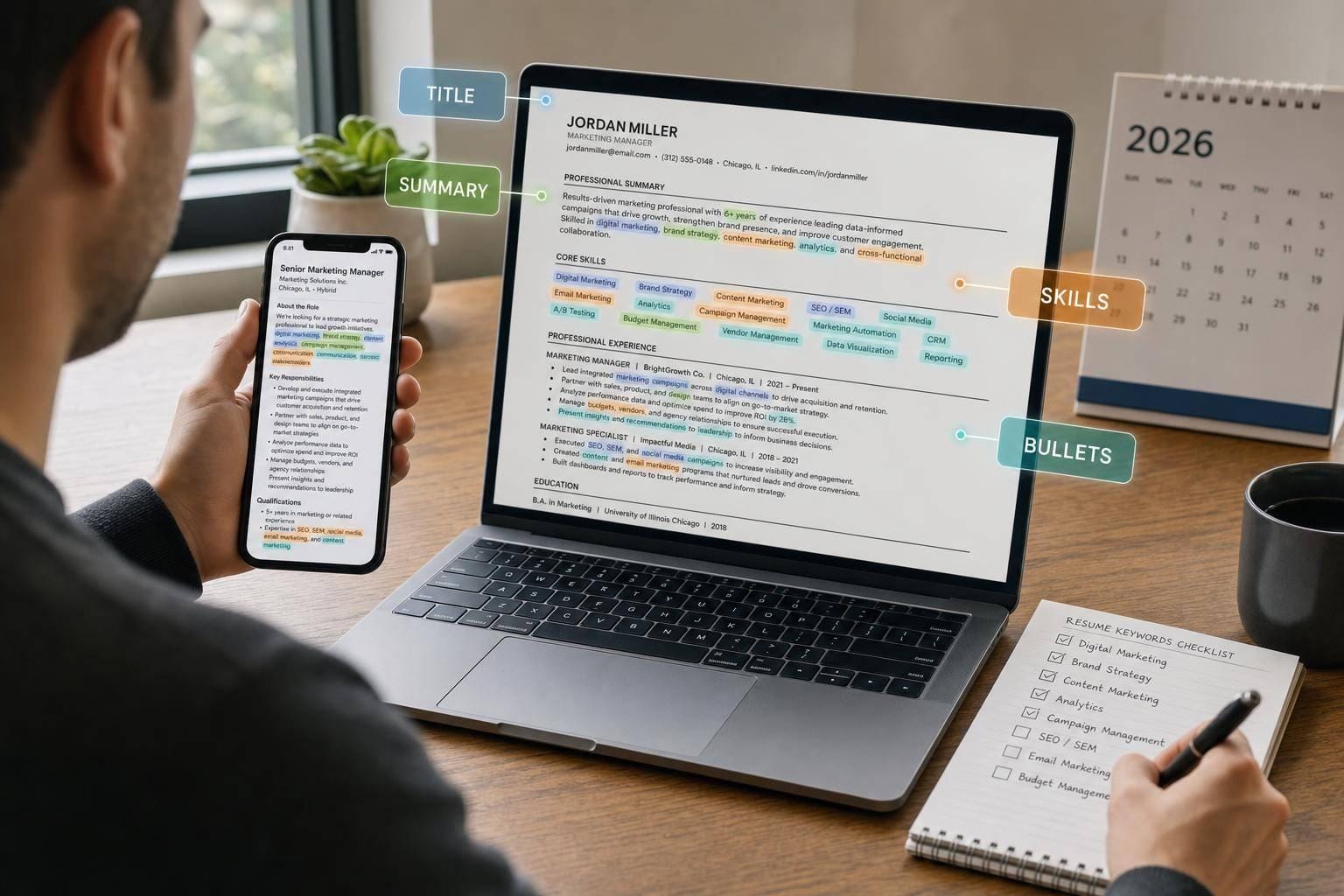
If your resume misses the right terms, you may get filtered out before a recruiter reads it. With 82.3% of U.S. companies using ATS, the fix is simple: match the job title, tools, skills, and credentials from the posting, then place them in the sections ATS checks first.
Here’s the short version:
- Use 15–25 keywords per resume
- Pull 5–8 terms straight from the job description
- Put top terms in your target title, summary, skills, and experience
- Use exact wording for tools, systems, and licenses
- Back every keyword with proof in a bullet
If you’re sending many applications, pair this process with an ai resume builder, a job search coach, or a job application service so each version stays aligned with the role.
How to Write a Resume That Beats AI & Lands Interviews in 2025 - Deep Dive
sbb-itb-564272e
What I’d do first
Before I Apply for jobs, I’d:
- Pull 3–5 job posts for the same role and decode them
- Mark repeated terms
- Keep only the ones I can prove
- Add them near the top of the resume
- Rewrite 2–4 bullets using verb + keyword + metric
Quick comparison
| What matters | What to do |
|---|---|
| Job title | Mirror the exact title from the posting |
| Hard skills | Use them in bullets, not just a skills list |
| Tools/platforms | Match the exact product name |
| Credentials | Write full term + abbreviation |
| High-volume applying | Use a Virtual Assistant for Job Applications or a job search platform |
My simple takeaway
This isn’t about using keywords strategically. It’s about making your fit easy to spot. Below, I’ve turned the article into a short playbook you can use fast.
How 2026 Resume Keywords Work in Practice
Use these four keyword types to match the industry lists below. It’s one of the fastest ways to improve your resume’s match rate, especially if you’re using a job application service or working with a job search coach.
Job titles often carry extra weight in ATS scoring algorithms. If the posting says "Senior Backend Engineer," use that exact phrase in your resume header or the first line of your summary. Small wording changes can cost matches, so this is not the place to get cute.
Hard skills and methodologies like Agile, Financial Modeling, or SEO should show up in your experience bullets and in a skills section. Context matters more than a random keyword dump. A bullet that shows the skill in action will usually do more work than a long list at the bottom of the page.
Tools and platforms need exact wording. For example, "AWS Lambda" is stronger than "cloud experience." If the job description says "Google Analytics 4," use that exact string. ATS tools often scan for direct matches, and hiring teams do too. This is one reason many job seekers use an ai resume builder to mirror job-post language without missing details.
Credentials and compliance terms like CPA, PMP, or GDPR can trigger hard filters. Put them right after your name in the header, then include them again in a certifications section. If a hiring team needs that term to move you forward, don’t make them hunt for it.
Use this framework when you scan the industry keyword lists below.
In 2026, AI, automation, and ESG terms now appear across non-tech postings too. That shift matters most in tech, data, finance, operations, and healthcare roles. You’ll see these patterns across the industry lists that follow, whether you’re trying to Apply for jobs on your own or through a job search platform.
A good target is 15–25 total keywords per resume:
- 10–15 industry-specific terms
- 5–8 terms pulled straight from the job posting
Also, write the full term first, then the abbreviation. For example: Certified Public Accountant (CPA). That helps ATS pick up both versions. Generic soft-skill phrases don’t do much unless they’re tied to proof. A simple formula works better: verb + keyword + metric.
Use that formula when you place terms in your resume title, bullets, skills, and certifications. Then put those terms where ATS usually scans first: title, summary, skills, and experience. If you’re sending many applications each week, this step alone can make your process less messy - much like what a Virtual Assistant for Job Applications would handle for you.
Where Keywords Matter Most on a Resume
Once you’ve picked the right industry keywords, the next step is placement. This is where a lot of job seekers slip up. They add the right terms, but tuck them into spots the ATS may not weigh as heavily.
Use the order below first. Then match those terms to the wording in live U.S. job postings. If you want help doing that at scale, a job search platform or job application service can save a lot of time.
Group skills by category instead of cramming everything into one long line. For certifications, spell out the full name and include the short form too: Certified Public Accountant (CPA), Project Management Professional (PMP).
| Resume Section | ATS Priority | Best Keyword Strategy |
|---|---|---|
| Header / Target Title | 🔴 Critical | Mirror the exact job title from the posting |
| Professional Summary | 🔴 Critical | Front-load 3–6 high-priority keywords in the first two lines |
| Skills Section | 🔴 Critical | Group by category; use exact job-description phrasing |
| Experience Bullets | 🟠 High | Show the skill in context using achievement-based statements |
| Certifications | 🟡 Medium | Write the full credential name and abbreviation |
Here’s the simple takeaway: put your most important keywords where the ATS looks first.
- Header / Target Title: Use the exact job title from the posting. If the role says Operations Manager, don’t swap in Business Operations Lead unless both appear in the listing.
- Professional Summary: Place your top 3–6 keywords in the first two lines. This is prime real estate.
- Skills Section: Break skills into groups like Software, Methods, or Tools. It’s easier for both recruiters and ATS to scan.
- Experience Bullets: Don’t just list the keyword. Show how you used it and what happened as a result.
- Certifications: Include both the full credential and abbreviation so you catch either search version.
If you’re building resumes for multiple roles, tools like an ai resume builder or support from a job search coach can help you line up keywords with each target posting without starting from scratch every time.
Next, map these high-priority placements to the exact wording in real U.S. postings.
How to Match Keywords to Real U.S. Job Descriptions
Use the placement rules above to turn live job posts into a target keyword list. Pull 3–5 current postings for your target role. Then scan for repeated phrases tied to skills, tools, methods, and certifications.
Here’s the simple rule: if a term shows up in 3 or more postings, treat it as a core term for that role. It should likely appear on your resume. If a term appears in only one posting, it’s often company-specific jargon or a niche tool. Include it only if you plan to apply for jobs at that exact company.
Use the exact wording from the posting when it lines up with your real experience. That part matters more than people think. ATS systems often look for direct matches, so understanding the importance of keywords in job applications can help.
Prioritize terms in this order:
- Required qualifications
- Recurring tools and platforms
- Certifications and compliance terms
- Soft skills
Required qualifications come first because they’re often the main filters ATS systems use to sort and rank candidates. Soft skills still matter, but they usually carry less weight at the ATS stage.
Try to match the core terms that show up across most postings, and keep the total to about 15–25 keywords per resume. That’s usually enough to cover what matters without stuffing the page. Many ATS tools use both exact-match and meaning-based matching, so a giant comma-packed skills section can actually weaken relevance instead of helping.
A good gut check: if someone asked about that keyword in an interview, could you speak to it with a clear example? If not, leave it out. Every keyword on your resume should connect to work you’ve actually done and can explain with confidence.
If you’re using a job application service, a job search coach, or a Virtual Assistant for Job Applications, this is one of the first filters they should help you run. The same goes if you’re using an ai resume builder: the tool can help with wording, but the final keyword list still needs to reflect your actual background.
Next, apply this same filter to each industry list below.
1. Technology & Software Engineering
Tech resumes work better when they use the exact names of tools and systems. Don’t swap in broad labels when a hiring team is looking for something specific. If the job calls for AWS Lambda, Azure Kubernetes Service, or PostgreSQL, put those terms on the page as written.
That matters for two reasons. First, recruiters and hiring managers scan for direct matches. Second, many job search platform filters look for exact terms before a person ever reads your resume. A resume that says “cloud tools” is much weaker than one that says AWS Lambda, Docker, and Kubernetes.
Use the role below to choose the terms that fit your target posting:
| Role | High-Priority Keywords |
|---|---|
| Frontend | TypeScript, React, Next.js, Vue, GraphQL, Figma, Responsive Design, WCAG (Accessibility) |
| Backend | Go, Rust, Python, Node.js, Microservices Architecture, PostgreSQL, Redis, REST APIs, FastAPI |
| DevOps & Cloud | AWS (Lambda/EKS), Azure, GCP, Docker, Kubernetes, CI/CD, Terraform, GitOps, Observability, SRE |
| Mobile | Swift, Kotlin, React Native, Flutter, Mobile System Design |
| AI/ML | LLMs, Prompt Engineering, RAG, Vector Databases, PyTorch, TensorFlow, MLOps |
A simple rule: match the posting, not your whole career. You can use a resume keyword generator to identify which terms to prioritize. If you’re going after backend roles, push Go, Python, REST APIs, PostgreSQL, and Redis to the front. If you’re aiming at AI/ML work, lead with LLMs, RAG, Vector Databases, PyTorch, and MLOps. The point isn’t to dump every tool you’ve touched. The point is to make it easy for someone to say, “Yes, this person fits.”
For leadership language, be careful. Add it only when the role is above mid-level. If you’re targeting senior or staff jobs, include terms like System Design, Architecture Review, and Technical Leadership. If you’re applying for an IC role with 2 to 4 years of experience, stuffing in leadership language can feel off.
Also, write the full term first, then the short form. For example:
- Infrastructure as Code (IaC)
- Continuous Integration/Continuous Deployment (CI/CD)
This small detail helps both human readers and resume scanners. It also makes your resume easier to follow if someone is skimming fast, which happens all the time when teams apply for jobs at scale or sort through large candidate pools.
Most people stop at the Skills section. That’s a miss. You should use these keywords in both places:
- Skills, for direct match coverage
- Achievement bullets, to show you actually used them in real work
Here’s the difference:
Weak: Worked on backend services for a web app.
Better: Built Node.js and FastAPI backend services, added REST APIs, and improved PostgreSQL query performance for a high-traffic web app.
That second version gives the reader something concrete. It also helps if you’re using a job application service or working with a job search coach, because they can tune your resume around the words hiring teams already use.
If you’re updating resumes for more than one role type, don’t send the same version everywhere. A frontend resume and a DevOps resume should not look almost identical. That’s where a Virtual Assistant for Job Applications or a virtual assistant for job seekers can save time by tailoring each version without losing the thread of your experience.
And if you’re stuck on wording, using an ai resume builder can help you turn raw project work into bullets that carry both the right keywords and clear results.
2. Data, Analytics, AI & Machine Learning
Data and AI hiring language moves fast in 2026. That means broad phrases like “database experience” or “programming knowledge” won’t do much heavy lifting. You need the exact tools, systems, and methods that show up in the posting, then match them to the role you want.
One of the fastest-growing keyword groups for data roles in 2026 centers on Large Language Models (LLM). In many postings, that shows up alongside RAG (Retrieval-Augmented Generation), Vector Databases, Embeddings, and Prompt Engineering. Even standard Data Analyst roles now often ask for “AI literacy” or “AI workflow tools.” At the same time, dbt and Airflow are showing up more often in Analytics Engineer listings as teams move to modular data stacks.
If you're trying to apply for jobs with a resume that gets picked up, this part matters a lot: use the same wording employers use.
Pick the row below that lines up with your target posting, then carry those terms into your summary, skills section, and top resume bullets.
| Role | Primary Technical Keywords | Common Tools |
|---|---|---|
| Data Analyst | SQL, Excel, A/B Testing, Statistical Inference | Tableau, Looker, Google Analytics 4 |
| Data Scientist | Python, scikit-learn, Pandas, XGBoost | Snowflake, BigQuery, Jupyter |
| ML Engineer | PyTorch, TensorFlow, MLOps, Transformers | AWS SageMaker, Docker, Kubernetes |
| Analytics Engineer | dbt, Data Modeling, ETL/ELT, SQL | Airflow, Snowflake, Fivetran |
| BI Analyst | Power BI, SQL, Data Visualization, KPIs | SAP, Oracle, NetSuite |
After that, trim your list using wording from live U.S. job postings. Don’t swap in loose substitutes. If the posting says LLM, use LLM. If it says RAG, dbt, ETL/ELT, or GA4, use those exact terms.
That applies in two places most of all:
- Skills section
- Achievement bullets
Why does this matter? Because recruiters and ATS tools often scan for the product name, platform name, or method name used in the listing. “Built AI workflows” is vague. “Built RAG workflows with Vector Databases and Embeddings” is much sharper.
A strong bullet does two jobs at once: it names the keyword and proves you used it well.
"Improved model accuracy by 12% using XGBoost, resulting in $1.5M in recovered revenue"
That’s the pattern to follow. Name the tool. Show the result with machine learning case studies. Make it easy for a hiring team to connect your background to the role.
If you’re using an ai resume builder or an ai cover letter builder, double-check the output before sending it. These tools can help with speed, but they often add broad wording unless you feed them the exact terms from the posting. The same goes for any job application service or Virtual Assistant for Job Applications: the better the source keywords, the better the match.
For people targeting data roles at scale, a job search platform can help you compare postings and spot repeat terms across companies. That makes it easier to see whether a role leans more toward analytics, BI, ML, or LLM-related work.
Next: Product Management & UX keywords.
3. Product Management & UX
Product Strategy is a top PM keyword for 2026. If you work in product, don’t just list duties. Show outcomes. A bullet like “Led roadmap prioritization for a mobile app that improved retention by 20%” says far more than a vague line about ownership or cross-team work.
For PM and UX roles, keyword match matters. Your resume should mirror the language in the job post as closely as possible, especially if you use a job application service or apply through a job search platform that screens resumes before a person sees them.
For first mention, spell out these terms in full:
- Product Requirements Document (PRD)
- Key Performance Indicators (KPIs)
- Web Content Accessibility Guidelines (WCAG)
Use the row that fits your target role.
| Role | Core Technical Keywords | Tools to Name |
|---|---|---|
| Product Manager | Product Roadmap, OKRs, KPIs, A/B Testing, PRD, PLG, GTM Strategy | Jira, Mixpanel, Amplitude, SQL |
| UX / Product Designer | Wireframing, Prototyping, Design Systems, Accessibility (WCAG), Information Architecture | Figma, FigJam, Framer, Adobe XD |
| UX Researcher | User Research, Qualitative/Quantitative Methods, Personas, Journey Mapping | UserTesting, Dovetail, Maze, Optimal Workshop |
For UX roles, tools carry a lot of weight. Figma is a core UX tool in 2026. Design Systems shows up often in senior-level postings. Accessibility tied to WCAG is now required in many roles, not just a nice extra.
A common mistake UX candidates make is leaving results too vague. “Improved the user experience” sounds fine on the surface, but it often gets skipped by filters and hiring teams. “Redesigned the onboarding flow to improve task completion rate” is much stronger because it points to a clear result. Better yet, borrow the exact wording from the target posting instead of leaning on broad design terms.
That same rule applies if you apply for jobs across PM, design, or research roles: match the language, name the tools, and tie your work to a business or user outcome.
If you’re going after SaaS PM roles, add PLG to your summary and to one achievement bullet. Product-Led Growth (PLG) belongs on SaaS and B2B PM resumes. An ai resume builder can help with formatting, but you still need to make sure the wording fits the role you want.
If you’re stuck turning your work into sharper bullets, a job search coach or virtual assistant for job seekers can help you line up role terms with measurable outcomes.
4. Marketing, Growth & Sales
Marketing and sales resumes play by a different set of rules than product or tech resumes. Hiring teams look hard at revenue numbers, channel language, and CRM tools. That means the right keywords depend on the job itself. A demand gen resume should not read like a brand resume. Following standard resume writing tips ensures your formatting doesn't distract from your metrics. In the same way, an SDR resume needs different terms than a RevOps resume.
Use the exact role language from the job post, along with current platforms like GA4, HubSpot, Salesforce, Outreach, and Marketo. Your bullets should do more than list tools. A simple format works well: verb + metric + keyword.
For example:
"Raised ROAS 25% through paid social A/B testing."
That lands better than stuffing keywords into a long Skills section.
| Role | Keywords | Tools |
|---|---|---|
| Growth / Demand Gen | CAC, ROAS, LTV, pipeline, A/B testing, CRO | GA4, Marketo, HubSpot |
| SDR / AE | quota attainment, ARR, MRR, MEDDIC, Challenger, Go-to-Market (GTM) Strategy | Salesforce, Outreach, HubSpot |
| RevOps | Revenue Operations (RevOps), pipeline velocity, forecasting | Salesforce, HubSpot, Outreach |
| SEO / Content | Search Engine Optimization (SEO), SEM, lifecycle marketing | GA4, Marketo, HubSpot |
One small detail matters here: spell out the full term once, then use the acronym after that. So write Revenue Operations (RevOps) or Search Engine Optimization (SEO) the first time. After that, the short form is fine.
If you're trying to apply for jobs in these fields, this kind of resume wording can help your background pass ATS and get seen by humans. And if you want extra help shaping bullets around metrics and role terms, a job search coach or job application service can save time.
For people sending a high volume of applications, a Virtual Assistant for Job Applications can also help keep role titles, keywords, and tools lined up from one application to the next.
Next: finance, accounting, healthcare, and operations, where regulated terms and certifications become the main filters.
5. Finance, Accounting & Fintech
Finance and accounting resumes live or die on exact-match credentials and ATS-friendly formatting that ensures your resume is readable. The same exact-match method applies here too, but in finance, credential names and compliance terms often matter more than anything else.
Start with the full term, then add the abbreviation. That matters most for Generally Accepted Accounting Principles (GAAP), Certified Public Accountant (CPA), Chartered Financial Analyst (CFA), and Financial Planning & Analysis (FP&A). For FP&A roles, write Financial Planning & Analysis first, then use FP&A after that.
Use keywords inside results-focused bullets, not as a random stack of terms. A line like "Reduced month-end close by 3 days." works because it shows both the task and the outcome. Do the same for reconciliation, forecasting, budgeting, and compliance work. Newer terms that now show up more often include ESG reporting, sustainability accounting, and AI-assisted financial analysis.
If you're trying to apply for jobs in this field, tailoring matters more than most people expect. A finance resume should mirror the posting closely, especially for systems, controls, reporting terms, and certifications. If you want help doing that at scale, a job application service or Virtual Assistant for Job Applications can help keep each application aligned with the role.
Use the role guide below to match finance keywords to the job posting you're targeting:
| Role | High-Priority Keywords | Core Tools |
|---|---|---|
| Accounting | GAAP, IFRS, SOX Compliance, Internal Controls, General Ledger (GL), Month-End Close, Revenue Recognition, Accounts Payable (AP), Accounts Receivable (AR), Reconciliation, Cost Accounting | SAP, Oracle, NetSuite, QuickBooks |
| FP&A / Analysis | Financial Modeling, Budgeting, Forecasting, Variance Analysis, DCF, Valuation, P&L Management, Capital Allocation, SEC Reporting, Cash Flow Management | Advanced Excel (VBA, Power Query, Pivot Tables), SQL, Hyperion, Power BI |
| Risk & Fintech | KYC, AML, Risk Management, Regulatory Compliance, Internal Audit, Treasury, Internal Controls | SQL, Python, Bloomberg Terminal |
| Senior Finance | P&L Ownership, Board Reporting, Strategic Planning, ESG Reporting, Sustainability Accounting | SAP, Oracle, or Workday, Tableau |
Put CPA, CFA, or CMA in your header, summary, and certifications section so recruiters and ATS tools can spot those signals fast.
If you're updating your materials, an ai resume builder can help you keep keyword placement clean (or use an ATS resume checker to verify), and an ai cover letter builder can carry the same language into your application without making it sound copied.
Next: healthcare and clinical roles, where licensure, charting systems, and compliance terms drive keyword selection.
6. Healthcare, Nursing & Clinical Roles
Healthcare hiring is strict about exact credentials, licenses, and system names. In many cases, even a small mismatch can hurt your chances. HIPAA is a base keyword in most healthcare job posts, so your resume should spell out licenses, systems, and certifications exactly as employers list them.
Use the full term the first time you mention it, then switch to the abbreviation after that. That keeps your resume clear and easy to scan.
For example, name the exact system you use - Epic, Cerner, or Meditech - and pair it with compliance terms like HIPAA, OSHA, and Quality Assessment and Performance Improvement (QAPI). If you're trying to apply for jobs in hospitals or clinics, this kind of exact wording matters more than most people think.
Add these 2026 terms when they fit your background: Telehealth, Remote Patient Monitoring, Social Determinants of Health (SDOH), Value-Based Care, and AI-Assisted Diagnostics. These are especially useful for radiology, pathology, and health tech roles. If you're using a job application service or working with a job search coach, ask them to check whether these terms match the jobs you're targeting.
Use the table below to line up your keywords with your setting and role:
| Setting / Role | High-Priority 2026 Keywords | Essential Credentials, Systems & Tools |
|---|---|---|
| Hospital / Acute Care | Intensive Care Unit (ICU), Emergency Room (ER), Triage, Telemetry, Patient Assessment, Infection Control, NIH Stroke Scale (NIHSS) | Basic Life Support (BLS), Advanced Cardiovascular Life Support (ACLS), Pediatric Advanced Life Support (PALS), Epic |
| Outpatient / Primary Care | Care Coordination, Chronic Disease Management, Value-Based Care, Quality Metrics | Epic, Cerner, HIPAA |
| Home Health / Case Management | Social Determinants of Health (SDOH), Wound Care, Medication Administration, Discharge Planning, Patient Advocacy | Certified Case Manager (CCM), HIPAA, Meditech |
| Telehealth / Health Tech | Remote Patient Monitoring, Health Informatics, Health Level 7 (HL7), Fast Healthcare Interoperability Resources (FHIR), AI-Assisted Diagnostics | Telemedicine Platforms, Digital Health Literacy |
| LPN / CMA / Medical Assistant | Vital Signs, Clinical Documentation, Patient Intake | Basic Life Support (BLS), National Registered Certified Medical Assistant (NRCMA), Certified Clinical Medical Assistant (CCMA) |
If you hold RN, BSN, or NP, place that credential in your header, professional summary, and certifications section. Why repeat it? Because many applicant tracking systems scan each section on its own. A repeated credential has a better shot at showing up every time.
Numbers help too. Don’t just say you followed policy. Show the scale and result.
"Maintained 100% HIPAA compliance while managing 15+ patients daily."
This works well whether you're applying on a job search platform, using an ai resume builder, or getting help from a virtual assistant for job seekers.
Next: operations, supply chain, and customer success keywords, where process metrics and service terms take over.
7. Operations, Supply Chain & Customer Success
Resumes for operations, supply chain, and customer success live or die on metrics, systems, and results. Hiring teams want to see what you improved, what tools you used, and what changed because of your work.
For operations roles, don’t stop at “Lean Six Sigma.” State your belt level plainly: Green Belt or Black Belt. That small detail helps recruiters sort candidates fast. Your bullets should also show results, not just tasks.
"Led a DMAIC project that reduced processing time by 18%."
If you’ve used SAP, Oracle, or NetSuite, list them in both your Skills section and your Experience section. That may sound repetitive, but it helps you build ATS-friendly resumes that pass filters. If you're updating your resume before you Apply for jobs, this is one of the easiest fixes to make.
In supply chain, 2026 keyword trends mix old standbys with newer terms. You’ll still want phrases like S&OP (Sales and Operations Planning), WMS (Warehouse Management System), and Last-Mile Delivery. At the same time, more job posts now mention AI-Driven Forecasting, Automation/RPA, and Sustainability/ESG Operations. Use Sustainability/ESG Operations only if you can back it up with actual work. If it’s not in your background, don’t force it.
Customer success resumes are also changing. The language is moving closer to revenue, renewals, and account health. Terms like Expansion Revenue, Churn Prevention, Customer Health Score, and QBRs (Quarterly Business Reviews) stand out. Net Promoter Score (NPS) still matters too. And yes, platform names count. If you’ve worked in Gainsight, ChurnZero, or Zendesk, say so directly. A hiring manager should not have to guess, which is why you must human-proof your application.
A simple rule: use these terms in your summary, skills, and strongest bullets. Then adjust the wording so it mirrors the job post as closely as possible. That’s the same kind of tune-up a job search coach or Virtual Assistant for Job Applications would usually flag.
Use the table below for role-based keyword priority.
| Role | Primary Keywords | Key Systems & Credentials |
|---|---|---|
| Operations Manager | Lean Six Sigma, DMAIC, Kaizen, Process Improvement, Continuous Improvement, Operational Excellence, SLA Compliance, P&L Ownership | SAP, Oracle, NetSuite, PMP, Green Belt or Black Belt |
| Logistics Manager | WMS, TMS, Last-Mile Delivery, Order Fulfillment, SLA Compliance, Warehousing | SAP, Oracle, NetSuite |
| Demand Planner | S&OP, AI-Driven Forecasting, Capacity Planning, Inventory Management, Forecast Bias, MRP (Material Requirements Planning) | Oracle, SAP |
| Procurement Specialist | Strategic Sourcing, Vendor Management, Cost Reduction, Contract Negotiation, Sustainability/ESG Operations | ERP systems, SAP, Oracle, NetSuite |
| Customer Success Manager | Churn Prevention, QBRs (Quarterly Business Reviews), Onboarding, Customer Health Score, Net Promoter Score (NPS), CSAT, Expansion Revenue, Customer Retention | Gainsight, ChurnZero, Zendesk |
If you’re using an ai resume builder or ai cover letter builder, double-check the output before sending anything out. These tools can add the right terms, but they often miss the difference between used the system and drove the result.
Next: human resources, recruiting, and people operations keywords.
8. Human Resources, Recruiting & People Operations
For HR roles, your resume works best when the systems you name line up with the kind of company you want.
Use Workday or Taleo for enterprise HR jobs. Use BambooHR or ADP Workforce Now for SMB roles or payroll-heavy teams. Use Greenhouse or Lever for tech-driven recruiting groups. That match matters. It tells recruiters and the ATS what kind of HR stack you know and what kind of employer you fit.
Don’t tuck those terms into one section and call it a day. Repeat the same platform names in your summary, skills, and experience bullets. ATS scans all three.
If you're trying to apply for jobs in HR, this is one of the simplest ways to make your resume line up with the posting without forcing anything.
For HR resumes, compliance and certification language carries just as much weight as software names. Write the full term first, then the short form. For example:
- Human Resources Information System (HRIS)
- Family and Medical Leave Act (FMLA)
- Society for Human Resource Management Certified Professional (SHRM-CP)
That format helps both people and ATS. It also shows you know the language of the field.
A lot of 2026 HR postings now mention skills-based hiring, AI recruiting tools, and DEIB. If those areas are part of your background, add them to a bullet tied to a result. Don’t just list the phrase. Show what happened.
Example: Launched skills-based hiring workflows that cut time-to-fill by 18 days across high-volume roles.
For senior People Operations roles, wording has shifted a bit. Total Rewards is showing up more often than Compensation and Benefits. People Analytics also appears more often, usually next to tools like SQL or Tableau. If you use employee engagement, back it up with a business result such as retention, survey scores, or manager adoption. Same idea with eNPS and time-to-hire: if you moved the number, say so plainly.
This is the same logic a good job search coach would use: pull the most repeated terms from current postings, then match them to the work you’ve actually done.
| Role | Primary Keywords | Key Systems & Credentials |
|---|---|---|
| HR Generalist | Employee Relations, Benefits Administration, FMLA, FLSA, EEO, Onboarding, Performance Management | Workday, ADP Workforce Now, SHRM-CP, PHR |
| Talent Acquisition Specialist | Full-Cycle Recruiting, Sourcing, Candidate Experience, Skills-Based Hiring, AI Recruiting Tools | Greenhouse, Lever, Taleo |
| People Operations Manager | Workforce Planning, Succession Planning, Total Rewards, OKRs, eNPS, DEIB Programs | BambooHR, Workday, SHRM-SCP |
| HR Business Partner | Organizational Development, Change Management, Labor Relations (NLRA), People Analytics | Workday |
| Recruiter | Pipeline Management, Time-to-Hire, Offer Management, Employer Branding, AI-Powered Workflows | Greenhouse, Lever, Taleo |
If you're using a job application service or working with a virtual assistant for job seekers, make sure they keep these terms consistent across every section of your resume. Small wording gaps can cost matches, especially on HR roles where systems, compliance, and process language matter a lot.
An ai resume builder can help you spot missing keywords, but the final version still needs your real scope, tools, and outcomes.
9. Education, Training & Learning & Development
Education resumes usually need to follow one of two keyword paths: K-12 licensure terms or corporate L&D terms. The job post tells you which path to use, so mirror that language closely.
If you're moving between education and business roles, this matters more than people think. A school hiring team may look for licensure, IEP work, and classroom terms. A company hiring for Learning & Development may scan for instructional design, LMS work, and performance metrics. Same skill set, different label.
Use the table below to translate school-based language into wording an ATS is more likely to match for corporate training roles.
| Educator Term | Corporate/L&D Keyword |
|---|---|
| Lesson Planning | Instructional Design |
| Classroom Management | Facilitation / Stakeholder Management |
| Student Assessment | Learning Outcomes / Performance Metrics |
| Differentiated Instruction | Personalized Learning / Adaptive Learning |
| Google Classroom / Canvas | Learning Management System (LMS) |
For teaching roles:
State teaching certifications and endorsements often act as screening filters in ATS. Put them where they’re easy to find. In the certifications section, list Individualized Education Program (IEP), 504 plans, Multi-Tiered Support Systems (MTSS), and Response to Intervention (RTI) when they match your background. If you hold SPED or ESL endorsements, include those too.
This is one of those cases where being exact helps. Don’t just say you supported student needs. Name the frameworks and credentials the school is hiring for.
For corporate L&D roles:
AI literacy is showing up more often in 2026 L&D postings. If you used AI tools in course design, training development, or onboarding, say so directly. The same goes for workflows tied to AI-assisted content or adaptive learning platforms. Add those terms to your bullets and connect them to an outcome.
For example, instead of writing “helped build onboarding materials,” write something closer to: built onboarding content using AI-assisted drafting tools, cutting review time by 20%. That gives the ATS the keyword and gives the recruiter proof.
If you're updating materials for a career shift, tools like an ai resume builder can help you swap school-language wording for role-specific L&D phrasing without flattening your experience. If you also need help tailoring each application, a job application service or Virtual Assistant for Job Applications can save a lot of time.
For platform keywords:
Use the exact platform name you worked in - Canvas, Moodle, Schoology, or Blackboard. Don’t leave it at “learning platform” if the posting names a system. ATS tools often match the platform directly.
It also helps to connect platform use to a result in your experience bullets, especially around formative assessment. That might mean student progress, completion rates, training adoption, or feedback scores. Specific platform + action + result is usually the sweet spot.
If you’re trying to Apply for jobs across both school and company roles, this kind of keyword tuning can keep your resume from sounding off-target. And if you want outside input, a job search coach or virtual assistant for job seekers can help you line up your resume language with the jobs you want.
10. Cross-Industry Power Keywords for 2026
Cross-Industry Keywords to Reuse in 2026
After the role-based lists above, use these cross-industry terms to cover language that shows up in many job postings. Some keywords travel well across roles, mainly when a post leans on broad language around management, analysis, or working across teams. Think of these as backup terms that can strengthen your resume when the job description stays broad.
AI Literacy and AI Tools now show up in many U.S. job postings across departments. If you’ve used AI for drafting, analysis, or workflow automation, say so plainly on your resume. That can also help if you’re using an ai resume builder or an ai cover letter builder and want your materials to match the language employers use.
Use these as support keywords, not replacements for role-based terms.
| Universal Power Keyword | Use When | Best Placement |
|---|---|---|
| AI Literacy / AI Tools | The posting mentions AI, automation, or digital tools | Skills + Bullets |
| Stakeholder Management | The role involves cross-team or leadership work | Bullets (Mid-Senior) |
| Cross-Functional Collaboration | The posting references multiple teams or departments | Summary + Bullets |
| Data Analysis | The role requires reporting, metrics, or insights | Skills + Bullets |
| Project Management | The posting lists planning, delivery, or coordination | Summary + Bullets |
| Change Management | The role involves transformation or process shifts | Summary + Bullets |
| KPI Management | The posting references goals, targets, or performance | Bullets |
| Process Improvement | The role involves efficiency, operations, or workflow | Summary + Bullets |
Skip throwaway phrases like problem-solving and team player unless you connect them to a method or outcome. On their own, they often read like filler.
A simple rule helps here:
- Write the full term first, then the abbreviation
- Keep 15–25 total keywords
- Pull 5–8 directly from the posting
- Mirror terms repeated 2–3+ times
- Use them only when they match the job description and your real experience
This matters whether you Apply for jobs on your own or use a job application service. The same principle holds either way: match the posting, stay honest, and make it easy to craft an ATS-friendly resume.
If you want extra help with keyword matching, a job search coach or a Virtual Assistant for Job Applications can help spot the terms worth repeating without turning your resume into a keyword dump.
Next, place these terms where ATS actually scans first. Understanding how these systems work is the secret to boosting your job search success.
Where to Put Keywords: Layout Patterns That Work With ATS
Keyword placement can change whether an ATS reads your resume the way you want. Picking the right terms is step one. Putting them in the right spots is what helps those terms get seen.
If you're trying to Apply for jobs at scale, this part matters more than most people think. A resume can have the right words and still miss the mark if those words are buried in weak sections or tucked into formatting that parsing tools skip.
Use the layout rules below to turn the industry terms from earlier sections into ATS-friendly resume language.
Header / Target Title: Put your exact target job title right under your name. Match the job title and phrasing from the posting as closely as you can. If you have a key credential, add the abbreviation there too, like Jane Doe, PMP or Michael Torres, CPA. This gives the ATS an early, clear signal about role fit.
Professional Summary: Put 3–6 of your top keywords in the first two or three lines. Use the exact phrase from the job description, not your own rewrite. That small choice can make a big difference when systems scan for direct matches. If you're using an ai resume builder, double-check that it keeps those phrases intact instead of swapping in softer wording.
Skills Section: Keep this section plain and flat. Group skills by category, but don't place them inside graphics, columns, or tables that an ATS may read poorly. Think of this section as your direct-match keyword bank. Many people overdesign this area and then wonder why applications disappear into a black hole.
Experience Bullets: Use the Verb + Keyword + Result formula across your bullets. For example, "Led migration to Kubernetes, reducing deployment failures by 73%" does more than a simple skills entry because it shows the keyword in action. That context helps both ATS screening and human review. Use each top keyword about 1–3 times. More than that can look forced.
Credentials: Use the same rule for licenses, certifications, and compliance terms. On first mention, write the full name followed by the abbreviation. An ATS may scan for either one, so covering both is the safer move. This is one of those small details that saves you from getting filtered out for no good reason.
| Keyword Type | Full Name + Abbreviation Example | Best Placement |
|---|---|---|
| Finance | Certified Public Accountant (CPA), Chartered Financial Analyst (CFA) | Header, Summary, Skills, Certifications |
| Healthcare | Registered Nurse (RN), Basic Life Support (BLS) | Header, Summary, Skills, Certifications |
| Project Management | Project Management Professional (PMP), Certified ScrumMaster (CSM) | Header, Summary, Experience Bullets, Certifications |
| Technology | Structured Query Language (SQL), Amazon Web Services (AWS) | Skills Section, Experience Bullets |
| Marketing | Search Engine Optimization (SEO), Conversion Rate Optimization (CRO) | Summary, Skills, Experience Bullets |
Use standard section headers like Work Experience and Skills. Cute or unusual labels can confuse parsing. That's not the place to get fancy.
A simple workflow helps:
- Put the target title under your name
- Add top keywords to the summary
- List hard skills in plain text
- Work priority terms into experience bullets with results
- Write full credential names first, then abbreviations
If doing this by hand feels slow, that's where a job application service or Virtual Assistant for Job Applications can save time, especially when you're tailoring resumes across many roles. The same goes for a job search platform that helps track which version of your resume was sent where.
Next, compare which tools help you apply these rules faster and with less manual work.
Matching Job Description Language Without Keyword Stuffing
The industry lists give you the terms. This part is about using them in a way that sounds like you, not like a copy-paste job. After you’ve matched the right keywords, the next step is making them fit naturally into your ATS-optimized resume.
Use the job posting’s exact phrases when they line up with your actual experience. A lot of ATS tools still give extra weight to direct phrase matches.
Aim for selective alignment, not wall-to-wall coverage. You do not need to squeeze in every term from the posting. Put the top-priority terms near the top of the resume, especially in your Professional Summary and the first bullet under your most recent role.
Swap vague labels like “team player” or “detail-oriented” for proof-based bullets that show the skill and the result. That’s the difference between saying something and proving it.
Weak: Team player with strong communication skills
Better: Partnered with sales and support teams to cut ticket response time by 18%
Once the wording is in good shape, skip the shortcuts that can hurt both ATS parsing and recruiter trust.
- Keyword stuffing - a long comma-separated list of skills - can hurt your score because it lacks context.
- Hidden text and hidden fields are risky and are often rejected by ATS tools.
- Copying sentences from the posting might get past ATS, but recruiters usually spot it fast during human review.
Write acronyms with care. Spell out the full term first, then add the abbreviation in parentheses, like Certified Public Accountant (CPA) or Search Engine Optimization (SEO). That helps the ATS catch both versions and keeps the resume easy to read.
If you’re using an ai resume builder or a job application service, this is still worth checking by hand. Tools can help, but they can also overpack a resume with terms if you’re not watching closely.
Use these checks on every resume version before you send it. If you Apply for jobs through several platforms, this kind of review can save you from sending the same weak draft everywhere. It also helps if you’re working with a job search coach or a Virtual Assistant for Job Applications, since they can spot where the wording feels forced.
| Practice | ATS Impact | Recruiter Impact |
|---|---|---|
| Keyword stuffing | Flagged or downscored | Low trust |
| Hidden text | Often rejected | Immediate rejection |
| Verbatim copying from JD | May pass ATS | Immediate rejection during human review |
Tool Comparison: Jobscan, Teal, Rezi, TopResume, and scale.jobs
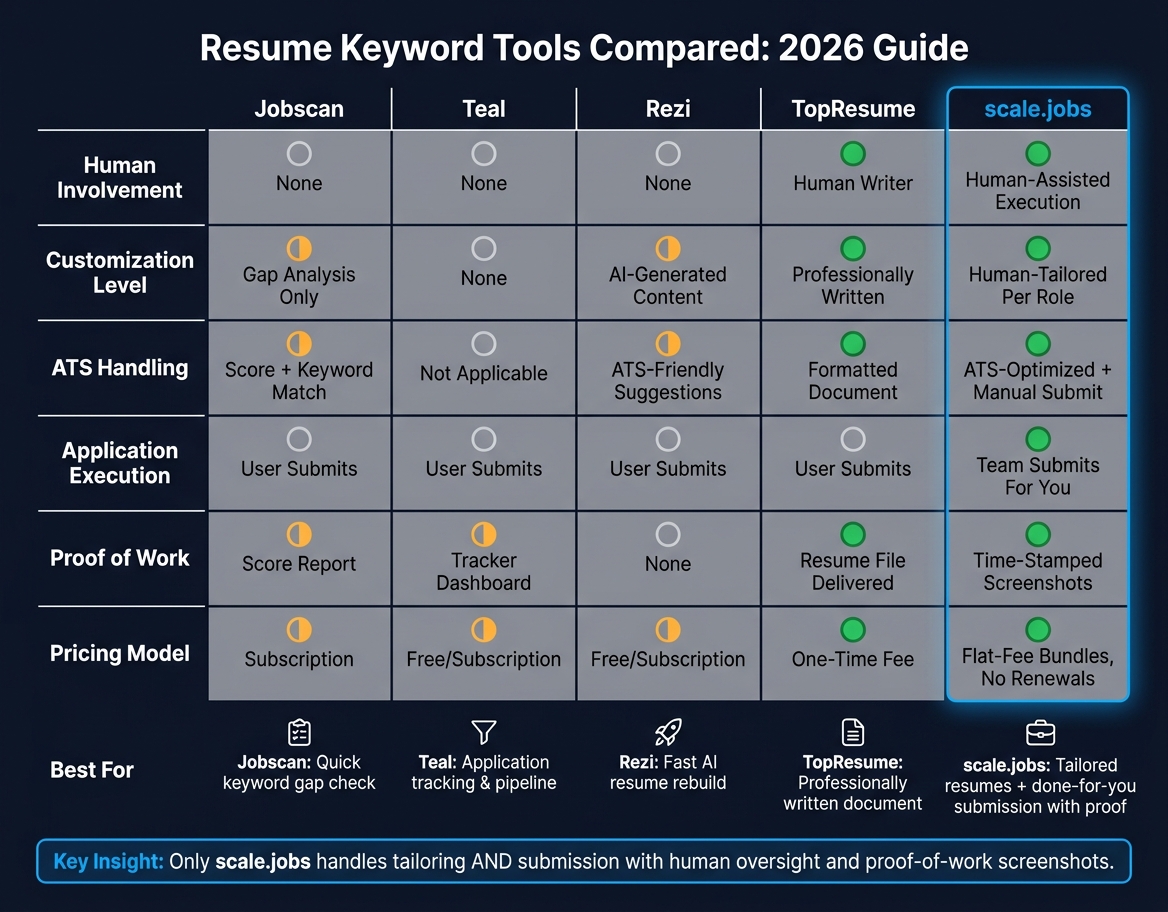
Resume Keyword Tools Compared: Jobscan vs Teal vs Rezi vs TopResume vs scale.jobs
Once your keywords are set, the next step is simple: pick the tool that fits the part of the workflow you still need help with. Some tools help you check a resume. Some help you write one. Some help you track applications. And some handle the actual submission work for you.
A good shortcut is to choose based on who does the work, how much tailoring you get, and whether the tool helps you actually apply for jobs or just prepare the documents.
Jobscan is best known for fast keyword gap analysis against a job description. It shows where your resume lines up and where it falls short. That makes it useful for DIY candidates who want a quick check before they submit. The tradeoff is pretty clear: it stops at diagnosis. You still rewrite the resume and send the application yourself.
Teal focuses on tracking. It gives you one dashboard to manage applications, deadlines, and your pipeline. If you like keeping your search organized, it can do that well. But it doesn't rewrite your resume or handle submissions. It's a fit for people running their own process and looking for one of the best job boards and tracking setups to stay organized.
Rezi leans into AI-assisted resume writing. It helps users rebuild or rewrite a resume fast, and it includes ATS-friendly formatting. That's useful when you need a working draft in a hurry. Still, AI output often needs editing. If you don't shape it around your actual experience, it can sound generic. For job seekers who want an ai resume builder to speed up the first draft, Rezi fits that lane.
TopResume takes a different route. A human writer drafts and polishes your resume, which can help senior professionals or career changers who need a stronger story on paper. But the service ends with the file delivery. After that, you're still on your own to search, tailor, and submit applications. It's closer to a document service than a full job application service.
scale.jobs is built for people who don't just need a resume file. They need the execution handled too. Instead of stopping at writing or scoring, it covers the workflow from tailoring through submission.
Here’s where scale.jobs stands apart:
- Human assistants tailor your resume to each role before submission
- ATS-optimized documents are matched to the posting, not just checked against it
- Manual submission by human assistants works across portals, with no bots and no automation risk
- Time-stamped proof-of-work screenshots show what was submitted and when
- Flat-fee bundles, no renewals mean unused credits are refunded
- Dedicated WhatsApp support stays with you during the campaign
If you want a stronger starting document before the campaign begins, their resume writing and career services can be used on their own.
The comparison gets a lot easier when you stop staring at feature grids and ask a plain question: Do you want a tool, or do you want the work done?
| Feature | Jobscan | Teal | Rezi | TopResume | scale.jobs |
|---|---|---|---|---|---|
| Human involvement | None | None | None | Human writer | Human-assisted execution |
| Customization level | Gap analysis only | None | AI-generated content | Professionally written | Human-tailored per role |
| ATS handling | Score + keyword match | Not applicable | ATS-friendly content suggestions | Formatted document | ATS-optimized, submitted manually |
| Application execution | User submits | User submits | User submits | User submits | Team submits for you |
| Transparency and proof of work | Score report | Tracker dashboard | None | Writer-delivered resume file | Time-stamped proof-of-work screenshots |
| Pricing model | Subscription | Free / Subscription | Free / Subscription | One-time fee | Flat-fee bundles, no renewals |
Use the summaries below based on your current workflow, not just what looks good on a pricing page.
Who Should Use Each Tool
Jobscan works well if you only need a fast keyword gap check before submitting your own applications.
Teal makes sense if you're running a self-directed search and want one place to track every application and deadline.
Rezi fits job seekers who need to rebuild a resume fast and want AI help with formatting and bullet points. If you're also working on outreach materials, pairing that kind of workflow with an ai cover letter builder can save more time.
TopResume is a solid pick if you want a human writer to shape your resume story and you're fine handling your own applications after that.
Who Should Choose scale.jobs
Choose scale.jobs if you need more than a document. It fits candidates applying at volume, people targeting both full time jobs and niche roles, and anyone who wants each resume tailored to the posting before it goes out.
It also fits job seekers who want confirmation that applications were submitted the right way. That's a big deal. Plenty of platforms help you prepare. Fewer help you finish the job.
For people who'd rather not manage the entire process alone, this sits closer to a virtual assistant for job seekers than a resume tool.
Switch to scale.jobs if…
- You're spending more time rewriting and submitting than getting ready for interviews
- You want each application tailored to the job description instead of sending the same resume everywhere
- You need proof that applications were submitted, not just a dashboard update
- You want to avoid bot-flagged submissions that some portals reject
- You prefer a flat-fee setup over a recurring subscription with vague output
Decision Summary
- Keyword gap check only → Jobscan
- Application tracking and pipeline management → Teal
- Fast resume rebuild with AI → Rezi
- Professionally written resume document → TopResume
- Tailored resumes plus done-for-you submission with proof of work → scale.jobs
If you're still deciding, match the tool to your job-search volume and how much human help you want. That's usually the part people miss. A long feature list can look nice, but it doesn't tell you who is still doing the heavy lifting.
Conclusion: Use the Right Keywords, in the Right Places, for the Right Roles
Treat this as a role-by-role reference. Start with the job description. Pull out the required qualifications, repeated terms, tools, and certifications. Then compare that list with your own background and keep ONLY the keywords you can back up with proof from your experience. That same filter should guide how you use the industry keyword lists above.
Put the most important terms first: required qualifications and words that show up again and again in the posting. Use the exact credential names and tool names the employer uses. Then support those terms with measurable results in your resume bullets. This approach helps you showcase achievements with real-life examples that resonate with recruiters. A keyword helps you get seen, but proof is what makes it believable.
Keyword matching matters only if your tailored resume gets in front of the right role. At that point, the next issue is simple: who’s handling tailoring and submission? If you want human-assisted tailoring, ATS-focused documents, manual submission, and proof-of-work tracking, Scale.jobs fits that workflow. If you're still building your materials first, an ai resume builder or ai cover letter builder can help you move faster before you Apply for jobs.
Use the posting’s language, place it in the right sections, and support it with measurable results.
FAQs
How often should I tailor my resume keywords?
Tailor your resume keywords for every job application. Most ATS tools score resumes by comparing your wording to the language in the job post. If you send the same resume everywhere, your match score can drop fast.
The better move? Build a strong base resume first, then tweak it for each role. Pull key terms straight from the posting and mirror the employer’s wording where it fits your actual experience. That gives your resume a better shot of passing the first screen.
A good target is to match 70–80% of the keywords in the job description.
If you're sending a lot of applications, this is where tools like an ai resume builder or a job application service can save time. They help you stay consistent while still tailoring each version.
You can also pair that with a job search platform if you want to track roles, manage edits, and Apply for jobs without losing momentum.
Which keywords matter most for ATS?
The keywords that matter most for ATS are the exact terms used in each job description, not some fixed master list. Most ATS tools score resumes by checking how closely your resume matches those terms.
Review five relevant job postings and mark the repeated noun phrases, tools, and certifications. Then place those keywords in your summary, skills section, and experience bullets. A keyword inside a bullet, such as "Built Python-based ETL pipeline," often counts more than listing it only in a skills section. Use the terms naturally. Don’t stuff your resume with keywords just to game the system.
If you want help tailoring your resume before you Apply for jobs, this is one of the most useful steps to get right. It also works well with an ai resume builder or an ai cover letter builder, since both can help you mirror the language used in target roles.
A simple workflow:
- Pull five job descriptions for roles you want
- Highlight repeated terms across all five
- Add the most common ones to your resume where they fit
- Put the strongest terms into experience bullets, not just skills
- Check that every keyword matches work you’ve actually done
This is the same basic approach many people use with a job application service or a job search coach: match the language, keep it honest, and make the fit easy for ATS to read.
Can too many keywords hurt my resume?
Yes. Too many keywords can hurt your resume.
Some ATS tools may flag a resume as keyword-stuffed. That can lower your match score or make a recruiter take a closer look for the wrong reason. And even if the system lets it through, a human still has to read it. A resume packed with repeated terms often feels clunky and hard to scan.
A better move is to blend keywords into your experience instead of stacking them in a long skills dump. Use this simple pattern: verb + keyword + result.
For example:
- Managed Salesforce data cleanup, cutting duplicate records by 30%
- Built Excel reporting dashboards, reducing weekly manual work by 5 hours
- Led customer support ticket triage in Zendesk, helping the team hit a 95% response SLA
Aim for 15 to 25 distinct keywords that line up with the job description. That’s usually enough to show fit without making your resume look forced.