
Top Resume Mistakes Found by ATS Tools (Based on 1,000+ Scans)

Sarah Mitchell
April 23, 2026

Applicant Tracking Systems (ATS) play a critical role in modern hiring, with 98.4% of Fortune 500 companies relying on them to filter resumes. Unfortunately, 75% of resumes are rejected before reaching a recruiter, often due to avoidable errors. The most common mistakes include complex formatting, missing keywords, inconsistent dates, and outdated information. Fixing these issues can significantly improve your chances of landing interviews.
Key takeaways to optimize your resume for ATS:
- Simplify formatting: Use a single-column layout, avoid tables, and stick to standard section headers like "Work Experience."
- Incorporate keywords: Match job descriptions by including relevant hard skills, certifications, and software proficiency.
- Consistency is key: Use uniform date formats and ATS-friendly fonts like Arial or Calibri.
- Stay relevant: Remove outdated skills and tailor your resume to each job posting.
For high-volume job applications, services like Scale.jobs offer tailored solutions, ensuring ATS compatibility and saving time. Tools like Jobscan.co can help identify keyword gaps, but Scale.jobs provides end-to-end support, including resume customization and application management.
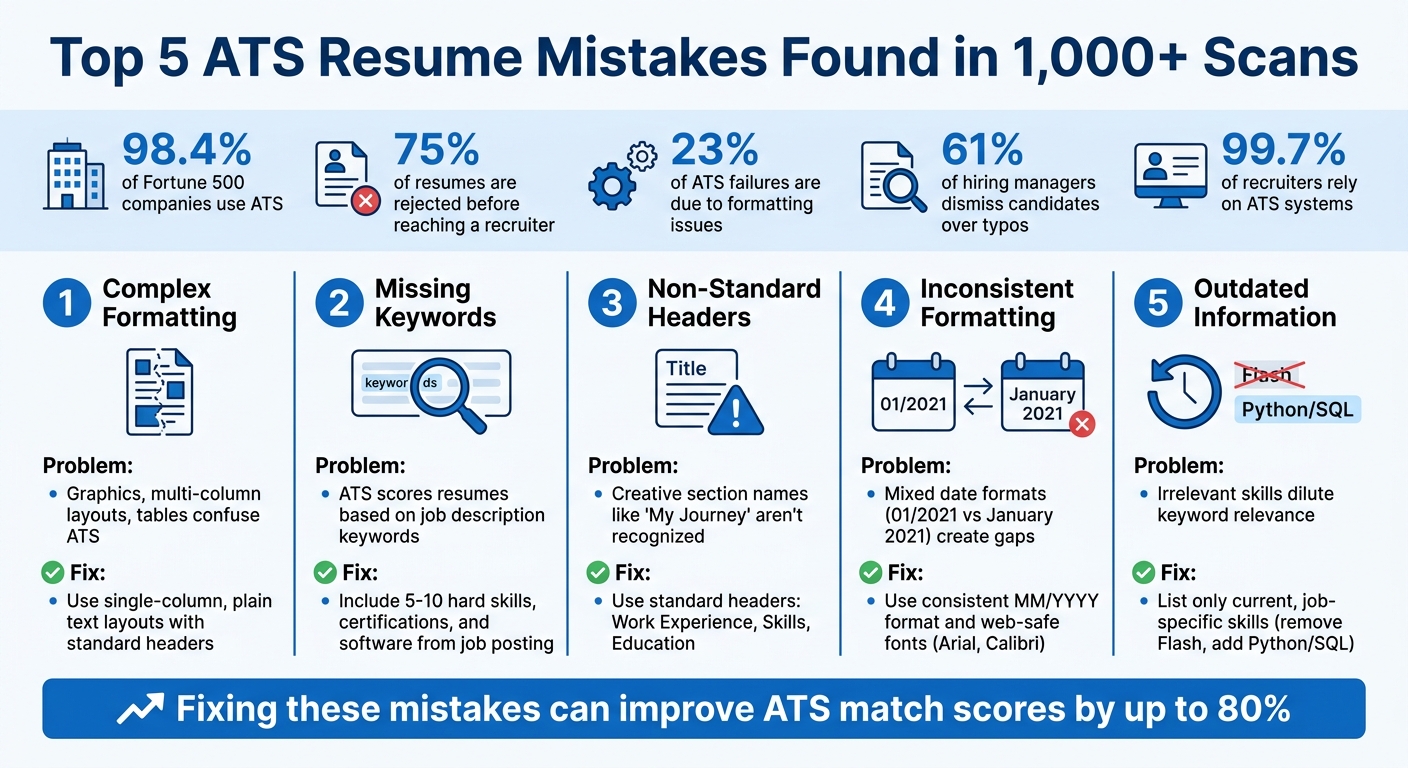
Top 5 ATS Resume Mistakes and How to Fix Them
Mistake 1: Complex Formatting That Breaks ATS Parsing
Why Complex Formatting Causes ATS Failures
Applicant Tracking Systems (ATS) process resumes by extracting text, completely ignoring any visual design elements. Features like visual design elements like graphics, icons, infographics, or decorative elements are either skipped or misinterpreted, meaning critical information might never make it into your application profile. For example, if you've used a chart to represent your skill levels, the ATS simply won't process it.
Multi-column layouts can be particularly problematic. Most ATS platforms scan resumes left to right across the entire page width. This means content in two columns might get jumbled together, blending sections like your contact information with job titles. For instance, it might read "John Smith | Senior Developer" as one continuous string. Similarly, tables often confuse ATS systems, leading to skipped or misread data like job titles or employment dates.
Non-standard section headers are another stumbling block. If your resume uses creative headings instead of standard ones like "Work Experience" or "Skills", the ATS might struggle to identify key sections. This can result in a lower match score for your application, even if your qualifications are spot on.
Let’s dive into some practical solutions to make your resume ATS-friendly.
How to Fix It: Use Plain Text-Based Layouts
The best way to avoid ATS parsing issues is to simplify your resume format. Stick to a single-column layout with clear, text-only content. Use standard headings like "Work Experience", "Education", and "Skills" to ensure the ATS can easily navigate your document. Avoid using tables for job details; instead, rely on line breaks and bullet points to organize information. Graphics, icons, and images should also be replaced with plain text descriptions to ensure nothing gets overlooked.
Here’s a quick reference table to guide you:
| Issue | Cause | Solution |
|---|---|---|
| Graphics & Icons | Cannot be read as text | Replace with plain text |
| Multi-column Layouts | Merges content, scrambling information | Use a single-column format |
| Tables | Often skipped or misinterpreted | Replace with tabs or bullet points |
| Non-standard Headers | ATS may not recognize sections | Use clear, standard headings |
If you're unsure how to implement these changes, tools like scale.jobs can help reformat your resume to meet ATS requirements without sacrificing readability. Alternatively, consider working with professional resume writers who specialize in crafting resumes that balance ATS compatibility with human appeal.
sbb-itb-564272e
Mistake 2: Missing Keywords from Job Descriptions
How ATS Systems Use Keywords to Score Resumes
Applicant Tracking Systems (ATS) are designed to scan resumes for specific terms from job descriptions and assign a compatibility score. If your resume doesn’t include these critical keywords, it may never make it to a hiring manager’s desk.
Hard skills, which are measurable and clearly defined, are the primary focus for ATS filters. Keywords like "Python", "QuickBooks", "CPA", or "Project Management" are easy for the system to identify and match. On the other hand, soft skills such as "leadership" or "communication" are more subjective and often have less influence on ATS scoring. A study of over one million job postings highlighted that recruiters prioritize concrete, job-specific hard skills when configuring ATS filters.
Here’s a breakdown of how various keyword types affect ATS results:
| Keyword Type | Examples | ATS Impact |
|---|---|---|
| Hard Skills | Python, SQL, Adobe Photoshop, Project Management | High (Primary filter criteria) |
| Certifications | CPA, CFA, Bachelor of Engineering | High (Verification criteria) |
| Soft Skills | Leadership, Communication, Teamwork | Low (Subjective/Hard to prove) |
| Software | Microsoft Project, Canva, QuickBooks, Jira | High (Tool proficiency) |
While some advanced ATS systems may evaluate the context in which keywords appear, many still focus on keyword presence alone. This makes a dedicated "Skills" section crucial, as it ensures keywords are easily detectable compared to burying them in dense paragraphs.
How to Fix It: Add Keywords from Each Job Posting
The job description is your guide to crafting a tailored resume. Identify the specific hard skills, software, and certifications mentioned in the posting, and incorporate them verbatim into your resume. For instance, if the posting specifies "JavaScript" instead of "JS", use "JavaScript." Similarly, if it mentions "Jira" instead of a generic term like "project management software", stick with "Jira."
Strategically place these keywords in three key areas:
- Skills Section: A dedicated list of skills makes it easy for ATS and hiring managers to spot relevant terms.
- Work Experience Bullets: Integrate keywords with quantifiable achievements, like "Used SQL to analyze datasets of 50,000+ records."
- Resume Summary: If space allows, include a summary that highlights your most relevant skills and achievements.
Keep your skills list concise - around 5 to 10 hard skills - to ensure credibility.
"A simple skills list is enough to bypass ATS and allow hiring managers to quickly skim your resume for key skills." - Resume Worded
Avoid using visual elements like infographics or skill bars, as they can interfere with ATS parsing and make keywords undetectable. If you have a long list of skills, consider organizing them by proficiency (e.g., "Expert" vs. "Working Knowledge") to make it easier for both ATS and human reviewers to assess your qualifications.
Mistake 3: Using Headers, Footers, and Non-Standard Section Names
Why ATS Tools Skip Headers and Unusual Section Titles
Headers and footers might seem like a great way to organize your resume, but for Applicant Tracking Systems (ATS), they often create problems. ATS tools are designed to focus solely on the main body of a document, ignoring anything placed in headers or footers. This means that if you put your contact details, links, or certifications in these areas, there's a good chance they won't make it into the recruiter's database.
Another common issue is the use of non-standard section titles. ATS systems rely on familiar headers to categorize information. When you use creative titles like "My Professional Journey" instead of "Work Experience" or "Knowledge Base" instead of "Skills", the system may fail to properly categorize your data. These formatting missteps contribute to 23% of ATS failures. Considering that over 98% of Fortune 500 companies use ATS tools to screen resumes, such errors can prevent your application from ever being seen by a recruiter.
How to Fix It: Use Standard Section Headings
To ensure your resume is ATS-friendly, move all your contact details - such as your name, phone number, and email - into the main body of the document. Avoid using icons for labels like "Phone" or "Email", as ATS tools can't interpret them. Instead, stick to plain text.
When it comes to section titles, use standard headers that ATS systems are programmed to recognize. Here's a quick guide:
| Section | ✅ Standard Headers | ❌ Non-Standard Headers |
|---|---|---|
| Contact | Contact, Contact Info | "Let's Talk", Icons only |
| Summary | Summary, Professional Summary, Profile | "My Story", "Bio", "Intro" |
| Experience | Experience, Work Experience, Professional Experience | "Where I've Been", "Gigs", "Track Record" |
| Education | Education, Academic Background | "Alma Mater", "Learning", "Scholastics" |
| Skills | Skills, Technical Skills, Core Competencies | "Toolbox", "What I Know", "Stack" |
To check if your resume is properly formatted, try running a plain-text test. Copy and paste your resume into a simple text editor like Notepad. If your contact information disappears or sections look out of order, ATS systems are likely to encounter the same issues.
If you're unsure about your resume's formatting or need professional assistance, consider using a professional resume writing service to see if the investment is right for you. These services can help you create a resume that not only passes ATS screening but also appeals to human recruiters.
Once you've standardized your headers, double-check that all dates and content are consistent to avoid further complications with ATS parsing.
Mistake 4: Inconsistent Dates, Typos, and Formatting
How Inconsistencies Disrupt ATS Reading
Mixing up date formats on your resume - like using "01/2021" in one section and "January 2021" in another - can confuse Applicant Tracking Systems (ATS). These systems rely on consistent formats to calculate your total experience. If you use abbreviations like '21 or skip months entirely, it can lead to errors, creating gaps in your work history and potentially flagging your resume as incomplete.
Formatting inconsistencies, such as varying bullet styles, font sizes, or using custom fonts, can also disrupt ATS parsing. For instance, icons like 📞 may show up as "[NULL]" or cause misinterpretations. 61% of hiring managers dismiss candidates over typos, and with 99.7% of recruiters relying on ATS systems, even minor errors can hurt your chances. These mistakes not only confuse the ATS but also make your resume look less polished and professional to human reviewers.
How to Fix It: Maintain Consistent Formatting Throughout
Stick to a single date format across your resume, such as MM/YYYY (e.g., 01/2021) or Month YYYY (e.g., January 2021). Avoid abbreviations or skipping details to ensure ATS systems can read your timeline accurately.
Choose web-safe fonts like Arial, Calibri, Georgia, or Verdana, as these are ATS-friendly. Avoid custom fonts, which often scramble during parsing. Keep font sizes consistent for all body text and make sure your bullet points follow the same style throughout.
An easy way to check for formatting issues is the plain text test. Copy your resume into a basic text editor like Notepad to see how it appears without formatting. If some text doesn’t show up or looks incorrect, it might be invisible to the ATS. If you're unsure, consider using a professional resume writing service that offers ATS testing to ensure your resume is compatible with hiring systems used by top companies.
Mistake 5: Including Outdated or Irrelevant Information
Why Outdated Content Hurts Your ATS Score
Outdated or irrelevant details on your resume can harm your chances with Applicant Tracking Systems (ATS). Just like formatting and keyword mistakes, listing skills that are no longer in demand or unrelated to the job weakens your resume's focus. Modern recruitment platforms like Oracle Recruiting use advanced tools to match candidates with job requirements. Including obsolete skills, such as Flash, can dilute your resume's keyword relevance, making it harder for the ATS to view you as a strong fit.
"AI-based recruitment software goes beyond keywords, evaluating candidates based on qualitative and quantitative nuances." - HireQuotient
Research from over a million job postings reveals that recruiters prioritize specific hard skills over an exhaustive list of everything you've ever learned. Listing more than 15 skills can make you appear unfocused, while a targeted list of 5-10 relevant skills highlights your expertise. Irrelevant or outdated experience not only clutters your resume but also confuses AI algorithms, reducing your overall match score. To improve your ATS score, focus on showcasing current and job-specific skills.
How to Fix It: Keep Your Resume Relevant and Tailored
To improve your ATS compatibility, regularly update your resume and customize it for each job application. Start by auditing your skills section. Highlight measurable, in-demand hard skills such as Python, SQL, or Project Management, and remove any outdated or unrelated ones.
Tailor your resume to mirror the job description. For example, if the position emphasizes Salesforce and data visualization, make sure these are front and center, replacing outdated CRM platforms. Update your bullet points with specific, results-oriented achievements, such as "Reduced data analysis time by 7 days" or "Increased ROI by 20%." These adjustments not only improve ATS recognition but also demonstrate to recruiters that your skills deliver real-world results.
Why Your Resume is Rejected by ATS (& How to FIX IT)
Jobscan.co vs Scale.jobs: Which Solves ATS Resume Problems Better?
When it comes to tackling common ATS (Applicant Tracking System) resume challenges, Jobscan.co and Scale.jobs take very different approaches. Here’s how they stack up against each other.
Jobscan.co operates as a self-service tool that scans your resume against job descriptions, providing a "Match Rate" score. It suggests keywords to improve your score, leaving you to manually update your resume and reapply. This platform is ideal for job seekers who prefer a hands-on approach and are applying to fewer than 15 jobs per month. It offers 5 free scans each month, with paid plans starting at $49.95/month for unlimited scans and access to its keyword-matching dashboard.
Scale.jobs, on the other hand, offers a more comprehensive, human-driven service. Instead of giving you a score and leaving the work to you, Scale.jobs assigns trained virtual assistants (VAs) to handle the entire application process. This includes rewriting your resume for specific ATS platforms (like Workday or Taleo), customizing cover letters, and manually submitting applications to avoid automation flags. You’ll receive instant WhatsApp updates and time-stamped screenshots for transparency. Pricing is a flat fee: $199 for 250 applications or $299 for 500 applications.
Why Scale.jobs Stands Out for High-Volume Applicants
For those applying to 50 or more jobs per week, Scale.jobs offers tailored solutions. Human VAs ensure every resume and cover letter is customized for each job, addressing specific company needs, including complex factors like visa sponsorship. They can submit up to 30+ applications daily across various platforms - whether it’s corporate ATS systems, niche job boards, or direct company websites. Unlike automated tools, their manual approach avoids triggering bot-detection systems. With a flat-fee pricing model, applicants save significant time - up to 20+ hours weekly - that can be redirected toward networking and interview preparation.
Where Jobscan.co Shines
Jobscan.co’s real-time ATS scoring dashboard is a great fit for job seekers applying to a smaller number of roles. If you’re targeting 5–15 carefully selected positions each month and enjoy fine-tuning your resume yourself, this tool offers immediate feedback on keyword gaps. Its lower monthly cost of $49.95 makes it a budget-friendly option for those who prefer to stay in full control of their applications.
For those seeking professional assistance with resumes, resume writing services offer a middle ground, delivering ATS-optimized documents tailored by experts.
Feature Comparison Table
Here’s a quick breakdown of the key differences between Jobscan.co and Scale.jobs:
| Feature | Jobscan.co | Scale.jobs |
|---|---|---|
| Primary Method | AI-driven keyword matching | Human-led application management |
| Human Involvement | Minimal (user implements suggestions) | Dedicated VAs manage the entire process |
| Resume Customization | DIY based on match scores | Tailored per job by experts |
| Application Submission | Manual by user | Handled by VAs (up to 30+ per day) |
| ATS Handling | Keyword optimization suggestions | Manual ATS-specific submissions |
| Transparency | Match Rate score dashboard | Time-stamped submission screenshots |
| Communication | Automated emails/web dashboard | Instant WhatsApp notifications |
| Pricing Model | $49.95/month subscription | $199–$299 one-time flat fee |
| Best For | DIY users applying to <15 jobs/month | High-volume applicants (50+ jobs/week) |
Who Should Use Jobscan.co?
If you’re applying to a small number of jobs each month, Jobscan.co can be a helpful tool. It’s well-suited for job seekers who enjoy managing their own applications and have the time to manually implement ATS fixes. The platform’s keyword optimization feedback is particularly useful for those with a single resume they want to tweak for multiple roles.
Who Should Choose Scale.jobs?
Scale.jobs is the better option for high-volume applicants. If you’re submitting dozens of applications weekly, need resumes tailored for different ATS platforms, or are managing complex requirements like visa sponsorship, this service can save you significant time and effort. By outsourcing the repetitive tasks of resume customization and application submission, you can focus on networking and interview preparation while knowing your applications are being handled professionally and transparently.
Switch to Scale.jobs If...
Make your job search more efficient and aligned with ATS-friendly practices by considering Scale.jobs under these circumstances:
- You’re submitting 50+ applications weekly and spending over 20 hours tweaking resumes: Scale.jobs' human virtual assistants can handle up to 30 applications daily, giving you more time to focus on networking and preparing for interviews.
- You need customized resumes for unique cases like visa sponsorship or specialized industries: Unlike Jobscan.co's keyword-matching tools, Scale.jobs' assistants craft resumes that emphasize sponsorship eligibility, adapt to regional preferences, and align with specific company expectations.
- You’re tired of navigating multiple application platforms: Whether it’s Workday, Taleo, Greenhouse, niche job boards, or direct company websites, Scale.jobs' assistants manage the entire process. They also avoid triggering bot-detection systems that can interfere with automated tools.
- You want clear proof of work: Get time-stamped screenshots, real-time WhatsApp updates, and a detailed dashboard to ensure every application is accounted for.
- You prefer a flat fee over monthly subscriptions: Scale.jobs offers straightforward pricing - $199 for 250 applications or $299 for 500 - eliminating the recurring $49.95/month fees charged by some platforms. For an extra edge, their resume writing services can help you create a polished, ATS-optimized resume before starting high-volume applications.
Check out our decision summary next to find out which service fits your high-volume job application needs best.
Conclusion: Fix ATS Resume Mistakes Without Sacrificing Quality
Avoiding the five common ATS mistakes - complex formatting, missing keywords, non-standard sections, inconsistent dates, and outdated information - can boost your match scores by as much as 80%. To achieve this, focus on ATS-friendly practices: use exact phrases from job descriptions, stick to standard headings, ensure consistent date formatting, and highlight recent, relevant achievements in every tailored resume.
That said, optimizing for ATS doesn't mean sacrificing readability for human recruiters. At the end of the day, hiring decisions are made by people who value compelling resumes that showcase your strengths and contributions. By addressing these common pitfalls, you not only improve your ATS score but also make a stronger impression on recruiters - a win-win that platforms like Scale.jobs excel at delivering.
What sets Scale.jobs apart from competitors like Jobscan is its blend of advanced AI technology and human expertise. Instead of relying solely on algorithmic checks, Scale.jobs uses a unique human-AI hybrid model. This approach ensures your resume is tailored to the nuances of job descriptions, positions your experience effectively, and avoids clunky keyword stuffing. Their trained virtual assistants also handle submissions across platforms like Workday, Taleo, Greenhouse, and niche job boards, all while avoiding detection by bot filters.
Beyond saving you over 20 hours a week, Scale.jobs provides transparent updates through WhatsApp and a dashboard, giving you peace of mind throughout the process. If you're just getting started, their professional resume writing services can help you create a strong, ATS-optimized resume that strikes the perfect balance between machine compatibility and recruiter appeal.
FAQs
What’s the safest resume file type for ATS?
The most reliable file type for an ATS-friendly resume is .docx (Microsoft Word). This format is universally accepted and works seamlessly with nearly all ATS platforms, ensuring your resume is read and processed accurately without any formatting errors.
How many keywords should I include without sounding stuffed?
To make your resume work effectively with an ATS (Applicant Tracking System), aim to include 10–15 relevant keywords that align with the job description. This strikes the perfect balance between tailoring your resume and avoiding keyword stuffing, which can appear forced or unnatural. The key is to weave these keywords naturally into your resume's content, ensuring it remains easy to read while staying ATS-friendly.
How can I check what an ATS reads on my resume?
ATS simulation tools are a great way to understand how an applicant tracking system (ATS) processes your resume. These tools can pinpoint key issues, such as missing keywords, formatting mistakes, or structural inconsistencies, that might prevent your resume from getting through to a recruiter.
To make your resume ATS-friendly, stick to a clean, standardized format. Avoid intricate designs, graphics, or unusual fonts, as these can confuse the system. Instead, opt for straightforward layouts and simple fonts that ensure readability.
By testing your resume with these tools, you can fine-tune it to meet ATS requirements. This not only improves its readability but also increases your chances of passing the initial screening process and moving closer to landing your next role. For added support, consider using an AI resume builder to streamline the process.